
Windows Defender gave me a malware warning (file name = "hosts")

synnchan

New member
Local time
10:06 PM
Messages
18
Windows Defender gave me a malware warning (file name = "hosts")

So... my Windows Defender gave me a warning earlier ago. It said I had an infected system file named "hosts". I already removed the file from my computer, but it can still be found on my history. Look:
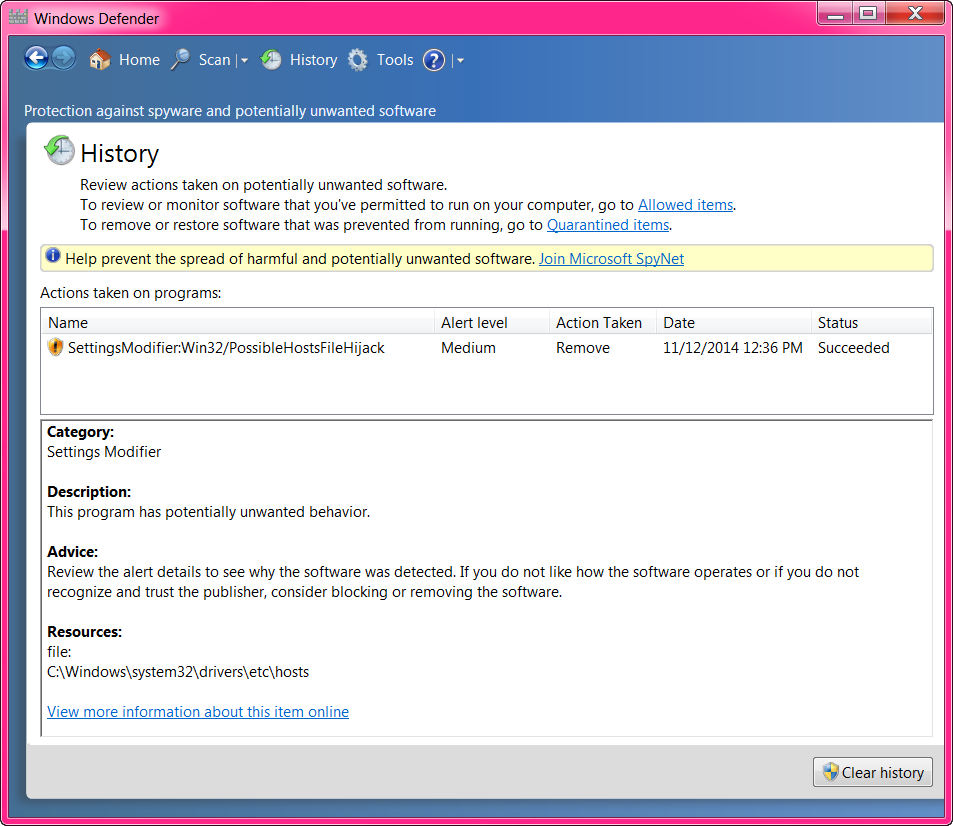
umsL5WX.png


What is that malware about anyway? I know I already removed it, but I worry a lot about my computer so I want to make sure everything is fine.

So... can someone tell me why I got it? Is it really dangerous?
 

My Computer My Computer

At a glance

Windows 7 Ultimate 64-bit SP1Intel Core i5 3330 @ 3.00GHz | Ivy Bridge 22n...8.00GB Dual-Channel DDR3 @ 665MHz (9-9-9-24)1023MB NVIDIA GeForce GTX 650 (ZOTAC Internat...
Computer type
PC/Desktop
Computer Manufacturer/Model Number
msi© MS-7788
OS
Windows 7 Ultimate 64-bit SP1
CPU
Intel Core i5 3330 @ 3.00GHz | Ivy Bridge 22nm Technology
Motherboard
MSI H61M-P31 (G3) (MS-7788) (SOCKET 0)
Memory
8.00GB Dual-Channel DDR3 @ 665MHz (9-9-9-24)
Graphics Card(s)
1023MB NVIDIA GeForce GTX 650 (ZOTAC International)
Hard Drives
931GB Seagate ST31000524AS ATA Device (SATA)
465GB Seagate Portable USB Device [USB (SATA)]
Antivirus
avast! 2014.9.0.2021 140820-0
Browser
Mozilla Firefox 31.0
First of all the threat has been removed. You are no longer in danger from that particular threat. Malware is used to describe harmful software that has been installed on your computer. It can be very dangerous with the capability of hacking into your system, harvesting passwords, bank accounts, etc. In your case it was a medium threat. It usually means, pop ups, advertisements. Since it has been uninstalled it is no longer a threat.
For the future, download the free Malwarebytes and scan once a week.
Be sure that you have a quality Anti Virus such as Avast.
Stay away from sites that may be dangerous. Those are the ones that you really want to visit.
 

My Computer My Computer

At a glance

Windows 10, Home Clean InstallIntel Core2 processsor Q8200(2.33Ghz 1333FSB)...6 gbATI Radeon 256MB HD3650
Computer type
PC/Desktop
Computer Manufacturer/Model Number
Dell XPS 420
OS
Windows 10, Home Clean Install
CPU
Intel Core2 processsor Q8200(2.33Ghz 1333FSB) Quad Core Tech
Motherboard
Dell
Memory
6 gb
Graphics Card(s)
ATI Radeon 256MB HD3650
Sound Card
Intergrated 7.1 Channel Audio
Monitor(s) Displays
Dell SP2009W 20"
Hard Drives
640 GB Serial ATA Hard drive
Cooling
Fan
Keyboard
Dell USB Keyboard
Mouse
Dell Premium Optical USB
Internet Speed
DSL 2.85
Hi and welcome to SevenForums,
Looks as though you already have Avast installed :/

Review Jacee’s instructions to run Adwcleaner here post #7,
Ignore the title of the thread,
http://www.sevenforums.com/system-security/316404-instant-savings-app.html
Screen shot of the download button to use for Adwcleaner

You can use these free tools to see if they find anything,
Manually Update them before running full scans,
Try not to use your computer while the scans are running, (one at a time of course).
See this tutorial on how to download and run Malwarebytes,
http://www.sevenforums.com/tutorials/338716-malwarebytes-anti-malware-free.html
Also use the Custom scan option not the Threat scan,
Please Do Not clean/ Delete or Remove Any detections before posting the scan results first before review especially Malwarebytes,
http://www.malwarebytes.org/products/malwarebytes_free

SAS is safe to remove anything it finds ;)
http://www.superantispyware.com/?tag=SUPERANTISPYWARE
This one is the longest up to 4 hours, the others are only about 45 minutes,
http://www.microsoft.com/security/scanner/en-us/default.aspx
 

My Computer My Computer

At a glance

Win-7-Pro64bit 7-H-Prem-64biti7-5930K 2nd i9-9940x both water blocked VRM'...Trident-z 3200C14 2nd Trident-z 3600C16EVGA 1080ti ftw3 2nd Titan Xp both water blocked
Computer type
PC/Desktop
Computer Manufacturer/Model Number
Custom assembled by me :}
OS
Win-7-Pro64bit 7-H-Prem-64bit
CPU
i7-5930K 2nd i9-9940x both water blocked VRM's too
Motherboard
ASUS SABERTOOTH X99 2nd ASUS x299 Apex
Memory
Trident-z 3200C14 2nd Trident-z 3600C16
Graphics Card(s)
EVGA 1080ti ftw3 2nd Titan Xp both water blocked
Sound Card
Built-in Realtek
Monitor(s) Displays
1-AOC G2460PG 24"G-Sync 144Hz/ 2nd 1-ASUS VG248QE 24" 144Hz
Screen Resolution
1920 x 1080 144Hz
Hard Drives
2-Samsung M.2 Evo & Evo Plus
2-Samsung 850 EVO 500GB SSD's/ 3-2.5 W.D. Black 1tb-&3-1tb/3-3.5 WD Black 1tb hdd's
PSU
EVGA SuperNOVA 1000-P2 2nd 1200-P2
Case
2-Corsair Obsidian Series 450D Black ATX Mid Tower
Cooling
Custom water loops
Keyboard
Logitech G710+/ 2nd Logitech G910
Mouse
2-RedDragon M901 Perdition 16400 dpi Gaming mouse = wired
Internet Speed
Comcast Ping 19ms 89.31mbps download speed 6.12mbps upload
Antivirus
Malwarebytes Pro/ Superantispyware Pro
Browser
FireFox & Pale moon
Other Info
2nd ASUS X299 Apex/Intel i9-9940x with Custom water loop/7H-Prem-x64/Corsair 450D case/Ram Trident-z 3600C16 4x8gb / Samsung970Evo plus 500gb SSD/Dual ssd EZ swap evo/PSU EVGA SuperNova 1200w-P2 80+Platinum/GPU Titan Xp /8-ML-140 on push-pull on 2-280GTX rads
Do you have any tools that modify the host file? Have you modified the host file?

Windows defender is just giving you a heads up the host file has been modified. Google it for info.
 

My Computer My Computer

At a glance

Windows 10 ProAMD Ryzen 5 2400G Processor with Radeon RX Ve...G.SKILL Ripjaws V Series 16GB (2 x 8GB) 288-P...2047MB NVIDIA GeForce GTX 1060 6GB (EVGA)
Computer type
PC/Desktop
Computer Manufacturer/Model Number
Custom Built
OS
Windows 10 Pro
CPU
AMD Ryzen 5 2400G Processor with Radeon RX Vega 11 Graphics
Motherboard
ASRock X470 Master SLI/AC AM4 AMD Promontory X470 SATA 6Gb/s
Memory
G.SKILL Ripjaws V Series 16GB (2 x 8GB) 288-Pin DDR4 SDRAM D
Graphics Card(s)
2047MB NVIDIA GeForce GTX 1060 6GB (EVGA)
Sound Card
Motherboard Built in
Monitor(s) Displays
Acer R240HY bidx 23.8-Inch IPS HDMI DVI VGA (1920 x 1080) Wi
Screen Resolution
1920 x 1080
Hard Drives
1TB Sandisk SSD PLUS (Main drive)
500 GB Seagate 7200 RPM (Games)
500 GB Western Digital 7200 RPM (Virtual Machines)
PSU
CORSAIR TX Series TX650M 650W 80+ Gold Modular Power Supply
Case
CORSAIR CARBIDE SPEC-02 Mid-Tower Gaming Case, Red LED Fan
Cooling
220mm, two 120mm, and four 60mm fans
Keyboard
Wired Dell keyboard
Mouse
Wireless Logitech mouse
Internet Speed
250mb down, 30mb up
Antivirus
Panda Cloud Antivirus
Browser
Chrome-ish x64
Other Info
Your awesome for reading this.
I've tried twice to put a link to a website that offers a modified "Host" file
but the post will not allow the link to be viewed.

This website offers a modified "Host" file to stop most ads and redirection.
I've used it for a long time with no problems.
AFAIK, all Windows 7s use a host file located where the OP sees it.
There are specific instructions for installing the new "Host" file.
Although, the OP didn't state any intentional modification to the existing
file, I'm just assuming it may have happened.

It would be helpful if some of the gurus would check out the website
and give some opinions.
 
Last edited:

My Computer My Computer

At a glance

Windows 7 Home Pro SP1 64bitIntel Xeon E-3 1240v28GBNVIDIA 300
Computer type
PC/Desktop
Computer Manufacturer/Model Number
Home Built
OS
Windows 7 Home Pro SP1 64bit
CPU
Intel Xeon E-3 1240v2
Motherboard
HP
Memory
8GB
Graphics Card(s)
NVIDIA 300
Sound Card
Onboard
Monitor(s) Displays
Hanns G 25"
Screen Resolution
1920x1080
Hard Drives
Hitachi 2GB
PSU
Seasonic 430W
Case
Antec
Cooling
Stock
Keyboard
Logitech
Mouse
Logitech
Internet Speed
5MB
Back
Top