
Windows Defender Not Working

jsmoline

New member
Power User
Local time
10:45 AM
Messages
233
Hello,
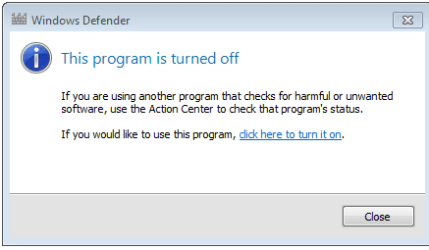
I selected Windows Defender in Control Panel. Got a message saying it's turned off. If you are using another program, check the status in action center. I am using Microsoft Security Essentials. Is that the reason Windows Defender won't turn on? I like MSE so it's not critical that I use WD. I'm just curious. Do they conflict with each other? Thanks,
John
 

Attachments
  • Capture.PNG
    Capture.PNG
    13.2 KB · Views: 30

My Computer

OS
Windows 7 Home Premium
CPU
Intel(R) Pentium(R) 4 CPU 3.20GHz
Motherboard
Asus P5VD2-MX-XE
Memory
Physical Memory : 2048 MB (2 x 1024 DDR2-SDRAM )
Graphics Card(s)
Video Card : NVIDIA GeForce 7300 SE/7200 GS
Sound Card
ASUSTeK Computer ALC-660 6-channel CODEC
Monitor(s) Displays
Monitor Type : Acer X183H - 19 inches
Screen Resolution
1366 x 768
Hard Drives
ATA WDC WD1600JS-60NCB1
Keyboard
Logitech
Mouse
Logitech
Internet Speed
DSL 3000
Hello,
I selected Windows Defender in Control Panel. Got a message saying it's turned off. If you are using another program, check the status in action center. I am using Microsoft Security Essentials. Is that the reason Windows Defender won't turn on? I like MSE so it's not critical that I use WD. I'm just curious. Do they conflict with each other? Thanks,
John


YES. Microsoft Security Essentials turns it off because it has it built in.
 

My Computer

Computer type
PC/Desktop
Computer Manufacturer/Model Number
Self Built
OS
Windows 10 Pro
CPU
Intel i5
Motherboard
I have a fatherboard
Memory
I'm old and lost a few chips
Graphics Card(s)
Yup
Sound Card
Yup
Monitor(s) Displays
Samsung 32" UHD
Screen Resolution
3840 x 2160
Hard Drives
Samsung 860 EVO drives
PSU
450 Watt and some fans that blow
Case
Small tower
Cooling
Yes I am cool. lol
Keyboard
Who needs a keyboard?
Mouse
Logitech Laser G7 wireless
Internet Speed
Zippy fast UP and DOWN
Antivirus
I got a shot
Browser
The new Improved EDGE 2020
Yes, Windows Defender is included in MSE.

Type services.msc in the start search box, then click on the 'gear icon'. When the Services Window opens, scroll down to Windows Defender, right click and choose properties.
Now set Windows Defender to "Disabled". MSE will be just fine!
 

My Computer

Computer type
PC/Desktop
Computer Manufacturer/Model Number
Bruce ... somewhere in his 40's
OS
Windows 7 Ultimate 32bit SP1
CPU
Intel(R) Core(TM)2 Quad CPU @ 2.40GHz, 2400 MHz
Motherboard
INTEL/D975XBX2
Memory
4 GB
Graphics Card(s)
ATI Radeon HD 2600 Pro
Monitor(s) Displays
Samsung SyncMaster 914v
Screen Resolution
1280 x 1024
Hard Drives
2/500GB each ... ST3500630AS ATA Device.
One is not connected
PSU
Rocketfish 700 W
Case
G.Skill Gigabyte Chassis
Keyboard
Standard PS/2 Keyboard
Mouse
Microsoft PS/2 Mouse
Internet Speed
DSL
Antivirus
Avira Internet Security
Browser
IE 11
Other Info
ATI HDMI Audio
Good to know. Thanks a lot,
John
 

My Computer

OS
Windows 7 Home Premium
CPU
Intel(R) Pentium(R) 4 CPU 3.20GHz
Motherboard
Asus P5VD2-MX-XE
Memory
Physical Memory : 2048 MB (2 x 1024 DDR2-SDRAM )
Graphics Card(s)
Video Card : NVIDIA GeForce 7300 SE/7200 GS
Sound Card
ASUSTeK Computer ALC-660 6-channel CODEC
Monitor(s) Displays
Monitor Type : Acer X183H - 19 inches
Screen Resolution
1366 x 768
Hard Drives
ATA WDC WD1600JS-60NCB1
Keyboard
Logitech
Mouse
Logitech
Internet Speed
DSL 3000
If you have a look into your task Manager > Processes, you will see the MsMpEng.exe running. This is the .exe for MSE or Defender. It is either one or the other, but the same .exe cannot run both at the same time.
 

My Computer

Computer Manufacturer/Model Number
HP, Dell, Gateway, Toshiba - 4 laptops and 2 desktops
OS
Vista, Windows7, Mint Mate, Zorin, Windows 8
CPU
from 1.6GHz Duo to i7
Monitor(s) Displays
2x HP w2207
Hard Drives
5x HDD, 7x SSD, 12x Externals
Keyboard
with trackball - no mices
Mouse
Trackball mice
Internet Speed
DSL 6000
I get it. Same animal can only run one instance. Thanks for the help.
 

My Computer

OS
Windows 7 Home Premium
CPU
Intel(R) Pentium(R) 4 CPU 3.20GHz
Motherboard
Asus P5VD2-MX-XE
Memory
Physical Memory : 2048 MB (2 x 1024 DDR2-SDRAM )
Graphics Card(s)
Video Card : NVIDIA GeForce 7300 SE/7200 GS
Sound Card
ASUSTeK Computer ALC-660 6-channel CODEC
Monitor(s) Displays
Monitor Type : Acer X183H - 19 inches
Screen Resolution
1366 x 768
Hard Drives
ATA WDC WD1600JS-60NCB1
Keyboard
Logitech
Mouse
Logitech
Internet Speed
DSL 3000
By the way, How many of you have done this? I started with W95, managed to skip W 98, 98 SE and Me. Held out for XP. Skipped all the Vistas and ended up with W 7 Ultimate. So far all have done well for me without a lot of trouble. I'm counting on W7 to be with me for a while. Thanks,
John
 

My Computer

OS
Windows 7 Home Premium
CPU
Intel(R) Pentium(R) 4 CPU 3.20GHz
Motherboard
Asus P5VD2-MX-XE
Memory
Physical Memory : 2048 MB (2 x 1024 DDR2-SDRAM )
Graphics Card(s)
Video Card : NVIDIA GeForce 7300 SE/7200 GS
Sound Card
ASUSTeK Computer ALC-660 6-channel CODEC
Monitor(s) Displays
Monitor Type : Acer X183H - 19 inches
Screen Resolution
1366 x 768
Hard Drives
ATA WDC WD1600JS-60NCB1
Keyboard
Logitech
Mouse
Logitech
Internet Speed
DSL 3000
I was trying to imagine where an OS will go after Windows 7 has now achieved instantaneous near-perfection.

My guess is that it will be done with the hands in mid-air.

Today I was playing around with a Win7 touchscreen and realized it is already there.
 
Touchscreens? - They are always filthy. I prefer my scrollball.
 

My Computer

Computer Manufacturer/Model Number
HP, Dell, Gateway, Toshiba - 4 laptops and 2 desktops
OS
Vista, Windows7, Mint Mate, Zorin, Windows 8
CPU
from 1.6GHz Duo to i7
Monitor(s) Displays
2x HP w2207
Hard Drives
5x HDD, 7x SSD, 12x Externals
Keyboard
with trackball - no mices
Mouse
Trackball mice
Internet Speed
DSL 6000
If they would make a screen protector, like I have on my iPhone, that would be cool. It never gets smudgy at all. I do, however, agree with you about the mouse. If I'm not standing at a counter checking out a customer I think I'll stick with the mouse. It stays right with me and it's a lot closer than reaching across my desk to the screen. But that's just me. Are we suppose to be chatting on here? Sorry if I broke any rules.:o You're the best help. Thanks,
John
 

My Computer

OS
Windows 7 Home Premium
CPU
Intel(R) Pentium(R) 4 CPU 3.20GHz
Motherboard
Asus P5VD2-MX-XE
Memory
Physical Memory : 2048 MB (2 x 1024 DDR2-SDRAM )
Graphics Card(s)
Video Card : NVIDIA GeForce 7300 SE/7200 GS
Sound Card
ASUSTeK Computer ALC-660 6-channel CODEC
Monitor(s) Displays
Monitor Type : Acer X183H - 19 inches
Screen Resolution
1366 x 768
Hard Drives
ATA WDC WD1600JS-60NCB1
Keyboard
Logitech
Mouse
Logitech
Internet Speed
DSL 3000
Cool
 

My Computer

OS
Windows 7 Home Premium
CPU
Intel(R) Pentium(R) 4 CPU 3.20GHz
Motherboard
Asus P5VD2-MX-XE
Memory
Physical Memory : 2048 MB (2 x 1024 DDR2-SDRAM )
Graphics Card(s)
Video Card : NVIDIA GeForce 7300 SE/7200 GS
Sound Card
ASUSTeK Computer ALC-660 6-channel CODEC
Monitor(s) Displays
Monitor Type : Acer X183H - 19 inches
Screen Resolution
1366 x 768
Hard Drives
ATA WDC WD1600JS-60NCB1
Keyboard
Logitech
Mouse
Logitech
Internet Speed
DSL 3000
I guess it's OK to chat on this thread. The original topic was sufficiently covered and can be regarded as solved.
I never uses meeces. I prefer my keyboards with scrollball. It's a lot faster and more precise and I only have to lift my hands for typing. Else I do everything with my thumbs whilst my hands are resting on the desk covered with a towel - for comfort.
 

My Computer

Computer Manufacturer/Model Number
HP, Dell, Gateway, Toshiba - 4 laptops and 2 desktops
OS
Vista, Windows7, Mint Mate, Zorin, Windows 8
CPU
from 1.6GHz Duo to i7
Monitor(s) Displays
2x HP w2207
Hard Drives
5x HDD, 7x SSD, 12x Externals
Keyboard
with trackball - no mices
Mouse
Trackball mice
Internet Speed
DSL 6000
That reminds me, I hope my Logitech keyboard and mouse software will work with W 7
 

My Computer

OS
Windows 7 Home Premium
CPU
Intel(R) Pentium(R) 4 CPU 3.20GHz
Motherboard
Asus P5VD2-MX-XE
Memory
Physical Memory : 2048 MB (2 x 1024 DDR2-SDRAM )
Graphics Card(s)
Video Card : NVIDIA GeForce 7300 SE/7200 GS
Sound Card
ASUSTeK Computer ALC-660 6-channel CODEC
Monitor(s) Displays
Monitor Type : Acer X183H - 19 inches
Screen Resolution
1366 x 768
Hard Drives
ATA WDC WD1600JS-60NCB1
Keyboard
Logitech
Mouse
Logitech
Internet Speed
DSL 3000
Back
Top