
Windows detects speakers that aren't plugged in?

eblip

New member
Local time
3:02 AM
Messages
12
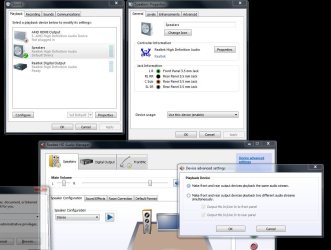
Would anyone know why Windows would be detecting speakers under playback devices when absolutely no speakers are plugged in?

The result is I can not get sound out of any speakers I plug in, presumably because Windows is trying to use these phantom nonexistent speakers. USB headphones work fine, but USB speakers do not (Guessing because headphones show up as a different type of device ).

I've tried disconnecting everything from the system not required to boot into Windows, so the only output device is coming from my video card to a standard VGA monitor.

If it provides any additional info, I get no audio booting into a Linux Mint live OS either, but I didn't do too much troubleshooting when I was in there, more just wanted to check and see if it was exclusive to Windows.

The board is a ASRock 970 Extreme3 with RealTek audio. I've tried fully uninstalling and reinstalling the drivers and restoring BIOS defaults, neither made any difference.
This seems like the onboard audio card is completely malfunctioning but I hope there is some other explanation. Thanks.
 

My Computer My Computer

OS
Microsoft Windows 7 Ultimate 64-bit 7601 Multiprocessor Free Service Pack 1
CPU
AMD Phenom(tm) II X6 1045T Processor
Motherboard
ASRock 970 Extreme3
Memory
8.00 GB
Graphics Card(s)
AMD Radeon HD 6800 Series
Sound Card
(1) AMD High Definition Audio Device (2) Realtek High Defi
Screen Resolution
1280 x 1024 x 32 bits (4294967296 colors) @ 60 Hz
Hard Drives
(1) OCZ-AGILITY3 ATA Device (2) ST3160815AS ATA Device
Have they ever worked or did they just stop recently? If they just stopped recently, you might try a System Restore to a date when they were working.
 

My Computer My Computer

Computer type
PC/Desktop
Computer Manufacturer/Model Number
Custom Build
OS
Windows 7 Home Premium 32-Bit - Build 7600 SP1
CPU
Intel Core i3-2120 3.30Ghz
Motherboard
Asus P8Z68-V LX Intel Z68 Socket H2 ATX
Memory
Kingston 4 GB DDR3 1333 mhz
Graphics Card(s)
AMD Radeon HD6670
Sound Card
Sound Blaster Audigy SE 24-Bit
Monitor(s) Displays
Asus VE228
Screen Resolution
1440 X 900
Hard Drives
OCZ Vertex 3 120 GB Sata 3 SSD ==
Kingston SH103/S3 120 G Hyper X 120 GB SSD ==
Western Digital 500 GB Caviar Green 7200 RPM ==
PSU
Corsair CX600M == 600 Watt
Case
NZXT Apollo - Silver with Clear Side Panel
Cooling
Three 120 mm Fans
Keyboard
Microsoft Natural 4000
Mouse
Microsoft Custom Optical 3000
Internet Speed
AT&T Fiber Optic Wireless Network
Antivirus
Microsoft Security Essentials
Browser
Chrome
Other Info
120 mm Blue LED Fan -- Three Blue LED Lazer Light Sticks

My Computer My Computer

Computer type
PC/Desktop
Computer Manufacturer/Model Number
Home Built Desktop By DataTech
OS
Windows 7 Ultimate X64 SP1
CPU
Intel i5-2550K, Differing ~4.4-4.8GHz No built in GPU
Motherboard
ASUS P8Z68-V PRO/GEN3
Memory
16GB G.Skill Sniper 1866MHz @ 2133MHz 2x8GB
Graphics Card(s)
ASUS GTX650TIB-DC2OC-2GD5, (650TI Boost)
Sound Card
Onboard Realtek 5-1
Monitor(s) Displays
Samsung P2570HD
Screen Resolution
1920x1080
Hard Drives
Samsung 840 Pro 256GB SSD for OS, 500GB Seagate Constellation (Enterprise drive) for Data
PSU
Corsair HX650W
Case
Inwin Dragon Rider
Cooling
Hyper 212 EVO w/two Noctua fans, push-pull, @1300 RPM
Keyboard
E-Z Eyes, bright yellow keys with large characters
Mouse
steelseries SENSEI Laser Pro Gaming
Internet Speed
48-51Mbs Mbs down, 11 Mbs up Xfinity Cable
Antivirus
Norton Internet Security 2013
Browser
IE 10, Opera, Pale Moon if needed
Other Info
4 case fans, LG BluRay-RE, ASUS DVD-RW, Mr. Fusion power supply, 1.21 gigawatts.
The speakers were working yesterday, I did a big reshuffle of my two desktops and swapped a monitor to this system as well as installed a USB 3.0 PCIe card. The very first thing I did when I realized the sound had stopped working was remove and completely uninstall the drivers for the USB 3.0 card and hook the original monitor up. When that didn't work I did a system restore to the previous day with a reinstall/uninstall of the audio drivers then restored BIOS defaults, none of these produced any change.

The snip below is with absolutely no audio device attached to the computer, nor any front panel audio jacks or anything similar.
 

Attachments

  • Capture.JPG
    Capture.JPG
    102.9 KB · Views: 23

My Computer My Computer

OS
Microsoft Windows 7 Ultimate 64-bit 7601 Multiprocessor Free Service Pack 1
CPU
AMD Phenom(tm) II X6 1045T Processor
Motherboard
ASRock 970 Extreme3
Memory
8.00 GB
Graphics Card(s)
AMD Radeon HD 6800 Series
Sound Card
(1) AMD High Definition Audio Device (2) Realtek High Defi
Screen Resolution
1280 x 1024 x 32 bits (4294967296 colors) @ 60 Hz
Hard Drives
(1) OCZ-AGILITY3 ATA Device (2) ST3160815AS ATA Device
If you connected the monitor via HDMI it may be detecting the monitor's speakers since that carries audio as well.

Try clicking on RealTek Digital Output in the Sound window and set is as default.

Retrace all of your steps in moving things around to see if you missed something. I don't think the sound chip would go out like that.
 

My Computer My Computer

Computer type
PC/Desktop
Computer Manufacturer/Model Number
Home Built Desktop By DataTech
OS
Windows 7 Ultimate X64 SP1
CPU
Intel i5-2550K, Differing ~4.4-4.8GHz No built in GPU
Motherboard
ASUS P8Z68-V PRO/GEN3
Memory
16GB G.Skill Sniper 1866MHz @ 2133MHz 2x8GB
Graphics Card(s)
ASUS GTX650TIB-DC2OC-2GD5, (650TI Boost)
Sound Card
Onboard Realtek 5-1
Monitor(s) Displays
Samsung P2570HD
Screen Resolution
1920x1080
Hard Drives
Samsung 840 Pro 256GB SSD for OS, 500GB Seagate Constellation (Enterprise drive) for Data
PSU
Corsair HX650W
Case
Inwin Dragon Rider
Cooling
Hyper 212 EVO w/two Noctua fans, push-pull, @1300 RPM
Keyboard
E-Z Eyes, bright yellow keys with large characters
Mouse
steelseries SENSEI Laser Pro Gaming
Internet Speed
48-51Mbs Mbs down, 11 Mbs up Xfinity Cable
Antivirus
Norton Internet Security 2013
Browser
IE 10, Opera, Pale Moon if needed
Other Info
4 case fans, LG BluRay-RE, ASUS DVD-RW, Mr. Fusion power supply, 1.21 gigawatts.
If you connected the monitor via HDMI it may be detecting the monitor's speakers since that carries audio as well.

Try clicking on RealTek Digital Output in the Sound window and set is as default.

Retrace all of your steps in moving things around to see if you missed something. I don't think the sound chip would go out like that.

No HDMI inputs on either the old or the new monitor, and the RealTek Digital Output is only for digital audio outputs I don't have.

Something else strange happened a few hours ago. The little RealTek notification icon on the taskbar was constantly popping up saying an audio device had either been plugged in or unplugged. It would usually do a dozen or so of unplugged, then switch to plugged in. This lasted about an hour and just abruptly stopped.

I've never had onboard audio crap out like this, nor have even heard of it happening. To know without a doubt it was hardware related, I did a fresh Win 7 installation on a different hard drive and using the original monitor with no new hardware at all.

After installing the RealTek audio drivers in the new installation I got the exact same behavior. Speakers detected when they weren't plugged in, and absolutely no audio when speakers were plugged in.

If I had to make a wild guess, I think something about that USB PCIe card had something to do with it. The card is easily the most poorly designed and cheap PCB I've ever seen, but how it could have ruined onboard audio is beyond me.
 

My Computer My Computer

OS
Microsoft Windows 7 Ultimate 64-bit 7601 Multiprocessor Free Service Pack 1
CPU
AMD Phenom(tm) II X6 1045T Processor
Motherboard
ASRock 970 Extreme3
Memory
8.00 GB
Graphics Card(s)
AMD Radeon HD 6800 Series
Sound Card
(1) AMD High Definition Audio Device (2) Realtek High Defi
Screen Resolution
1280 x 1024 x 32 bits (4294967296 colors) @ 60 Hz
Hard Drives
(1) OCZ-AGILITY3 ATA Device (2) ST3160815AS ATA Device
It is very odd behavior. Did you get the RealTek driver from your motherboard's page?


Since you did a fresh install I think that points to some bad hardware. I will ask some others to have a look.
 

My Computer My Computer

Computer type
PC/Desktop
Computer Manufacturer/Model Number
Home Built Desktop By DataTech
OS
Windows 7 Ultimate X64 SP1
CPU
Intel i5-2550K, Differing ~4.4-4.8GHz No built in GPU
Motherboard
ASUS P8Z68-V PRO/GEN3
Memory
16GB G.Skill Sniper 1866MHz @ 2133MHz 2x8GB
Graphics Card(s)
ASUS GTX650TIB-DC2OC-2GD5, (650TI Boost)
Sound Card
Onboard Realtek 5-1
Monitor(s) Displays
Samsung P2570HD
Screen Resolution
1920x1080
Hard Drives
Samsung 840 Pro 256GB SSD for OS, 500GB Seagate Constellation (Enterprise drive) for Data
PSU
Corsair HX650W
Case
Inwin Dragon Rider
Cooling
Hyper 212 EVO w/two Noctua fans, push-pull, @1300 RPM
Keyboard
E-Z Eyes, bright yellow keys with large characters
Mouse
steelseries SENSEI Laser Pro Gaming
Internet Speed
48-51Mbs Mbs down, 11 Mbs up Xfinity Cable
Antivirus
Norton Internet Security 2013
Browser
IE 10, Opera, Pale Moon if needed
Other Info
4 case fans, LG BluRay-RE, ASUS DVD-RW, Mr. Fusion power supply, 1.21 gigawatts.
It gets a bit weirder, I purchased a PCI sound card this evening and after disabling onboard audio in the BIOS and installing the new card I get absolutely no reaction from the computer when plugging in a 3.5mm audio jack. This was the same thing happening with the onboard audio.

I popped the sound card in my other desktop and it works perfectly. What could possibly cause the onboard 3.5mm jack AND a soundcard 3.5mm jack to malfunction? This is with a new Win 7 install and only the basic peripherals attached (VGA monitor, mouse and keyboard). I'm completely at a loss.
 

My Computer My Computer

OS
Microsoft Windows 7 Ultimate 64-bit 7601 Multiprocessor Free Service Pack 1
CPU
AMD Phenom(tm) II X6 1045T Processor
Motherboard
ASRock 970 Extreme3
Memory
8.00 GB
Graphics Card(s)
AMD Radeon HD 6800 Series
Sound Card
(1) AMD High Definition Audio Device (2) Realtek High Defi
Screen Resolution
1280 x 1024 x 32 bits (4294967296 colors) @ 60 Hz
Hard Drives
(1) OCZ-AGILITY3 ATA Device (2) ST3160815AS ATA Device
Does the USB and sound card use the same type of slot, i.e., PCIe X1, X4 or PCI?
 

My Computer My Computer

Computer type
PC/Desktop
Computer Manufacturer/Model Number
Home Built Desktop By DataTech
OS
Windows 7 Ultimate X64 SP1
CPU
Intel i5-2550K, Differing ~4.4-4.8GHz No built in GPU
Motherboard
ASUS P8Z68-V PRO/GEN3
Memory
16GB G.Skill Sniper 1866MHz @ 2133MHz 2x8GB
Graphics Card(s)
ASUS GTX650TIB-DC2OC-2GD5, (650TI Boost)
Sound Card
Onboard Realtek 5-1
Monitor(s) Displays
Samsung P2570HD
Screen Resolution
1920x1080
Hard Drives
Samsung 840 Pro 256GB SSD for OS, 500GB Seagate Constellation (Enterprise drive) for Data
PSU
Corsair HX650W
Case
Inwin Dragon Rider
Cooling
Hyper 212 EVO w/two Noctua fans, push-pull, @1300 RPM
Keyboard
E-Z Eyes, bright yellow keys with large characters
Mouse
steelseries SENSEI Laser Pro Gaming
Internet Speed
48-51Mbs Mbs down, 11 Mbs up Xfinity Cable
Antivirus
Norton Internet Security 2013
Browser
IE 10, Opera, Pale Moon if needed
Other Info
4 case fans, LG BluRay-RE, ASUS DVD-RW, Mr. Fusion power supply, 1.21 gigawatts.
The USB card I installed yesterday used a PCIe x1 port but I removed that the moment I noticed the audio problems and haven't plugged it in since. The new sound card uses PCI (non-express).

I'm not sure where along the way this happened, but I can now get sound out of USB speakers (probably after fully uninstalling and disabling the onboard), still nothing out of the 3.5s though.
 

My Computer My Computer

OS
Microsoft Windows 7 Ultimate 64-bit 7601 Multiprocessor Free Service Pack 1
CPU
AMD Phenom(tm) II X6 1045T Processor
Motherboard
ASRock 970 Extreme3
Memory
8.00 GB
Graphics Card(s)
AMD Radeon HD 6800 Series
Sound Card
(1) AMD High Definition Audio Device (2) Realtek High Defi
Screen Resolution
1280 x 1024 x 32 bits (4294967296 colors) @ 60 Hz
Hard Drives
(1) OCZ-AGILITY3 ATA Device (2) ST3160815AS ATA Device
Not trying to be condescending. Did you by chance disconnect the HD front panel audio connector from the board? did you try the 3.5mm plugs on the board and the audio card. Also re-enable the onboard audio.

I have pulled my hair out in the past getting audio to work and just offering what I tried or found.
 

My Computer My Computer

Computer type
PC/Desktop
Computer Manufacturer/Model Number
Home Built Desktop By DataTech
OS
Windows 7 Ultimate X64 SP1
CPU
Intel i5-2550K, Differing ~4.4-4.8GHz No built in GPU
Motherboard
ASUS P8Z68-V PRO/GEN3
Memory
16GB G.Skill Sniper 1866MHz @ 2133MHz 2x8GB
Graphics Card(s)
ASUS GTX650TIB-DC2OC-2GD5, (650TI Boost)
Sound Card
Onboard Realtek 5-1
Monitor(s) Displays
Samsung P2570HD
Screen Resolution
1920x1080
Hard Drives
Samsung 840 Pro 256GB SSD for OS, 500GB Seagate Constellation (Enterprise drive) for Data
PSU
Corsair HX650W
Case
Inwin Dragon Rider
Cooling
Hyper 212 EVO w/two Noctua fans, push-pull, @1300 RPM
Keyboard
E-Z Eyes, bright yellow keys with large characters
Mouse
steelseries SENSEI Laser Pro Gaming
Internet Speed
48-51Mbs Mbs down, 11 Mbs up Xfinity Cable
Antivirus
Norton Internet Security 2013
Browser
IE 10, Opera, Pale Moon if needed
Other Info
4 case fans, LG BluRay-RE, ASUS DVD-RW, Mr. Fusion power supply, 1.21 gigawatts.
This tower doesn't have any front panel audio connectors, and there are no alternative 3.5mm jacks anywhere but coming out the I/O panel and the sound card. I'm wondering if popping out the CMOS battery for a few minutes would help, but I'm not very hopeful.
 

My Computer My Computer

OS
Microsoft Windows 7 Ultimate 64-bit 7601 Multiprocessor Free Service Pack 1
CPU
AMD Phenom(tm) II X6 1045T Processor
Motherboard
ASRock 970 Extreme3
Memory
8.00 GB
Graphics Card(s)
AMD Radeon HD 6800 Series
Sound Card
(1) AMD High Definition Audio Device (2) Realtek High Defi
Screen Resolution
1280 x 1024 x 32 bits (4294967296 colors) @ 60 Hz
Hard Drives
(1) OCZ-AGILITY3 ATA Device (2) ST3160815AS ATA Device
Well, at this point I can see no reason why not. If you have a new one slap it in.

Be sure to power off and pull the main power cable from the machine. You may have a jumper on the board labeled CLR RTC or CLR CMOS which you would move to the adjacent pins for 5 seconds to reset CMOS too.

Please...add your systems specs? Here's how:SystemInfo See Your System Specs Under System Manufacturer/Model Number add whether it is a desktop or laptop and whether self built.

Log in to Seven Forums and you will be able to transfer the info directly to the specs page in your profile from within the System Info app.
After doing this your specs will be available in each of your posts. Click on My system Specs in the lower left of this post to see how it should look.:)
Full instructions are in the tutorial.
 

My Computer My Computer

Computer type
PC/Desktop
Computer Manufacturer/Model Number
Home Built Desktop By DataTech
OS
Windows 7 Ultimate X64 SP1
CPU
Intel i5-2550K, Differing ~4.4-4.8GHz No built in GPU
Motherboard
ASUS P8Z68-V PRO/GEN3
Memory
16GB G.Skill Sniper 1866MHz @ 2133MHz 2x8GB
Graphics Card(s)
ASUS GTX650TIB-DC2OC-2GD5, (650TI Boost)
Sound Card
Onboard Realtek 5-1
Monitor(s) Displays
Samsung P2570HD
Screen Resolution
1920x1080
Hard Drives
Samsung 840 Pro 256GB SSD for OS, 500GB Seagate Constellation (Enterprise drive) for Data
PSU
Corsair HX650W
Case
Inwin Dragon Rider
Cooling
Hyper 212 EVO w/two Noctua fans, push-pull, @1300 RPM
Keyboard
E-Z Eyes, bright yellow keys with large characters
Mouse
steelseries SENSEI Laser Pro Gaming
Internet Speed
48-51Mbs Mbs down, 11 Mbs up Xfinity Cable
Antivirus
Norton Internet Security 2013
Browser
IE 10, Opera, Pale Moon if needed
Other Info
4 case fans, LG BluRay-RE, ASUS DVD-RW, Mr. Fusion power supply, 1.21 gigawatts.
System specs should be uploaded now. CMOS reseat didn't do anything, also reseated my video card and all power connectors while I was in there, still no response from the onboard 3.5mm
 

My Computer My Computer

OS
Microsoft Windows 7 Ultimate 64-bit 7601 Multiprocessor Free Service Pack 1
CPU
AMD Phenom(tm) II X6 1045T Processor
Motherboard
ASRock 970 Extreme3
Memory
8.00 GB
Graphics Card(s)
AMD Radeon HD 6800 Series
Sound Card
(1) AMD High Definition Audio Device (2) Realtek High Defi
Screen Resolution
1280 x 1024 x 32 bits (4294967296 colors) @ 60 Hz
Hard Drives
(1) OCZ-AGILITY3 ATA Device (2) ST3160815AS ATA Device
Should have mentioned, the AMD HDMI sound device is off the video card and I've tried the onboard audio with that device both disabled and enabled with no change.
 

My Computer My Computer

OS
Microsoft Windows 7 Ultimate 64-bit 7601 Multiprocessor Free Service Pack 1
CPU
AMD Phenom(tm) II X6 1045T Processor
Motherboard
ASRock 970 Extreme3
Memory
8.00 GB
Graphics Card(s)
AMD Radeon HD 6800 Series
Sound Card
(1) AMD High Definition Audio Device (2) Realtek High Defi
Screen Resolution
1280 x 1024 x 32 bits (4294967296 colors) @ 60 Hz
Hard Drives
(1) OCZ-AGILITY3 ATA Device (2) ST3160815AS ATA Device
Just noticed another clue. If I completely uninstall the onboard RealTek drivers, then plug in speakers to the 3.5mm out jack, the Playback device tab in Sound shows the Speakers device flickering on and off several times per second. No amount of jiggling around the jack changes the flickering.
 

My Computer My Computer

OS
Microsoft Windows 7 Ultimate 64-bit 7601 Multiprocessor Free Service Pack 1
CPU
AMD Phenom(tm) II X6 1045T Processor
Motherboard
ASRock 970 Extreme3
Memory
8.00 GB
Graphics Card(s)
AMD Radeon HD 6800 Series
Sound Card
(1) AMD High Definition Audio Device (2) Realtek High Defi
Screen Resolution
1280 x 1024 x 32 bits (4294967296 colors) @ 60 Hz
Hard Drives
(1) OCZ-AGILITY3 ATA Device (2) ST3160815AS ATA Device
Sounds like a hardware failure to me. If it was software I would expect it to work in another OS and on a clean install. Disabling the onboard sound in the BIOS would normally let you use an add-in sound card. My guess is the onboard sound has failed, and its so messed up it won't disable. Open up your case and just make sure a screw or something similar didn't get dropped inside or jammed up under the motherboard. Anything else weird happening? Sometimes a bad or failing power supply can cause weird things to happen.
 

My Computer My Computer

Computer type
PC/Desktop
Computer Manufacturer/Model Number
Home Built
OS
Windows 10 Education 64 bit
CPU
AMD Phenom II X4 980 Black Edition Deneb 3.7GHz
Motherboard
Asus M4N68T-M V2 µATX Motherboard
Memory
8GB 4GBx2 Kingston PC10600 DDR3 1333 Memory
Graphics Card(s)
Zotac NVIDIA Geforce GT640 2 Gig DDR3 PCIe
Sound Card
VIA VT1708s High Definition Audio 8-channel Onboard
Monitor(s) Displays
22" LG E2242 1080p and 2 19" I-INC AG191D
Screen Resolution
1280x1024 - 1920x1080 - 1280x1024
Hard Drives
Crucial M100 256 GB SSD and 500 GB WD Blue SATA
PSU
Thermaltake TR 620
Case
Power Up Black ATX Mid-Tower Case
Cooling
Stock heatsink and fan
Keyboard
Logitech Wireless K350 Wave
Mouse
Logitech Wireless M570 Trackman Wheel
Internet Speed
80 Mbps Down 30 Mbps Up
Antivirus
Windows Defender
Browser
Internet Explorer 11
Other Info
HP DVD1040e Lightscribe - External USB2
Sounds like a hardware failure to me. If it was software I would expect it to work in another OS and on a clean install. Disabling the onboard sound in the BIOS would normally let you use an add-in sound card. My guess is the onboard sound has failed, and its so messed up it won't disable. Open up your case and just make sure a screw or something similar didn't get dropped inside or jammed up under the motherboard. Anything else weird happening? Sometimes a bad or failing power supply can cause weird things to happen.

No other anomalous behaviors beyond the audio.

I checked out the manufacturer's diagram for the ASRock 970 Extreme3 and just as I suspected the audio codec chip is directly next to the PCIe x1 slot where I plugged in the USB 3.0 expansion card a few days ago.

Now I'm just trying to figure out if it was more likely I hit it with ESD when installing or if somehow the card (by virtue of it's horrible design) somehow corrupted the chip merely by its proximity. The first seems more plausible, but generally I'm not touching the motherboard at all when I insert cards, unless they have a lock mechanism which the PCIe x1 slot doesn't have. If the latter seems completely implausible I'll have to own full culpability and can't blame the crappy card.

Is there any chance I can damage further or even perhaps desolder the chip to eliminate the chips interference with other sound cards? Anything at all I could possibly do to get BIOS to actually disengage the chip entirely?
 

My Computer My Computer

OS
Microsoft Windows 7 Ultimate 64-bit 7601 Multiprocessor Free Service Pack 1
CPU
AMD Phenom(tm) II X6 1045T Processor
Motherboard
ASRock 970 Extreme3
Memory
8.00 GB
Graphics Card(s)
AMD Radeon HD 6800 Series
Sound Card
(1) AMD High Definition Audio Device (2) Realtek High Defi
Screen Resolution
1280 x 1024 x 32 bits (4294967296 colors) @ 60 Hz
Hard Drives
(1) OCZ-AGILITY3 ATA Device (2) ST3160815AS ATA Device
The audio chip could have been cracked and wouldn't be visible without magnification..maybe. I'd advise against trying to de-solder it too, it may have 20 or so connections in the embedded conductors in the PCB and would damage something else.

I think that board has a removable BIOS chip. You might give ASrock a call to see what they might suggest. 1-909-590-8308

Email: [email protected]


Support: HTPC, Home Theatre PC Manufacturer & Supplier - ASRock Inc.
 

My Computer My Computer

Computer type
PC/Desktop
Computer Manufacturer/Model Number
Home Built Desktop By DataTech
OS
Windows 7 Ultimate X64 SP1
CPU
Intel i5-2550K, Differing ~4.4-4.8GHz No built in GPU
Motherboard
ASUS P8Z68-V PRO/GEN3
Memory
16GB G.Skill Sniper 1866MHz @ 2133MHz 2x8GB
Graphics Card(s)
ASUS GTX650TIB-DC2OC-2GD5, (650TI Boost)
Sound Card
Onboard Realtek 5-1
Monitor(s) Displays
Samsung P2570HD
Screen Resolution
1920x1080
Hard Drives
Samsung 840 Pro 256GB SSD for OS, 500GB Seagate Constellation (Enterprise drive) for Data
PSU
Corsair HX650W
Case
Inwin Dragon Rider
Cooling
Hyper 212 EVO w/two Noctua fans, push-pull, @1300 RPM
Keyboard
E-Z Eyes, bright yellow keys with large characters
Mouse
steelseries SENSEI Laser Pro Gaming
Internet Speed
48-51Mbs Mbs down, 11 Mbs up Xfinity Cable
Antivirus
Norton Internet Security 2013
Browser
IE 10, Opera, Pale Moon if needed
Other Info
4 case fans, LG BluRay-RE, ASUS DVD-RW, Mr. Fusion power supply, 1.21 gigawatts.
Depending on where the standoffs are it might have just been board flex when inserting the other card that damaged something. Whatever happened I don't think it's repairable. Unless you find a screw or something else where its not supposed to be there isn't much you can do. The Bios just sends a signal to the audio chip telling it to turn off. If the audio chip is broken and won't turn off, replacing the BIOS chip won't make any difference. You could try one last ditch power drain. Power down, unplug the power supply from the wall outlet, then press the case power button until the power LED fades to black. Reset the BIOS to fail safe defaults with the jumper and or remove the CMOS battery for about 5 minutes. Put the battery back in power up, and see if you can turn the onboard audio off. This is a grasping at straws type of deal so don't expect any miracles.
 

My Computer My Computer

Computer type
PC/Desktop
Computer Manufacturer/Model Number
Home Built
OS
Windows 10 Education 64 bit
CPU
AMD Phenom II X4 980 Black Edition Deneb 3.7GHz
Motherboard
Asus M4N68T-M V2 µATX Motherboard
Memory
8GB 4GBx2 Kingston PC10600 DDR3 1333 Memory
Graphics Card(s)
Zotac NVIDIA Geforce GT640 2 Gig DDR3 PCIe
Sound Card
VIA VT1708s High Definition Audio 8-channel Onboard
Monitor(s) Displays
22" LG E2242 1080p and 2 19" I-INC AG191D
Screen Resolution
1280x1024 - 1920x1080 - 1280x1024
Hard Drives
Crucial M100 256 GB SSD and 500 GB WD Blue SATA
PSU
Thermaltake TR 620
Case
Power Up Black ATX Mid-Tower Case
Cooling
Stock heatsink and fan
Keyboard
Logitech Wireless K350 Wave
Mouse
Logitech Wireless M570 Trackman Wheel
Internet Speed
80 Mbps Down 30 Mbps Up
Antivirus
Windows Defender
Browser
Internet Explorer 11
Other Info
HP DVD1040e Lightscribe - External USB2
Back
Top