Solved Windows Diagnostic Tool Error 0x800706F7

shylok

New member
Local time
3:30 PM
Messages
5
Hi, the Windows Dianostic Tool has just stopped working which might be down to a recent series of Windows Updates on the 9th Dec

Definition Update for Microsoft Security Essentials - KB2310138 (Definition 1.189.1735.0)
Update for Windows 7 for x64-based Systems (KB3004394)
Windows Malicious Software Removal Tool x64 - December 2014 (KB890830)
Security Update for Windows 7 for x64-based Systems (KB3013126)
Update for Windows 7 for x64-based Systems (KB3014406)
Cumulative Security Update for Internet Explorer 9 for Windows 7 for x64-based Systems (KB3008923)
Update for Windows 7 for x64-based Systems (KB3009736)
Update for Windows 7 for x64-based Systems (KB3006121)
Update for Windows 7 for x64-based Systems (KB3006625)
Update for Windows 7 for x64-based Systems (KB3013410)
Update for Microsoft Silverlight (KB3011970)
Definition Update for Microsoft Security Essentials - KB2310138 (Definition 1.189.1724.0)

I've also ran a SFC Scannow which tells me that Windows Resource Protection found corrupt files but was unable to fix some of them, see attachment for details
 

Attachments

My Computer

Computer type
PC/Desktop
Computer Manufacturer/Model Number
n/a
OS
Windows 7 Home Premium 64bit
CPU
Intel Core 2 Duo 8400
Motherboard
Gigabyte GA-EP35-DS3R
Memory
4GB Corsair Twin 4x 6400c4 800mhz PC64000 4-4-4-12
Graphics Card(s)
BFG Nvidia Geforce 8800GTS 512mb PCI-e 2.0
Sound Card
Creative Soundblaster Xtreme Gamer
Monitor(s) Displays
Samsung Syncmaster 226bw 22"
Screen Resolution
1680 x 1050
Hard Drives
Samsung 840 SSD Pro 128gb
PSU
Corsair CMPSU-620HX (620 Watt)
Antivirus
Windows Microsoft Essential
Browser
Mozilla Firefox 31 series
Update KB3004394 was the issue for me. Uninstall that and restart then attempt to use the diagnostic tool.
 

My Computer

Computer type
Laptop
OS
windows 7 pro 64 bit
Yes that was the culprit, thanks, i completed another SFC Scannow & no corrupted files were found this time round.

Will the next Windows Update automatically push out
KB3004394 again? Microsoft should be told about that bug

Edit: Just checked & Windows wanted me to update to that again, so i hid it
 

My Computer

Computer type
PC/Desktop
Computer Manufacturer/Model Number
n/a
OS
Windows 7 Home Premium 64bit
CPU
Intel Core 2 Duo 8400
Motherboard
Gigabyte GA-EP35-DS3R
Memory
4GB Corsair Twin 4x 6400c4 800mhz PC64000 4-4-4-12
Graphics Card(s)
BFG Nvidia Geforce 8800GTS 512mb PCI-e 2.0
Sound Card
Creative Soundblaster Xtreme Gamer
Monitor(s) Displays
Samsung Syncmaster 226bw 22"
Screen Resolution
1680 x 1050
Hard Drives
Samsung 840 SSD Pro 128gb
PSU
Corsair CMPSU-620HX (620 Watt)
Antivirus
Windows Microsoft Essential
Browser
Mozilla Firefox 31 series
Same problem, same solution. And the update is still being pushed out.
 

My Computer

Computer type
PC/Desktop
Computer Manufacturer/Model Number
custom
OS
Winodws 7 Home Premium 64bit
Last edited:

My Computer

Computer type
Laptop
Computer Manufacturer/Model Number
MSI PE60 6QE
OS
Win 10 Pro x64, Win 7 Pro x64
CPU
Intel Core i7-6700HQ Skylake
Motherboard
MSI MS-16J5
Memory
16gb Crucial DDR4
Graphics Card(s)
NVIDIA GeForce GTX 960M 2 GB
Screen Resolution
1920 x 1080
Hard Drives
Samsung 850 EVO 250 GB M.2 SSD (MZ-N5E250BW)
HGST 1TB @7200 RPM HTS721010A9E630
Case
Plastic
Keyboard
Got one...
Mouse
Yep, one of those too.
Internet Speed
FIOS 75/75
Antivirus
Defender
Browser
Chrome/FFox/Ex-PLODE-r/(L)Edge
Other Info
Defender, Custom Hosts, uBlock, regular backups w/ Macrium (Free)
SF Diagnostic Tool not working

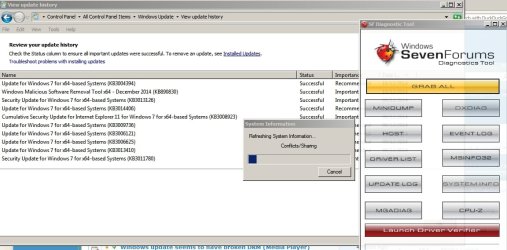
It works for me. Here it is running along with a screenshot of recently installed updates.

SF Diagnostic Tool.jpg
 

My Computer

Computer type
Laptop
Computer Manufacturer/Model Number
ASUS
OS
Microsoft Windows 7 Home Premium 64-bit 7601 Multiprocessor Free Service Pack 1
CPU
AMD C-60 APU with Radeon(tm) HD Graphics
Motherboard
ASUSTeK COMPUTER INC. X501U
Memory
4.00 GB
Graphics Card(s)
AMD Radeon HD 6290 Graphics
Sound Card
(1) AMD High Definition Audio Device (2) Realtek High Defi
Screen Resolution
1366 x 768 x 32 bits (4294967296 colors) @ 60 Hz
Hard Drives
Hitachi HTS545050A7E380 SATA Disk Device
Antivirus
Comodo CIS & FW, SecureAplus App Whitelisting, Threatfire
Browser
Cyberfox 64bit, Opera 64bit, Airfox
Other Info
Spy-The-Spy, HitmanPro.Alert, Norton Connect Safe, MJRegWatcher, BitDefender TrafficLight, Voodoo Shield, Zemana AntiMalware
Thankyou thankyou thankyou! Bloody stupid windows update!
 

My Computer

Computer type
PC/Desktop
OS
Windows 7 Ultimate x64
Hi,
I uninstaled KB3004394 today and it didn't came back!
 

My Computer

Computer type
PC/Desktop
Computer Manufacturer/Model Number
custom
OS
Windows 7 Pro x64
CPU
AMD Phenom X3
Motherboard
Asus
Memory
4Go
Graphics Card(s)
Nvidia 9600 GT
Hard Drives
Toshiba SSD 120 Go
WD Caviar Blue 1 To
Antivirus
Bitdefender
Browser
Firefox
Kb3004394

Should I remove KB3004394? It's not caused any issues for me at all but I'm reading that it's been pulled. Possibly it didn't cause any problems because UAC is switched off on my machine and has been replaced by an alternative.

I've checked and I have no issues with unsigned drivers or system files.
 

My Computer

Computer type
Laptop
Computer Manufacturer/Model Number
ASUS
OS
Microsoft Windows 7 Home Premium 64-bit 7601 Multiprocessor Free Service Pack 1
CPU
AMD C-60 APU with Radeon(tm) HD Graphics
Motherboard
ASUSTeK COMPUTER INC. X501U
Memory
4.00 GB
Graphics Card(s)
AMD Radeon HD 6290 Graphics
Sound Card
(1) AMD High Definition Audio Device (2) Realtek High Defi
Screen Resolution
1366 x 768 x 32 bits (4294967296 colors) @ 60 Hz
Hard Drives
Hitachi HTS545050A7E380 SATA Disk Device
Antivirus
Comodo CIS & FW, SecureAplus App Whitelisting, Threatfire
Browser
Cyberfox 64bit, Opera 64bit, Airfox
Other Info
Spy-The-Spy, HitmanPro.Alert, Norton Connect Safe, MJRegWatcher, BitDefender TrafficLight, Voodoo Shield, Zemana AntiMalware
Update KB3004394 was the issue for me. Uninstall that and restart then attempt to use the diagnostic tool.


Thank you for your post. You saved my day and my sanity.
 

My Computer

Computer type
PC/Desktop
Computer Manufacturer/Model Number
HP
OS
Windows7 64bit home premium
CPU
i7
Motherboard
amd
Memory
16g
Update KB3004394 was the issue for me. Uninstall that and restart then attempt to use the diagnostic tool.


@minimumimpact Thank you for your post. You saved my day and my sanity.
 

My Computer

Computer type
PC/Desktop
Computer Manufacturer/Model Number
HP
OS
Windows7 64bit home premium
CPU
i7
Motherboard
amd
Memory
16g
Hi, thats interesting about UAC & that could be the difference between it working for some & not for others, i have two different User Accounts on my Windows 7 system, one is a standard user for guests & the other is an Admin account that is password protected, ill also add that i did turn off UAC notifications because its nagging is a right pain whenever i download or install software, its one off the downsides to Win 7
 

My Computer

Computer type
PC/Desktop
Computer Manufacturer/Model Number
n/a
OS
Windows 7 Home Premium 64bit
CPU
Intel Core 2 Duo 8400
Motherboard
Gigabyte GA-EP35-DS3R
Memory
4GB Corsair Twin 4x 6400c4 800mhz PC64000 4-4-4-12
Graphics Card(s)
BFG Nvidia Geforce 8800GTS 512mb PCI-e 2.0
Sound Card
Creative Soundblaster Xtreme Gamer
Monitor(s) Displays
Samsung Syncmaster 226bw 22"
Screen Resolution
1680 x 1050
Hard Drives
Samsung 840 SSD Pro 128gb
PSU
Corsair CMPSU-620HX (620 Watt)
Antivirus
Windows Microsoft Essential
Browser
Mozilla Firefox 31 series
You sir are awesome, that fix was searched hard and you had the only correct answer :party: I knew it was an update but so many updates went in on fresh installs it would have taken forever 1x1. You nailed it congrats. Microsoft's solution? Repair install or format. I did reinstall 3 x thinking maybe faulty ram but after that I knew it was an update issue.
 

My Computer

Computer type
PC/Desktop
Computer Manufacturer/Model Number
Custom
OS
7 Pro X64
CPU
I5 unlocked
Motherboard
Asus P8Z77
Memory
16 gigs of Corsair Vengeance
Graphics Card(s)
Asus Direct CU Top 7970
Monitor(s) Displays
50 inch Toshiba LED TV
Screen Resolution
1920x1080
Hard Drives
3x 1TB Seagate
2x 2TB Seagate
PSU
650 Cougar
Case
LanBoy
Cooling
Copper Zalman
Antivirus
Malwarebytes
Browser
IE
Thanks!

Hey new user here just wanted to say thanks to everyone that contributed-most frustrating 3 hours ever. I'm a rookie-took me forever to get everything straight but all good now. Muchas gracias
 

My Computer

Computer type
PC/Desktop
Computer Manufacturer/Model Number
Custom Build
OS
Windows 7 Ultimate X64
CPU
AMD A-8 5600K APU
Memory
8 GB
Graphics Card(s)
Radeon HD Graphics 3.6 Hz
Hard Drives
ST1000DM 003-1CH162 SATA Disk
Antivirus
Windows Defender
Browser
Chrome
Update KB3004394 was the issue for me. Uninstall that and restart then attempt to use the diagnostic tool.
This article describes an update for Windows Root Certificate Program in Windows 8.1, Windows RT 8.1, Windows Server 2012 R2, Windows 8, Windows RT, Windows Server 2012, Windows 7, and Windows Server 2008 R2.


samusng note 4 tasche
 
Last edited:

My Computer

Computer type
PC/Desktop
OS
Jalinaza
It may just be that I'm not extremely computer-savvy, and so don't really know what I'm doing, but when I search through the control panel update uninstall window, I can't kind the particular update that's causing this issue. The weird thing is that I can still see it in my update history as having been a successful installation. What should I do about this?
 

My Computer

Computer type
PC/Desktop
OS
Windows 7 Pro x64
I have a program from i0bits called uninstaller, and it lets me see each item that was in the update clearly. its a free program, and I guarantee you ...the best uninstaller I have ever used. Give it a try.
 

My Computer

Computer type
PC/Desktop
Computer Manufacturer/Model Number
HP
OS
Windows7 64bit home premium
CPU
i7
Motherboard
amd
Memory
16g

My Computer

Computer type
Laptop
Computer Manufacturer/Model Number
MSI PE60 6QE
OS
Win 10 Pro x64, Win 7 Pro x64
CPU
Intel Core i7-6700HQ Skylake
Motherboard
MSI MS-16J5
Memory
16gb Crucial DDR4
Graphics Card(s)
NVIDIA GeForce GTX 960M 2 GB
Screen Resolution
1920 x 1080
Hard Drives
Samsung 850 EVO 250 GB M.2 SSD (MZ-N5E250BW)
HGST 1TB @7200 RPM HTS721010A9E630
Case
Plastic
Keyboard
Got one...
Mouse
Yep, one of those too.
Internet Speed
FIOS 75/75
Antivirus
Defender
Browser
Chrome/FFox/Ex-PLODE-r/(L)Edge
Other Info
Defender, Custom Hosts, uBlock, regular backups w/ Macrium (Free)
I have seen to many problems on this forum caused by anything for IObit.

I don't even like typing the word Ixxxx.
Make my barge pole 50 ft.
 

My Computer

Computer type
PC/Desktop
Computer Manufacturer/Model Number
Home made Desktop
OS
Windows 10 Pro. 64/ version 1709 Windows 7 Pro/64
CPU
Intel i7-6800K @ 4.3
Motherboard
ASUS X-99 Deluxe II
Memory
Corsair Platinum 16 gig @2400
Graphics Card(s)
EVGA GTX 1070 OC
Monitor(s) Displays
Asus 27" LED LCD/VE278Q
Screen Resolution
1920-1080 or 1280-720 HDMI
Hard Drives
INTEL SSD 730-240 Gb Sata 3.0/
PSU
EVGA Platium 1200W
Case
Phanteks Luxe Tempered Glass 8 fans/ one radiator
Cooling
XSPC/ Water Cooled CPU
Keyboard
Das 4 Professional
Mouse
Logitech M705/MX Anywhere 2-S
Internet Speed
100 mbits
Antivirus
Microsoft Security Essentials/ Malwarebytes Premium 3.0/ SAS
Browser
I.E. 11 default/Firefox/ ISP Time Warner Cable/Spectrum
Other Info
LG BluRay Burner/
Sound system-KLipsch-THX/
Icy Dock ssd Hot Swap bays.
Back
Top