Solved Windows doesn't recognize all my hdd capacity.

hemis

New member
Local time
11:45 PM
Messages
10
Hello!
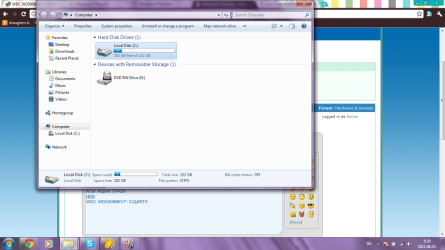
I've just bought a new laptop. It was with Linux Boot-Up system. I installed Windows 7 Ultimate x64. Installed all drivers that were on official Acer homepage. Then I saw that the Windows doesn't show all my HDD capacity. It should show 500gb, but it shows only 232GB.
What should I do?
my comp. -
Acer Aspire 5742G
HDD
WDC WD5000BEVT-22A0RT0
picture of my HDD
In attachment is screenshot from my PC.
waiting for replies,
best regards,
Hemis
 

Attachments
  • Untitled.png
    Untitled.png
    85.6 KB · Views: 54

My Computer

OS
Windows 7 Ultimate x64
Hello hemis, you said when you bought your laptop, than there operating system was "Linux". Therefore, I think, your hardisk formatted as linux file system base. Windows file system and linux file system is totally different. So when you installed windows 7, at that time you format your c: drive. So widows seven only recognize your c: drive. Because window's seven recognize that file system. Please you format all of other partition on your hardisk by "NTFS" file system. To see your all of other partition go to "run" option and write "diskmgmt.msc" and then press enter. Here you see all of your hardisk partition. Now select drive and right click and then chose "format".

All the best.
 

My Computer

OS
windows 7 ultimate 32 bit
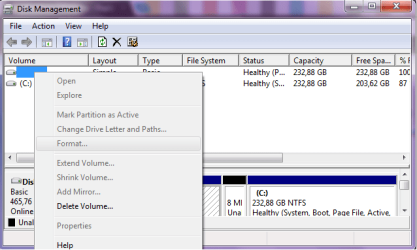
Thanks, finally I found the other partition of my HDD, but now there's a new problem. I can't press 'Format'. :D
what should I do?

edit - and what will happen if I'll press 'delete Volume'?
 

Attachments

  • Untitled2.png
    Untitled2.png
    18.7 KB · Views: 25

My Computer

OS
Windows 7 Ultimate x64
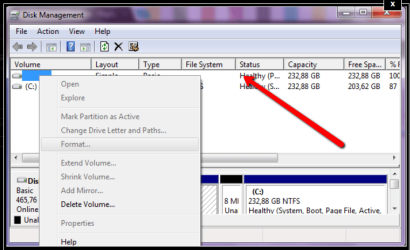
just a guess ,but have you clicked the partition you wish to format fist ,try selecting it and the see if format is still greyed out.
click where arrow points
2011-08-23_1038.png
 

My Computer

Computer Manufacturer/Model Number
Hewlett packard/p6512uk
OS
Microsoft Windows 7 Home Premium 64-bit 7600
CPU
IIx4 amd athelon 635 processor
Motherboard
FOXCONN 2AA9
Memory
2x2gb
Graphics Card(s)
ati radeon HD 5450
Sound Card
(1) Realtek High Definition Audio (2) AMD High Definition
Monitor(s) Displays
samsung lcd tv 32"
Screen Resolution
1360x 768
Hard Drives
(1) WDC WD10 01FAES-60Z2A0 SATA Disk Device (2) Maxtor OneTouch USB Device (3) ST310003 33AS USB Device (4) WD My Book 1111 USB Device
PSU
?
Cooling
air!
Keyboard
wireless hp
Mouse
wireless Hp,optical
Internet Speed
1.10mb/s
Antivirus
MSE
Browser
Firefox
nop, there the menu even doesn't pop up...
 

My Computer

OS
Windows 7 Ultimate x64

My Computer

Computer Manufacturer/Model Number
HP, Dell, Gateway, Toshiba - 4 laptops and 2 desktops
OS
Vista, Windows7, Mint Mate, Zorin, Windows 8
CPU
from 1.6GHz Duo to i7
Monitor(s) Displays
2x HP w2207
Hard Drives
5x HDD, 7x SSD, 12x Externals
Keyboard
with trackball - no mices
Mouse
Trackball mice
Internet Speed
DSL 6000
Hello Hemis,

Open Disk Management by going to Run and typing "diskmgmt.msc". Select the non C: partition (most probably a linux partition), right click with mouse and select "Delete Volume" and in next dialog box click on "Yes". This will remove the partition and make the space Unallocated. In this space you can create either single or multiple partitions.

To create a partition, right click on the unallocated space and select "New Simple Volume". This will open "New Simple Volume Wizard". Click Next. In this box to create a single partition filling complete unallocated space just click Next. Otherwise reduce the Size in Simple volume size in MB (up-down arrow buttons) or directly entering a value of your choice. Click Next and again Next.

Now select file system as NTFS (preferably for Win 7) or exFAT for a extended FAT partition. Keep default allocation unit size. At Volume Label you may give a name or do nothing. Put a check mark on "Perform a Quick Format" and no check mark on "Enable File and Folder Compression". Click Next and review the settings you have made so far and Click Finish to exit the wizard. Now in the Unallocated space a partition will be created and formatted with a drive letter which appeared and selected in the wizard.

You may always go back in the wizard before pressing Finish to change any values you have accepted before.
 

My Computer

Computer Manufacturer/Model Number
Toshiba Satellite P775-S7232
OS
MS Windows 7 Ultimate 64-bit SP1
CPU
i5-2410M 2.3GHz (2.9GHz Turbo-Boost) Sandy Bridge 32nm
Motherboard
Toshiba PHRAA ver. PSBY1U-00F003
Memory
4GB+4GB Samsung DDR3 PC3-10700 (1333 MHz)
Graphics Card(s)
Video Intel(R) HD Graphics Family, 1696MB available memory
Sound Card
Realtek High Definition Audio version=6.0.1.6323
Monitor(s) Displays
17.3 " Trubrite TFT LCD, LED Backlit
Screen Resolution
1600x900 32 bit, Native support for 720P content
Hard Drives
TOSHIBA MK6476GSXN
580.614 [GB] partitioned C: 80GB and D: 500GB with hidden recovery partitons.

Spare bay for 2nd HDD but no SATA connector :-(
PSU
Toshiba AC/DC Adapter
Case
Notebook
Cooling
Built-in Fan
Keyboard
Premium Raised Tile keyboard
Mouse
Logitech M215 wireless mouse
Internet Speed
Not fast enough
Other Info
Built-in Harman Kardon speakers with Dolby Advanced Audio, Waves MaxxAudio® 3. HDMI, 1xUSB3+3xUSB2 ports, WebCam, Battery life 4hrs 11mins, 4GB Readyboost SDHC card, WD My Book Essential Ext HDDs 2 TB, 2x1TB, My Passport SE 1TB and WDTV 1st Gen for Multimedia playing on a Sony Wega 32" LCD.
Recent addition to my toys are Asus Transformer Pad TF300T with 32GB onboard sd card + 32GB microsd card.
thanks to all of you! problem solved with minitool partition wizard. :)
 

My Computer

OS
Windows 7 Ultimate x64
Back
Top