Windows doesn't seem to see my restore Image

skylos

New member
Local time
9:52 PM
Messages
21
Hi,
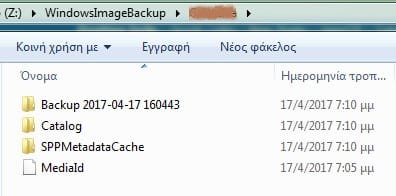
windows 7 and I have created some time ago an image, stored on Z:
(check attachment)

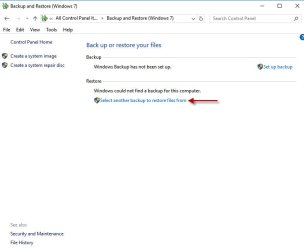
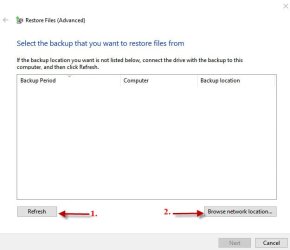
Now, when i go to restore the image Windows claims it cannot find any image :(

Can anyone help me out?

I used to be able to create and restore images with no problem. Why this, now?

Thanks
 

Attachments
  • bup.jpg
    bup.jpg
    12 KB · Views: 55

My Computer My Computer

At a glance

Windows 7 Ultimate x64i34 GB
Computer type
PC/Desktop
OS
Windows 7 Ultimate x64
CPU
i3
Motherboard
Asus
Memory
4 GB
Hard Drives
ssd for boot, data on sata
Antivirus
AVG
Browser
ff, chrome, opera

My Computer My Computer

At a glance

Win 7 Pro 64-bitIntel i5 2.4 Ghz8GB DDR3Intel HD 3000
Computer type
Laptop
Computer Manufacturer/Model Number
Sony Vaio VPCEB47GM Laptop
OS
Win 7 Pro 64-bit
CPU
Intel i5 2.4 Ghz
Memory
8GB DDR3
Graphics Card(s)
Intel HD 3000
Sound Card
IDT High Definition
Monitor(s) Displays
15.6 WGXA Anti-Glare LED
Screen Resolution
1280x800
Hard Drives
640Gb 7200rpm
Antivirus
MSE
Browser
Opera (primary) with IE9 backup
It's a 200 GB sata drive split in two paritions Z and Y. There are other hard disks of course.

Do check the attachment for the two partitions of this disk.
 

Attachments

  • disks.jpg
    disks.jpg
    28.3 KB · Views: 2

My Computer My Computer

At a glance

Windows 7 Ultimate x64i34 GB
Computer type
PC/Desktop
OS
Windows 7 Ultimate x64
CPU
i3
Motherboard
Asus
Memory
4 GB
Hard Drives
ssd for boot, data on sata
Antivirus
AVG
Browser
ff, chrome, opera
Are you using the System Repair Disk to access "Windows Complete PC Restore"? Sometimes the Repair Disk has better luck finding system images.

If you still can't locate your system image, you could try searching for the backup.

SysImg 1.jpg SysImg 2.jpg

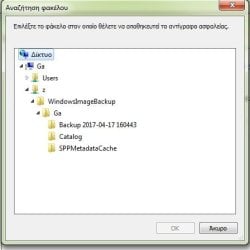
Your screenshot in Post # 1 shows "( Z: ) > WindowsImageBackup > deleted >". Without giving up any of your personal info, is the deleted info part of the file path to that system image?

One final thought. The native Windows 7 imaging tool is not the most reliable. Many people have reported problems creating and/or restoring. A free alternative is Macrium Reflect. It's highly recommended on this Forum. One of the members has an excellent tutorial.

Imaging with free Macrium - Windows 7 Help Forums
 

My Computer My Computer

At a glance

Win 7 Pro 64-bitIntel i5 2.4 Ghz8GB DDR3Intel HD 3000
Computer type
Laptop
Computer Manufacturer/Model Number
Sony Vaio VPCEB47GM Laptop
OS
Win 7 Pro 64-bit
CPU
Intel i5 2.4 Ghz
Memory
8GB DDR3
Graphics Card(s)
Intel HD 3000
Sound Card
IDT High Definition
Monitor(s) Displays
15.6 WGXA Anti-Glare LED
Screen Resolution
1280x800
Hard Drives
640Gb 7200rpm
Antivirus
MSE
Browser
Opera (primary) with IE9 backup
First of all, thanks for trying to help. :)


I had already tried out your suggestions.

For some reason, it cannot see the image. :/ It used to work just fine (once upon a time...)

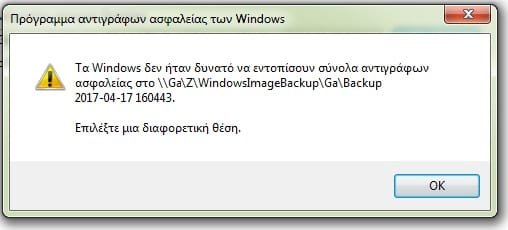
Even when I point to the location, it doesn't see it.

\\Ga\z\WindowsImageBackup\Ga\Backup 2017-04-17 160443\
\\Ga\z\WindowsImageBackup\Ga\
\\Ga\z\WindowsImageBackup\

whichever I pick of the three I get the same error message.

Can Macrium Reflect restore images made with W7 itself?

thanks
 

Attachments

  • backup2.jpg
    backup2.jpg
    14.6 KB · Views: 32
  • backup.jpg
    backup.jpg
    18.7 KB · Views: 32

My Computer My Computer

At a glance

Windows 7 Ultimate x64i34 GB
Computer type
PC/Desktop
OS
Windows 7 Ultimate x64
CPU
i3
Motherboard
Asus
Memory
4 GB
Hard Drives
ssd for boot, data on sata
Antivirus
AVG
Browser
ff, chrome, opera
Assuming Ga is your computer name this looks ok except you should have a MediaID file under the Ga folder. Windows should ideally be able to locate the WindowsImageBackup folder in the root of Z.

Although I have used Windows inbuilt system imaging extensively in the past without problem, others have experienced problems with autolocation of the image folder. If you want to simply extract important files from your image vhd (under the Backup... folder) you can use this tutorial.
System Image - Extract Files Using Disk Management

In future you may want to try this much more flexible and reliable imaging program used by myself and many forum members.
https://www.macrium.com/reflectfree
 

My Computer My Computer

At a glance

Windows 7x64 Home Premium SP1Intel i7 2600kG.Skill Ripjaws (DDR3-1600) 2x4GBNvidia GeForce GTS 450; Intel HD Graphics 300...
Computer type
PC/Desktop
Computer Manufacturer/Model Number
Own build
OS
Windows 7x64 Home Premium SP1
CPU
Intel i7 2600k
Motherboard
ASUS P8Z68 Deluxe
Memory
G.Skill Ripjaws (DDR3-1600) 2x4GB
Graphics Card(s)
Nvidia GeForce GTS 450; Intel HD Graphics 3000(GT2+)
Monitor(s) Displays
Dell Ultrasharp IPS panel U2311H, Samsung SyncMaster P2350
Screen Resolution
1920x1080
Hard Drives
Samsung 850 Pro SSD 256GB, Samsung SSD 840 120GB, Seagates 1TB Barracuda ST31000528AS x2
PSU
Seasonic M12II 520W
Case
Lian Li Lancool PC-K60
Cooling
Case: 1x120mm, 3x140mm CPU: Hyper 212+
Keyboard
Logitech MK520 (wireless)
Mouse
Logitech MK520
Internet Speed
6-7 Mbps
Antivirus
Norton Security Premium, Malwarebytes on 2 (MSE on 3rd PC)
Browser
FireFox
Other Info
Audio: Logitech Z523 2.1
You can restore it using wbadmin command in winpe/winre

Another way is to mount the vhd (e.g. in windows disk management). Assign a letter to the mounted vhd.

Then use the copy function of a partition manger to copy vhd to HD partition.
 

My Computers My Computers

  • At a glance

    7 X64i5 84002x8gb 3200mhz
    Computer type
    PC/Desktop
    OS
    7 X64
    CPU
    i5 8400
    Motherboard
    gigabyte b365m ds3h
    Memory
    2x8gb 3200mhz
    Hard Drives
    various
    PSU
    pure power 11 400w cm
    Case
    Coolermaster
    Cooling
    cryorig m9i
  • At a glance

    7x64g54008gb ddr4 2400
    Computer type
    PC/Desktop
    OS
    7x64
    CPU
    g5400
    Motherboard
    ga b365m ds3h
    Memory
    8gb ddr4 2400
    PSU
    xfx pro 450w
If you must try to restore your image but jump through a few hoops then this approach should show the key steps. Note you would be using Macrium V6 (free) now.
recovery to smaller hard drive
From memory I believe Windows image restore uses wbadmin anyway.

It is recommended that you always have more than one image on more than one storage device.
 
Last edited:

My Computer My Computer

At a glance

Windows 7x64 Home Premium SP1Intel i7 2600kG.Skill Ripjaws (DDR3-1600) 2x4GBNvidia GeForce GTS 450; Intel HD Graphics 300...
Computer type
PC/Desktop
Computer Manufacturer/Model Number
Own build
OS
Windows 7x64 Home Premium SP1
CPU
Intel i7 2600k
Motherboard
ASUS P8Z68 Deluxe
Memory
G.Skill Ripjaws (DDR3-1600) 2x4GB
Graphics Card(s)
Nvidia GeForce GTS 450; Intel HD Graphics 3000(GT2+)
Monitor(s) Displays
Dell Ultrasharp IPS panel U2311H, Samsung SyncMaster P2350
Screen Resolution
1920x1080
Hard Drives
Samsung 850 Pro SSD 256GB, Samsung SSD 840 120GB, Seagates 1TB Barracuda ST31000528AS x2
PSU
Seasonic M12II 520W
Case
Lian Li Lancool PC-K60
Cooling
Case: 1x120mm, 3x140mm CPU: Hyper 212+
Keyboard
Logitech MK520 (wireless)
Mouse
Logitech MK520
Internet Speed
6-7 Mbps
Antivirus
Norton Security Premium, Malwarebytes on 2 (MSE on 3rd PC)
Browser
FireFox
Other Info
Audio: Logitech Z523 2.1
No need to jump through all those hoops. Mount the image and use copy function of a partition manager. Not difficult, and fairly quick.
 

My Computers My Computers

  • At a glance

    7 X64i5 84002x8gb 3200mhz
    Computer type
    PC/Desktop
    OS
    7 X64
    CPU
    i5 8400
    Motherboard
    gigabyte b365m ds3h
    Memory
    2x8gb 3200mhz
    Hard Drives
    various
    PSU
    pure power 11 400w cm
    Case
    Coolermaster
    Cooling
    cryorig m9i
  • At a glance

    7x64g54008gb ddr4 2400
    Computer type
    PC/Desktop
    OS
    7x64
    CPU
    g5400
    Motherboard
    ga b365m ds3h
    Memory
    8gb ddr4 2400
    PSU
    xfx pro 450w
To use Disk management you need a running Windows OS. Then you would need to be able to copy the mounted partition onto the existing Windows OS partition while the system is running (using say Partition Wizard mini tool) - can you do this?
If you use a bootable partition manager like Partition Wizard again how do you attach/mount the vhd since you don't have access to the Disk management utility?

This is what pushed me down the Macrium system imaging path in the old link I posted above.
 
Last edited:

My Computer My Computer

At a glance

Windows 7x64 Home Premium SP1Intel i7 2600kG.Skill Ripjaws (DDR3-1600) 2x4GBNvidia GeForce GTS 450; Intel HD Graphics 300...
Computer type
PC/Desktop
Computer Manufacturer/Model Number
Own build
OS
Windows 7x64 Home Premium SP1
CPU
Intel i7 2600k
Motherboard
ASUS P8Z68 Deluxe
Memory
G.Skill Ripjaws (DDR3-1600) 2x4GB
Graphics Card(s)
Nvidia GeForce GTS 450; Intel HD Graphics 3000(GT2+)
Monitor(s) Displays
Dell Ultrasharp IPS panel U2311H, Samsung SyncMaster P2350
Screen Resolution
1920x1080
Hard Drives
Samsung 850 Pro SSD 256GB, Samsung SSD 840 120GB, Seagates 1TB Barracuda ST31000528AS x2
PSU
Seasonic M12II 520W
Case
Lian Li Lancool PC-K60
Cooling
Case: 1x120mm, 3x140mm CPU: Hyper 212+
Keyboard
Logitech MK520 (wireless)
Mouse
Logitech MK520
Internet Speed
6-7 Mbps
Antivirus
Norton Security Premium, Malwarebytes on 2 (MSE on 3rd PC)
Browser
FireFox
Other Info
Audio: Logitech Z523 2.1
Then you would need to be able to copy the mounted partition onto the existing Windows OS partition while the system is running (using say Partition Wizard mini tool) - can you do this?

No, you don't need to do that.


Use a decent boot media that includes mmc , etc. I have posted them often enough.

x64

17514x64-v3.iso


x86

A23x86.iso


( Some partitioners e.g. pguru will mount vhd files without using diskmgmt, and clone that mounted partition. If you do it that way , then the OS drive letter of the restored image needs to be fixed - I have provided a function to do that in my boot media )


In addition, for those who want to create boot media themselvers, I have also posted in other threads a little batch that will make it for you. In spite of the name, it also works for x86.

NEW7x64UPD.zip
 

My Computers My Computers

  • At a glance

    7 X64i5 84002x8gb 3200mhz
    Computer type
    PC/Desktop
    OS
    7 X64
    CPU
    i5 8400
    Motherboard
    gigabyte b365m ds3h
    Memory
    2x8gb 3200mhz
    Hard Drives
    various
    PSU
    pure power 11 400w cm
    Case
    Coolermaster
    Cooling
    cryorig m9i
  • At a glance

    7x64g54008gb ddr4 2400
    Computer type
    PC/Desktop
    OS
    7x64
    CPU
    g5400
    Motherboard
    ga b365m ds3h
    Memory
    8gb ddr4 2400
    PSU
    xfx pro 450w
Well that's jumping through hoops IMO for many and some trust in your boot media. I'd suggest you be a little more explicit in offering OPs an option to try your boot media and provide directions on what they need to do once they have downloaded some ISO.

I think many would prefer simple direct guidance using recognized third party tools.
 

My Computer My Computer

At a glance

Windows 7x64 Home Premium SP1Intel i7 2600kG.Skill Ripjaws (DDR3-1600) 2x4GBNvidia GeForce GTS 450; Intel HD Graphics 300...
Computer type
PC/Desktop
Computer Manufacturer/Model Number
Own build
OS
Windows 7x64 Home Premium SP1
CPU
Intel i7 2600k
Motherboard
ASUS P8Z68 Deluxe
Memory
G.Skill Ripjaws (DDR3-1600) 2x4GB
Graphics Card(s)
Nvidia GeForce GTS 450; Intel HD Graphics 3000(GT2+)
Monitor(s) Displays
Dell Ultrasharp IPS panel U2311H, Samsung SyncMaster P2350
Screen Resolution
1920x1080
Hard Drives
Samsung 850 Pro SSD 256GB, Samsung SSD 840 120GB, Seagates 1TB Barracuda ST31000528AS x2
PSU
Seasonic M12II 520W
Case
Lian Li Lancool PC-K60
Cooling
Case: 1x120mm, 3x140mm CPU: Hyper 212+
Keyboard
Logitech MK520 (wireless)
Mouse
Logitech MK520
Internet Speed
6-7 Mbps
Antivirus
Norton Security Premium, Malwarebytes on 2 (MSE on 3rd PC)
Browser
FireFox
Other Info
Audio: Logitech Z523 2.1
Boot it up and you get desktop, start menu, etc.

If you can use windows, you can use the boot media. Take a look at it for yourself.

Or you can use NEW7x64UPD.zip and it will incorporate any of the popular imaging/partitioning programs that you have in your running OS.
 

My Computers My Computers

  • At a glance

    7 X64i5 84002x8gb 3200mhz
    Computer type
    PC/Desktop
    OS
    7 X64
    CPU
    i5 8400
    Motherboard
    gigabyte b365m ds3h
    Memory
    2x8gb 3200mhz
    Hard Drives
    various
    PSU
    pure power 11 400w cm
    Case
    Coolermaster
    Cooling
    cryorig m9i
  • At a glance

    7x64g54008gb ddr4 2400
    Computer type
    PC/Desktop
    OS
    7x64
    CPU
    g5400
    Motherboard
    ga b365m ds3h
    Memory
    8gb ddr4 2400
    PSU
    xfx pro 450w
Hi guys and again, thanks for trying to help.

My system is both bootable and workable. It's just that it doesn't work 100% correctly. I think there is some spywhere hidden, to say the least. And this is why I want to recover the full system from my image.

So, are there more detailed instructions to try out this solution?
You can restore it using wbadmin command in winpe/winre

Another way is to mount the vhd (e.g. in windows disk management). Assign a letter to the mounted vhd.

Then use the copy function of a partition manger to copy vhd to HD partition.
 

My Computer My Computer

At a glance

Windows 7 Ultimate x64i34 GB
Computer type
PC/Desktop
OS
Windows 7 Ultimate x64
CPU
i3
Motherboard
Asus
Memory
4 GB
Hard Drives
ssd for boot, data on sata
Antivirus
AVG
Browser
ff, chrome, opera
Boot the media linked to in my previous post.

EITHER

1.When you get to the desktop, open disk management. Mount the vhd.

Give the mounted vhd a lettere.

Open Aomei partition assistant. Select partition copy wizard. Copy the mounted partition to unallocated space. Fix OS letter.

OR

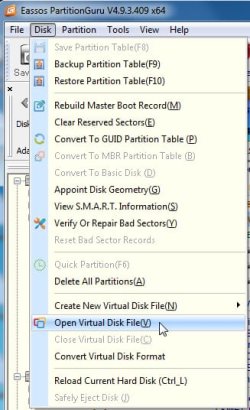
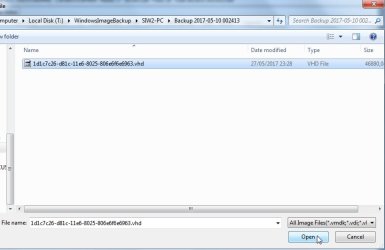
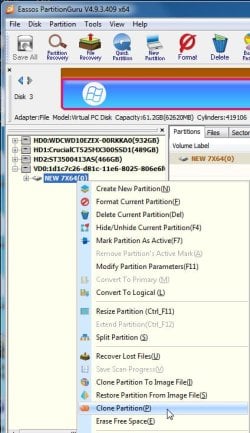
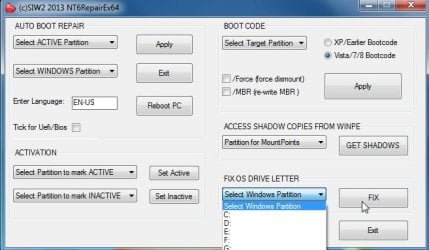
2. Open pguru, mount vhd, clone vhd contents to partition. Then to fix os letter: open NT6Repair, point the dropdown at the letter you cloned TO, click FIX.


i ) Select open virtual disk

pg1.jpg


ii) Browse to vhd

pg2.jpg


iii) Rt click mounted vhd and select Clone

pg4.jpg

iv) After cloning , Fix drive letter:select letter you cloned vhd TO

fix-os-letter.jpg

You can also use NT6Repair to create boot menu .
 
Last edited:

My Computers My Computers

  • At a glance

    7 X64i5 84002x8gb 3200mhz
    Computer type
    PC/Desktop
    OS
    7 X64
    CPU
    i5 8400
    Motherboard
    gigabyte b365m ds3h
    Memory
    2x8gb 3200mhz
    Hard Drives
    various
    PSU
    pure power 11 400w cm
    Case
    Coolermaster
    Cooling
    cryorig m9i
  • At a glance

    7x64g54008gb ddr4 2400
    Computer type
    PC/Desktop
    OS
    7x64
    CPU
    g5400
    Motherboard
    ga b365m ds3h
    Memory
    8gb ddr4 2400
    PSU
    xfx pro 450w
SIW2---I downloaded the NEW7x64UPD.zip file.
It will not complete with my Paragon Hard Disk Manager 14 Professional. I let it search for LAUNCHER.EXE for 24 hours and it does not find it. Launcher.exe is in the exact place it should be.
 

My Computer My Computer

At a glance

Windows 7 Ultimate x64
Computer type
PC/Desktop
OS
Windows 7 Ultimate x64
Probably I made an error in one of the batch files.

EDIT:

I forgot to include an .ini file.

You can copy and paste the following code into a text file, save it as getpmexe.ini and put it in the BIN folder.

getpmexe.ini
Code:
ENVI TEXEPATH=d:\launcher.exe
BROW TEXEPATH,,Select LAUNCHER.EXE,exe
EXEC =!CMD.EXE /C ECHO set exepath="%TEXEPATH%">"%CurDir%\setexepath.cmd"
ENVI TEXEPATH=
 

My Computers My Computers

  • At a glance

    7 X64i5 84002x8gb 3200mhz
    Computer type
    PC/Desktop
    OS
    7 X64
    CPU
    i5 8400
    Motherboard
    gigabyte b365m ds3h
    Memory
    2x8gb 3200mhz
    Hard Drives
    various
    PSU
    pure power 11 400w cm
    Case
    Coolermaster
    Cooling
    cryorig m9i
  • At a glance

    7x64g54008gb ddr4 2400
    Computer type
    PC/Desktop
    OS
    7x64
    CPU
    g5400
    Motherboard
    ga b365m ds3h
    Memory
    8gb ddr4 2400
    PSU
    xfx pro 450w
Back
Top