Solved Windows DVD Maker - Music Skipping

JackyKilford

New member
Local time
8:29 PM
Messages
6
I've created a DVD of my daughters wedding but when you use the pan and zoom function the music keeps skipping as the photographs change.
Please help.
Is there any way of correcting this as the skipping is very noticeable and annoying but the DVD looks so much better when the pan & zoom is enabled.:cry:
 

My Computer My Computer

At a glance

Windows 7 home premium 64 bit spiIntel Core i3 2120 @ 3.30GHz Sandy Bridge 32n...Type DDR3W2234 on Intel HD Graphics
Computer Manufacturer/Model Number
Microsoft Windows 7 Home Premium 64-bit SP1 Serial Number: 4FG99-BC3HD-73CQT-WMF7J-3Q6C9
OS
Windows 7 home premium 64 bit spi
CPU
Intel Core i3 2120 @ 3.30GHz Sandy Bridge 32nm Technology
Motherboard
Foxconn Model 2ADA (CPU 1)
Memory
Type DDR3
Graphics Card(s)
W2234 on Intel HD Graphics
Sound Card
IDT High Definition Audio CODEC
Monitor(s) Displays
W2234 on Intel HD Graphics
Screen Resolution
1680x1050 pixels
Hard Drives
932GB Hitachi HDS721010DLE630 ATA Device (SATA)
Keyboard
HID Keyboard Device
Mouse
HID-compliant mouse
Could you please update your system specifications, using the Speccy link (via my signature).

It could be related to your system specifications.

Once you have Speccy installed, go to UserCP, and then go to Edit System Specs in the left pane, and fill out the information from Speccy onto there.

Thank you.

Hope this helps,

Harry
 

My Computer My Computer

Computer type
Laptop
Thanks for the reply Harry. Have downloaded Speccy as you suggested and filled out as much information as I could find but I'm a bit of a novice at all this technical stuff and not sure what I'm supposed to do next :o
 

My Computer My Computer

At a glance

Windows 7 home premium 64 bit spiIntel Core i3 2120 @ 3.30GHz Sandy Bridge 32n...Type DDR3W2234 on Intel HD Graphics
Computer Manufacturer/Model Number
Microsoft Windows 7 Home Premium 64-bit SP1 Serial Number: 4FG99-BC3HD-73CQT-WMF7J-3Q6C9
OS
Windows 7 home premium 64 bit spi
CPU
Intel Core i3 2120 @ 3.30GHz Sandy Bridge 32nm Technology
Motherboard
Foxconn Model 2ADA (CPU 1)
Memory
Type DDR3
Graphics Card(s)
W2234 on Intel HD Graphics
Sound Card
IDT High Definition Audio CODEC
Monitor(s) Displays
W2234 on Intel HD Graphics
Screen Resolution
1680x1050 pixels
Hard Drives
932GB Hitachi HDS721010DLE630 ATA Device (SATA)
Keyboard
HID Keyboard Device
Mouse
HID-compliant mouse
Thanks for updating your system specifications it will help me and everyone else on the forums with resolving your problem.

I will have a proper look into a solution, when I get home from college.
 

My Computer My Computer

Computer type
Laptop
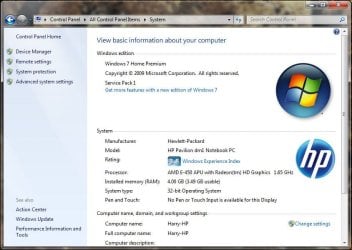
How much RAM do you have installed?

You can find out from here: Start > Right-Click Computer > Properties

I've uploaded a screenshot to illustrate what you should see.
 

Attachments

  • Capture.JPG
    Capture.JPG
    72.2 KB · Views: 8

My Computer My Computer

Computer type
Laptop
6.00gb
 

My Computer My Computer

At a glance

Windows 7 home premium 64 bit spiIntel Core i3 2120 @ 3.30GHz Sandy Bridge 32n...Type DDR3W2234 on Intel HD Graphics
Computer Manufacturer/Model Number
Microsoft Windows 7 Home Premium 64-bit SP1 Serial Number: 4FG99-BC3HD-73CQT-WMF7J-3Q6C9
OS
Windows 7 home premium 64 bit spi
CPU
Intel Core i3 2120 @ 3.30GHz Sandy Bridge 32nm Technology
Motherboard
Foxconn Model 2ADA (CPU 1)
Memory
Type DDR3
Graphics Card(s)
W2234 on Intel HD Graphics
Sound Card
IDT High Definition Audio CODEC
Monitor(s) Displays
W2234 on Intel HD Graphics
Screen Resolution
1680x1050 pixels
Hard Drives
932GB Hitachi HDS721010DLE630 ATA Device (SATA)
Keyboard
HID Keyboard Device
Mouse
HID-compliant mouse
Does the problem always occur often? You do have a Intel (most probably integrated) graphics card which could causing the choppy video effects.

Intel graphics do have a reputation for not being a very good graphics card.

Have you created a test DVD yet? I have just read that the preview within Windows DVD Maker may not be the same quality as the actual burned DVD; the quality of DVD is meant to much greater according to a Microsoft article.
 

My Computer My Computer

Computer type
Laptop
Thanks for the time you're putting into this.
When you run the DVD on preview the skipping happens on a regular basis as the photos pan in and zoom out. Sometimes if you leave it and go back to it after a day or so it will run okay for a while and just when you think it's okay it will start skipping a short way into the slideshow. If you switch the pan and zoom function off then music is fine. Yes it is Intel graphics card and as yet I've not tried to burn to actual DVD.
Jacky
 

My Computer My Computer

At a glance

Windows 7 home premium 64 bit spiIntel Core i3 2120 @ 3.30GHz Sandy Bridge 32n...Type DDR3W2234 on Intel HD Graphics
Computer Manufacturer/Model Number
Microsoft Windows 7 Home Premium 64-bit SP1 Serial Number: 4FG99-BC3HD-73CQT-WMF7J-3Q6C9
OS
Windows 7 home premium 64 bit spi
CPU
Intel Core i3 2120 @ 3.30GHz Sandy Bridge 32nm Technology
Motherboard
Foxconn Model 2ADA (CPU 1)
Memory
Type DDR3
Graphics Card(s)
W2234 on Intel HD Graphics
Sound Card
IDT High Definition Audio CODEC
Monitor(s) Displays
W2234 on Intel HD Graphics
Screen Resolution
1680x1050 pixels
Hard Drives
932GB Hitachi HDS721010DLE630 ATA Device (SATA)
Keyboard
HID Keyboard Device
Mouse
HID-compliant mouse
Create a Test DVD, and then see how the performance is, it may just be due to the preview mode.

Have you performed a anti-virus scan just to rule out any possibility of malware, even though it is most probably not a contributing factor.
 

My Computer My Computer

Computer type
Laptop
Thanks for those suggestions will give both of them a go tomorrow and get back to you. Again many thanks for your help with this problem.
Jacky
 

My Computer My Computer

At a glance

Windows 7 home premium 64 bit spiIntel Core i3 2120 @ 3.30GHz Sandy Bridge 32n...Type DDR3W2234 on Intel HD Graphics
Computer Manufacturer/Model Number
Microsoft Windows 7 Home Premium 64-bit SP1 Serial Number: 4FG99-BC3HD-73CQT-WMF7J-3Q6C9
OS
Windows 7 home premium 64 bit spi
CPU
Intel Core i3 2120 @ 3.30GHz Sandy Bridge 32nm Technology
Motherboard
Foxconn Model 2ADA (CPU 1)
Memory
Type DDR3
Graphics Card(s)
W2234 on Intel HD Graphics
Sound Card
IDT High Definition Audio CODEC
Monitor(s) Displays
W2234 on Intel HD Graphics
Screen Resolution
1680x1050 pixels
Hard Drives
932GB Hitachi HDS721010DLE630 ATA Device (SATA)
Keyboard
HID Keyboard Device
Mouse
HID-compliant mouse
Thanks for those suggestions will give both of them a go tomorrow and get back to you. Again many thanks for your help with this problem.
Jacky

No problem, and thank you for posting back your results tomorrow.
 

My Computer My Computer

Computer type
Laptop
you can also try the DVD on another computer (possibly a gaming computer), or (if it can read it) in a DVD recorder-player linked to the TV.

If there it works fine then it's likely your computer's fault (limited graphic card).
 

My Computer My Computer

At a glance

Win 7 Pro 64-bit 7601AMD Phenom 9650 QuadCore, revision DR-B35 GB yes I run 2x 2GB and 1x 1GB, different b...NVIDIA GeForce 9800 GT 512 Mb, unknown manufa...
Computer type
PC/Desktop
Computer Manufacturer/Model Number
custom built
OS
Win 7 Pro 64-bit 7601
CPU
AMD Phenom 9650 QuadCore, revision DR-B3
Motherboard
ASUS M4A78
Memory
5 GB yes I run 2x 2GB and 1x 1GB, different brand, spank me.
Graphics Card(s)
NVIDIA GeForce 9800 GT 512 Mb, unknown manufacturer.
Sound Card
Crappy Realtek Integrated Audio
Monitor(s) Displays
Fujitsu Siemens P19-3P
Screen Resolution
1280 x 1024 x 32 bits @ 60 Hz Oh yeah, 4:3 rocks!
Hard Drives
(1) MAXTOR S TM3320613AS SATA Disk Device (2) STM35004 18AS SATA Disk Device (3) TOSHIBA USB 2.5"-HDD
PSU
whatever, around 450w
Case
Scavenged from old company PC, 10+ years old
Cooling
CPU fan, GPU fan, case fan, nothing fancy
Keyboard
Microsoft, PS/2, white.
Mouse
Optical, logitec.
Internet Speed
effective max speeds: 70-ish kB/s down 30-ish kB/s up
Antivirus
Avira, free edition.
Browser
Firefox with FXChrome to make it look like Google Chrome :P
Other Info
Was discarded by previous owner due to "horrible performance".
Was running Win Xp from a IDE drive. Yeah. Was a pain.
SATA II drive and Win7 and it zips away! Yay!
Skipping Music

I ran the anti virus scan and made a test DVD as you suggested and "hey presto" the music played through with no problems. So it appears the skipping occurs only when running the preview, the overall outcome is unaffected.

Thank you so much for your help on this, I'd spent days putting this slideshow and video clips together for my daughter and was so disappointed when I thought it was going to be spoilt by the skipping music. :thumbsup:
 

My Computer My Computer

At a glance

Windows 7 home premium 64 bit spiIntel Core i3 2120 @ 3.30GHz Sandy Bridge 32n...Type DDR3W2234 on Intel HD Graphics
Computer Manufacturer/Model Number
Microsoft Windows 7 Home Premium 64-bit SP1 Serial Number: 4FG99-BC3HD-73CQT-WMF7J-3Q6C9
OS
Windows 7 home premium 64 bit spi
CPU
Intel Core i3 2120 @ 3.30GHz Sandy Bridge 32nm Technology
Motherboard
Foxconn Model 2ADA (CPU 1)
Memory
Type DDR3
Graphics Card(s)
W2234 on Intel HD Graphics
Sound Card
IDT High Definition Audio CODEC
Monitor(s) Displays
W2234 on Intel HD Graphics
Screen Resolution
1680x1050 pixels
Hard Drives
932GB Hitachi HDS721010DLE630 ATA Device (SATA)
Keyboard
HID Keyboard Device
Mouse
HID-compliant mouse
It's great to know that your slideshow wasn't spoiled :'D
 

My Computer My Computer

Computer type
Laptop
Back
Top