Windows Error Code 80070422 - Windows Updates

ebytes

New member
Local time
3:24 PM
Messages
23
This is a fairly new system I recently set up. It's a Dell Precision T1700 workstation with the following specs:

OS: Windows 7 Professional 64-bit
Processor: Intel Xeon E3-1271 v3 @ 3.60GHz
Memory: 16GB
Video Card: NVIDIA NVS 510
Hard Drive: 2 x Crucial M550 1TB SSD drives @ Raid 1
Anti-Virus Software Installed: Norton 360 & Malwarebytes Anti-Malware Premium

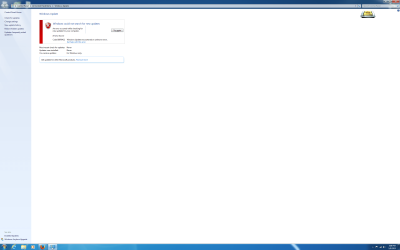
I got the dreaded Windows Error Code 80070422 and searched online for a solution but was unable to get Windows to update. I'm not certain when this error message began, but I ran into initial problems setting this workstation up when the ASUS PCI-e Wireless Card kept causing the system to go BSOD on me so I did System Restore on this workstation several times before finally giving up and changing the Wireless PCI-e card to Amped Wireless instead and everything seems fine now. But ever since I updated to a different wireless adapter, Windows Update will not function. Please help. Thanks!

Kenny
 

My Computer

Computer type
PC/Desktop
Computer Manufacturer/Model Number
Dell
OS
Windows 7 - 64 bit
CPU
Intel Xeon E3-1271 v3 @ 3.60GHz
Memory
16GB
Graphics Card(s)
NVIDIA NVS 510
Hard Drives
2 x Crucial M550 1TB SSD running Raid 1
Antivirus
Norton 360 & Malwarebytes Anti-Malware Premium
Browser
Internet Explorer, Mozilla Firefox & Google Chrome
I tried running the SFC Scan tool from the Command Prompt, but go this message when I hit ENTER:

Windows Resource Protection could not start the repair service.
 

Attachments

  • Error Code.png
    Error Code.png
    80 KB · Views: 3

My Computer

Computer type
PC/Desktop
Computer Manufacturer/Model Number
Dell
OS
Windows 7 - 64 bit
CPU
Intel Xeon E3-1271 v3 @ 3.60GHz
Memory
16GB
Graphics Card(s)
NVIDIA NVS 510
Hard Drives
2 x Crucial M550 1TB SSD running Raid 1
Antivirus
Norton 360 & Malwarebytes Anti-Malware Premium
Browser
Internet Explorer, Mozilla Firefox & Google Chrome
I ran the System Update Readiness Tool (SURT) tool.

I tried uploading the CBS zip file but I'm having trouble uploading that file. This is what happens after I select the file and click on Upload:
Uploading File(s) - Please Wait


404 - File or directory not found.

The resource you are looking for might have been removed, had its name changed, or is temporarily unavailable.


Is there an alternative method instead?
 

My Computer

Computer type
PC/Desktop
Computer Manufacturer/Model Number
Dell
OS
Windows 7 - 64 bit
CPU
Intel Xeon E3-1271 v3 @ 3.60GHz
Memory
16GB
Graphics Card(s)
NVIDIA NVS 510
Hard Drives
2 x Crucial M550 1TB SSD running Raid 1
Antivirus
Norton 360 & Malwarebytes Anti-Malware Premium
Browser
Internet Explorer, Mozilla Firefox & Google Chrome

My Computer

Computer type
Laptop
Computer Manufacturer/Model Number
Asus K52F or Lenovo B51-80
OS
Win 7 x64 Home Premium (and x86 VirtualBox VM)/Win10
CPU
i3 370M/i7 6500U
Motherboard
Asus/Lenovo
Memory
8GB - finally :)/8GB
Graphics Card(s)
it's an i3, dude!/dual Intel&nVidia
Sound Card
onboard
Monitor(s) Displays
15.6" built-in
Screen Resolution
1366x768/1920x1080
Hard Drives
750GB Seagate internal
Sundry external drives attached to other computers on the local network
1TB SSD on the Lenovo
PSU
n/a
Internet Speed
as much as I can get - usually on a dongle/phone, so <1MB/s
Antivirus
MSE/Defender
Browser
IE11/12/Edge/Chrome/FF(if I must)
Farbar Service Scanner Version: 21-07-2014
Ran by Riklisi (administrator) on 09-01-2015 at 11:10:08
Running from "C:\Users\Riklisi\Downloads"
Microsoft Windows 7 Professional Service Pack 1 (X64)
Boot Mode: Normal
****************************************************************

Internet Services:
============

Connection Status:
==============
Localhost is accessible.
LAN connected.
Google IP is accessible.
Google.com is accessible.
Yahoo.com is accessible.


Windows Firewall:
=============

Firewall Disabled Policy:
==================


System Restore:
============

System Restore Disabled Policy:
========================


Action Center:
============


Windows Update:
============

Windows Autoupdate Disabled Policy:
============================


Windows Defender:
==============
WinDefend Service is not running. Checking service configuration:
The start type of WinDefend service is set to Demand. The default start type is Auto.
The ImagePath of WinDefend service is OK.
The ServiceDll of WinDefend service is OK.


Other Services:
==============


File Check:
========
C:\Windows\System32\nsisvc.dll => File is digitally signed
C:\Windows\System32\drivers\nsiproxy.sys => File is digitally signed
C:\Windows\System32\dhcpcore.dll => File is digitally signed
C:\Windows\System32\drivers\afd.sys => File is digitally signed
C:\Windows\System32\drivers\tdx.sys => File is digitally signed
C:\Windows\System32\Drivers\tcpip.sys => File is digitally signed
C:\Windows\System32\dnsrslvr.dll => File is digitally signed
C:\Windows\System32\mpssvc.dll => File is digitally signed
C:\Windows\System32\bfe.dll => File is digitally signed
C:\Windows\System32\drivers\mpsdrv.sys => File is digitally signed
C:\Windows\System32\SDRSVC.dll => File is digitally signed
C:\Windows\System32\vssvc.exe => File is digitally signed
C:\Windows\System32\wscsvc.dll => File is digitally signed
C:\Windows\System32\wbem\WMIsvc.dll => File is digitally signed
C:\Windows\System32\wuaueng.dll => File is digitally signed
C:\Windows\System32\qmgr.dll => File is digitally signed
C:\Windows\System32\es.dll => File is digitally signed
C:\Windows\System32\cryptsvc.dll => File is digitally signed
C:\Program Files\Windows Defender\MpSvc.dll => File is digitally signed
C:\Windows\System32\ipnathlp.dll => File is digitally signed
C:\Windows\System32\iphlpsvc.dll => File is digitally signed
C:\Windows\System32\svchost.exe => File is digitally signed
C:\Windows\System32\rpcss.dll => File is digitally signed


**** End of log ****
 

My Computer

Computer type
PC/Desktop
Computer Manufacturer/Model Number
Dell
OS
Windows 7 - 64 bit
CPU
Intel Xeon E3-1271 v3 @ 3.60GHz
Memory
16GB
Graphics Card(s)
NVIDIA NVS 510
Hard Drives
2 x Crucial M550 1TB SSD running Raid 1
Antivirus
Norton 360 & Malwarebytes Anti-Malware Premium
Browser
Internet Explorer, Mozilla Firefox & Google Chrome
Hmm - strange, as the 80070422 error is pretty specific and implies that a service has been disabled. I would have expected it to be one of the services that the FSS checks.

Please try stripping out the oldest CBSPersist cab files from your upload, until the final filesize is below 8MB, and then uploading the resulting file.

Please also run through the http://www.sevenforums.com/bsod-help-support/96879-blue-screen-death-bsod-posting-instructions.html and just upload the resulting file in your reply
 

My Computer

Computer type
Laptop
Computer Manufacturer/Model Number
Asus K52F or Lenovo B51-80
OS
Win 7 x64 Home Premium (and x86 VirtualBox VM)/Win10
CPU
i3 370M/i7 6500U
Motherboard
Asus/Lenovo
Memory
8GB - finally :)/8GB
Graphics Card(s)
it's an i3, dude!/dual Intel&nVidia
Sound Card
onboard
Monitor(s) Displays
15.6" built-in
Screen Resolution
1366x768/1920x1080
Hard Drives
750GB Seagate internal
Sundry external drives attached to other computers on the local network
1TB SSD on the Lenovo
PSU
n/a
Internet Speed
as much as I can get - usually on a dongle/phone, so <1MB/s
Antivirus
MSE/Defender
Browser
IE11/12/Edge/Chrome/FF(if I must)
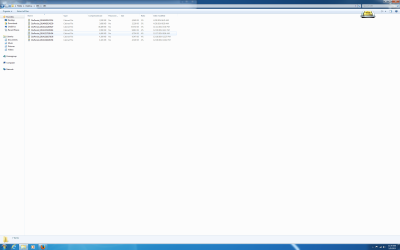
There were originally 7 cab files, so I stripped it down to the remaining and most recent one.
 

Attachments

  • Cab files.png
    Cab files.png
    70.7 KB · Views: 2

My Computer

Computer type
PC/Desktop
Computer Manufacturer/Model Number
Dell
OS
Windows 7 - 64 bit
CPU
Intel Xeon E3-1271 v3 @ 3.60GHz
Memory
16GB
Graphics Card(s)
NVIDIA NVS 510
Hard Drives
2 x Crucial M550 1TB SSD running Raid 1
Antivirus
Norton 360 & Malwarebytes Anti-Malware Premium
Browser
Internet Explorer, Mozilla Firefox & Google Chrome
This is from the DM Log Collector.
 

Attachments

My Computer

Computer type
PC/Desktop
Computer Manufacturer/Model Number
Dell
OS
Windows 7 - 64 bit
CPU
Intel Xeon E3-1271 v3 @ 3.60GHz
Memory
16GB
Graphics Card(s)
NVIDIA NVS 510
Hard Drives
2 x Crucial M550 1TB SSD running Raid 1
Antivirus
Norton 360 & Malwarebytes Anti-Malware Premium
Browser
Internet Explorer, Mozilla Firefox & Google Chrome
The obvious culprit here could be Norton.
The type of errors you are seeing is typical of a race condition, where the OS and the AV compete for resources and eventually one errors out.
Please try uninstalling Norton, and running their removal tool, then installing MSE temporarily (at least) until we get things on an even keel.

Download the Norton Removal Tool from here https://www-secure.symantec.com/norton-support/jsp/help-solutions.jsp?lg=english&ct=united+states&docid=20080710133834EN&product=home&version=1&pvid=f-home

Close all other programs, then run the tool. When it's complete, reboot the machine whether it asks for it or not.

After the reboot, open an Elevated Command Prompt, and run the following command

NETSH WINSOCK RESET

You'll be advised to reboot - do so.

then post another MGADiag report, and test Windows Update again.
 

My Computer

Computer type
Laptop
Computer Manufacturer/Model Number
Asus K52F or Lenovo B51-80
OS
Win 7 x64 Home Premium (and x86 VirtualBox VM)/Win10
CPU
i3 370M/i7 6500U
Motherboard
Asus/Lenovo
Memory
8GB - finally :)/8GB
Graphics Card(s)
it's an i3, dude!/dual Intel&nVidia
Sound Card
onboard
Monitor(s) Displays
15.6" built-in
Screen Resolution
1366x768/1920x1080
Hard Drives
750GB Seagate internal
Sundry external drives attached to other computers on the local network
1TB SSD on the Lenovo
PSU
n/a
Internet Speed
as much as I can get - usually on a dongle/phone, so <1MB/s
Antivirus
MSE/Defender
Browser
IE11/12/Edge/Chrome/FF(if I must)
Diagnostic Report (1.9.0027.0):
-----------------------------------------
Windows Validation Data-->

Validation Code: 0
Cached Online Validation Code: 0x0
Windows Product Key: *****-*****-7BKDD-YRRQ3-QPHMF
Windows Product Key Hash: euZTP8gzx5PMgT1+4yAvoxDzbaA=
Windows Product ID: 00371-OEM-9046457-34668
Windows Product ID Type: 3
Windows License Type: OEM System Builder
Windows OS version: 6.1.7601.2.00010100.1.0.048
ID: {4E9B4886-9844-4701-9E8F-EED9AF3CB0E0}(1)
Is Admin: Yes
TestCab: 0x0
LegitcheckControl ActiveX: N/A, hr = 0x80070002
Signed By: N/A, hr = 0x80070002
Product Name: Windows 7 Professional
Architecture: 0x00000009
Build lab: 7601.win7sp1_gdr.130828-1532
TTS Error:
Validation Diagnostic:
Resolution Status: N/A

Vista WgaER Data-->
ThreatID(s): N/A, hr = 0x80070002
Version: N/A, hr = 0x80070002

Windows XP Notifications Data-->
Cached Result: N/A, hr = 0x80070002
File Exists: No
Version: N/A, hr = 0x80070002
WgaTray.exe Signed By: N/A, hr = 0x80070002
WgaLogon.dll Signed By: N/A, hr = 0x80070002

OGA Notifications Data-->
Cached Result: N/A, hr = 0x80070002
Version: N/A, hr = 0x80070002
OGAExec.exe Signed By: N/A, hr = 0x80070002
OGAAddin.dll Signed By: N/A, hr = 0x80070002

OGA Data-->
Office Status: 109 N/A
OGA Version: N/A, 0x80070002
Signed By: N/A, hr = 0x80070002
Office Diagnostics: 025D1FF3-364-80041010_025D1FF3-229-80041010_025D1FF3-230-1_025D1FF3-517-80040154_025D1FF3-237-80040154_025D1FF3-238-2_025D1FF3-244-80070002_025D1FF3-258-3

Browser Data-->
Proxy settings: N/A
User Agent: Mozilla/4.0 (compatible; MSIE 8.0; Win32)
Default Browser: C:\Program Files (x86)\Mozilla Firefox\firefox.exe
Download signed ActiveX controls: Prompt
Download unsigned ActiveX controls: Disabled
Run ActiveX controls and plug-ins: Allowed
Initialize and script ActiveX controls not marked as safe: Disabled
Allow scripting of Internet Explorer Webbrowser control: Disabled
Active scripting: Allowed
Script ActiveX controls marked as safe for scripting: Allowed

File Scan Data-->

Other data-->
Office Details: <GenuineResults><MachineData><UGUID>{4E9B4886-9844-4701-9E8F-EED9AF3CB0E0}</UGUID><Version>1.9.0027.0</Version><OS>6.1.7601.2.00010100.1.0.048</OS><Architecture>x64</Architecture><PKey>*****-*****-*****-*****-QPHMF</PKey><PID>00371-OEM-9046457-34668</PID><PIDType>3</PIDType><SID>S-1-5-21-822106934-892464946-280285899</SID><SYSTEM><Manufacturer>Dell Inc.</Manufacturer><Model>Precision T1700</Model></SYSTEM><BIOS><Manufacturer>Dell Inc.</Manufacturer><Version>A10</Version><SMBIOSVersion major="2" minor="7"/><Date>20140828000000.000000+000</Date></BIOS><HWID>99A83D07018400F4</HWID><UserLCID>0409</UserLCID><SystemLCID>0409</SystemLCID><TimeZone>Eastern Standard Time(GMT-05:00)</TimeZone><iJoin>0</iJoin><SBID><stat>3</stat><msppid></msppid><name></name><model></model></SBID><OEM><OEMID>DELL </OEMID><OEMTableID>CBX3 </OEMTableID></OEM><GANotification/></MachineData><Software><Office><Result>109</Result><Products/><Applications/></Office></Software></GenuineResults>

Spsys.log Content: 0x80070002

Licensing Data-->
Software licensing service version: 6.1.7601.17514

Name: Windows(R) 7, Professional edition
Description: Windows Operating System - Windows(R) 7, OEM_COA_NSLP channel
Activation ID: e120e868-3df2-464a-95a0-b52fa5ada4bf
Application ID: 55c92734-d682-4d71-983e-d6ec3f16059f
Extended PID: 00371-00180-464-534668-02-1033-7601.0000-3252014
Installation ID: 013790783614439870656920769595286820338036748954615021
Processor Certificate URL: SpcService Web Service
Machine Certificate URL: RacService Web Service
Use License URL: UseLicenseService Web Service
Product Key Certificate URL: PkcService Web Service
Partial Product Key: QPHMF
License Status: Licensed
Remaining Windows rearm count: 3
Trusted time: 1/12/2015 10:24:51 AM

Windows Activation Technologies-->
HrOffline: 0x00000000
HrOnline: 0x00000000
HealthStatus: 0x0000000000000000
Event Time Stamp: 11:24:2014 10:21
ActiveX: Registered, Version: 7.1.7600.16395
Admin Service: Registered, Version: 7.1.7600.16395
HealthStatus Bitmask Output:


HWID Data-->
HWID Hash Current: LAAAAAEAAAABAAEAAQACAAAAAQABAAEAHKJApfDWRtZ6an5V2se2k+XXyPY=

OEM Activation 1.0 Data-->
N/A

OEM Activation 2.0 Data-->
BIOS valid for OA 2.0: yes
Windows marker version: 0x20001
OEMID and OEMTableID Consistent: yes
BIOS Information:
ACPI Table Name OEMID Value OEMTableID Value
APIC DELL CBX3
FACP DELL CBX3
HPET DELL CBX3
MCFG DELL CBX3
FPDT DELL CBX3
SLIC DELL CBX3
LPIT DELL CBX3
SSDT PmRef Cpu0Ist
SSDT PmRef Cpu0Ist
SSDT PmRef Cpu0Ist
SSDT PmRef Cpu0Ist
SSDT PmRef Cpu0Ist
ASF! INTEL HCG
MSDM DELL CBX3
DMAR INTEL HSW
EINJ AMI AMI EINJ
ERST AMIER AMI ERST
HEST AMI AMI HEST
BERT AMI AMI BERT

 

My Computer

Computer type
PC/Desktop
Computer Manufacturer/Model Number
Dell
OS
Windows 7 - 64 bit
CPU
Intel Xeon E3-1271 v3 @ 3.60GHz
Memory
16GB
Graphics Card(s)
NVIDIA NVS 510
Hard Drives
2 x Crucial M550 1TB SSD running Raid 1
Antivirus
Norton 360 & Malwarebytes Anti-Malware Premium
Browser
Internet Explorer, Mozilla Firefox & Google Chrome
I installed Microsoft Security Essentials as suggested and uninstalled Norton using the removal tool.
 

My Computer

Computer type
PC/Desktop
Computer Manufacturer/Model Number
Dell
OS
Windows 7 - 64 bit
CPU
Intel Xeon E3-1271 v3 @ 3.60GHz
Memory
16GB
Graphics Card(s)
NVIDIA NVS 510
Hard Drives
2 x Crucial M550 1TB SSD running Raid 1
Antivirus
Norton 360 & Malwarebytes Anti-Malware Premium
Browser
Internet Explorer, Mozilla Firefox & Google Chrome
After uninstalling Norton and installing Microsoft Security Essentials as suggested and running the MGADiag report, I still got the same Error code.
 

My Computer

Computer type
PC/Desktop
Computer Manufacturer/Model Number
Dell
OS
Windows 7 - 64 bit
CPU
Intel Xeon E3-1271 v3 @ 3.60GHz
Memory
16GB
Graphics Card(s)
NVIDIA NVS 510
Hard Drives
2 x Crucial M550 1TB SSD running Raid 1
Antivirus
Norton 360 & Malwarebytes Anti-Malware Premium
Browser
Internet Explorer, Mozilla Firefox & Google Chrome

My Computer

Computer type
Laptop
Computer Manufacturer/Model Number
Asus K52F or Lenovo B51-80
OS
Win 7 x64 Home Premium (and x86 VirtualBox VM)/Win10
CPU
i3 370M/i7 6500U
Motherboard
Asus/Lenovo
Memory
8GB - finally :)/8GB
Graphics Card(s)
it's an i3, dude!/dual Intel&nVidia
Sound Card
onboard
Monitor(s) Displays
15.6" built-in
Screen Resolution
1366x768/1920x1080
Hard Drives
750GB Seagate internal
Sundry external drives attached to other computers on the local network
1TB SSD on the Lenovo
PSU
n/a
Internet Speed
as much as I can get - usually on a dongle/phone, so <1MB/s
Antivirus
MSE/Defender
Browser
IE11/12/Edge/Chrome/FF(if I must)
Here's the file from the DM Log Collector
 

Attachments

My Computer

Computer type
PC/Desktop
Computer Manufacturer/Model Number
Dell
OS
Windows 7 - 64 bit
CPU
Intel Xeon E3-1271 v3 @ 3.60GHz
Memory
16GB
Graphics Card(s)
NVIDIA NVS 510
Hard Drives
2 x Crucial M550 1TB SSD running Raid 1
Antivirus
Norton 360 & Malwarebytes Anti-Malware Premium
Browser
Internet Explorer, Mozilla Firefox & Google Chrome
SF Diagnostic Tool v5

The previous post I made has an incomplete log for the SF Diagnostic Tool. This should be the full log.
 

Attachments

My Computer

Computer type
PC/Desktop
Computer Manufacturer/Model Number
Dell
OS
Windows 7 - 64 bit
CPU
Intel Xeon E3-1271 v3 @ 3.60GHz
Memory
16GB
Graphics Card(s)
NVIDIA NVS 510
Hard Drives
2 x Crucial M550 1TB SSD running Raid 1
Antivirus
Norton 360 & Malwarebytes Anti-Malware Premium
Browser
Internet Explorer, Mozilla Firefox & Google Chrome
The application Events log shows the following repeated error...
Code:
Activation context generation failed for "C:\Windows\system32\nccredprovider.dll".Error in manifest or policy file "" on line . A component version required by the application conflicts with another component version already active. Conflicting components are:. Component 1: C:\Windows\WinSxS\manifests\amd64_microsoft.vc80.crt_1fc8b3b9a1e18e3b_8.0.50727.6195_none_88e41e092fab0294.manifest. Component 2: C:\Windows\WinSxS\manifests\amd64_microsoft.vc80.crt_1fc8b3b9a1e18e3b_8.0.50727.4940_none_88df89932faf0bf6.manifest.

The immediate question has to be - Why do you have Novell Networking clients installed?
There are two ways to deal with this problem - either uninstall the Novell Client, or uninstall and reinstall the Visual C++ 2005 application.


The System Event log shows the following to be the first failure point for installs...
Code:
  Date: 2014-11-21T14:19:04.800
Installation Failure: Windows failed to install the following update with error 0x800706be: Cumulative Security Update for ActiveX Killbits for Windows 7 for x64-based Systems (KB2900986).


There are also a massive number of this error...
Code:
The BCM42RLY service failed to start due to the following error: 
The system cannot find the file specified.
This started on the 21/11/14 - and apparently is still present.

The worrying thing is that the System Event log apparently finishes on the 18th December.

This coincides nicely with this error in the App event...
Code:
Event[378]:
  Log Name: Application
  Source: MsiInstaller
  Date: 2014-11-21T13:18:58.000
  Event ID: 11708
  Task: N/A
  Level: Information
  Opcode: Info
  Keyword: Classic
  User: S-1-5-21-822106934-892464946-280285899-1000
  User Name: Riklisi-PC\Riklisi
  Computer: Riklisi-PC
  Description: 
Product: Broadcom NetXtreme-I Netlink Driver and Management Installer -- Installation operation failed.

Please see if the drivers are complaining still, in the Device Manager.
 

My Computer

Computer type
Laptop
Computer Manufacturer/Model Number
Asus K52F or Lenovo B51-80
OS
Win 7 x64 Home Premium (and x86 VirtualBox VM)/Win10
CPU
i3 370M/i7 6500U
Motherboard
Asus/Lenovo
Memory
8GB - finally :)/8GB
Graphics Card(s)
it's an i3, dude!/dual Intel&nVidia
Sound Card
onboard
Monitor(s) Displays
15.6" built-in
Screen Resolution
1366x768/1920x1080
Hard Drives
750GB Seagate internal
Sundry external drives attached to other computers on the local network
1TB SSD on the Lenovo
PSU
n/a
Internet Speed
as much as I can get - usually on a dongle/phone, so <1MB/s
Antivirus
MSE/Defender
Browser
IE11/12/Edge/Chrome/FF(if I must)
The immediate question has to be - Why do you have Novell Networking clients installed?
There are two ways to deal with this problem - either uninstall the Novell Client, or uninstall and reinstall the Visual C++ 2005 application.

Novell Client is used to access the files in the company's network. I'll try and uninstall it and reinstall it to see if that does anything. I'll also do the same to the Visual C++ 2005 application.


Please see if the drivers are complaining still, in the Device Manager.
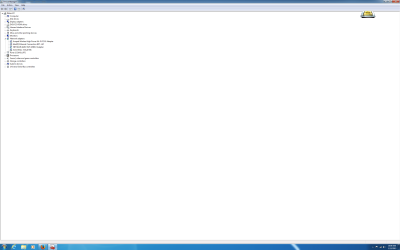
The drivers appear to look fine when I look at the Device Manager. Unless it's not displaying?
 

Attachments

  • Device Manager.png
    Device Manager.png
    49.8 KB · Views: 3

My Computer

Computer type
PC/Desktop
Computer Manufacturer/Model Number
Dell
OS
Windows 7 - 64 bit
CPU
Intel Xeon E3-1271 v3 @ 3.60GHz
Memory
16GB
Graphics Card(s)
NVIDIA NVS 510
Hard Drives
2 x Crucial M550 1TB SSD running Raid 1
Antivirus
Norton 360 & Malwarebytes Anti-Malware Premium
Browser
Internet Explorer, Mozilla Firefox & Google Chrome

Attachments

  • Visual C++ 2005 Install Error.png
    Visual C++ 2005 Install Error.png
    111.2 KB · Views: 2

My Computer

Computer type
PC/Desktop
Computer Manufacturer/Model Number
Dell
OS
Windows 7 - 64 bit
CPU
Intel Xeon E3-1271 v3 @ 3.60GHz
Memory
16GB
Graphics Card(s)
NVIDIA NVS 510
Hard Drives
2 x Crucial M550 1TB SSD running Raid 1
Antivirus
Norton 360 & Malwarebytes Anti-Malware Premium
Browser
Internet Explorer, Mozilla Firefox & Google Chrome
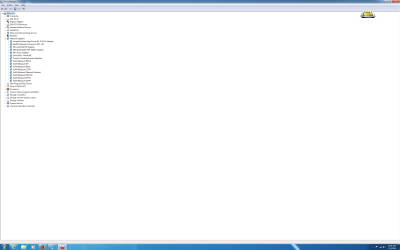
Looks OK - but try again, and this time enable 'View > Show hidden devices' in the menu bar
 

My Computer

Computer type
Laptop
Computer Manufacturer/Model Number
Asus K52F or Lenovo B51-80
OS
Win 7 x64 Home Premium (and x86 VirtualBox VM)/Win10
CPU
i3 370M/i7 6500U
Motherboard
Asus/Lenovo
Memory
8GB - finally :)/8GB
Graphics Card(s)
it's an i3, dude!/dual Intel&nVidia
Sound Card
onboard
Monitor(s) Displays
15.6" built-in
Screen Resolution
1366x768/1920x1080
Hard Drives
750GB Seagate internal
Sundry external drives attached to other computers on the local network
1TB SSD on the Lenovo
PSU
n/a
Internet Speed
as much as I can get - usually on a dongle/phone, so <1MB/s
Antivirus
MSE/Defender
Browser
IE11/12/Edge/Chrome/FF(if I must)
Device Manager - Hidden
 

Attachments

  • Device Manager - Hidden.png
    Device Manager - Hidden.png
    61.6 KB · Views: 1

My Computer

Computer type
PC/Desktop
Computer Manufacturer/Model Number
Dell
OS
Windows 7 - 64 bit
CPU
Intel Xeon E3-1271 v3 @ 3.60GHz
Memory
16GB
Graphics Card(s)
NVIDIA NVS 510
Hard Drives
2 x Crucial M550 1TB SSD running Raid 1
Antivirus
Norton 360 & Malwarebytes Anti-Malware Premium
Browser
Internet Explorer, Mozilla Firefox & Google Chrome
Back
Top