Windows Error Code 80070422 - Windows Updates

Hmm - the Device Manager looks OK.

As to the error with installing C++...
This error may occur when the Microsoft .NET Framework installation on the computer is damaged or is missing.
Try the below step to reinstall and repair the Microsoft .NET Framework installation on the computer and later check if you can install the software.
a) Click the Start button, click Control Panel, click Programs, and then click "Turn Windows features on or off." If you're prompted for an administrator password or confirmation, type the password or provide confirmation.
b) Locate Microsoft .NET framework 3.5.1, uncheck the box, click OK and restart the computer.
c) After the restart again open "Turn Windows features on or off" and place a check mark next to Microsoft .NET framework 3.5.1 and restart the computer.

If the above step fails then I would suggest that you manually download and install Microsoft Visual C++ 2005 and 2008 Redistributable Package and check if you can install the software.
In Programs and Features, do you show that you have installed Microsoft Visual C++ 2005 Redistributable and Microsoft Visual C++ 2008 Redistributable? If not, download from the links here.

Visual C++ 2005 Redistributable Package for (X86)
http://www.microsoft.com/downloads/en/details.aspx?FamilyId=32BC1BEE-A3F9-4C13-9C99-220B62A191EE&displaylang=en

Visual C++ 2005 Redistributable Packager for (x64)
[URL="http://www.microsoft.com/downloads/en/details.aspx?FamilyID=eb4ebe2d-33c0-4a47-9dd4-b9a6d7bd44da&displaylang=en"]http://www.microsoft.com/downloads/en/details.aspx?FamilyID=eb4ebe2d-33c0-4a47-9dd4-b9a6d7bd44da&displaylang=en[/URL]

(pinched from Marilyn O's post in Microsoft Visual C++ 2005 Redistributable error 1935 - Microsoft Community )
 

My Computer

Computer type
Laptop
Computer Manufacturer/Model Number
Asus K52F or Lenovo B51-80
OS
Win 7 x64 Home Premium (and x86 VirtualBox VM)/Win10
CPU
i3 370M/i7 6500U
Motherboard
Asus/Lenovo
Memory
8GB - finally :)/8GB
Graphics Card(s)
it's an i3, dude!/dual Intel&nVidia
Sound Card
onboard
Monitor(s) Displays
15.6" built-in
Screen Resolution
1366x768/1920x1080
Hard Drives
750GB Seagate internal
Sundry external drives attached to other computers on the local network
1TB SSD on the Lenovo
PSU
n/a
Internet Speed
as much as I can get - usually on a dongle/phone, so <1MB/s
Antivirus
MSE/Defender
Browser
IE11/12/Edge/Chrome/FF(if I must)
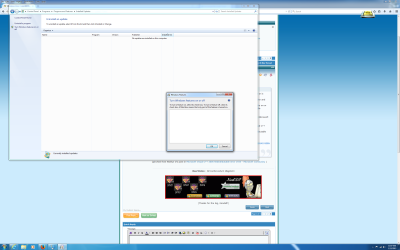
Great, I do not see anything inside the Window when I clicked on "Turn Windows features on or off"

I made sure I uninstalled the Visual C++ 2005 from the Program and Features section.
 

Attachments

  • Turn Windows features on or off.png
    Turn Windows features on or off.png
    333.7 KB · Views: 1

My Computer

Computer type
PC/Desktop
Computer Manufacturer/Model Number
Dell
OS
Windows 7 - 64 bit
CPU
Intel Xeon E3-1271 v3 @ 3.60GHz
Memory
16GB
Graphics Card(s)
NVIDIA NVS 510
Hard Drives
2 x Crucial M550 1TB SSD running Raid 1
Antivirus
Norton 360 & Malwarebytes Anti-Malware Premium
Browser
Internet Explorer, Mozilla Firefox & Google Chrome
In Programs and Features, do you show that you have installed Microsoft Visual C++ 2005 Redistributable and Microsoft Visual C++ 2008 Redistributable? If not, download from the links here.

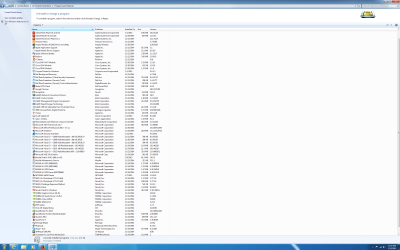
Visual C++ 2008/2010/2012 is there but not 2005 since I uninstalled it as you suggested earlier.
 

Attachments

  • Programs & Features.png
    Programs & Features.png
    295.8 KB · Views: 2

My Computer

Computer type
PC/Desktop
Computer Manufacturer/Model Number
Dell
OS
Windows 7 - 64 bit
CPU
Intel Xeon E3-1271 v3 @ 3.60GHz
Memory
16GB
Graphics Card(s)
NVIDIA NVS 510
Hard Drives
2 x Crucial M550 1TB SSD running Raid 1
Antivirus
Norton 360 & Malwarebytes Anti-Malware Premium
Browser
Internet Explorer, Mozilla Firefox & Google Chrome
OK - if we're lucky this may be a simple fix.

Open an elevated command prompt, and run the following commands:
reg load HKLM\COMPONENTS C:\Windows\System32\config\COMPONENTS
reg delete HKLM\COMPONENTS /v StoreDirty
reboot, and try the Turn Features.... again​
 

My Computer

Computer type
Laptop
Computer Manufacturer/Model Number
Asus K52F or Lenovo B51-80
OS
Win 7 x64 Home Premium (and x86 VirtualBox VM)/Win10
CPU
i3 370M/i7 6500U
Motherboard
Asus/Lenovo
Memory
8GB - finally :)/8GB
Graphics Card(s)
it's an i3, dude!/dual Intel&nVidia
Sound Card
onboard
Monitor(s) Displays
15.6" built-in
Screen Resolution
1366x768/1920x1080
Hard Drives
750GB Seagate internal
Sundry external drives attached to other computers on the local network
1TB SSD on the Lenovo
PSU
n/a
Internet Speed
as much as I can get - usually on a dongle/phone, so <1MB/s
Antivirus
MSE/Defender
Browser
IE11/12/Edge/Chrome/FF(if I must)
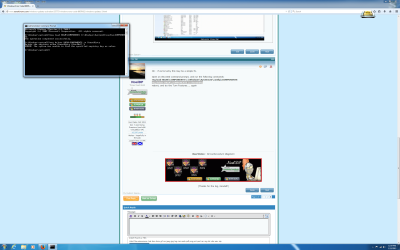
Not sure if it found the specific registry key.
 

Attachments

  • Command Prompt.png
    Command Prompt.png
    149.1 KB · Views: 2

My Computer

Computer type
PC/Desktop
Computer Manufacturer/Model Number
Dell
OS
Windows 7 - 64 bit
CPU
Intel Xeon E3-1271 v3 @ 3.60GHz
Memory
16GB
Graphics Card(s)
NVIDIA NVS 510
Hard Drives
2 x Crucial M550 1TB SSD running Raid 1
Antivirus
Norton 360 & Malwarebytes Anti-Malware Premium
Browser
Internet Explorer, Mozilla Firefox & Google Chrome
Still showing a blank window when I click on "Turn Windows features on or off"
 

My Computer

Computer type
PC/Desktop
Computer Manufacturer/Model Number
Dell
OS
Windows 7 - 64 bit
CPU
Intel Xeon E3-1271 v3 @ 3.60GHz
Memory
16GB
Graphics Card(s)
NVIDIA NVS 510
Hard Drives
2 x Crucial M550 1TB SSD running Raid 1
Antivirus
Norton 360 & Malwarebytes Anti-Malware Premium
Browser
Internet Explorer, Mozilla Firefox & Google Chrome
Hmmm - let's check something first...

Open an Elevated Command Prompt, and run the following command

REG QUERY HKLM\System\CurrentControlSet\Control\

post the results.


Here are some instructions to make life easier :)
1) To open an Elevated Command Prompt Window (the ECP window), click on Start, All Programs, Accessories – then right-click on Command Prompt, and select Run as Administrator. Accept the UAC prompt.
2) To run the commands easier, highlight the block of commands, and right-click on the highlight – select Copy. In the CP Window, click on the black/white icon at top left – select Paste. The commands will run but may not complete the last command, so hit the Enter Key once.
3) To copy the results... click on the Black/White icon in the top left, and select Edit... 'Select All', and hit the Enter key - then use Ctrl+V or r-click+Paste to paste it into your response.
 

My Computer

Computer type
Laptop
Computer Manufacturer/Model Number
Asus K52F or Lenovo B51-80
OS
Win 7 x64 Home Premium (and x86 VirtualBox VM)/Win10
CPU
i3 370M/i7 6500U
Motherboard
Asus/Lenovo
Memory
8GB - finally :)/8GB
Graphics Card(s)
it's an i3, dude!/dual Intel&nVidia
Sound Card
onboard
Monitor(s) Displays
15.6" built-in
Screen Resolution
1366x768/1920x1080
Hard Drives
750GB Seagate internal
Sundry external drives attached to other computers on the local network
1TB SSD on the Lenovo
PSU
n/a
Internet Speed
as much as I can get - usually on a dongle/phone, so <1MB/s
Antivirus
MSE/Defender
Browser
IE11/12/Edge/Chrome/FF(if I must)
Microsoft Windows [Version 6.1.7601]
Copyright (c) 2009 Microsoft Corporation. All rights reserved.

C:\Windows\system32>REG QUERY HKLM\System\CurrentControlSet\Control\

HKEY_LOCAL_MACHINE\System\CurrentControlSet\Control
PreshutdownOrder REG_MULTI_SZ wuauserv\0gpsvc\0trustedinstaller
WaitToKillServiceTimeout REG_SZ 12000
CurrentUser REG_SZ USERNAME
BootDriverFlags REG_DWORD 0x0
ServiceControlManagerExtension REG_EXPAND_SZ %systemroot%\system32\sce
xt.dll
SystemStartOptions REG_SZ NOEXECUTE=OPTIN
SystemBootDevice REG_SZ multi(0)disk(0)rdisk(0)partition(2)
FirmwareBootDevice REG_SZ multi(0)disk(0)rdisk(0)partition(1)

HKEY_LOCAL_MACHINE\System\CurrentControlSet\Control\ACPI
HKEY_LOCAL_MACHINE\System\CurrentControlSet\Control\AGP
HKEY_LOCAL_MACHINE\System\CurrentControlSet\Control\AppID
HKEY_LOCAL_MACHINE\System\CurrentControlSet\Control\Arbiters
HKEY_LOCAL_MACHINE\System\CurrentControlSet\Control\BackupRestore
HKEY_LOCAL_MACHINE\System\CurrentControlSet\Control\Citrix
HKEY_LOCAL_MACHINE\System\CurrentControlSet\Control\Class
HKEY_LOCAL_MACHINE\System\CurrentControlSet\Control\CMF
HKEY_LOCAL_MACHINE\System\CurrentControlSet\Control\CoDeviceInstallers
HKEY_LOCAL_MACHINE\System\CurrentControlSet\Control\COM Name Arbiter
HKEY_LOCAL_MACHINE\System\CurrentControlSet\Control\ComputerName
HKEY_LOCAL_MACHINE\System\CurrentControlSet\Control\ContentIndex
HKEY_LOCAL_MACHINE\System\CurrentControlSet\Control\CrashControl
HKEY_LOCAL_MACHINE\System\CurrentControlSet\Control\CriticalDeviceDatabase
HKEY_LOCAL_MACHINE\System\CurrentControlSet\Control\Cryptography
HKEY_LOCAL_MACHINE\System\CurrentControlSet\Control\DeviceClasses
HKEY_LOCAL_MACHINE\System\CurrentControlSet\Control\DeviceOverrides
HKEY_LOCAL_MACHINE\System\CurrentControlSet\Control\Diagnostics
HKEY_LOCAL_MACHINE\System\CurrentControlSet\Control\Els
HKEY_LOCAL_MACHINE\System\CurrentControlSet\Control\Errata
HKEY_LOCAL_MACHINE\System\CurrentControlSet\Control\FileSystem
HKEY_LOCAL_MACHINE\System\CurrentControlSet\Control\FileSystemUtilities
HKEY_LOCAL_MACHINE\System\CurrentControlSet\Control\GraphicsDrivers
HKEY_LOCAL_MACHINE\System\CurrentControlSet\Control\GroupOrderList
HKEY_LOCAL_MACHINE\System\CurrentControlSet\Control\HAL
HKEY_LOCAL_MACHINE\System\CurrentControlSet\Control\IDConfigDB
HKEY_LOCAL_MACHINE\System\CurrentControlSet\Control\Keyboard Layout
HKEY_LOCAL_MACHINE\System\CurrentControlSet\Control\Keyboard Layouts
HKEY_LOCAL_MACHINE\System\CurrentControlSet\Control\Lsa
HKEY_LOCAL_MACHINE\System\CurrentControlSet\Control\LsaExtensionConfig
HKEY_LOCAL_MACHINE\System\CurrentControlSet\Control\LsaInformation
HKEY_LOCAL_MACHINE\System\CurrentControlSet\Control\MediaCategories
HKEY_LOCAL_MACHINE\System\CurrentControlSet\Control\MediaDRM
HKEY_LOCAL_MACHINE\System\CurrentControlSet\Control\MediaInterfaces
HKEY_LOCAL_MACHINE\System\CurrentControlSet\Control\MediaProperties
HKEY_LOCAL_MACHINE\System\CurrentControlSet\Control\MediaResources
HKEY_LOCAL_MACHINE\System\CurrentControlSet\Control\MediaTypes
HKEY_LOCAL_MACHINE\System\CurrentControlSet\Control\MobilePC
HKEY_LOCAL_MACHINE\System\CurrentControlSet\Control\MPDEV
HKEY_LOCAL_MACHINE\System\CurrentControlSet\Control\MSDTC
HKEY_LOCAL_MACHINE\System\CurrentControlSet\Control\MUI
HKEY_LOCAL_MACHINE\System\CurrentControlSet\Control\NetDiagFx
HKEY_LOCAL_MACHINE\System\CurrentControlSet\Control\NetTrace
HKEY_LOCAL_MACHINE\System\CurrentControlSet\Control\Network
HKEY_LOCAL_MACHINE\System\CurrentControlSet\Control\NetworkProvider
HKEY_LOCAL_MACHINE\System\CurrentControlSet\Control\Nls
HKEY_LOCAL_MACHINE\System\CurrentControlSet\Control\NodeInterfaces
HKEY_LOCAL_MACHINE\System\CurrentControlSet\Control\Nsi
HKEY_LOCAL_MACHINE\System\CurrentControlSet\Control\PCW
HKEY_LOCAL_MACHINE\System\CurrentControlSet\Control\PnP
HKEY_LOCAL_MACHINE\System\CurrentControlSet\Control\Power
HKEY_LOCAL_MACHINE\System\CurrentControlSet\Control\Print
HKEY_LOCAL_MACHINE\System\CurrentControlSet\Control\PriorityControl
HKEY_LOCAL_MACHINE\System\CurrentControlSet\Control\ProductOptions
HKEY_LOCAL_MACHINE\System\CurrentControlSet\Control\Remote Assistance
HKEY_LOCAL_MACHINE\System\CurrentControlSet\Control\RtlQueryRegistryConfig
HKEY_LOCAL_MACHINE\System\CurrentControlSet\Control\SafeBoot
HKEY_LOCAL_MACHINE\System\CurrentControlSet\Control\ScsiPort
HKEY_LOCAL_MACHINE\System\CurrentControlSet\Control\SecurePipeServers
HKEY_LOCAL_MACHINE\System\CurrentControlSet\Control\SecurityProviders
HKEY_LOCAL_MACHINE\System\CurrentControlSet\Control\ServiceGroupOrder
HKEY_LOCAL_MACHINE\System\CurrentControlSet\Control\ServiceProvider
HKEY_LOCAL_MACHINE\System\CurrentControlSet\Control\Session Manager
HKEY_LOCAL_MACHINE\System\CurrentControlSet\Control\SNMP
HKEY_LOCAL_MACHINE\System\CurrentControlSet\Control\SQMServiceList
HKEY_LOCAL_MACHINE\System\CurrentControlSet\Control\Srp
HKEY_LOCAL_MACHINE\System\CurrentControlSet\Control\SrpExtensionConfig
HKEY_LOCAL_MACHINE\System\CurrentControlSet\Control\StillImage
HKEY_LOCAL_MACHINE\System\CurrentControlSet\Control\Storage
HKEY_LOCAL_MACHINE\System\CurrentControlSet\Control\SystemResources
HKEY_LOCAL_MACHINE\System\CurrentControlSet\Control\TabletPC
HKEY_LOCAL_MACHINE\System\CurrentControlSet\Control\Terminal Server
HKEY_LOCAL_MACHINE\System\CurrentControlSet\Control\TimeZoneInformation
HKEY_LOCAL_MACHINE\System\CurrentControlSet\Control\Ubpm
HKEY_LOCAL_MACHINE\System\CurrentControlSet\Control\usbflags
HKEY_LOCAL_MACHINE\System\CurrentControlSet\Control\usbstor
HKEY_LOCAL_MACHINE\System\CurrentControlSet\Control\VAN
HKEY_LOCAL_MACHINE\System\CurrentControlSet\Control\Video
HKEY_LOCAL_MACHINE\System\CurrentControlSet\Control\wcncsvc
HKEY_LOCAL_MACHINE\System\CurrentControlSet\Control\Wdf
HKEY_LOCAL_MACHINE\System\CurrentControlSet\Control\WDI
HKEY_LOCAL_MACHINE\System\CurrentControlSet\Control\Windows
HKEY_LOCAL_MACHINE\System\CurrentControlSet\Control\Winlogon
HKEY_LOCAL_MACHINE\System\CurrentControlSet\Control\WMI
HKEY_LOCAL_MACHINE\System\CurrentControlSet\Control\hivelist
HKEY_LOCAL_MACHINE\System\CurrentControlSet\Control\SystemInformation
HKEY_LOCAL_MACHINE\System\CurrentControlSet\Control\Winresume

C:\Windows\system32>
 

My Computer

Computer type
PC/Desktop
Computer Manufacturer/Model Number
Dell
OS
Windows 7 - 64 bit
CPU
Intel Xeon E3-1271 v3 @ 3.60GHz
Memory
16GB
Graphics Card(s)
NVIDIA NVS 510
Hard Drives
2 x Crucial M550 1TB SSD running Raid 1
Antivirus
Norton 360 & Malwarebytes Anti-Malware Premium
Browser
Internet Explorer, Mozilla Firefox & Google Chrome
That all looks normal, although the following value is different to the one on my machine...
SystemStartOptions REG_SZ NOEXECUTE=OPTIN

... I don't think it's likely to be causing your problem.

I'll do some more research later.
 

My Computer

Computer type
Laptop
Computer Manufacturer/Model Number
Asus K52F or Lenovo B51-80
OS
Win 7 x64 Home Premium (and x86 VirtualBox VM)/Win10
CPU
i3 370M/i7 6500U
Motherboard
Asus/Lenovo
Memory
8GB - finally :)/8GB
Graphics Card(s)
it's an i3, dude!/dual Intel&nVidia
Sound Card
onboard
Monitor(s) Displays
15.6" built-in
Screen Resolution
1366x768/1920x1080
Hard Drives
750GB Seagate internal
Sundry external drives attached to other computers on the local network
1TB SSD on the Lenovo
PSU
n/a
Internet Speed
as much as I can get - usually on a dongle/phone, so <1MB/s
Antivirus
MSE/Defender
Browser
IE11/12/Edge/Chrome/FF(if I must)
Just for kicks, tried Windows Update again and still got the same error message. Was hoping otherwise.
 

My Computer

Computer type
PC/Desktop
Computer Manufacturer/Model Number
Dell
OS
Windows 7 - 64 bit
CPU
Intel Xeon E3-1271 v3 @ 3.60GHz
Memory
16GB
Graphics Card(s)
NVIDIA NVS 510
Hard Drives
2 x Crucial M550 1TB SSD running Raid 1
Antivirus
Norton 360 & Malwarebytes Anti-Malware Premium
Browser
Internet Explorer, Mozilla Firefox & Google Chrome
I hadn't forgotten you. .. just not been well lately :-(
I'll try to do the research when I can.
 

My Computer

Computer type
Laptop
Computer Manufacturer/Model Number
Asus K52F or Lenovo B51-80
OS
Win 7 x64 Home Premium (and x86 VirtualBox VM)/Win10
CPU
i3 370M/i7 6500U
Motherboard
Asus/Lenovo
Memory
8GB - finally :)/8GB
Graphics Card(s)
it's an i3, dude!/dual Intel&nVidia
Sound Card
onboard
Monitor(s) Displays
15.6" built-in
Screen Resolution
1366x768/1920x1080
Hard Drives
750GB Seagate internal
Sundry external drives attached to other computers on the local network
1TB SSD on the Lenovo
PSU
n/a
Internet Speed
as much as I can get - usually on a dongle/phone, so <1MB/s
Antivirus
MSE/Defender
Browser
IE11/12/Edge/Chrome/FF(if I must)
No worries. Just wanted to update you from my end to see if it miraculously started working again.
 

My Computer

Computer type
PC/Desktop
Computer Manufacturer/Model Number
Dell
OS
Windows 7 - 64 bit
CPU
Intel Xeon E3-1271 v3 @ 3.60GHz
Memory
16GB
Graphics Card(s)
NVIDIA NVS 510
Hard Drives
2 x Crucial M550 1TB SSD running Raid 1
Antivirus
Norton 360 & Malwarebytes Anti-Malware Premium
Browser
Internet Explorer, Mozilla Firefox & Google Chrome
Sorry to bother you. Any luck with this? Thanks!
 

My Computer

Computer type
PC/Desktop
Computer Manufacturer/Model Number
Dell
OS
Windows 7 - 64 bit
CPU
Intel Xeon E3-1271 v3 @ 3.60GHz
Memory
16GB
Graphics Card(s)
NVIDIA NVS 510
Hard Drives
2 x Crucial M550 1TB SSD running Raid 1
Antivirus
Norton 360 & Malwarebytes Anti-Malware Premium
Browser
Internet Explorer, Mozilla Firefox & Google Chrome
Sorry - I did forget you this time! :o
I'll review the data again sometime today or tomorrow and get back to you.
 

My Computer

Computer type
Laptop
Computer Manufacturer/Model Number
Asus K52F or Lenovo B51-80
OS
Win 7 x64 Home Premium (and x86 VirtualBox VM)/Win10
CPU
i3 370M/i7 6500U
Motherboard
Asus/Lenovo
Memory
8GB - finally :)/8GB
Graphics Card(s)
it's an i3, dude!/dual Intel&nVidia
Sound Card
onboard
Monitor(s) Displays
15.6" built-in
Screen Resolution
1366x768/1920x1080
Hard Drives
750GB Seagate internal
Sundry external drives attached to other computers on the local network
1TB SSD on the Lenovo
PSU
n/a
Internet Speed
as much as I can get - usually on a dongle/phone, so <1MB/s
Antivirus
MSE/Defender
Browser
IE11/12/Edge/Chrome/FF(if I must)
As a last resort, I can do a full install and reinstall of Windows.
 

My Computer

Computer type
PC/Desktop
Computer Manufacturer/Model Number
Dell
OS
Windows 7 - 64 bit
CPU
Intel Xeon E3-1271 v3 @ 3.60GHz
Memory
16GB
Graphics Card(s)
NVIDIA NVS 510
Hard Drives
2 x Crucial M550 1TB SSD running Raid 1
Antivirus
Norton 360 & Malwarebytes Anti-Malware Premium
Browser
Internet Explorer, Mozilla Firefox & Google Chrome
Back
Top