

rakovsky
New member
- Local time
- 3:09 PM
- Messages
- 7
"Windows Error Recovery": "Windows Failed to Start", ,Status 0xc00000e
When I turn on my Lenovo G560 Laptop and Windows 7 (64 Bit) goes to load up, a black screen appears saying Windows Failed to Start and it is titled "Windows Error Recovery". I am attaching a photo of the screen below:
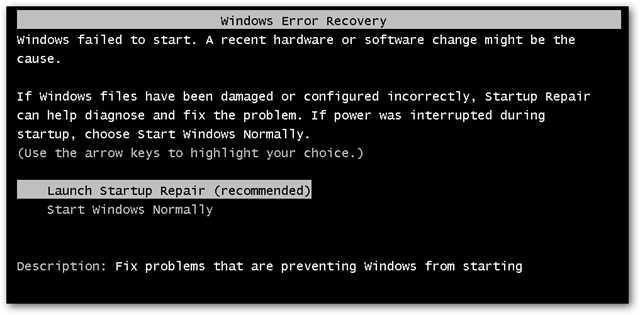
When I choose Launch Startup Repair, it demands that I insert an installation disc and says Status: 0xc000000e because a required device is inaccessible. My Lenovo computer did not come with an installation CD, unfortunately. I am attaching the screenshot below.

To try to solve the problem, I pressed F12 and it gave me a choice of which SATA to boot from, the first choice being Hitachi. I chose Hitachi and it didn't make a difference - the computer tried to boot from the Hitachi Sata and it failed - it showed this screen again. Then I pressed F12 again, and chose a different SATA, and that option did not work either.
Next, I pressed F3. It gave me a chance to run Windows Diagnostics, and I did so. It said that the scan's results would be shown after windows started. But unfortunately Windows did not show the results because it went back to the screen above. The same thing happened when I tried pressing F7 as when I pressed F3.
Next, I pressed F8. It had an option to run Safe Mode and also Safe Mode with Command Prompt. Neither of those options worked as the computer returned to the screen above when I tried those options. Another option from the F8 menu was to run "Repair Your Computer". I wanted to try this one, but when I do, it goes to the Launch Repair screen, which requires a Windows 7 CD. Unfortunately as I mentioned, no CD came with my Lenovo computer. The F8 Option of "Enable Low Resolution Video" also did not work.
Maybe the reason for this error is really a virus that got into the system. However, I do have the latest version of Norton running on auto-detect and have scanned it occasionally and it had not detected a virus. Another possible explanation is that there is a major problem in the "BIOS". Unfortunately I have average computer sophistication and don't know how to work with BIOs. I don't think that it's a hardware problem with something like overheating as the fan has always worked soundly.
When I turn on my Lenovo G560 Laptop and Windows 7 (64 Bit) goes to load up, a black screen appears saying Windows Failed to Start and it is titled "Windows Error Recovery". I am attaching a photo of the screen below:
When I choose Launch Startup Repair, it demands that I insert an installation disc and says Status: 0xc000000e because a required device is inaccessible. My Lenovo computer did not come with an installation CD, unfortunately. I am attaching the screenshot below.
To try to solve the problem, I pressed F12 and it gave me a choice of which SATA to boot from, the first choice being Hitachi. I chose Hitachi and it didn't make a difference - the computer tried to boot from the Hitachi Sata and it failed - it showed this screen again. Then I pressed F12 again, and chose a different SATA, and that option did not work either.
Next, I pressed F3. It gave me a chance to run Windows Diagnostics, and I did so. It said that the scan's results would be shown after windows started. But unfortunately Windows did not show the results because it went back to the screen above. The same thing happened when I tried pressing F7 as when I pressed F3.
Next, I pressed F8. It had an option to run Safe Mode and also Safe Mode with Command Prompt. Neither of those options worked as the computer returned to the screen above when I tried those options. Another option from the F8 menu was to run "Repair Your Computer". I wanted to try this one, but when I do, it goes to the Launch Repair screen, which requires a Windows 7 CD. Unfortunately as I mentioned, no CD came with my Lenovo computer. The F8 Option of "Enable Low Resolution Video" also did not work.
Maybe the reason for this error is really a virus that got into the system. However, I do have the latest version of Norton running on auto-detect and have scanned it occasionally and it had not detected a virus. Another possible explanation is that there is a major problem in the "BIOS". Unfortunately I have average computer sophistication and don't know how to work with BIOs. I don't think that it's a hardware problem with something like overheating as the fan has always worked soundly.
My Computer
At a glance
Win 7 (64)
- Computer type
- Laptop
- Computer Manufacturer/Model Number
- Lenovo
- OS
- Win 7 (64)
- Antivirus
- Norton
- Browser
- Chrome


