
So you try to run the 'rate my computer' and it fails showing this error message:
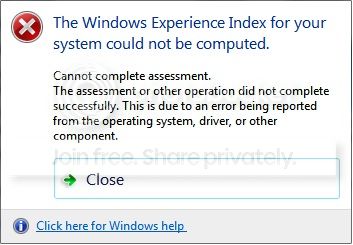
You are then advised to run a command prompt (old dos screen) as administrator and key in and run
winsat formal.
This fails and gives the following error messages:
error. failed to load XML
An invalid character was found in text content
winsat\main.cpp(1041)
unable to process xml file. winsat\main.cpp(4742)
Error: cannot process assessment results cannot load xml data from string
an invalid character was found in text content from interface msxm16.dll:Ixmldomdocument2
You start searching for these invalid characters after reading the various help threads out there such as this one: Windows Expierience Index could not be computed
You learn that not only does your computer have a bios but also something called a smbios, you may find it in registry thus:

Note the odd square OO's after version.
You might confirm this using HWiNFO, HWiNFO32 & HWiNFO64 - Hardware Information and Analysis Tools utility as seen here:

Editing the registry value will not work! Updating the bios probably won't work. The answer to this most frustrating problem is as follows:
Get onto your computer supplier, mine is Novatech here in the UK and I'll now paste his explanation here for you all.
The Problem
When the manufacture flashes the SMBIOS, it is basically adding simple and basic information, to allow the main BIOS to function, as well as hold data about the machine or component. Sometimes though the flash does go wrong, this is caused by the motherboard SMBIOS chip not taking the information correctly, hence why you would get invalid keys. The invalid keys come from the motherboard since it is trying to fill the information but cannot, so the invalid character, in your case squares appears in its place. With the invalid keys, it can cause the following problems:
• The Windows Experience Index not to run;
• Adobe software not to activate.
There are other problems it causes, but I have only seen these two. Sometimes re-flashing/updating the BIOS will fix the issue but this doesn’t always work. So you’ll need to re-flash the SMBIOS.
Flashing The SMBIOS
The easiest way to flash the SMBIOS is to do it within Windows, otherwise you’ll need some specialist equipment. To do it in Windows, you’ll need to get the manufactures SMBIOS flashing file, which should be a couple of Megabytes in size. This is due to the SMBIOS chip being very small. You would need to run the SMBIOS flashing tool in the Command Prompt Window at Administrative level, aka Right Clicking on Command Prompt and clicking Run As Administrator. In there you’ll need to run the .exe file that the manufacture has sent you. Sometimes they will ask to remote in and do it, just to make sure it is done correctly. When it is running in Command Prompt, you HAVE to wait until the Successful line appears, otherwise you will brick your SMBIOS and therefore can damage your main BIOS. Once the line appears, you’ll need to restart the machine. The computer may take a long time to shutdown, due to it doing the changes but if it takes longer than five minutes, hold down the power button to force it to shut down. When you turn it back on, it might not turn on correctly the first time, so you might need to turn it off, wait for ten seconds, and turn it back on again. Then the SMBIOS invalid key issue, should be fixed. If it is not fixed, it would appear that you have a deeper issue, most likely, the chip is damaged.
My grateful thanks to Gary at www.novatech.co.uk for sharing this with us all.
And just to confirm its fixed a couple more images for you, firstly Hwinfo again:
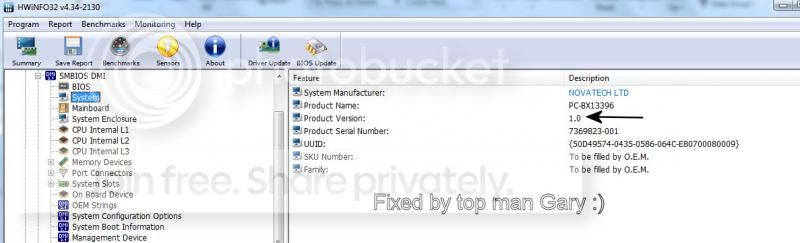
and my report screen:
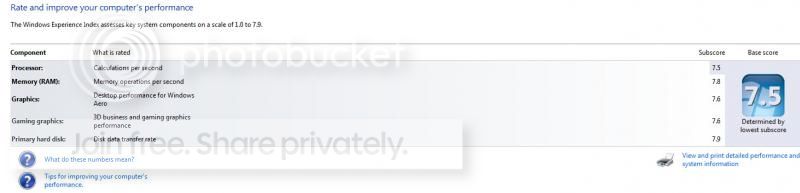
Hope this may help others.
Regards and thanks to all those who struggled with me on this
You are then advised to run a command prompt (old dos screen) as administrator and key in and run
winsat formal.
This fails and gives the following error messages:
error. failed to load XML
An invalid character was found in text content
winsat\main.cpp(1041)
unable to process xml file. winsat\main.cpp(4742)
Error: cannot process assessment results cannot load xml data from string
an invalid character was found in text content from interface msxm16.dll:Ixmldomdocument2
You start searching for these invalid characters after reading the various help threads out there such as this one: Windows Expierience Index could not be computed
You learn that not only does your computer have a bios but also something called a smbios, you may find it in registry thus:
Note the odd square OO's after version.
You might confirm this using HWiNFO, HWiNFO32 & HWiNFO64 - Hardware Information and Analysis Tools utility as seen here:
Editing the registry value will not work! Updating the bios probably won't work. The answer to this most frustrating problem is as follows:
Get onto your computer supplier, mine is Novatech here in the UK and I'll now paste his explanation here for you all.
The Problem
When the manufacture flashes the SMBIOS, it is basically adding simple and basic information, to allow the main BIOS to function, as well as hold data about the machine or component. Sometimes though the flash does go wrong, this is caused by the motherboard SMBIOS chip not taking the information correctly, hence why you would get invalid keys. The invalid keys come from the motherboard since it is trying to fill the information but cannot, so the invalid character, in your case squares appears in its place. With the invalid keys, it can cause the following problems:
• The Windows Experience Index not to run;
• Adobe software not to activate.
There are other problems it causes, but I have only seen these two. Sometimes re-flashing/updating the BIOS will fix the issue but this doesn’t always work. So you’ll need to re-flash the SMBIOS.
Flashing The SMBIOS
The easiest way to flash the SMBIOS is to do it within Windows, otherwise you’ll need some specialist equipment. To do it in Windows, you’ll need to get the manufactures SMBIOS flashing file, which should be a couple of Megabytes in size. This is due to the SMBIOS chip being very small. You would need to run the SMBIOS flashing tool in the Command Prompt Window at Administrative level, aka Right Clicking on Command Prompt and clicking Run As Administrator. In there you’ll need to run the .exe file that the manufacture has sent you. Sometimes they will ask to remote in and do it, just to make sure it is done correctly. When it is running in Command Prompt, you HAVE to wait until the Successful line appears, otherwise you will brick your SMBIOS and therefore can damage your main BIOS. Once the line appears, you’ll need to restart the machine. The computer may take a long time to shutdown, due to it doing the changes but if it takes longer than five minutes, hold down the power button to force it to shut down. When you turn it back on, it might not turn on correctly the first time, so you might need to turn it off, wait for ten seconds, and turn it back on again. Then the SMBIOS invalid key issue, should be fixed. If it is not fixed, it would appear that you have a deeper issue, most likely, the chip is damaged.
My grateful thanks to Gary at www.novatech.co.uk for sharing this with us all.
And just to confirm its fixed a couple more images for you, firstly Hwinfo again:
and my report screen:
Hope this may help others.
Regards and thanks to all those who struggled with me on this
Last edited:
My Computer
At a glance
Windows 7 pro 64bit SRP1intel i5-4460 @3.20GhzType DDR3 Size 16GBNVIDIA GeForce GTX 1050
- Computer type
- PC/Desktop
- Computer Manufacturer/Model Number
- Novatech ltd
- OS
- Windows 7 pro 64bit SRP1
- CPU
- intel i5-4460 @3.20Ghz
- Motherboard
- Manufacturer Gigabyte Technology Co., Ltd. Model H81M-DS2V (
- Memory
- Type DDR3 Size 16GB
- Graphics Card(s)
- NVIDIA GeForce GTX 1050
- Hard Drives
- Samsung SSD 840 EVO 500G SCSI Disk Device
TOSHIBA DT01ACA100 SCSI Disk 1TB
WDC WD10EFRX-68PJCN0 SCSI Disk Device 1TB (red)
TOSHIBA DT01ABA300 SCSI Disk Device
- PSU
- 600w
- Antivirus
- Kaspersky internet securities
- Browser
- Chrome and IE
- Other Info
- Back up, Acronis True image 2014 to external 2TB drive via front e-sata port supplied by PCI express card.


