Windows Experience Index for your system could not be Computer.Err

rachit2588

New member
Member
Local time
4:56 AM
Messages
44
Location
canada
Windows Experience Index for your system could not be Computed error

When i updated my drivers(manually) (video card). The ratings were greyed out, so i tried to refresh it but it cannot be refreshed.
Please can some one help to get it back working.?

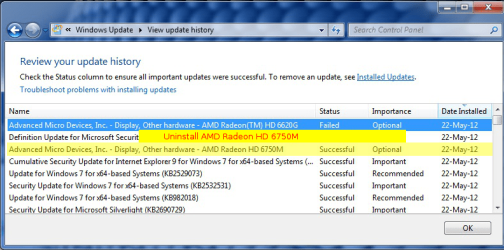
The video drivers in the windows update list is showing failure..but i have updated them manually...i think that might be causing some issue.
Please someone do update me with this issue.

Attached image.
 

Attachments

  • update.jpg
    update.jpg
    181.1 KB · Views: 399
Last edited:

My Computer My Computer

Computer Manufacturer/Model Number
Custom
OS
Windows 7 Ultimate x64
CPU
Core i5 760
Motherboard
HP
Memory
8GB ddr3 1333Mhz
Graphics Card(s)
6620g 1GB + 6750M
Sound Card
Realtek HD 5.1 Onboard
Monitor(s) Displays
hp 15.6
Screen Resolution
1366 768
Hard Drives
1 TB wd 7200rpm
+
750GB
Case
i ball
Keyboard
Logitech
Mouse
Logitech
Internet Speed
18 Mbps
I again reinstalled my graphics drivers but still showing me the same error? Please help.
 

My Computer My Computer

Computer Manufacturer/Model Number
Custom
OS
Windows 7 Ultimate x64
CPU
Core i5 760
Motherboard
HP
Memory
8GB ddr3 1333Mhz
Graphics Card(s)
6620g 1GB + 6750M
Sound Card
Realtek HD 5.1 Onboard
Monitor(s) Displays
hp 15.6
Screen Resolution
1366 768
Hard Drives
1 TB wd 7200rpm
+
750GB
Case
i ball
Keyboard
Logitech
Mouse
Logitech
Internet Speed
18 Mbps
If any system files were removed or changed then Windows won't usually complete the User index score. Using a driver that doesn't have a windows certified logo can also cause this type of problem.

You might be able to restore the system files by running the sfc/scannow command.
 

My Computer My Computer

Computer type
PC/Desktop
Computer Manufacturer/Model Number
Home built
OS
Windows 7 Ult, Windows 8.1 Pro,
CPU
Q9650-4.275GHz, E8600 4.5GHz, E6750-3.8GHz
Motherboard
Evga 780i FTW
Memory
G.Skill PC2 9600 1200Mhz 5 5 5 15 2T
Graphics Card(s)
GTX480
Sound Card
Asus Xonar D2
Monitor(s) Displays
HannsG
Screen Resolution
1680X1050
Hard Drives
GSkill Phoenix Pro 120GB SSD
PSU
ThermalTake Toughpower 1000Watt modular
Case
ThermalTake XaserV
Cooling
Xigmatek S1283
Keyboard
Logitech G15
Mouse
Logitech G9
Internet Speed
T1
I did that it says "Windows rresource Protection did not find any integrity violations."...still the prob there.
 

My Computer My Computer

Computer Manufacturer/Model Number
Custom
OS
Windows 7 Ultimate x64
CPU
Core i5 760
Motherboard
HP
Memory
8GB ddr3 1333Mhz
Graphics Card(s)
6620g 1GB + 6750M
Sound Card
Realtek HD 5.1 Onboard
Monitor(s) Displays
hp 15.6
Screen Resolution
1366 768
Hard Drives
1 TB wd 7200rpm
+
750GB
Case
i ball
Keyboard
Logitech
Mouse
Logitech
Internet Speed
18 Mbps
That error can most certainly be caused by the display driver. Do you have a system restore point from before you updated the driver? If you go to Device Manage, and expand Display Adapters, do you get any errors (yellow triangle with exclamation point)? You can try downloading the latest driver, uninstalling the current driver, reboot and let windows install it's own, then install the downloaded driver.

A Guy
 

My Computer My Computer

Computer type
PC/Desktop
OS
Windows 10 Home x64
CPU
INTEL Core i5-750 Quad-Core 3.37GHz
Motherboard
ASUS P7P55D
Memory
HyperX Fury Black Series 8GB (2 x 4GB) 1866Mhz
Graphics Card(s)
EVGA GeForce GTX 750 Superclocked 1GB 128-Bit GDDR5
Monitor(s) Displays
LG 32MA68HY 32" IPS
Screen Resolution
1920 x 1080
Hard Drives
Samsung 840 Evo 120GB, SEAGATE 500GB Barracuda® 7200.12, SATA 3 Gb/s, 7200 RPM, 16MB cache
PSU
ANTEC TruePower New TP-550, 80 PLUS, 550W
Case
ANTEC Three Hundred Illusion
Cooling
COOLER MASTER Hyper 212 Plus, 4 x 120mm 1 x 140mm Noctua's
Internet Speed
85 + Mbps
Antivirus
Avast
Browser
Vivaldi
Same error!
 

My Computer My Computer

Computer Manufacturer/Model Number
MSI
OS
Windows ultimate sp 1 64 bit
CPU
AMD Athlon II X3 455/4e core activate AMD Phenom X4 B55
Motherboard
MSI 760GM-P23
Memory
2*4 GB Team-Elite-1333 duel channel
Graphics Card(s)
Ati Readon 6850
Sound Card
Ati/amd sb600 high definition audio controller
Monitor(s) Displays
Packerd bell viseo 21inch
Screen Resolution
1680*1050
Hard Drives
WDC WD6400AAKS-22A7B0 (650 GB)
PSU
Adata HM-550 550W 80+ Modulair
Case
HKC
Cooling
Hyper TX3
Keyboard
Labtec 200
Mouse
Labtec 200
That error can most certainly be caused by the display driver. Do you have a system restore point from before you updated the driver? If you go to Device Manage, and expand Display Adapters, do you get any errors (yellow triangle with exclamation point)? You can try downloading the latest driver, uninstalling the current driver, reboot and let windows install it's own, then install the downloaded driver.

A Guy

Yes, i did that things too, but the device manager is showing no problems, still the WEI is not getting updated.:mad: What to do..?
 

My Computer My Computer

Computer Manufacturer/Model Number
Custom
OS
Windows 7 Ultimate x64
CPU
Core i5 760
Motherboard
HP
Memory
8GB ddr3 1333Mhz
Graphics Card(s)
6620g 1GB + 6750M
Sound Card
Realtek HD 5.1 Onboard
Monitor(s) Displays
hp 15.6
Screen Resolution
1366 768
Hard Drives
1 TB wd 7200rpm
+
750GB
Case
i ball
Keyboard
Logitech
Mouse
Logitech
Internet Speed
18 Mbps
You and try deleting the files in the DataStore. Navigate to:

C:\Windows\Performance\WinSat\DataStore

In the DataStore folder, delete all of the .xml files. Now try to rerun the assessment.

The WEI log file is usually located in:

C:\Windows\Performance\WinSAT\winsat.log

The log may cast light on where the issue lies.

A Guy
 

My Computer My Computer

Computer type
PC/Desktop
OS
Windows 10 Home x64
CPU
INTEL Core i5-750 Quad-Core 3.37GHz
Motherboard
ASUS P7P55D
Memory
HyperX Fury Black Series 8GB (2 x 4GB) 1866Mhz
Graphics Card(s)
EVGA GeForce GTX 750 Superclocked 1GB 128-Bit GDDR5
Monitor(s) Displays
LG 32MA68HY 32" IPS
Screen Resolution
1920 x 1080
Hard Drives
Samsung 840 Evo 120GB, SEAGATE 500GB Barracuda® 7200.12, SATA 3 Gb/s, 7200 RPM, 16MB cache
PSU
ANTEC TruePower New TP-550, 80 PLUS, 550W
Case
ANTEC Three Hundred Illusion
Cooling
COOLER MASTER Hyper 212 Plus, 4 x 120mm 1 x 140mm Noctua's
Internet Speed
85 + Mbps
Antivirus
Avast
Browser
Vivaldi
You could try to rollback the flagged driver(s) in Device Manager and restart your machine. If that doesn't help try uninstalling the flagged driver(s) in Device Manager and restart your machine, Windows should find HW and install the drivers for you. Then you can try updating them - note: sometime WinUpdate picks the wrong driver - I tend to update drivers only from the manufacturer site.
 

My Computer My Computer

Computer type
Laptop
Computer Manufacturer/Model Number
HP Pavilion dv6-6c10us
OS
x64 (6.3.9600) Win8.1 Pro & soon dual boot x64 (6.1.7601) Win7_SP1 HomePrem
CPU
AMD A6-3420M APU with Radeon(tm) HD Graphics
Motherboard
Hewlett-Packard 1805
Memory
6.00 GB
Graphics Card(s)
AMD Radeon(TM) HD 6520G
Sound Card
(1) AMD High Definition Audio Device (2) IDT High Definiti
Monitor(s) Displays
HP W2072a 20" LCD (1600 x 900) @ 60 Hz
Screen Resolution
1366 x 768 x 32 bits (4294967296 colors) @ 60 Hz
Hard Drives
ST640LM0 00 HM641JI SATA Disk Device
Keyboard
Logitech k520 wireless KB
Mouse
Logitech m320 wireless mouse (bundled with KB)
Internet Speed
15/5 | 54 MB Wireless 'n'
Antivirus
Realtime: Defender or Avast | On-demand: Malwarebytes, ESET
Browser
IE 11 on Win8, IE 10 on win 7
Other Info
Media: [Gimp, Audacity, VLC] || Comm: [WEmail 2012, Skype] || Productivity: [OpenOffice,| Textpad] || Utils: [Sysinternals, cCleaner, Speccy, Defraggler]
Try this: Back off the other WU for AMD 6750M (3rd from the top). Restart and see if the WEI will update.

Visit the AMD page for the 6700 series, click the support & drivers (right hand top) and try the autodetect, or fill in the fields specific to your machine. I've never used the AMD autodetect, but if it works well, it should find any updates needed (the 6620g update too). If you get the updates from AMD and WU offers to update those HW components, I would hide those WU updates.

Good luck.
 

Attachments

  • Rachit2.png
    Rachit2.png
    106.3 KB · Views: 180
Last edited:

My Computer My Computer

Computer type
Laptop
Computer Manufacturer/Model Number
HP Pavilion dv6-6c10us
OS
x64 (6.3.9600) Win8.1 Pro & soon dual boot x64 (6.1.7601) Win7_SP1 HomePrem
CPU
AMD A6-3420M APU with Radeon(tm) HD Graphics
Motherboard
Hewlett-Packard 1805
Memory
6.00 GB
Graphics Card(s)
AMD Radeon(TM) HD 6520G
Sound Card
(1) AMD High Definition Audio Device (2) IDT High Definiti
Monitor(s) Displays
HP W2072a 20" LCD (1600 x 900) @ 60 Hz
Screen Resolution
1366 x 768 x 32 bits (4294967296 colors) @ 60 Hz
Hard Drives
ST640LM0 00 HM641JI SATA Disk Device
Keyboard
Logitech k520 wireless KB
Mouse
Logitech m320 wireless mouse (bundled with KB)
Internet Speed
15/5 | 54 MB Wireless 'n'
Antivirus
Realtime: Defender or Avast | On-demand: Malwarebytes, ESET
Browser
IE 11 on Win8, IE 10 on win 7
Other Info
Media: [Gimp, Audacity, VLC] || Comm: [WEmail 2012, Skype] || Productivity: [OpenOffice,| Textpad] || Utils: [Sysinternals, cCleaner, Speccy, Defraggler]
Back
Top