Windows Experience Index Score

nate1232

New member
Local time
7:05 AM
Messages
13
So my base score is 5.1 - the score comes from Graphics. I'm wondering why its so low. My Gaming graphics is rated 6.2. I know I have a fairly good graphics card - Ati Radeon HD 5450 with 1GB ram.

What does this score of 5.1 mean? What kind of limitations might I have, where does that score come from, and is it possible to improve?
 

My Computer My Computer

Computer Manufacturer/Model Number
Dell
OS
Windows 7 Home 64 bit
CPU
Intel Core 2 Quad Q8300 @ 2.5GHz
Memory
4096MB DDR3
Graphics Card(s)
ATI Radeon HD 5450
Sound Card
Realtek High Definition Audio
Monitor(s) Displays
Insignia LCD TV
Hard Drives
1TB
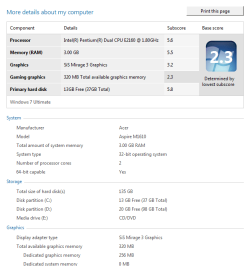
Talking about Low...score ....?

http://
spztcw.png
 

My Computer My Computer

Computer Manufacturer/Model Number
Sony fz model .
OS
Wds 7 32.bit Ultimate
CPU
Intel T7100 Core2Duo 1.8Ghz
Motherboard
Sony
Memory
3GB.
Graphics Card(s)
Mobile Intel 965 chipset.
Sound Card
SigmaTel HD
Screen Resolution
1280x800
Hard Drives
320GB Hitachi 7200Rpm
I think the score you get with your PC is based off the stuff other people have in their rigs. So if people have rigs with two or three video cards or solid state drives in it your not going to have a high score. I personal think a score of 5 you are that avrage user and if your in 8-10 you have one heck of a gaming rig
score.png
 

My Computer My Computer

Computer Manufacturer/Model Number
custom
OS
windows 7
CPU
AMD Phenom II X4 965
Motherboard
M4N98TD EVO
Memory
8 gigs Gskill
Graphics Card(s)
GTX470
Sound Card
sound blaster
Monitor(s) Displays
2x hpw1907
Hard Drives
2X WD750
PSU
1100w rosewill
Case
Thermaltake Tsunami VA3000BWA Black Aluminum
Keyboard
g11
Mouse
logitech G7
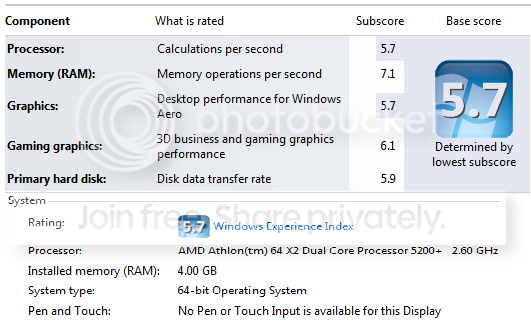
WEI breaks down the graphical capabilities of your system into two separate sub-scores. This first sub-score (Graphics) is for desktop performance, specifically that of the Windows Aero user experience. The second graphics-based subscore (Gaming graphics) is for 3D business and gaming graphics performance.

Microsoft provides the following information about interpreting a base score:

1.0 to 1.9 - Basic performance. Even a component with a 1.0 subscore meets the Windows 7 minimum requirements.
2.0 to 2.9 - Enhanced performance. Windows Aero may be available.
3.0 to 3.9 - Windows Aero will be enabled.
4.0 to 4.9 - Good performance with high-resolution displays and multiple displays.
5.0 to 5.9 - Capable of running high-end video games, 3D modeling applications, and high-end video editing applications.
6.0 to 6.9 - Supports DirectX 10 graphics with high frame rates at high resolutions.
7.0 to 7.9 - Highest performance level available. Reserved for systems with SSD hard drive, high-end graphics card, and multi-core (i.e. 8 or more) processor.

However, WEI should not be used as a benchmarking tool because of many severe limitations. See this thread.

http://www.sevenforums.com/performa...ce-index-true.html?highlight=experience+index
 

My Computer My Computer

Computer Manufacturer/Model Number
Too many to describe...
OS
Windows 7 x64 pro/ Windows 7 x86 Pro/ XP SP3 x86
My WEI score actually went down when I upgraded the driver for my graphics card. Latest driver too.
 

My Computer My Computer

Computer type
PC/Desktop
Computer Manufacturer/Model Number
Dell Vostro 460
OS
Windows 10 Pro 64bit
CPU
Intel Core i7 2600 @ 3.4Ghz
Motherboard
Dell 0Y2MRG
Memory
16GB PC3-10600 DDR3 @ 1333Mhz
Graphics Card(s)
ASUS GeForce GTX 550 Ti 1GB DDR5
Sound Card
Realtek ALC888 HD Audio
Monitor(s) Displays
Dell E2211H 22" Widescreen Flat Panel
Screen Resolution
1920 x 1080
Hard Drives
Kingston 480GB SATA III SSD, Western Digital 1TB SATA III HDD
PSU
Antec Modular 550W
Keyboard
Dell USB Keyboard
Mouse
Dell USB Mouse
Internet Speed
200Mbs Down/20Mbs Up
Other Info
Netgear C7000 Cable Modem/Wireless Router
When Vista came out it wouldn't run very well on computers with older or lower spec hardware, a lot of people bought Vista and it wouldn't run on their computer.

Needless to say, there were a lot of people a little upset (sarcasm), MS came out with WEI so everyone could run the WEI test before buying Vista, to see if their hardware was capable of running the 'new OS '.

One of the main reasons was the Aero test, but it also pointed to any areas that might need to upgrade, RAM being one of the issues at that time.

It really doesn't qualify as a benchmark, but has generated a lot of revenue for hardware companies over the years.
A top score of 7.9 for the processor is not possible, many sites say, but people still try the next upgrade.

It's the quest to obtain the highest number.

I'll bet Intel and AMD paid for the scoring system changes for the processor score, and leaving that top number un-obtainable.
They have definitely made a lot of money from that WEI score.
 

My Computer My Computer

Computer type
PC/Desktop
Computer Manufacturer/Model Number
76~2.0
OS
Windows 7 Ult x64 - SP1/ Windows 8 Pro x64
CPU
Intel Core i5-3570K 4.6GHz
Motherboard
Gigabyte GA-Z77X UD3H, f18
Memory
8GB (2X4GB) DDR3 1600 Corsair Vengeance CL8 1.5v
Graphics Card(s)
Sapphire HD 7770 Vapor-X OC 1GB DDR5
Sound Card
Onboard VIA VT2021
Monitor(s) Displays
22" LCD Dell
Screen Resolution
1680x1050
Hard Drives
Samsung 840Pro 128GB SSD,
Seagate Barracuda 500GB SATA2 7200rpm 32MB cache, Seagate Barracuda 1TB SATA2 7200rpm 32MB cache,
PSU
Corsair HX650W
Case
Cooler Master Storm Scout
Cooling
Corsair H80 2x12cm Noctua NF P12 , 2x14cm case fans
Keyboard
Logitech Wave
Mouse
CM Sentinel
Internet Speed
Dismal
Antivirus
Avast
Browser
Opera Next
Other Info
Haswell laptop: HP Envy 17t-j, i7-4700MQ, GeForce 740M 2GB DDR3, 17.3" Full HD 1920x1080, 16GB RAM, Samsung 840 Pro 128GB, 1TB Hitachi 7200 HDD,
Desktop: eSATA ports,
External eSATA Seagate 500GB SATA2 7200rpm,
External WD USB 500GB
i was about to give link to that thread but bill2 has already opened the path :)
 

My Computer My Computer

OS
window's 7
CPU
core 2 quad
Motherboard
gigabyte
Memory
2gb corsair
Graphics Card(s)
ati hd4850
Monitor(s) Displays
lg
Screen Resolution
1600 X 900
Case
power logic
Other Info
none of the spec above is accurate
my budget system tweaked a bit just waiting on my ATI Radeon HD 5550 Graphics Card 1GB should get the base score up a bit
 

Attachments

  • Untitled.png
    Untitled.png
    15.5 KB · Views: 1,248
Last edited:

My Computer My Computer

Computer Manufacturer/Model Number
acer aspire m1610
OS
windows 7 ultimate x64
CPU
intel pentium dual cpu e2160@1800 oc to 2.40 ghz
Motherboard
acer f672cr with unlocked award bios
Memory
4gb pc2 6400u (800mhz)
Graphics Card(s)
ati radeon hd 5500
Sound Card
creative sb audigy 2
Monitor(s) Displays
emprex 19"
Hard Drives
hitachi sata 160gb
PSU
cit 600w
Case
standard
Cooling
standard + silent case fan
Hi lecky2009, Welcome to Seven Forums.

There is an on-going thread for posting your WEI scores, link below.

The below link is where everyone posts their WEI scores, you should post yours there.


Show Us Your WEI (2)
 

My Computer My Computer

Computer type
PC/Desktop
Computer Manufacturer/Model Number
76~2.0
OS
Windows 7 Ult x64 - SP1/ Windows 8 Pro x64
CPU
Intel Core i5-3570K 4.6GHz
Motherboard
Gigabyte GA-Z77X UD3H, f18
Memory
8GB (2X4GB) DDR3 1600 Corsair Vengeance CL8 1.5v
Graphics Card(s)
Sapphire HD 7770 Vapor-X OC 1GB DDR5
Sound Card
Onboard VIA VT2021
Monitor(s) Displays
22" LCD Dell
Screen Resolution
1680x1050
Hard Drives
Samsung 840Pro 128GB SSD,
Seagate Barracuda 500GB SATA2 7200rpm 32MB cache, Seagate Barracuda 1TB SATA2 7200rpm 32MB cache,
PSU
Corsair HX650W
Case
Cooler Master Storm Scout
Cooling
Corsair H80 2x12cm Noctua NF P12 , 2x14cm case fans
Keyboard
Logitech Wave
Mouse
CM Sentinel
Internet Speed
Dismal
Antivirus
Avast
Browser
Opera Next
Other Info
Haswell laptop: HP Envy 17t-j, i7-4700MQ, GeForce 740M 2GB DDR3, 17.3" Full HD 1920x1080, 16GB RAM, Samsung 840 Pro 128GB, 1TB Hitachi 7200 HDD,
Desktop: eSATA ports,
External eSATA Seagate 500GB SATA2 7200rpm,
External WD USB 500GB
@thomas242

WEI doesn't account for multiple GPU's...just the primary GPU in your system.

@nate1232, your WEI score seems accurate. The 5450 is hardly a "fairly good graphics card". Upgrade your graphics card to improve your score in this area. If you don't do any heavy gaming though, I wouldn't worry about it. I have a pair of 5770's in crossfire and get 6.2 if I remember correctly (and like I mentioned above, that 2nd GPU isn't considered in the scoring).
 

My Computer My Computer

Computer Manufacturer/Model Number
Custom Built
OS
Windows 7 Ultimate x64
CPU
Intel Q6600 Quad Core at 3.0 Ghz
Motherboard
XFX Nforce 680i SLI
Memory
8GB (4x2GB) Corsair CM2X2048-6400C5
Graphics Card(s)
XFX Radeon HD 5770
Sound Card
Onboard Realtek HD Audio
Monitor(s) Displays
22" Samsung
Screen Resolution
1680x1050
Hard Drives
2x1TB Seagate ST31000340AS in RAID 0
PSU
580W Mushikn HP-580
Case
Antec Nine Hundred
Cooling
Noctua CPU Cooling + 5 Case Fans
Keyboard
Logitech G15
Mouse
Logitech Optical Mouse
Internet Speed
Cable
use of WEI

The WEI is a general guideline designed to show you the relative performance of the four major system components: processor (the brain), RAM (the short-term memory), graphics performance (fancy/3D graphics) and the hard disk (long-term memory).

The point of the numbers is to give a general indication of what your system can do, and to compare which parts of your system are stronger or weaker relative to one another. It's handy if you need more speed, but don't have the technical knowledge to know what part of your system may be slowing you down. It's not a perfect absolute indicator; it's a general guideline of the relative performance of 4 quite different components.

For example a user might have a decent processor and only 1 or 2 GB of RAM, and not realize that more RAM will give them much faster general performance than getting a new processor. The WEI gives you a general RELATIVE score, so you can say - ah! I see, my processor is quick, but my ram is my system weak point. Or - my system is fast enough for general use (RAM and processor), but bad for games (a weak 3d graphic score). Or, if you have a bad windows AERO score, you can turn off the Aero feature for simplified windows appearance and better system speed.

Sure, expert users who know their systems will not find it very useful - but since they know their relative strong points, they don't need it anyway. It's designed for novices. From that point of view, I would say it's an extremely useful (and general) system evaluation tool.

The WEI is particularly useful for laptops, as many laptop users do not realize that their system may be as powerful as a desktop in terms of processor and RAM, but be short in terms of graphics cards. (Graphics cards tend to produce a lot of heat - difficult in laptop design). Likewise, Netbooks are often very deficient in RAM, and looking at the WEI would make it clear that this is the area where an upgrade could most improve performance.


Comments claiming that the WEI designed for processor companies to sell you faster processors are suspect. That's like saying car companies publish the amount of horsepower a car has in order to 'lure' you into buying a bigger engine. By showing that RAM may be the best and least expensive way to upgrade your system (which is often the case), the WEI may encourage the upgrade of other components instead of a costly processor/motherboard upgrade. Those who don't know much about their systems should find the WEI a very handy general indicator of the relative performance of the different parts of their computers. It's so simple that it's possible even my mother could understand it. Anything about a computer that my mom could possibly understand could only be, in my opinion, the result of engineering genius.

 

My Computer My Computer

Computer Manufacturer/Model Number
Dell Altitude E6510
OS
Win 7 Premium 64 bit
CPU
i5
Memory
4GB
Back
Top