Windows Experience Score for a SSD only 5.9

DazGizmo

New member
Local time
5:20 AM
Messages
10
Location
Nottingham, UK
Hello everyone

I have been having issues with my Laptop lately and the other day my SSD Windows Experience Score was 7.1... today it is only 5.9 and googling around this is usual for a spinner.

I have run the Lenovo system check and everything passes.

I have installed 12GB of Ram but I often have to remove 2 x 2GB sticks as it reads I have only 6GB in both the Bios and Windows info.

I have been having Kernel-Power (41) 63 for a few weeks when rendering it just shuts down and tries to restart sometimes stuck in a loop as it appears to me to be a heat issue maybe. I have monitored both the CPU and GPU temps and nothing really out of the ordinary...

So some of your insights or further checks I should make would be welcome
Thanks
 

My Computer My Computer

Computer type
Laptop
Computer Manufacturer/Model Number
Lenovo W701
OS
Windows 7 Professional 64bit
CPU
Intel(R) Core(TM) i7 Q820 @ 1.73Ghz 4 Core
Memory
12GB but only showing 6GB - have to keep reseating 2 x 2GB
Graphics Card(s)
NVidia Quadro FX 2800M
Hard Drives
2 x 128 GB SSB
1 x 512 GB HybridDrive for mass storage
Antivirus
iolo System Shield
Browser
Google
Hi and welcome to SevenForums,
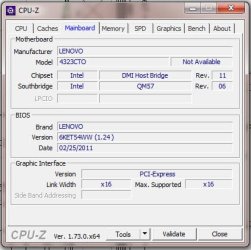
You might use cpu-z and post the Mainboard section with a screen shot,
CPU-Z | Softwares | CPUID

All mother boards have restriction for how much ram per slot it can handle possibly you went over ?
My Acer has a 2gb per slot limit so I can only use 4x2gb = 8gb's of ram as an example.

Did you clean install onto the new ssd ?
You might be out of align but you can try Free mini tool and align all partitions by selecting the disk or select each partition or a single partition and just align it
Best Free Partition Manager for Windows | MiniTool Partition Free
 

My Computer My Computer

Computer type
PC/Desktop
Computer Manufacturer/Model Number
Custom assembled by me :}
OS
Win-7-Pro64bit 7-H-Prem-64bit
CPU
i7-5930K 2nd i9-9940x both water blocked VRM's too
Motherboard
ASUS SABERTOOTH X99 2nd ASUS x299 Apex
Memory
Trident-z 3200C14 2nd Trident-z 3600C16
Graphics Card(s)
EVGA 1080ti ftw3 2nd Titan Xp both water blocked
Sound Card
Built-in Realtek
Monitor(s) Displays
1-AOC G2460PG 24"G-Sync 144Hz/ 2nd 1-ASUS VG248QE 24" 144Hz
Screen Resolution
1920 x 1080 144Hz
Hard Drives
2-Samsung M.2 Evo & Evo Plus
2-Samsung 850 EVO 500GB SSD's/ 3-2.5 W.D. Black 1tb-&3-1tb/3-3.5 WD Black 1tb hdd's
PSU
EVGA SuperNOVA 1000-P2 2nd 1200-P2
Case
2-Corsair Obsidian Series 450D Black ATX Mid Tower
Cooling
Custom water loops
Keyboard
Logitech G710+/ 2nd Logitech G910
Mouse
2-RedDragon M901 Perdition 16400 dpi Gaming mouse = wired
Internet Speed
Comcast Ping 19ms 89.31mbps download speed 6.12mbps upload
Antivirus
Malwarebytes Pro/ Superantispyware Pro
Browser
FireFox & Pale moon
Other Info
2nd ASUS X299 Apex/Intel i9-9940x with Custom water loop/7H-Prem-x64/Corsair 450D case/Ram Trident-z 3600C16 4x8gb / Samsung970Evo plus 500gb SSD/Dual ssd EZ swap evo/PSU EVGA SuperNova 1200w-P2 80+Platinum/GPU Titan Xp /8-ML-140 on push-pull on 2-280GTX rads
My two cents worth I have two well specified machines now ie an i7 8GB 1600 RAM Samsung 850 EVO's etc etc but the thing that pulls them up and I have found in general is the graphics this is still so with the good machines even though they have on board NVidia GPU's.
So what has exactly turned the wick down?? and 7.1 appears to be extremely good for a spinner - I stand to be corrected of course.
 

My Computer My Computer

Computer type
PC/Desktop
Computer Manufacturer/Model Number
Own build (new) Desk1 / Asus ROG Win 7 / Desk2 1st build
OS
Desk1 7 Home Prem / Desk2 10 Pro / Main lap Asus ROG 10 Pro 2 laptop Toshiba 7 Pro Asus P2520 7 & 10
CPU
Desk1 i5 3750K / Laptop i7 GTX 860M / Desk2 i5 2500
Motherboard
Desk1 Asus P877-V / Desk2 Gigabyte H67 UD3H / Laptop ?
Memory
Desk1 8GB (1866) / Desk2 16GB (1333) / Laptop 8Gb DDR3
Graphics Card(s)
Desk 1& 2NVidia GTX 650 & Laptops on board Intel
Sound Card
Desk 1 & 2 -XONAR DG Realtek High Def audio Laptop
Monitor(s) Displays
Desk 1 Benq HD 2450 / Desk2 Philips 24" / Laptop 17.5"
Screen Resolution
1920x1080 D1 & D2 & Laptop 1
Hard Drives
Desk1 Samsung 120GB 830 SSD
Asus ROG 256GB 850 Pro SSD
Desk2 Samsung 840 256 SSD
Toshiba 120GB EVO
PSU
Desk 1 Corsair HX 1050/ Laptop ? / Desk 2 Corsair HX 650
Case
Desk 1 Cooler HAF XM ? Toshiba laptop / Desk2 Coolermaster
Cooling
Fans on all Desk1 -2 Desk2 - all Coolermasters 5 Laptop ?
Keyboard
Desk 1 MS Sidewinder X6 Desk 2 MS Sidewinder X 4
Mouse
Desk 1&2 - Gigabyte MS 900 gamer - laptop - Logitec wireless
Internet Speed
ADSL2+
Other Info
One other Desktop (tester) and spare Toshba laptop both with SSD's
Running Kaspersky 2016 ISS on all machines config'd identically
Logitec audio stereo systems on each machine (x3)
Canon MG5250MFC
Router/modem TP-Link running WPA2SK
Hi
Thanks for your reply..
The SSD is not a new install and has been fine and had a good score up until today.... I will check my Power settings as I could have the performance of it lower maybe..

Regarding the RAM, like I mentioned I often have to remove the 2 x 2GB sticks and reseat them and the Bios and Windows Recognises 12GB... Just do not understand why it should go off...
Also another point on the RAM i did not mention is that at the moment it is reading 6GB but when I remove 2 x 2GB it then read 8GB which is correct as 2 x 4GB sticks are installed under the keyboard.. So it's like one channel is off 1 x 4GB and 1 x 2GB... the plot thickens...
 

Attachments

  • SevenForums - Lenovo W701 - CPUZ - MainBoard info capture.jpg
    SevenForums - Lenovo W701 - CPUZ - MainBoard info capture.jpg
    31.5 KB · Views: 48

My Computer My Computer

Computer type
Laptop
Computer Manufacturer/Model Number
Lenovo W701
OS
Windows 7 Professional 64bit
CPU
Intel(R) Core(TM) i7 Q820 @ 1.73Ghz 4 Core
Memory
12GB but only showing 6GB - have to keep reseating 2 x 2GB
Graphics Card(s)
NVidia Quadro FX 2800M
Hard Drives
2 x 128 GB SSB
1 x 512 GB HybridDrive for mass storage
Antivirus
iolo System Shield
Browser
Google
Hi,
Yea I believe you might be limited to 8gb's
Have you tried 4x2gb's
Although 2x4gb's might be the same as long as you're in the same color slots as using all at 4x2gb's
 

My Computer My Computer

Computer type
PC/Desktop
Computer Manufacturer/Model Number
Custom assembled by me :}
OS
Win-7-Pro64bit 7-H-Prem-64bit
CPU
i7-5930K 2nd i9-9940x both water blocked VRM's too
Motherboard
ASUS SABERTOOTH X99 2nd ASUS x299 Apex
Memory
Trident-z 3200C14 2nd Trident-z 3600C16
Graphics Card(s)
EVGA 1080ti ftw3 2nd Titan Xp both water blocked
Sound Card
Built-in Realtek
Monitor(s) Displays
1-AOC G2460PG 24"G-Sync 144Hz/ 2nd 1-ASUS VG248QE 24" 144Hz
Screen Resolution
1920 x 1080 144Hz
Hard Drives
2-Samsung M.2 Evo & Evo Plus
2-Samsung 850 EVO 500GB SSD's/ 3-2.5 W.D. Black 1tb-&3-1tb/3-3.5 WD Black 1tb hdd's
PSU
EVGA SuperNOVA 1000-P2 2nd 1200-P2
Case
2-Corsair Obsidian Series 450D Black ATX Mid Tower
Cooling
Custom water loops
Keyboard
Logitech G710+/ 2nd Logitech G910
Mouse
2-RedDragon M901 Perdition 16400 dpi Gaming mouse = wired
Internet Speed
Comcast Ping 19ms 89.31mbps download speed 6.12mbps upload
Antivirus
Malwarebytes Pro/ Superantispyware Pro
Browser
FireFox & Pale moon
Other Info
2nd ASUS X299 Apex/Intel i9-9940x with Custom water loop/7H-Prem-x64/Corsair 450D case/Ram Trident-z 3600C16 4x8gb / Samsung970Evo plus 500gb SSD/Dual ssd EZ swap evo/PSU EVGA SuperNova 1200w-P2 80+Platinum/GPU Titan Xp /8-ML-140 on push-pull on 2-280GTX rads
According to the Specs it is 16GB:

Memory
PC3-8500 Non-Parity (NP) Double Data Rate Three (DDR3) Technology
Four SO-DIMM Slots
The use of 1066 MHz SO DIMM memory is recommended for this system.
1 GB, 2GB, or 4GB memory
Supports up to 16GB maximum memory


It clearly is either faulty RAM, Motherboard, or something else.

12GB I often have available but recently this drop off and seating I have to do to get it back.
 

My Computer My Computer

Computer type
Laptop
Computer Manufacturer/Model Number
Lenovo W701
OS
Windows 7 Professional 64bit
CPU
Intel(R) Core(TM) i7 Q820 @ 1.73Ghz 4 Core
Memory
12GB but only showing 6GB - have to keep reseating 2 x 2GB
Graphics Card(s)
NVidia Quadro FX 2800M
Hard Drives
2 x 128 GB SSB
1 x 512 GB HybridDrive for mass storage
Antivirus
iolo System Shield
Browser
Google
Just looked at the CPUZ and it's reading 12GB LOL
 

Attachments

  • SevenForums - Lenovo W701 - Memory - CPUZ - VS - Windows.jpg
    SevenForums - Lenovo W701 - Memory - CPUZ - VS - Windows.jpg
    107.8 KB · Views: 2

My Computer My Computer

Computer type
Laptop
Computer Manufacturer/Model Number
Lenovo W701
OS
Windows 7 Professional 64bit
CPU
Intel(R) Core(TM) i7 Q820 @ 1.73Ghz 4 Core
Memory
12GB but only showing 6GB - have to keep reseating 2 x 2GB
Graphics Card(s)
NVidia Quadro FX 2800M
Hard Drives
2 x 128 GB SSB
1 x 512 GB HybridDrive for mass storage
Antivirus
iolo System Shield
Browser
Google
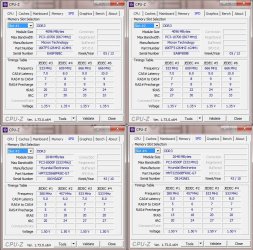
Also the Memory Slot info:
 

Attachments

  • SevenForums - Lenovo W701 - Memory - CPUZ - Memory Slot Selection info.jpg
    SevenForums - Lenovo W701 - Memory - CPUZ - Memory Slot Selection info.jpg
    150.4 KB · Views: 1

My Computer My Computer

Computer type
Laptop
Computer Manufacturer/Model Number
Lenovo W701
OS
Windows 7 Professional 64bit
CPU
Intel(R) Core(TM) i7 Q820 @ 1.73Ghz 4 Core
Memory
12GB but only showing 6GB - have to keep reseating 2 x 2GB
Graphics Card(s)
NVidia Quadro FX 2800M
Hard Drives
2 x 128 GB SSB
1 x 512 GB HybridDrive for mass storage
Antivirus
iolo System Shield
Browser
Google
Hi,
Wonder why the frequency's are different must not be matching ram :/
I'd remove 3 & 4 and buy a couple more like 1 & 2.
 

My Computer My Computer

Computer type
PC/Desktop
Computer Manufacturer/Model Number
Custom assembled by me :}
OS
Win-7-Pro64bit 7-H-Prem-64bit
CPU
i7-5930K 2nd i9-9940x both water blocked VRM's too
Motherboard
ASUS SABERTOOTH X99 2nd ASUS x299 Apex
Memory
Trident-z 3200C14 2nd Trident-z 3600C16
Graphics Card(s)
EVGA 1080ti ftw3 2nd Titan Xp both water blocked
Sound Card
Built-in Realtek
Monitor(s) Displays
1-AOC G2460PG 24"G-Sync 144Hz/ 2nd 1-ASUS VG248QE 24" 144Hz
Screen Resolution
1920 x 1080 144Hz
Hard Drives
2-Samsung M.2 Evo & Evo Plus
2-Samsung 850 EVO 500GB SSD's/ 3-2.5 W.D. Black 1tb-&3-1tb/3-3.5 WD Black 1tb hdd's
PSU
EVGA SuperNOVA 1000-P2 2nd 1200-P2
Case
2-Corsair Obsidian Series 450D Black ATX Mid Tower
Cooling
Custom water loops
Keyboard
Logitech G710+/ 2nd Logitech G910
Mouse
2-RedDragon M901 Perdition 16400 dpi Gaming mouse = wired
Internet Speed
Comcast Ping 19ms 89.31mbps download speed 6.12mbps upload
Antivirus
Malwarebytes Pro/ Superantispyware Pro
Browser
FireFox & Pale moon
Other Info
2nd ASUS X299 Apex/Intel i9-9940x with Custom water loop/7H-Prem-x64/Corsair 450D case/Ram Trident-z 3600C16 4x8gb / Samsung970Evo plus 500gb SSD/Dual ssd EZ swap evo/PSU EVGA SuperNova 1200w-P2 80+Platinum/GPU Titan Xp /8-ML-140 on push-pull on 2-280GTX rads
Don't know if it is of any consequence but the voltages are different too.

With all installed use this to check very detailed info on those figures.
Using HW Info
PART A:
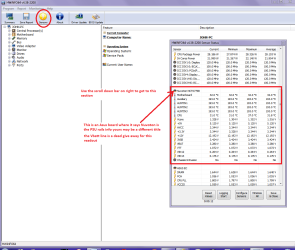
You can test the volts on the PSU with HW Info HWiNFO, HWiNFO32/64 - Download < download the right bit version and close the right hand window select Sensors and scroll down to the power section where you will see what the volts are doing see my pic. In my pic the section (Nuvoton) with VBATT is a dead give away you are in the section for the rail voltages. There are other section titles and one that pops up often is ITE
Now the voltage on the different rails have to be within 5% =+/- of what is required or the machine will not work properly if at all.
IE
12v = 11.4v min to 12.6max
5v = 4.75v min 5.25v max
3.3v = 3.135v min to 3.465v max
See this for the rail voltage info
PSUs 101: A Detailed Look Into Power Supplies (Section 2.)
The original right hand window shows the machine running and is handy for that but for looking at the components in some detail close it and use the main left hand side panel
FOR OTHER COMPONENTS
PART B:
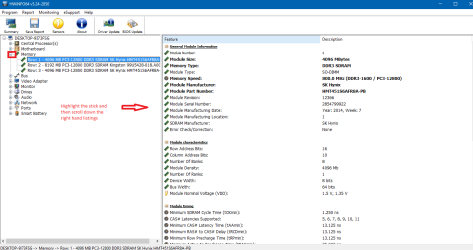
Open each small square with + in it on the section the components are in and then click on the individual component/s (it will highlight in blue) - in the right hand side will appear all sorts of details including brands speeds and other essential info that particular device. See pic for example.
Use PART B: to open up the RAM and it would be interesting (to me) to see what the PSU is doing too.
 

Attachments

  • HW INFO DESKTOP PSU.PNG
    HW INFO DESKTOP PSU.PNG
    49.8 KB · Views: 1
  • HW RAM.PNG
    HW RAM.PNG
    35.5 KB · Views: 1

My Computer My Computer

Computer type
PC/Desktop
Computer Manufacturer/Model Number
Own build (new) Desk1 / Asus ROG Win 7 / Desk2 1st build
OS
Desk1 7 Home Prem / Desk2 10 Pro / Main lap Asus ROG 10 Pro 2 laptop Toshiba 7 Pro Asus P2520 7 & 10
CPU
Desk1 i5 3750K / Laptop i7 GTX 860M / Desk2 i5 2500
Motherboard
Desk1 Asus P877-V / Desk2 Gigabyte H67 UD3H / Laptop ?
Memory
Desk1 8GB (1866) / Desk2 16GB (1333) / Laptop 8Gb DDR3
Graphics Card(s)
Desk 1& 2NVidia GTX 650 & Laptops on board Intel
Sound Card
Desk 1 & 2 -XONAR DG Realtek High Def audio Laptop
Monitor(s) Displays
Desk 1 Benq HD 2450 / Desk2 Philips 24" / Laptop 17.5"
Screen Resolution
1920x1080 D1 & D2 & Laptop 1
Hard Drives
Desk1 Samsung 120GB 830 SSD
Asus ROG 256GB 850 Pro SSD
Desk2 Samsung 840 256 SSD
Toshiba 120GB EVO
PSU
Desk 1 Corsair HX 1050/ Laptop ? / Desk 2 Corsair HX 650
Case
Desk 1 Cooler HAF XM ? Toshiba laptop / Desk2 Coolermaster
Cooling
Fans on all Desk1 -2 Desk2 - all Coolermasters 5 Laptop ?
Keyboard
Desk 1 MS Sidewinder X6 Desk 2 MS Sidewinder X 4
Mouse
Desk 1&2 - Gigabyte MS 900 gamer - laptop - Logitec wireless
Internet Speed
ADSL2+
Other Info
One other Desktop (tester) and spare Toshba laptop both with SSD's
Running Kaspersky 2016 ISS on all machines config'd identically
Logitec audio stereo systems on each machine (x3)
Canon MG5250MFC
Router/modem TP-Link running WPA2SK
Yes, I did notice that myself Re Frequency and Voltages...

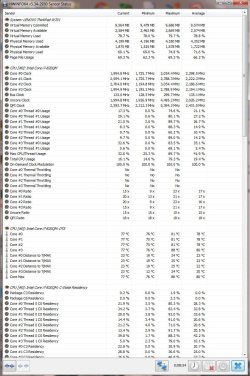
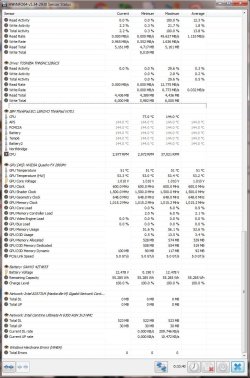
Here is the HWiFO on sensors... not comprehensive on Voltages as I see it...
 

Attachments

  • SevenForums - Lenovo W701 - NWiNFO - Sensors Top.jpg
    SevenForums - Lenovo W701 - NWiNFO - Sensors Top.jpg
    167.2 KB · Views: 1
  • SevenForums - Lenovo W701 - NWiNFO - Sensors Mid.jpg
    SevenForums - Lenovo W701 - NWiNFO - Sensors Mid.jpg
    141.4 KB · Views: 1
  • SevenForums - Lenovo W701 - NWiNFO - Sensors Btm.jpg
    SevenForums - Lenovo W701 - NWiNFO - Sensors Btm.jpg
    142.3 KB · Views: 1

My Computer My Computer

Computer type
Laptop
Computer Manufacturer/Model Number
Lenovo W701
OS
Windows 7 Professional 64bit
CPU
Intel(R) Core(TM) i7 Q820 @ 1.73Ghz 4 Core
Memory
12GB but only showing 6GB - have to keep reseating 2 x 2GB
Graphics Card(s)
NVidia Quadro FX 2800M
Hard Drives
2 x 128 GB SSB
1 x 512 GB HybridDrive for mass storage
Antivirus
iolo System Shield
Browser
Google
Hi,
Personally I would again just use the 2x4gb sticks in slot 1 & 3 or 2 & 4 slots and live with 8gb's of the better ram instead of messing with the 2x2gb's of lower rated ram
Using slots 1 & 3 or 2 & 4 will get you dual channel operating
Being in 1 & 2 would be single channel
They need to be in the same colored slots for dual channel.

You can try if you insist putting the 4gb sticks in 1 & 3 or 2 & 4 and the other 2gb sticks in the other same colored slots.
 

My Computer My Computer

Computer type
PC/Desktop
Computer Manufacturer/Model Number
Custom assembled by me :}
OS
Win-7-Pro64bit 7-H-Prem-64bit
CPU
i7-5930K 2nd i9-9940x both water blocked VRM's too
Motherboard
ASUS SABERTOOTH X99 2nd ASUS x299 Apex
Memory
Trident-z 3200C14 2nd Trident-z 3600C16
Graphics Card(s)
EVGA 1080ti ftw3 2nd Titan Xp both water blocked
Sound Card
Built-in Realtek
Monitor(s) Displays
1-AOC G2460PG 24"G-Sync 144Hz/ 2nd 1-ASUS VG248QE 24" 144Hz
Screen Resolution
1920 x 1080 144Hz
Hard Drives
2-Samsung M.2 Evo & Evo Plus
2-Samsung 850 EVO 500GB SSD's/ 3-2.5 W.D. Black 1tb-&3-1tb/3-3.5 WD Black 1tb hdd's
PSU
EVGA SuperNOVA 1000-P2 2nd 1200-P2
Case
2-Corsair Obsidian Series 450D Black ATX Mid Tower
Cooling
Custom water loops
Keyboard
Logitech G710+/ 2nd Logitech G910
Mouse
2-RedDragon M901 Perdition 16400 dpi Gaming mouse = wired
Internet Speed
Comcast Ping 19ms 89.31mbps download speed 6.12mbps upload
Antivirus
Malwarebytes Pro/ Superantispyware Pro
Browser
FireFox & Pale moon
Other Info
2nd ASUS X299 Apex/Intel i9-9940x with Custom water loop/7H-Prem-x64/Corsair 450D case/Ram Trident-z 3600C16 4x8gb / Samsung970Evo plus 500gb SSD/Dual ssd EZ swap evo/PSU EVGA SuperNova 1200w-P2 80+Platinum/GPU Titan Xp /8-ML-140 on push-pull on 2-280GTX rads
Thanks,

I will look into purchasing matching 2 x 4GB sticks. ;)

I have not had any Powerdowns since I have managed to get the processor to go into Turbomode when it's demanded. I think this what may have led to the Critical Kernel-Power crashes. Only time will tell. :p
 

My Computer My Computer

Computer type
Laptop
Computer Manufacturer/Model Number
Lenovo W701
OS
Windows 7 Professional 64bit
CPU
Intel(R) Core(TM) i7 Q820 @ 1.73Ghz 4 Core
Memory
12GB but only showing 6GB - have to keep reseating 2 x 2GB
Graphics Card(s)
NVidia Quadro FX 2800M
Hard Drives
2 x 128 GB SSB
1 x 512 GB HybridDrive for mass storage
Antivirus
iolo System Shield
Browser
Google
Yes best bet is what Thrash Zone has suggested personally I would opt for a single 8GB that would ensure a tight match of the sticks chips. But the choice and budget is yours of course.
 

My Computer My Computer

Computer type
PC/Desktop
Computer Manufacturer/Model Number
Own build (new) Desk1 / Asus ROG Win 7 / Desk2 1st build
OS
Desk1 7 Home Prem / Desk2 10 Pro / Main lap Asus ROG 10 Pro 2 laptop Toshiba 7 Pro Asus P2520 7 & 10
CPU
Desk1 i5 3750K / Laptop i7 GTX 860M / Desk2 i5 2500
Motherboard
Desk1 Asus P877-V / Desk2 Gigabyte H67 UD3H / Laptop ?
Memory
Desk1 8GB (1866) / Desk2 16GB (1333) / Laptop 8Gb DDR3
Graphics Card(s)
Desk 1& 2NVidia GTX 650 & Laptops on board Intel
Sound Card
Desk 1 & 2 -XONAR DG Realtek High Def audio Laptop
Monitor(s) Displays
Desk 1 Benq HD 2450 / Desk2 Philips 24" / Laptop 17.5"
Screen Resolution
1920x1080 D1 & D2 & Laptop 1
Hard Drives
Desk1 Samsung 120GB 830 SSD
Asus ROG 256GB 850 Pro SSD
Desk2 Samsung 840 256 SSD
Toshiba 120GB EVO
PSU
Desk 1 Corsair HX 1050/ Laptop ? / Desk 2 Corsair HX 650
Case
Desk 1 Cooler HAF XM ? Toshiba laptop / Desk2 Coolermaster
Cooling
Fans on all Desk1 -2 Desk2 - all Coolermasters 5 Laptop ?
Keyboard
Desk 1 MS Sidewinder X6 Desk 2 MS Sidewinder X 4
Mouse
Desk 1&2 - Gigabyte MS 900 gamer - laptop - Logitec wireless
Internet Speed
ADSL2+
Other Info
One other Desktop (tester) and spare Toshba laptop both with SSD's
Running Kaspersky 2016 ISS on all machines config'd identically
Logitec audio stereo systems on each machine (x3)
Canon MG5250MFC
Router/modem TP-Link running WPA2SK
Thanks Guys....

System getting bad again... a couple of power-downs and now I only have 4GB of ram (I have 2 x 4GB sticks installed these are under the keyboard).

Say only 4GB in the Bios as well... Not sure if I will be wasting my money buying more RAM but I need to do something as I cannot do my work as 4GB is not enough to do my renderings...

I wonder if the motherboard is giving up... how can it pass all the tests one day then the next it's a disaster?? :cry:
 

My Computer My Computer

Computer type
Laptop
Computer Manufacturer/Model Number
Lenovo W701
OS
Windows 7 Professional 64bit
CPU
Intel(R) Core(TM) i7 Q820 @ 1.73Ghz 4 Core
Memory
12GB but only showing 6GB - have to keep reseating 2 x 2GB
Graphics Card(s)
NVidia Quadro FX 2800M
Hard Drives
2 x 128 GB SSB
1 x 512 GB HybridDrive for mass storage
Antivirus
iolo System Shield
Browser
Google
Got all 12GB back (Swaping around the 2 GB sticks (I have 4 of them as I must have upgraded with the 2 x 4GB at some point)...

I just do not understand what is happening...
I did have switch around one 2GB stick with another one...like start up the laptop it constantly was looping in bios and would not start... changed the stick and F1 into Bios and got 12GB back ... madness..

I think I will invest in 4 x new sticks - with these, unless you can recommend anything else - Crucial 4GB DDR3L-1600 SODIMM CT5303435 | ThinkPad W701 | Crucial UK

Driving me nuts... :confused:
 

My Computer My Computer

Computer type
Laptop
Computer Manufacturer/Model Number
Lenovo W701
OS
Windows 7 Professional 64bit
CPU
Intel(R) Core(TM) i7 Q820 @ 1.73Ghz 4 Core
Memory
12GB but only showing 6GB - have to keep reseating 2 x 2GB
Graphics Card(s)
NVidia Quadro FX 2800M
Hard Drives
2 x 128 GB SSB
1 x 512 GB HybridDrive for mass storage
Antivirus
iolo System Shield
Browser
Google
Dan probably the best option mate but do if you can find the sticks in matched pairs - I personally have not seen them in a quad pack. That brand is good along with Corsair (I have used a lot in laptops) , and G Skill (the latter) I have used a lot in my builds.
If I didn't mention it before then that forum Welcome to the G.SKILL TECH FORUM has a fellow called Tradesman who is quite the expert at advising on RAM.
 

My Computer My Computer

Computer type
PC/Desktop
Computer Manufacturer/Model Number
Own build (new) Desk1 / Asus ROG Win 7 / Desk2 1st build
OS
Desk1 7 Home Prem / Desk2 10 Pro / Main lap Asus ROG 10 Pro 2 laptop Toshiba 7 Pro Asus P2520 7 & 10
CPU
Desk1 i5 3750K / Laptop i7 GTX 860M / Desk2 i5 2500
Motherboard
Desk1 Asus P877-V / Desk2 Gigabyte H67 UD3H / Laptop ?
Memory
Desk1 8GB (1866) / Desk2 16GB (1333) / Laptop 8Gb DDR3
Graphics Card(s)
Desk 1& 2NVidia GTX 650 & Laptops on board Intel
Sound Card
Desk 1 & 2 -XONAR DG Realtek High Def audio Laptop
Monitor(s) Displays
Desk 1 Benq HD 2450 / Desk2 Philips 24" / Laptop 17.5"
Screen Resolution
1920x1080 D1 & D2 & Laptop 1
Hard Drives
Desk1 Samsung 120GB 830 SSD
Asus ROG 256GB 850 Pro SSD
Desk2 Samsung 840 256 SSD
Toshiba 120GB EVO
PSU
Desk 1 Corsair HX 1050/ Laptop ? / Desk 2 Corsair HX 650
Case
Desk 1 Cooler HAF XM ? Toshiba laptop / Desk2 Coolermaster
Cooling
Fans on all Desk1 -2 Desk2 - all Coolermasters 5 Laptop ?
Keyboard
Desk 1 MS Sidewinder X6 Desk 2 MS Sidewinder X 4
Mouse
Desk 1&2 - Gigabyte MS 900 gamer - laptop - Logitec wireless
Internet Speed
ADSL2+
Other Info
One other Desktop (tester) and spare Toshba laptop both with SSD's
Running Kaspersky 2016 ISS on all machines config'd identically
Logitec audio stereo systems on each machine (x3)
Canon MG5250MFC
Router/modem TP-Link running WPA2SK
Thanks

Well, all good so far rendering without any power downs.... 12GB still!
One thing I did do this time (I have done this in the past but not recently) is use a contact cleaner/enhancer on all the Stick contacts and the sockets.

I use this Russ Andrews 2016 - Connect With Your Music

I am into music and use this for contacts on cables and plugs on my HIFI etc...

Do not just spray it on the sticks as it can remove and dissolve coatings on some of the components and stickers etc. spray onto an foam cleaning stick or cloth...

Expensive, but lasts a long time and does work... :)
 
Last edited:

My Computer My Computer

Computer type
Laptop
Computer Manufacturer/Model Number
Lenovo W701
OS
Windows 7 Professional 64bit
CPU
Intel(R) Core(TM) i7 Q820 @ 1.73Ghz 4 Core
Memory
12GB but only showing 6GB - have to keep reseating 2 x 2GB
Graphics Card(s)
NVidia Quadro FX 2800M
Hard Drives
2 x 128 GB SSB
1 x 512 GB HybridDrive for mass storage
Antivirus
iolo System Shield
Browser
Google
Hmm if you want something simple see this
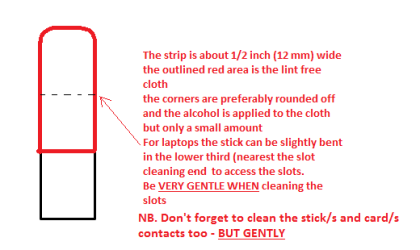
SLOT CLEANING
Now as for the slots to clean them use a strip of old credit card (or any card thin enough some are better than others ) about 1/2 inch wide nip the corners off one end - preferably round them off hold a piece of thin lint free cloth over the end dab on some form of alcohol - isopropyl alcohol (what we swab the skin with before an injection) is good and GENTLY swipe along the slots.
This can also be done for the GPU slot/s and also the contacts of the sticks or cards - not the stick but some lint free cloth of course. See my pic for the stick but please be very gentle doing it if you are in any doubt - please ask before doing it but I use this all the time and have yet to damage anything
 

Attachments

  • STICK CLEANER.PNG
    STICK CLEANER.PNG
    6.1 KB · Views: 5

My Computer My Computer

Computer type
PC/Desktop
Computer Manufacturer/Model Number
Own build (new) Desk1 / Asus ROG Win 7 / Desk2 1st build
OS
Desk1 7 Home Prem / Desk2 10 Pro / Main lap Asus ROG 10 Pro 2 laptop Toshiba 7 Pro Asus P2520 7 & 10
CPU
Desk1 i5 3750K / Laptop i7 GTX 860M / Desk2 i5 2500
Motherboard
Desk1 Asus P877-V / Desk2 Gigabyte H67 UD3H / Laptop ?
Memory
Desk1 8GB (1866) / Desk2 16GB (1333) / Laptop 8Gb DDR3
Graphics Card(s)
Desk 1& 2NVidia GTX 650 & Laptops on board Intel
Sound Card
Desk 1 & 2 -XONAR DG Realtek High Def audio Laptop
Monitor(s) Displays
Desk 1 Benq HD 2450 / Desk2 Philips 24" / Laptop 17.5"
Screen Resolution
1920x1080 D1 & D2 & Laptop 1
Hard Drives
Desk1 Samsung 120GB 830 SSD
Asus ROG 256GB 850 Pro SSD
Desk2 Samsung 840 256 SSD
Toshiba 120GB EVO
PSU
Desk 1 Corsair HX 1050/ Laptop ? / Desk 2 Corsair HX 650
Case
Desk 1 Cooler HAF XM ? Toshiba laptop / Desk2 Coolermaster
Cooling
Fans on all Desk1 -2 Desk2 - all Coolermasters 5 Laptop ?
Keyboard
Desk 1 MS Sidewinder X6 Desk 2 MS Sidewinder X 4
Mouse
Desk 1&2 - Gigabyte MS 900 gamer - laptop - Logitec wireless
Internet Speed
ADSL2+
Other Info
One other Desktop (tester) and spare Toshba laptop both with SSD's
Running Kaspersky 2016 ISS on all machines config'd identically
Logitec audio stereo systems on each machine (x3)
Canon MG5250MFC
Router/modem TP-Link running WPA2SK
Back
Top