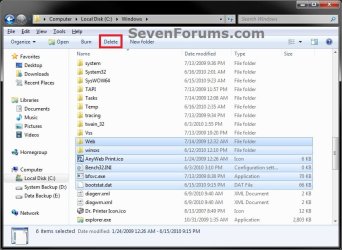
Windows Explorer - Add or Remove Delete Button

How to Add a Delete Button to Windows 7 Explorer Toolbar


   Information
By default Windows 7 does not have a Delete button on the Windows Explorer toolbar.

This will show you how to add or remove a Delete button to the Windows 7 Explorer toolbar. If added, the Delete button will be available inside opened included folders in the default Documents, Music, Pictures, and Videos libraries, and in all folders with the General Items, Videos, Documents, Music, and Pictures folder templates in Windows Explorer.
   Note
When you select one or more files or folders and click on the Delete button on the toolbar, these files and folders will be moved to the Recycle Bin.
   Warning
You must be logged in as an administrator to be able to add a Delete button.

Do not use this in Vista. It is only for Windows 7.


EXAMPLE: Delete Button Added to Windows 7 Explorer Toolbar
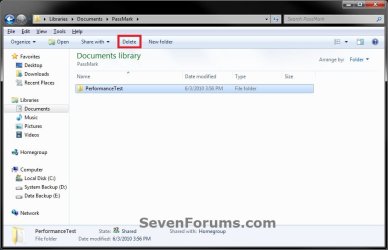
Library.jpg

Windows_Explorer.jpg


OPTION ONE

Add Delete Button to Windows 7 Explorer Toolbar


1. Open the Start Menu, then type regedit in the search box and press enter.

2. In regedit, navigate to each location below. (see left screenshot below step 4)
HKEY_LOCAL_MACHINE\SOFTWARE\Microsoft\Windows\CurrentVersion\Explorer\FolderTypes
3. If prompted by UAC, then click on Yes.

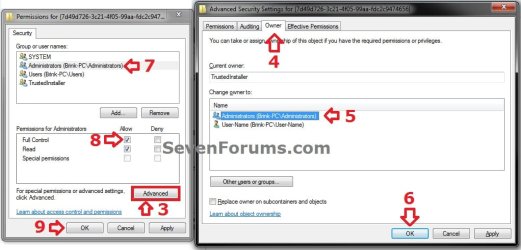
4. In the left pane under FolderTypes, right click on a {long number} key below and click on Permissions. Take ownership (step 3 in Option Two of Method TWO at this link) of this key, and Allow your administrator account Full Control of the key. Repeat this for each {long number} key below. (see screenshots below)


NOTE: The screenshots below are numbered in order to help make doing this step easier to do.
  • {5c4f28b5-f869-4e84-8e60-f11db97c5cc7}
  • {7d49d726-3c21-4f05-99aa-fdc2c9474656}
  • {b3690e58-e961-423b-b687-386ebfd83239}
Step1.jpg

Step2.jpg

5. When finished, you can close regedit.

6. Click on the Download button below to download the file below.
Add_Delete_Toolbar_Button_to_Windows_Explorer.reg

Download


7. Click on Save, and save the .reg file to the desktop.

8. Right click on the downloaded .reg file and click on Merge.

9. Click on Run, Yes, Yes, and OK when prompted.
NOTE: If you get a error about not being able to import all of the REG file, then you may have missed doing step 4 completely for one of the {long number} keys.

10. When done, you can delete the downloaded .reg file if you like.

11. If open, close and reopen Windows Explorer to see the Delete button on the toolbar when you select a file or folder.


OPTION TWO

Remove Delete Button from Windows 7 Explorer Toolbar


1. Click on the Download button below to download the file below.
Remove_Delete_Toolbar_Button_from_Windows_Explorer.reg

Download


2. Click on Save, and save the .reg file to the desktop.

3. Right click on the downloaded .reg file and click on Merge.

4. Click on Run, Yes, Yes, and OK when prompted.

5. When done, you can delete the downloaded .reg file if you like.

6. If open, close and reopen Windows Explorer to see that the Delete button has been removed from the toolbar.
That's it,
Shawn


Attachments

Last edited:
Are you able to manually open the registry (regedit.exe), or is only with this REG file?

Do you have UAC turned on?

If only this REG file, then this usually means that a GUID number was missed having been taken ownership and "Allow" "Full control" of.
Oh yes, I can open the registry editor and merge, add, and delete any other registry entries. It's only with this REG file that won't merge. I'm not running any security programs that would interfere, and I don't have UAC on.

I'm going to call it a night for now. I'll take another crack at this tomorrow, and maybe even a reboot will solve the problem. I appreciate your help, Brink :).

Turn on UAC to the top level, then try again when you get time to next to see if it will work for you then. See you tomorrow. :)
 

My Computer

Computer type
PC/Desktop
Computer Manufacturer/Model Number
Self built custom
OS
64-bit Windows 11 Pro for Workstations
CPU
Intel i7-8700K OC'd to 5 GHz
Motherboard
ASUS ROG Maximus XI Formula Z390
Memory
64 GB (4x16GB) G.SKILL TridentZ RGB DDR4 3600 MHz
Graphics Card(s)
ASUS ROG-STRIX-GTX1080TI-O11G-GAMING
Sound Card
Integrated
Monitor(s) Displays
2 x Samsung Odyssey G7 27"
Screen Resolution
2560x1440
Hard Drives
1TB Samsung 990 PRO M.2,
4TB Samsung 990 PRO PRO M.2,
TerraMaster F8 SSD Plus NAS
PSU
Seasonic Prime Titanium 850W
Case
Thermaltake Core P3
Cooling
Corsair Hydro H115i
Keyboard
Logitech wireless K800
Mouse
Logitech MX Master 4
Internet Speed
2 Gb/s Download and 100 Mb/s Upload
Antivirus
Malwarebyte Anti-Malware Premium
Browser
Google Chrome
Other Info
Logitech Z625 speaker system,
Logitech BRIO 4K Pro webcam,
HP Color LaserJet Pro MFP M477fdn,
APC SMART-UPS RT 1000 XL - SURT1000XLI,
Galaxy S23 Plus phone
Hi Misfortune

You may want to look back at post #8 there where I mentioned looking for any duplicates as well as first deleting all 5 keys once they were in full control as Brink mentioned as well as ownership.

With repeat attempts I came across the duplicate entries and after not getting frustrated simply waited the next day to take a fresh look and saw immediate results by manually removing all 5 keys and then a fresh merge of the download went right on without hesitation.

Protections as well as the software for the dual monitors here was also turned off but had no effect on what was preventling the merger from working.

1)Try a quick shutdown and then start back up to load Windows fresh and look for the 5 keys.

2)Take ownership as well as full control to see those removed. Verify you have the right ones of course.

3) Then browse to the folder even "desktop" try highlighting the reg file which you can also download into a temp folder if you prefer. Once hightlighted with a single click in a Windows Explorer window click the merge button.

I was a little caught off guard but took notes when seeing those few steps work right away. If you saw the error message in the screen posted earlier you are running into the same thing there too. Hopefully this will work for you as well.
 

My Computers

System One System Two

  • Computer type
    PC/Desktop
    Computer Manufacturer/Model Number
    Custom builds = 2
    OS
    W7 Ultimate x64/W10 Pro x64/W11 Pro Triple Boot - Main PC W7 Remote PC Micro ATX W7 Pro x64/W11 Pro
    CPU
    AMD Phenom II X4 975 Deneb 3.6ghz - 965 2nd remote pc
    Motherboard
    Gigabyte GA-790XTA-UD4-Gigabyte GA-880GM-D2H remote pc
    Memory
    Kingston Hyper X DDR3 1600 1.5v 16gb - Hyper X Fury 8gb 2nd
    Graphics Card(s)
    MSI HD Radeon 5750 1gb - MSI HD Radeon 6450 on mini tower
    Sound Card
    Creative Labs X-Fi Xtreme Audio P - Realtek onooard 2nd case
    Monitor(s) Displays
    ASUS VW199T-P 19" HP 2082a Main-HP 2082a 20" remote pc
    Screen Resolution
    Asus 1440x900 - HP 1600x900
    Hard Drives
    WD Black 1TB HD per OS W7, W10, and pending W11 presently on 500gb OS Drive - Pending Triple 1TB HDs for Spanned Storage/backup volume
    Single 2TB external USB enclosure, single 1TB System 7 Host/Boot drive, Pending 8TB external HD for system image b
    PSU
    Corsair 750TX - primary / Corsair CX600 - second
    Case
    Antec 900-2 - SSD compatible / NZXT Vulcan mini tower
    Cooling
    Zalman CNPS9900A
    Keyboard
    AZIO L70 Backlit Letters Gaming - ONN Cordless/USB
    Mouse
    MSI DS200 Programmable, Logitech Cordless
    Internet Speed
    30mbps upgrade - primary hard wired - mini tower usb WiFi
    Antivirus
    GFI VIPRE Internet Security 2014 on W7 2016 beta on W10,
    Browser
    Cyberfox, WaterFox 64bit FF variants, FireFox x64, Pale Moon
    Other Info
    Accomdata fan cooled usb 2.0 PIDE/Sata II, III external enclosure.
    Sambient usb/eSata PATA/Sata II, III external enclosure.
  • Computer type
    PC/Desktop
    System Manufacturer/Model Number
    CUSTOM ASSEMBLY
    OS
    W7 Pro x64/W11 Pro
    CPU
    AMD Deneb 3.6ghz - 965
    Motherboard
    Gigabyte GA-880GM-D2H remote pc
    Memory
    Kingston Hyper X Fury 8gb
    Graphics Card(s)
    MSI HD Radeon 6450 DVI Output
    Sound Card
    Realtek onooard Creative or Other separate PENDING
    Monitor(s) Displays
    VIZIO 32" LCD TV Separate LCD Pending
    Screen Resolution
    1600x1080
    Hard Drives
    WD 500GB OS Host/Boot WD Green 1TB Storage/Backup
    PSU
    Corsair 600W - THERMALTAKE 600W spare case
    Case
    NZXT Vulcan mini tower
    Cooling
    Twin 120mm Top Fans - 240mm Side Cover
    Keyboard
    ONN Cordless/USB Logitech Cordless
    Mouse
    ONN USB/Cordless - Logitech Cordless
    Internet Speed
    DSL 5G
    Browser
    MS Edge, FireFox, WaterFox x64, FireFox Nightly
    Other Info
    OS Testing-Remote Access to Main TeamViewer
OK, I got it to work using Night Hawk's method. I made a System Restore point, then exported (made backups) of each of the registry keys. I then deleted each key, and then closed the registry editor. Then, one by one, I merged the exported (backed up) keys. I then merged Brink's REG file to add the delete button, and -- finally! -- I got a confirmation box saying the keys were merged. Upon opening a new Explorer window, the Delete button was there :)!

Thank you both, Brink and Night Hawk, for the help! Although I still have no clue why my silly computer wouldn't grant me permission to edit the registry, even though I had full control and was the owner :confused:.
 

My Computer

OS
Windows 7 Home Premium x64
I'm not sure why you had to do it that way either, but I'm happy that you got it working for you.

To be honest, I'm not sure why you guys deleted anything to begin with. As long as all of the GUID numbers in step 4 have been "taken ownership" of by your user account and you "Allow" your user account "Full Control" of each GUID number in step 4, then the REG file should merge completely to add the "Delete" toolbar button. No matter how many times you run the REG file, it will not add multiple instances. :confused:
 

My Computer

Computer type
PC/Desktop
Computer Manufacturer/Model Number
Self built custom
OS
64-bit Windows 11 Pro for Workstations
CPU
Intel i7-8700K OC'd to 5 GHz
Motherboard
ASUS ROG Maximus XI Formula Z390
Memory
64 GB (4x16GB) G.SKILL TridentZ RGB DDR4 3600 MHz
Graphics Card(s)
ASUS ROG-STRIX-GTX1080TI-O11G-GAMING
Sound Card
Integrated
Monitor(s) Displays
2 x Samsung Odyssey G7 27"
Screen Resolution
2560x1440
Hard Drives
1TB Samsung 990 PRO M.2,
4TB Samsung 990 PRO PRO M.2,
TerraMaster F8 SSD Plus NAS
PSU
Seasonic Prime Titanium 850W
Case
Thermaltake Core P3
Cooling
Corsair Hydro H115i
Keyboard
Logitech wireless K800
Mouse
Logitech MX Master 4
Internet Speed
2 Gb/s Download and 100 Mb/s Upload
Antivirus
Malwarebyte Anti-Malware Premium
Browser
Google Chrome
Other Info
Logitech Z625 speaker system,
Logitech BRIO 4K Pro webcam,
HP Color LaserJet Pro MFP M477fdn,
APC SMART-UPS RT 1000 XL - SURT1000XLI,
Galaxy S23 Plus phone
The only thing I can figure is it may have something to do with some layer of data execution protection now seen in 7 that wasn't present in Vista. The UAC is kept off here as well as having disabled all other protections when first running into this one.

I'm glad to see you got it to work for you there! Misfortune :D It would be interesting to know sometime just what we have in common as far as the registry that prevented the initial attempts we made. At least we have a fix available in case anyone else runs into this too.
 

My Computers

System One System Two

  • Computer type
    PC/Desktop
    Computer Manufacturer/Model Number
    Custom builds = 2
    OS
    W7 Ultimate x64/W10 Pro x64/W11 Pro Triple Boot - Main PC W7 Remote PC Micro ATX W7 Pro x64/W11 Pro
    CPU
    AMD Phenom II X4 975 Deneb 3.6ghz - 965 2nd remote pc
    Motherboard
    Gigabyte GA-790XTA-UD4-Gigabyte GA-880GM-D2H remote pc
    Memory
    Kingston Hyper X DDR3 1600 1.5v 16gb - Hyper X Fury 8gb 2nd
    Graphics Card(s)
    MSI HD Radeon 5750 1gb - MSI HD Radeon 6450 on mini tower
    Sound Card
    Creative Labs X-Fi Xtreme Audio P - Realtek onooard 2nd case
    Monitor(s) Displays
    ASUS VW199T-P 19" HP 2082a Main-HP 2082a 20" remote pc
    Screen Resolution
    Asus 1440x900 - HP 1600x900
    Hard Drives
    WD Black 1TB HD per OS W7, W10, and pending W11 presently on 500gb OS Drive - Pending Triple 1TB HDs for Spanned Storage/backup volume
    Single 2TB external USB enclosure, single 1TB System 7 Host/Boot drive, Pending 8TB external HD for system image b
    PSU
    Corsair 750TX - primary / Corsair CX600 - second
    Case
    Antec 900-2 - SSD compatible / NZXT Vulcan mini tower
    Cooling
    Zalman CNPS9900A
    Keyboard
    AZIO L70 Backlit Letters Gaming - ONN Cordless/USB
    Mouse
    MSI DS200 Programmable, Logitech Cordless
    Internet Speed
    30mbps upgrade - primary hard wired - mini tower usb WiFi
    Antivirus
    GFI VIPRE Internet Security 2014 on W7 2016 beta on W10,
    Browser
    Cyberfox, WaterFox 64bit FF variants, FireFox x64, Pale Moon
    Other Info
    Accomdata fan cooled usb 2.0 PIDE/Sata II, III external enclosure.
    Sambient usb/eSata PATA/Sata II, III external enclosure.
  • Computer type
    PC/Desktop
    System Manufacturer/Model Number
    CUSTOM ASSEMBLY
    OS
    W7 Pro x64/W11 Pro
    CPU
    AMD Deneb 3.6ghz - 965
    Motherboard
    Gigabyte GA-880GM-D2H remote pc
    Memory
    Kingston Hyper X Fury 8gb
    Graphics Card(s)
    MSI HD Radeon 6450 DVI Output
    Sound Card
    Realtek onooard Creative or Other separate PENDING
    Monitor(s) Displays
    VIZIO 32" LCD TV Separate LCD Pending
    Screen Resolution
    1600x1080
    Hard Drives
    WD 500GB OS Host/Boot WD Green 1TB Storage/Backup
    PSU
    Corsair 600W - THERMALTAKE 600W spare case
    Case
    NZXT Vulcan mini tower
    Cooling
    Twin 120mm Top Fans - 240mm Side Cover
    Keyboard
    ONN Cordless/USB Logitech Cordless
    Mouse
    ONN USB/Cordless - Logitech Cordless
    Internet Speed
    DSL 5G
    Browser
    MS Edge, FireFox, WaterFox x64, FireFox Nightly
    Other Info
    OS Testing-Remote Access to Main TeamViewer
You're most welcome Nerone, and welcome to Seven Forums. :)
 

My Computer

Computer type
PC/Desktop
Computer Manufacturer/Model Number
Self built custom
OS
64-bit Windows 11 Pro for Workstations
CPU
Intel i7-8700K OC'd to 5 GHz
Motherboard
ASUS ROG Maximus XI Formula Z390
Memory
64 GB (4x16GB) G.SKILL TridentZ RGB DDR4 3600 MHz
Graphics Card(s)
ASUS ROG-STRIX-GTX1080TI-O11G-GAMING
Sound Card
Integrated
Monitor(s) Displays
2 x Samsung Odyssey G7 27"
Screen Resolution
2560x1440
Hard Drives
1TB Samsung 990 PRO M.2,
4TB Samsung 990 PRO PRO M.2,
TerraMaster F8 SSD Plus NAS
PSU
Seasonic Prime Titanium 850W
Case
Thermaltake Core P3
Cooling
Corsair Hydro H115i
Keyboard
Logitech wireless K800
Mouse
Logitech MX Master 4
Internet Speed
2 Gb/s Download and 100 Mb/s Upload
Antivirus
Malwarebyte Anti-Malware Premium
Browser
Google Chrome
Other Info
Logitech Z625 speaker system,
Logitech BRIO 4K Pro webcam,
HP Color LaserJet Pro MFP M477fdn,
APC SMART-UPS RT 1000 XL - SURT1000XLI,
Galaxy S23 Plus phone
Hi there, after numerous unsuccessful attempts using the given method, I can confirm what Misfortune says. Exporting, deleting and re-merging the keys then running the add delete toolbar button reg file works. Fantastic!!!!! Thanks to Brink and Night Hawk and Misfortune.
 

My Computer

Computer Manufacturer/Model Number
Acer Aspire 5741
OS
windows 7 Home Premium
CPU
Intel Core i5 @ 2.27GHz 32nm Technology
Motherboard
Acer Aspire 5741 (CPU)
Memory
DDR3 4.0GB
Graphics Card(s)
Intel(R) Graphics Media Accelerator HD
Sound Card
Realtek High Definition Audio Intel(R) Display Audio
Monitor(s) Displays
Generic PnP Monitor on Intel Graphics Media Accelerator HD
Screen Resolution
1366x768
Hard Drives
Seagate 2.5" SATA 500GB
Keyboard
Synaptics PS/2 Port TouchPad
Mouse
Microsoft Comfort Mouse 4500 (IntelliPoint)
I'm happy to hear that you got it working Kiwichick. :)
 

My Computer

Computer type
PC/Desktop
Computer Manufacturer/Model Number
Self built custom
OS
64-bit Windows 11 Pro for Workstations
CPU
Intel i7-8700K OC'd to 5 GHz
Motherboard
ASUS ROG Maximus XI Formula Z390
Memory
64 GB (4x16GB) G.SKILL TridentZ RGB DDR4 3600 MHz
Graphics Card(s)
ASUS ROG-STRIX-GTX1080TI-O11G-GAMING
Sound Card
Integrated
Monitor(s) Displays
2 x Samsung Odyssey G7 27"
Screen Resolution
2560x1440
Hard Drives
1TB Samsung 990 PRO M.2,
4TB Samsung 990 PRO PRO M.2,
TerraMaster F8 SSD Plus NAS
PSU
Seasonic Prime Titanium 850W
Case
Thermaltake Core P3
Cooling
Corsair Hydro H115i
Keyboard
Logitech wireless K800
Mouse
Logitech MX Master 4
Internet Speed
2 Gb/s Download and 100 Mb/s Upload
Antivirus
Malwarebyte Anti-Malware Premium
Browser
Google Chrome
Other Info
Logitech Z625 speaker system,
Logitech BRIO 4K Pro webcam,
HP Color LaserJet Pro MFP M477fdn,
APC SMART-UPS RT 1000 XL - SURT1000XLI,
Galaxy S23 Plus phone
Welcome to the Seven Forums! kiwichick Also glad to hear the method is also helping others running into any similar problems getting the delete option onto the WE toolbar. :D
 

My Computers

System One System Two

  • Computer type
    PC/Desktop
    Computer Manufacturer/Model Number
    Custom builds = 2
    OS
    W7 Ultimate x64/W10 Pro x64/W11 Pro Triple Boot - Main PC W7 Remote PC Micro ATX W7 Pro x64/W11 Pro
    CPU
    AMD Phenom II X4 975 Deneb 3.6ghz - 965 2nd remote pc
    Motherboard
    Gigabyte GA-790XTA-UD4-Gigabyte GA-880GM-D2H remote pc
    Memory
    Kingston Hyper X DDR3 1600 1.5v 16gb - Hyper X Fury 8gb 2nd
    Graphics Card(s)
    MSI HD Radeon 5750 1gb - MSI HD Radeon 6450 on mini tower
    Sound Card
    Creative Labs X-Fi Xtreme Audio P - Realtek onooard 2nd case
    Monitor(s) Displays
    ASUS VW199T-P 19" HP 2082a Main-HP 2082a 20" remote pc
    Screen Resolution
    Asus 1440x900 - HP 1600x900
    Hard Drives
    WD Black 1TB HD per OS W7, W10, and pending W11 presently on 500gb OS Drive - Pending Triple 1TB HDs for Spanned Storage/backup volume
    Single 2TB external USB enclosure, single 1TB System 7 Host/Boot drive, Pending 8TB external HD for system image b
    PSU
    Corsair 750TX - primary / Corsair CX600 - second
    Case
    Antec 900-2 - SSD compatible / NZXT Vulcan mini tower
    Cooling
    Zalman CNPS9900A
    Keyboard
    AZIO L70 Backlit Letters Gaming - ONN Cordless/USB
    Mouse
    MSI DS200 Programmable, Logitech Cordless
    Internet Speed
    30mbps upgrade - primary hard wired - mini tower usb WiFi
    Antivirus
    GFI VIPRE Internet Security 2014 on W7 2016 beta on W10,
    Browser
    Cyberfox, WaterFox 64bit FF variants, FireFox x64, Pale Moon
    Other Info
    Accomdata fan cooled usb 2.0 PIDE/Sata II, III external enclosure.
    Sambient usb/eSata PATA/Sata II, III external enclosure.
  • Computer type
    PC/Desktop
    System Manufacturer/Model Number
    CUSTOM ASSEMBLY
    OS
    W7 Pro x64/W11 Pro
    CPU
    AMD Deneb 3.6ghz - 965
    Motherboard
    Gigabyte GA-880GM-D2H remote pc
    Memory
    Kingston Hyper X Fury 8gb
    Graphics Card(s)
    MSI HD Radeon 6450 DVI Output
    Sound Card
    Realtek onooard Creative or Other separate PENDING
    Monitor(s) Displays
    VIZIO 32" LCD TV Separate LCD Pending
    Screen Resolution
    1600x1080
    Hard Drives
    WD 500GB OS Host/Boot WD Green 1TB Storage/Backup
    PSU
    Corsair 600W - THERMALTAKE 600W spare case
    Case
    NZXT Vulcan mini tower
    Cooling
    Twin 120mm Top Fans - 240mm Side Cover
    Keyboard
    ONN Cordless/USB Logitech Cordless
    Mouse
    ONN USB/Cordless - Logitech Cordless
    Internet Speed
    DSL 5G
    Browser
    MS Edge, FireFox, WaterFox x64, FireFox Nightly
    Other Info
    OS Testing-Remote Access to Main TeamViewer
Thanks for the welcome guys.

I don't know if this has been discussed anywhere else but I did notice something about how users may be confused as to whether it has worked or not. I didn't think it had worked myself until I discovered this. I hope I can explain and have it make sense :D

Ok. The delete button will not be visible when a file/folder is selected from within "library view". You have to actually be "in the folder itself".

For example: (See information box at top of tutorial)

I open Explorer and select Libraries in the folder tree. I then click on the Documents library or double-click the Documents library icon in the main window. I am now in "library view". If I click on a file or folder there is no delete button.

Now I expand the Documents library in the folder tree. I then click on My Documents. Now I am actually "in the folder itself". If I click on a file or folder there is the delete button.
 

My Computer

Computer Manufacturer/Model Number
Acer Aspire 5741
OS
windows 7 Home Premium
CPU
Intel Core i5 @ 2.27GHz 32nm Technology
Motherboard
Acer Aspire 5741 (CPU)
Memory
DDR3 4.0GB
Graphics Card(s)
Intel(R) Graphics Media Accelerator HD
Sound Card
Realtek High Definition Audio Intel(R) Display Audio
Monitor(s) Displays
Generic PnP Monitor on Intel Graphics Media Accelerator HD
Screen Resolution
1366x768
Hard Drives
Seagate 2.5" SATA 500GB
Keyboard
Synaptics PS/2 Port TouchPad
Mouse
Microsoft Comfort Mouse 4500 (IntelliPoint)
That's how mine works too kiwichick, good explanation. :D
 

My Computer

Computer type
PC/Desktop
Computer Manufacturer/Model Number
Self Built
OS
Win 10 Pro x64
CPU
Intel I5-2500K @3.3GHz
Motherboard
Asrock P67 Extreme4
Memory
16GB G.Skill Ripjaws X (4x4GB)
Graphics Card(s)
EVGA GeForce 750 Ti SC 2GB
Sound Card
ASUS Xonar DG 5.1 Channels 24-bit 96KHz PCI Interface Sound
Monitor(s) Displays
auria eq2367
Screen Resolution
1920 x 1080
Hard Drives
250GB Samsung 850 EVO SSD
1TB WD Blue
1TB Hitachi
PSU
SeaSonic X 650W 80 Plus Gold
Case
Corsair Obsidian 750D
Cooling
Corsair H60, Three 140mm case fans
Keyboard
Logitech Wireless Keyboard K520
Mouse
Logitech Wireless Mouse M310
Internet Speed
Wave Broadband ~ 100 dn 5 up
Antivirus
Windows Defender, Malwarebytes Premium
Browser
Edge, IE11, Chrome
Other Info
Laptop specs: HP g7-1365dx /
CPU: AMD A6-3420M APU with Radeon(tm) HD Graphics /
RAM: Crucial 8Gb (2x4Gb) /
SSD: Crucial M4-CT128M4SSD2 ATA Device/ FW 000F /
GFX: AMD Radeon HD 6520G /
OS: Windows 10 Pro x64
When first going to highlight any folder or file when browsing any drive the delete will appear immediately for use since you have pointed WE to one or more file(s) or folder(s). You wouldn't to see the things you need removed when simply going to click on your user account or clicking on any drive now would you? :eek: :D

That prevents any accidental deletions of things you want to keep until directly pointing out items to be removed by first seeing them highlighed and then clicking on the delete button to send them on their way.
 

My Computers

System One System Two

  • Computer type
    PC/Desktop
    Computer Manufacturer/Model Number
    Custom builds = 2
    OS
    W7 Ultimate x64/W10 Pro x64/W11 Pro Triple Boot - Main PC W7 Remote PC Micro ATX W7 Pro x64/W11 Pro
    CPU
    AMD Phenom II X4 975 Deneb 3.6ghz - 965 2nd remote pc
    Motherboard
    Gigabyte GA-790XTA-UD4-Gigabyte GA-880GM-D2H remote pc
    Memory
    Kingston Hyper X DDR3 1600 1.5v 16gb - Hyper X Fury 8gb 2nd
    Graphics Card(s)
    MSI HD Radeon 5750 1gb - MSI HD Radeon 6450 on mini tower
    Sound Card
    Creative Labs X-Fi Xtreme Audio P - Realtek onooard 2nd case
    Monitor(s) Displays
    ASUS VW199T-P 19" HP 2082a Main-HP 2082a 20" remote pc
    Screen Resolution
    Asus 1440x900 - HP 1600x900
    Hard Drives
    WD Black 1TB HD per OS W7, W10, and pending W11 presently on 500gb OS Drive - Pending Triple 1TB HDs for Spanned Storage/backup volume
    Single 2TB external USB enclosure, single 1TB System 7 Host/Boot drive, Pending 8TB external HD for system image b
    PSU
    Corsair 750TX - primary / Corsair CX600 - second
    Case
    Antec 900-2 - SSD compatible / NZXT Vulcan mini tower
    Cooling
    Zalman CNPS9900A
    Keyboard
    AZIO L70 Backlit Letters Gaming - ONN Cordless/USB
    Mouse
    MSI DS200 Programmable, Logitech Cordless
    Internet Speed
    30mbps upgrade - primary hard wired - mini tower usb WiFi
    Antivirus
    GFI VIPRE Internet Security 2014 on W7 2016 beta on W10,
    Browser
    Cyberfox, WaterFox 64bit FF variants, FireFox x64, Pale Moon
    Other Info
    Accomdata fan cooled usb 2.0 PIDE/Sata II, III external enclosure.
    Sambient usb/eSata PATA/Sata II, III external enclosure.
  • Computer type
    PC/Desktop
    System Manufacturer/Model Number
    CUSTOM ASSEMBLY
    OS
    W7 Pro x64/W11 Pro
    CPU
    AMD Deneb 3.6ghz - 965
    Motherboard
    Gigabyte GA-880GM-D2H remote pc
    Memory
    Kingston Hyper X Fury 8gb
    Graphics Card(s)
    MSI HD Radeon 6450 DVI Output
    Sound Card
    Realtek onooard Creative or Other separate PENDING
    Monitor(s) Displays
    VIZIO 32" LCD TV Separate LCD Pending
    Screen Resolution
    1600x1080
    Hard Drives
    WD 500GB OS Host/Boot WD Green 1TB Storage/Backup
    PSU
    Corsair 600W - THERMALTAKE 600W spare case
    Case
    NZXT Vulcan mini tower
    Cooling
    Twin 120mm Top Fans - 240mm Side Cover
    Keyboard
    ONN Cordless/USB Logitech Cordless
    Mouse
    ONN USB/Cordless - Logitech Cordless
    Internet Speed
    DSL 5G
    Browser
    MS Edge, FireFox, WaterFox x64, FireFox Nightly
    Other Info
    OS Testing-Remote Access to Main TeamViewer
I too had been searching for a method/hack to add a "delete" button and similar Windows XP styled icons to Windows 7 x64 Windows Explorer toolbar with no success (save for the aforementioned registry hack). A couple of weeks ago, a friend told me about a wonderful little FREE utility called, "Classic Shell". Classic Shell is a collection of features that were available in older versions of Windows but as everyone knows were inexplicably removed from Vista and Windows 7. It has a classic start menu for Windows 7, it adds a toolbar for Windows Explorer and supports a variety of smaller features. The latest version is 3.3.0. Simply run a Quick Google search to download a copy. It works absolutely perfectly and you will not be disappointed!
 

My Computer

Computer Manufacturer/Model Number
Custom-Built
OS
Windows 7 Ultimate x64
CPU
i7
Motherboard
Intel
Memory
8GB
Graphics Card(s)
nVidia GeForce GT 330
Sound Card
Creative Labs Sound Blaster X-Fi Titanium
Monitor(s) Displays
Samsung 2494SW 24-inch
Hard Drives
2 Hitachi Drives 1 TB each
PSU
Antec CP-1000 1000 Watt
Case
Antec Sonata Elite
Cooling
5 120mm fans
Thanks for the Tip !!!

Thanks for the Tip!!!

And how the heck did you ever discover the instructions???

Cheers!
 

My Computer

OS
Windows 7 Professional 64 bit
You're most welcome LaZeR30, and welcome to Seven Forums.

It was a matter of finding the correct registry location and GUID numbers for the Delete button. It was fun finding them.
 

My Computer

Computer type
PC/Desktop
Computer Manufacturer/Model Number
Self built custom
OS
64-bit Windows 11 Pro for Workstations
CPU
Intel i7-8700K OC'd to 5 GHz
Motherboard
ASUS ROG Maximus XI Formula Z390
Memory
64 GB (4x16GB) G.SKILL TridentZ RGB DDR4 3600 MHz
Graphics Card(s)
ASUS ROG-STRIX-GTX1080TI-O11G-GAMING
Sound Card
Integrated
Monitor(s) Displays
2 x Samsung Odyssey G7 27"
Screen Resolution
2560x1440
Hard Drives
1TB Samsung 990 PRO M.2,
4TB Samsung 990 PRO PRO M.2,
TerraMaster F8 SSD Plus NAS
PSU
Seasonic Prime Titanium 850W
Case
Thermaltake Core P3
Cooling
Corsair Hydro H115i
Keyboard
Logitech wireless K800
Mouse
Logitech MX Master 4
Internet Speed
2 Gb/s Download and 100 Mb/s Upload
Antivirus
Malwarebyte Anti-Malware Premium
Browser
Google Chrome
Other Info
Logitech Z625 speaker system,
Logitech BRIO 4K Pro webcam,
HP Color LaserJet Pro MFP M477fdn,
APC SMART-UPS RT 1000 XL - SURT1000XLI,
Galaxy S23 Plus phone
FAAAHHHKIN fail man...
i KNOW i am having issues w/
5c4f28b5-f869-4e84-8e60-f11db97c5cc7
when i clicked full controlll in became greyed but checked, then the same w/ read, but special permissions is NOT checked. i am REALLY at a loss.
shit - someone help me out here LOL

btw, Shaun you're a techie geeks god man. BRINK RULES!!! lol

PEACE!

--->EDIT----
but THEN i found this beauty LOL:
http://www.nirsoft.net/utils/custom_explorer_toolbar.html
 

My Computer

Computer type
PC/Desktop
Computer Manufacturer/Model Number
Homemade Heap
OS
Windows 7 x64 Ultimate
CPU
AMD Phenom II X4 965 Black Edition 3.4Ghz (OC @ 3.7Ghz)
Motherboard
ASUS M5A97 LE R2.0
Memory
G-Skill (2x4GB) DDR3 1333 1.5v (OV to 1.65v @ 1432)
Graphics Card(s)
EVGA GeForce GTS 450 SC Edition
Sound Card
Onboard
Monitor(s) Displays
42 inch HP Television/Monitor
Screen Resolution
1920x1080
Hard Drives
SSD OS:OCZ RevoDrive X2 220GB PCIe SSD >>>
HDD Storage: 1x Western Digital Black 750GB, 32MB, 6.0,
2x Western Digital Blue 1TB, 32MB, 6.0,
1x Seagate Baracuda 3TB, 64MB, 6.0
PSU
Antec EarthWatts EA750 750W
Case
IN WIN Dragon Rider Black Steel Full Tower
Cooling
ALL AIR. Case:1x 220mm, 4x 120mm / CPU:Stock 4 pipe AMD PIB
Keyboard
Steelseries MERC Stealth
Mouse
Tek Republic TM Black 7 Button + 1 Wheel
Internet Speed
10Mb/s
Antivirus
ESET Security Suite v6
Browser
Firefox
Other Info
Optical Drive: Sony Optiarc 24x DVD Double Layer Lightscribe,
Fan Controller: NZXT Sentry-2 Touch Screen (5 fans + temps),
Audio: Kenwood 500w Home System

My Computer

Computer type
PC/Desktop
Computer Manufacturer/Model Number
Self built custom
OS
64-bit Windows 11 Pro for Workstations
CPU
Intel i7-8700K OC'd to 5 GHz
Motherboard
ASUS ROG Maximus XI Formula Z390
Memory
64 GB (4x16GB) G.SKILL TridentZ RGB DDR4 3600 MHz
Graphics Card(s)
ASUS ROG-STRIX-GTX1080TI-O11G-GAMING
Sound Card
Integrated
Monitor(s) Displays
2 x Samsung Odyssey G7 27"
Screen Resolution
2560x1440
Hard Drives
1TB Samsung 990 PRO M.2,
4TB Samsung 990 PRO PRO M.2,
TerraMaster F8 SSD Plus NAS
PSU
Seasonic Prime Titanium 850W
Case
Thermaltake Core P3
Cooling
Corsair Hydro H115i
Keyboard
Logitech wireless K800
Mouse
Logitech MX Master 4
Internet Speed
2 Gb/s Download and 100 Mb/s Upload
Antivirus
Malwarebyte Anti-Malware Premium
Browser
Google Chrome
Other Info
Logitech Z625 speaker system,
Logitech BRIO 4K Pro webcam,
HP Color LaserJet Pro MFP M477fdn,
APC SMART-UPS RT 1000 XL - SURT1000XLI,
Galaxy S23 Plus phone
oh hey yeah, i like the looks of the Explorer Toolbar Editor.
just got it, i will be playing with that baby next.
Thanks BRINK.
PEACE!!!:cool:
 

My Computer

Computer type
PC/Desktop
Computer Manufacturer/Model Number
Homemade Heap
OS
Windows 7 x64 Ultimate
CPU
AMD Phenom II X4 965 Black Edition 3.4Ghz (OC @ 3.7Ghz)
Motherboard
ASUS M5A97 LE R2.0
Memory
G-Skill (2x4GB) DDR3 1333 1.5v (OV to 1.65v @ 1432)
Graphics Card(s)
EVGA GeForce GTS 450 SC Edition
Sound Card
Onboard
Monitor(s) Displays
42 inch HP Television/Monitor
Screen Resolution
1920x1080
Hard Drives
SSD OS:OCZ RevoDrive X2 220GB PCIe SSD >>>
HDD Storage: 1x Western Digital Black 750GB, 32MB, 6.0,
2x Western Digital Blue 1TB, 32MB, 6.0,
1x Seagate Baracuda 3TB, 64MB, 6.0
PSU
Antec EarthWatts EA750 750W
Case
IN WIN Dragon Rider Black Steel Full Tower
Cooling
ALL AIR. Case:1x 220mm, 4x 120mm / CPU:Stock 4 pipe AMD PIB
Keyboard
Steelseries MERC Stealth
Mouse
Tek Republic TM Black 7 Button + 1 Wheel
Internet Speed
10Mb/s
Antivirus
ESET Security Suite v6
Browser
Firefox
Other Info
Optical Drive: Sony Optiarc 24x DVD Double Layer Lightscribe,
Fan Controller: NZXT Sentry-2 Touch Screen (5 fans + temps),
Audio: Kenwood 500w Home System
You're most welcome. :)
 

My Computer

Computer type
PC/Desktop
Computer Manufacturer/Model Number
Self built custom
OS
64-bit Windows 11 Pro for Workstations
CPU
Intel i7-8700K OC'd to 5 GHz
Motherboard
ASUS ROG Maximus XI Formula Z390
Memory
64 GB (4x16GB) G.SKILL TridentZ RGB DDR4 3600 MHz
Graphics Card(s)
ASUS ROG-STRIX-GTX1080TI-O11G-GAMING
Sound Card
Integrated
Monitor(s) Displays
2 x Samsung Odyssey G7 27"
Screen Resolution
2560x1440
Hard Drives
1TB Samsung 990 PRO M.2,
4TB Samsung 990 PRO PRO M.2,
TerraMaster F8 SSD Plus NAS
PSU
Seasonic Prime Titanium 850W
Case
Thermaltake Core P3
Cooling
Corsair Hydro H115i
Keyboard
Logitech wireless K800
Mouse
Logitech MX Master 4
Internet Speed
2 Gb/s Download and 100 Mb/s Upload
Antivirus
Malwarebyte Anti-Malware Premium
Browser
Google Chrome
Other Info
Logitech Z625 speaker system,
Logitech BRIO 4K Pro webcam,
HP Color LaserJet Pro MFP M477fdn,
APC SMART-UPS RT 1000 XL - SURT1000XLI,
Galaxy S23 Plus phone
Back
Top