Windows Explorer - Add or Remove Delete Button

How to Add a Delete Button to Windows 7 Explorer Toolbar


   Information
By default Windows 7 does not have a Delete button on the Windows Explorer toolbar.

This will show you how to add or remove a Delete button to the Windows 7 Explorer toolbar. If added, the Delete button will be available inside opened included folders in the default Documents, Music, Pictures, and Videos libraries, and in all folders with the General Items, Videos, Documents, Music, and Pictures folder templates in Windows Explorer.
   Note
When you select one or more files or folders and click on the Delete button on the toolbar, these files and folders will be moved to the Recycle Bin.
   Warning
You must be logged in as an administrator to be able to add a Delete button.

Do not use this in Vista. It is only for Windows 7.


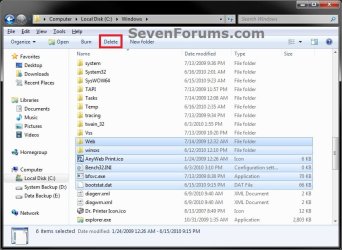
EXAMPLE: Delete Button Added to Windows 7 Explorer Toolbar
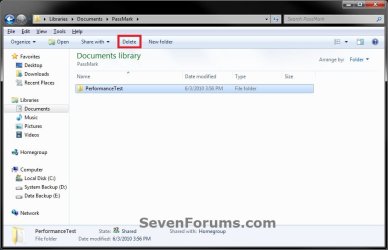
Library.jpg

Windows_Explorer.jpg


OPTION ONE

Add Delete Button to Windows 7 Explorer Toolbar


1. Open the Start Menu, then type regedit in the search box and press enter.

2. In regedit, navigate to each location below. (see left screenshot below step 4)
HKEY_LOCAL_MACHINE\SOFTWARE\Microsoft\Windows\CurrentVersion\Explorer\FolderTypes
3. If prompted by UAC, then click on Yes.

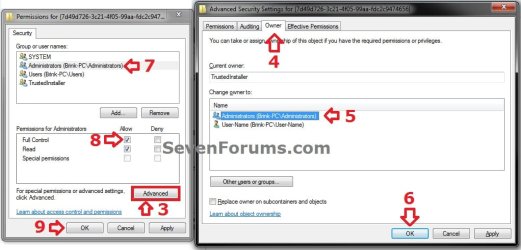
4. In the left pane under FolderTypes, right click on a {long number} key below and click on Permissions. Take ownership (step 3 in Option Two of Method TWO at this link) of this key, and Allow your administrator account Full Control of the key. Repeat this for each {long number} key below. (see screenshots below)


NOTE: The screenshots below are numbered in order to help make doing this step easier to do.
  • {5c4f28b5-f869-4e84-8e60-f11db97c5cc7}
  • {7d49d726-3c21-4f05-99aa-fdc2c9474656}
  • {b3690e58-e961-423b-b687-386ebfd83239}
Step1.jpg

Step2.jpg

5. When finished, you can close regedit.

6. Click on the Download button below to download the file below.
Add_Delete_Toolbar_Button_to_Windows_Explorer.reg

Download


7. Click on Save, and save the .reg file to the desktop.

8. Right click on the downloaded .reg file and click on Merge.

9. Click on Run, Yes, Yes, and OK when prompted.
NOTE: If you get a error about not being able to import all of the REG file, then you may have missed doing step 4 completely for one of the {long number} keys.

10. When done, you can delete the downloaded .reg file if you like.

11. If open, close and reopen Windows Explorer to see the Delete button on the toolbar when you select a file or folder.


OPTION TWO

Remove Delete Button from Windows 7 Explorer Toolbar


1. Click on the Download button below to download the file below.
Remove_Delete_Toolbar_Button_from_Windows_Explorer.reg

Download


2. Click on Save, and save the .reg file to the desktop.

3. Right click on the downloaded .reg file and click on Merge.

4. Click on Run, Yes, Yes, and OK when prompted.

5. When done, you can delete the downloaded .reg file if you like.

6. If open, close and reopen Windows Explorer to see that the Delete button has been removed from the toolbar.
That's it,
Shawn


Attachments

Last edited:
dumb mistake

:cry:big problem!-was trying to add 'delete' button to folder's command bar using method from the beginning of this thread, but instead of using option 1, I used option 2 and REMOVED 'DELETE' OPTION FROM tHE ORGANIZE CONTEXT MENU!!!:o. Now I cannot delete anything from any folder. I tried using option 1 afterwards but it did not work. Shawn or anybody there with some idea, please help, I really don't want to resort to use of system restore.
Thanks in advance
 

My Computer

Computer type
PC/Desktop
Computer Manufacturer/Model Number
dell xps 420
OS
windows 7 ultimate 32 bit
Antivirus
kaspersky
Browser
ie 10
Hello Darwin, and welcome to Seven Forums.

No worries. Option Two only removes what was done in Option One.

Double check to make sure that you did all of the steps in Option One. Especially step 4.
 

My Computer

Computer type
PC/Desktop
Computer Manufacturer/Model Number
Self built custom
OS
64-bit Windows 11 Pro for Workstations
CPU
Intel i7-8700K OC'd to 5 GHz
Motherboard
ASUS ROG Maximus XI Formula Z390
Memory
64 GB (4x16GB) G.SKILL TridentZ RGB DDR4 3600 MHz
Graphics Card(s)
ASUS ROG-STRIX-GTX1080TI-O11G-GAMING
Sound Card
Integrated
Monitor(s) Displays
2 x Samsung Odyssey G7 27"
Screen Resolution
2560x1440
Hard Drives
1TB Samsung 990 PRO M.2,
4TB Samsung 990 PRO PRO M.2,
TerraMaster F8 SSD Plus NAS
PSU
Seasonic Prime Titanium 850W
Case
Thermaltake Core P3
Cooling
Corsair Hydro H115i
Keyboard
Logitech wireless K800
Mouse
Logitech MX Master 4
Internet Speed
2 Gb/s Download and 100 Mb/s Upload
Antivirus
Malwarebyte Anti-Malware Premium
Browser
Google Chrome
Other Info
Logitech Z625 speaker system,
Logitech BRIO 4K Pro webcam,
HP Color LaserJet Pro MFP M477fdn,
APC SMART-UPS RT 1000 XL - SURT1000XLI,
Galaxy S23 Plus phone
It works!

Thanks for the info. I always thought Windows 7 was a pain not to have the delete button. This method really works for me, and it's easy to do too even though it looks a little complicated at first. Very clear instructions, nice! Appreciate it!
 

My Computer

Computer type
Laptop
Computer Manufacturer/Model Number
Dell
OS
Windows 7 home 64 bit
You're most welcome mayshamp, and welcome to Seven Forums. I'm glad to hear that it was helpful. :)
 

My Computer

Computer type
PC/Desktop
Computer Manufacturer/Model Number
Self built custom
OS
64-bit Windows 11 Pro for Workstations
CPU
Intel i7-8700K OC'd to 5 GHz
Motherboard
ASUS ROG Maximus XI Formula Z390
Memory
64 GB (4x16GB) G.SKILL TridentZ RGB DDR4 3600 MHz
Graphics Card(s)
ASUS ROG-STRIX-GTX1080TI-O11G-GAMING
Sound Card
Integrated
Monitor(s) Displays
2 x Samsung Odyssey G7 27"
Screen Resolution
2560x1440
Hard Drives
1TB Samsung 990 PRO M.2,
4TB Samsung 990 PRO PRO M.2,
TerraMaster F8 SSD Plus NAS
PSU
Seasonic Prime Titanium 850W
Case
Thermaltake Core P3
Cooling
Corsair Hydro H115i
Keyboard
Logitech wireless K800
Mouse
Logitech MX Master 4
Internet Speed
2 Gb/s Download and 100 Mb/s Upload
Antivirus
Malwarebyte Anti-Malware Premium
Browser
Google Chrome
Other Info
Logitech Z625 speaker system,
Logitech BRIO 4K Pro webcam,
HP Color LaserJet Pro MFP M477fdn,
APC SMART-UPS RT 1000 XL - SURT1000XLI,
Galaxy S23 Plus phone
Unblock the downloaded .reg file

In order for your .reg file to be imported properly you must first unblock it or you will experience the same error as not following the steps above.

To do this you must right click the .reg file and click properties, then at the bottom near where it says "Security:" click the button that says "Unblock".

Provided you have followed the steps above everything should work fine :cool:
 

My Computer

Computer type
PC/Desktop
OS
Somerset
In order for your .reg file to be imported properly you must first unblock it or you will experience the same error as not following the steps above.

To do this you must right click the .reg file and click properties, then at the bottom near where it says "Security:" click the button that says "Unblock".

Provided you have followed the steps above everything should work fine :cool:

Hello Chillax,

There's no need to unblock the .reg file unless you just wanted to. :)

When you merge the downloaded .reg file, clicking on Run when prompted would be to allow the blocked .reg file to merge.

Unblocking the .reg file would only stop you from being prompted to click on Run whenever merging it.
 

My Computer

Computer type
PC/Desktop
Computer Manufacturer/Model Number
Self built custom
OS
64-bit Windows 11 Pro for Workstations
CPU
Intel i7-8700K OC'd to 5 GHz
Motherboard
ASUS ROG Maximus XI Formula Z390
Memory
64 GB (4x16GB) G.SKILL TridentZ RGB DDR4 3600 MHz
Graphics Card(s)
ASUS ROG-STRIX-GTX1080TI-O11G-GAMING
Sound Card
Integrated
Monitor(s) Displays
2 x Samsung Odyssey G7 27"
Screen Resolution
2560x1440
Hard Drives
1TB Samsung 990 PRO M.2,
4TB Samsung 990 PRO PRO M.2,
TerraMaster F8 SSD Plus NAS
PSU
Seasonic Prime Titanium 850W
Case
Thermaltake Core P3
Cooling
Corsair Hydro H115i
Keyboard
Logitech wireless K800
Mouse
Logitech MX Master 4
Internet Speed
2 Gb/s Download and 100 Mb/s Upload
Antivirus
Malwarebyte Anti-Malware Premium
Browser
Google Chrome
Other Info
Logitech Z625 speaker system,
Logitech BRIO 4K Pro webcam,
HP Color LaserJet Pro MFP M477fdn,
APC SMART-UPS RT 1000 XL - SURT1000XLI,
Galaxy S23 Plus phone
No Merge option! What now?

Hey, when I right-click on the downloaded "Add_Delete_Toolbar...Explorer.reg" I don't see a "merge" option!
What now?
 

My Computer

Computer type
Laptop
Computer Manufacturer/Model Number
Asus
OS
Windows 7 Pro, 64bit
CPU
i7
Motherboard
Asus
Memory
4GB
Graphics Card(s)
Geforce 610M 2GB
Hard Drives
1 750GB
Antivirus
Microsoft
Browser
IE
Hey, when I right-click on the downloaded "Add_Delete_Toolbar...Explorer.reg" I don't see a "merge" option!
What now?

Hello pcrody, :-)

It sounds like you have another app other than Registry Editor ("C:\Windows\regedit.exe") set as the default app for .reg files.

You can also right click on the .reg file, and use Open with > Registry Editor to merge it.
 

My Computer

Computer type
PC/Desktop
Computer Manufacturer/Model Number
Self built custom
OS
64-bit Windows 11 Pro for Workstations
CPU
Intel i7-8700K OC'd to 5 GHz
Motherboard
ASUS ROG Maximus XI Formula Z390
Memory
64 GB (4x16GB) G.SKILL TridentZ RGB DDR4 3600 MHz
Graphics Card(s)
ASUS ROG-STRIX-GTX1080TI-O11G-GAMING
Sound Card
Integrated
Monitor(s) Displays
2 x Samsung Odyssey G7 27"
Screen Resolution
2560x1440
Hard Drives
1TB Samsung 990 PRO M.2,
4TB Samsung 990 PRO PRO M.2,
TerraMaster F8 SSD Plus NAS
PSU
Seasonic Prime Titanium 850W
Case
Thermaltake Core P3
Cooling
Corsair Hydro H115i
Keyboard
Logitech wireless K800
Mouse
Logitech MX Master 4
Internet Speed
2 Gb/s Download and 100 Mb/s Upload
Antivirus
Malwarebyte Anti-Malware Premium
Browser
Google Chrome
Other Info
Logitech Z625 speaker system,
Logitech BRIO 4K Pro webcam,
HP Color LaserJet Pro MFP M477fdn,
APC SMART-UPS RT 1000 XL - SURT1000XLI,
Galaxy S23 Plus phone
Now, how do I make the those buttons larger....
 

My Computers

System One System Two

  • Computer type
    PC/Desktop
    Computer Manufacturer/Model Number
    Custom
    OS
    Windows 7 64 Bit
    CPU
    AMD Phenom 9850 Quad Core
    Motherboard
    MSI K9N2 SLI Platinum
    Memory
    8GB DDR2 800MHZ
    Graphics Card(s)
    GIGABYTE GeForce GTX 1060 6 GB
    Hard Drives
    SAMSUNG 870 EVO 500 GB
    PSU
    Rosewill 1000
    Case
    Lian Li Deluxe Full Tower
    Cooling
    Noctua DH-D14
    Keyboard
    Microsoft Natural Elite
    Mouse
    Logitech G305 Wireless
    Internet Speed
    1 Gigabit
    Antivirus
    Windows Security Essentials
    Browser
    Supermium
  • Computer type
    PC/Desktop

My Computer

Computer type
PC/Desktop
Computer Manufacturer/Model Number
Self built custom
OS
64-bit Windows 11 Pro for Workstations
CPU
Intel i7-8700K OC'd to 5 GHz
Motherboard
ASUS ROG Maximus XI Formula Z390
Memory
64 GB (4x16GB) G.SKILL TridentZ RGB DDR4 3600 MHz
Graphics Card(s)
ASUS ROG-STRIX-GTX1080TI-O11G-GAMING
Sound Card
Integrated
Monitor(s) Displays
2 x Samsung Odyssey G7 27"
Screen Resolution
2560x1440
Hard Drives
1TB Samsung 990 PRO M.2,
4TB Samsung 990 PRO PRO M.2,
TerraMaster F8 SSD Plus NAS
PSU
Seasonic Prime Titanium 850W
Case
Thermaltake Core P3
Cooling
Corsair Hydro H115i
Keyboard
Logitech wireless K800
Mouse
Logitech MX Master 4
Internet Speed
2 Gb/s Download and 100 Mb/s Upload
Antivirus
Malwarebyte Anti-Malware Premium
Browser
Google Chrome
Other Info
Logitech Z625 speaker system,
Logitech BRIO 4K Pro webcam,
HP Color LaserJet Pro MFP M477fdn,
APC SMART-UPS RT 1000 XL - SURT1000XLI,
Galaxy S23 Plus phone
FINALLY I FOUND THIS SOULUTION...

WAS SEARCHING THIS FOR CENTURIES...
HOW MICROSOFT LEAVE WIN7 WITHOUT DELETE BUTTON...
I REMEMBER IT WAS IN PREVIOUS WIN MYBE XP OR VISTA...
IT WAS RED CROSS DEL BUTTON LIKE...
I THOUGHT WIN7 ULTIMATE SP1 MUST HAVE...
TY FOR THIS POST... THIS IS GOLDEN...
HOW I MISSED THIS POST HERE... XDD

THAT DEL BUTTON IN WIN EXPLORER AWESOME THING...

@Brink TY FOR THIS POST...
 

My Computers

System One System Two

  • Computer type
    PC/Desktop
    OS
    Windows 7 Ultimate 32bit
    Antivirus
    What is that? 👀
    Browser
    IE 9
  • Computer type
    PC/Desktop
    System Manufacturer/Model Number
    𝐖𝐈𝐍𝐃𝐎𝐖𝐒 𝟕 x86
    OS
    AlienOS
    Motherboard
    ALIENZ
    Internet Speed
    2FAST4U
    Antivirus
    What is that? 👀
FINALLY I FOUND THIS SOULUTION...

WAS SEARCHING THIS FOR CENTURIES...
HOW MICROSOFT LEAVE WIN7 WITHOUT DELETE BUTTON...
I REMEMBER IT WAS IN PREVIOUS WIN MYBE XP OR VISTA...
IT WAS RED CROSS DEL BUTTON LIKE...
I THOUGHT WIN7 ULTIMATE SP1 MUST HAVE...
TY FOR THIS POST... THIS IS GOLDEN...
HOW I MISSED THIS POST HERE... XDD

THAT DEL BUTTON IN WIN EXPLORER AWESOME THING...

@Brink TY FOR THIS POST...

Glad it could help. :party:
 

My Computer

Computer type
PC/Desktop
Computer Manufacturer/Model Number
Self built custom
OS
64-bit Windows 11 Pro for Workstations
CPU
Intel i7-8700K OC'd to 5 GHz
Motherboard
ASUS ROG Maximus XI Formula Z390
Memory
64 GB (4x16GB) G.SKILL TridentZ RGB DDR4 3600 MHz
Graphics Card(s)
ASUS ROG-STRIX-GTX1080TI-O11G-GAMING
Sound Card
Integrated
Monitor(s) Displays
2 x Samsung Odyssey G7 27"
Screen Resolution
2560x1440
Hard Drives
1TB Samsung 990 PRO M.2,
4TB Samsung 990 PRO PRO M.2,
TerraMaster F8 SSD Plus NAS
PSU
Seasonic Prime Titanium 850W
Case
Thermaltake Core P3
Cooling
Corsair Hydro H115i
Keyboard
Logitech wireless K800
Mouse
Logitech MX Master 4
Internet Speed
2 Gb/s Download and 100 Mb/s Upload
Antivirus
Malwarebyte Anti-Malware Premium
Browser
Google Chrome
Other Info
Logitech Z625 speaker system,
Logitech BRIO 4K Pro webcam,
HP Color LaserJet Pro MFP M477fdn,
APC SMART-UPS RT 1000 XL - SURT1000XLI,
Galaxy S23 Plus phone
Back
Top