Windows Explorer crash upon startup, no BSoD

RGavin

New member
Local time
7:27 PM
Messages
5
Location
Tennessee
Hello! My name is Gavin, and my problem today is that I have a constant crash of Windows Explorer upon startup and can't seem to get it fixed. I'll provide some details below.


Safe Mode:
Loaded once, and then continued to crash after. Checked multiple times, still crashing.

Regular Boot:
Loads up desktop, occasionally files and shortcuts. Windows Explorer crashes shortly after, but no BSoD.

Computer Specifications:
Laptop
Toshiba Satellite A505-S6980
Intel Core 2 Duo T6600 @ 2.4 Ghz
Integrated Graphics [Family Chipset]
Windows 7 Home Premium 64 Bit


If you guys could help, that would be amazing, and I would very much appreciate it, as I am a music composer and have some deadlines soon!
 

My Computer My Computer

Computer type
Laptop
Computer Manufacturer/Model Number
Toshiba Satellite A505-S6980
OS
Windows 7 Home Premium 64 Bit
CPU
Intel Core 2 Duo T6600 @ 2.4 Ghz [Mobile]
Memory
4GB DDR2 RAM
Graphics Card(s)
Integrated Graphics
Hard Drives
Standard Internal HDD - 500GB
WD USB Passport - 500GB
Antivirus
Avast! Free Liscense
Browser
Google Chrome

My Computer My Computer

Computer type
PC/Desktop
Computer Manufacturer/Model Number
Own build (new) Desk1 / Asus ROG Win 7 / Desk2 1st build
OS
Desk1 7 Home Prem / Desk2 10 Pro / Main lap Asus ROG 10 Pro 2 laptop Toshiba 7 Pro Asus P2520 7 & 10
CPU
Desk1 i5 3750K / Laptop i7 GTX 860M / Desk2 i5 2500
Motherboard
Desk1 Asus P877-V / Desk2 Gigabyte H67 UD3H / Laptop ?
Memory
Desk1 8GB (1866) / Desk2 16GB (1333) / Laptop 8Gb DDR3
Graphics Card(s)
Desk 1& 2NVidia GTX 650 & Laptops on board Intel
Sound Card
Desk 1 & 2 -XONAR DG Realtek High Def audio Laptop
Monitor(s) Displays
Desk 1 Benq HD 2450 / Desk2 Philips 24" / Laptop 17.5"
Screen Resolution
1920x1080 D1 & D2 & Laptop 1
Hard Drives
Desk1 Samsung 120GB 830 SSD
Asus ROG 256GB 850 Pro SSD
Desk2 Samsung 840 256 SSD
Toshiba 120GB EVO
PSU
Desk 1 Corsair HX 1050/ Laptop ? / Desk 2 Corsair HX 650
Case
Desk 1 Cooler HAF XM ? Toshiba laptop / Desk2 Coolermaster
Cooling
Fans on all Desk1 -2 Desk2 - all Coolermasters 5 Laptop ?
Keyboard
Desk 1 MS Sidewinder X6 Desk 2 MS Sidewinder X 4
Mouse
Desk 1&2 - Gigabyte MS 900 gamer - laptop - Logitec wireless
Internet Speed
ADSL2+
Other Info
One other Desktop (tester) and spare Toshba laptop both with SSD's
Running Kaspersky 2016 ISS on all machines config'd identically
Logitec audio stereo systems on each machine (x3)
Canon MG5250MFC
Router/modem TP-Link running WPA2SK
Hello and welcome RGavin mate go back into safe mode (power on and tap F8) and run these


http://www.sevenforums.com/tutorials/1538-sfc-scannow-command-system-file-checker.html

http://www.sevenforums.com/tutorials/433-disk-check.html

for starters.

Hello, ICit2lol, I booted into safe mode with command prompt so that explorer wouldn't crash, and ran a check disk, it came up with 2 errors in index $I30 for file 142135. It proceeded to tell me that it could not continue in read only mode. The integrity check didn't find any violations.
 

My Computer My Computer

Computer type
Laptop
Computer Manufacturer/Model Number
Toshiba Satellite A505-S6980
OS
Windows 7 Home Premium 64 Bit
CPU
Intel Core 2 Duo T6600 @ 2.4 Ghz [Mobile]
Memory
4GB DDR2 RAM
Graphics Card(s)
Integrated Graphics
Hard Drives
Standard Internal HDD - 500GB
WD USB Passport - 500GB
Antivirus
Avast! Free Liscense
Browser
Google Chrome
Gavin having a bit to do with Toshies over a while now I would be interested if you could run Speccy and let us know what the temps are. Speccy - Download < from piriform.

This could be heat thing and if you are up for it it isn't that hard to fix the problem - if it is a heat problem!

Now if you cannot get onto the net get a mate to make a Speccy install for you on a stick and download it in safe mode and run.
 

My Computer My Computer

Computer type
PC/Desktop
Computer Manufacturer/Model Number
Own build (new) Desk1 / Asus ROG Win 7 / Desk2 1st build
OS
Desk1 7 Home Prem / Desk2 10 Pro / Main lap Asus ROG 10 Pro 2 laptop Toshiba 7 Pro Asus P2520 7 & 10
CPU
Desk1 i5 3750K / Laptop i7 GTX 860M / Desk2 i5 2500
Motherboard
Desk1 Asus P877-V / Desk2 Gigabyte H67 UD3H / Laptop ?
Memory
Desk1 8GB (1866) / Desk2 16GB (1333) / Laptop 8Gb DDR3
Graphics Card(s)
Desk 1& 2NVidia GTX 650 & Laptops on board Intel
Sound Card
Desk 1 & 2 -XONAR DG Realtek High Def audio Laptop
Monitor(s) Displays
Desk 1 Benq HD 2450 / Desk2 Philips 24" / Laptop 17.5"
Screen Resolution
1920x1080 D1 & D2 & Laptop 1
Hard Drives
Desk1 Samsung 120GB 830 SSD
Asus ROG 256GB 850 Pro SSD
Desk2 Samsung 840 256 SSD
Toshiba 120GB EVO
PSU
Desk 1 Corsair HX 1050/ Laptop ? / Desk 2 Corsair HX 650
Case
Desk 1 Cooler HAF XM ? Toshiba laptop / Desk2 Coolermaster
Cooling
Fans on all Desk1 -2 Desk2 - all Coolermasters 5 Laptop ?
Keyboard
Desk 1 MS Sidewinder X6 Desk 2 MS Sidewinder X 4
Mouse
Desk 1&2 - Gigabyte MS 900 gamer - laptop - Logitec wireless
Internet Speed
ADSL2+
Other Info
One other Desktop (tester) and spare Toshba laptop both with SSD's
Running Kaspersky 2016 ISS on all machines config'd identically
Logitec audio stereo systems on each machine (x3)
Canon MG5250MFC
Router/modem TP-Link running WPA2SK
Gavin having a bit to do with Toshies over a while now I would be interested if you could run Speccy and let us know what the temps are. Speccy - Download < from piriform.

This could be heat thing and if you are up for it it isn't that hard to fix the problem - if it is a heat problem!

Now if you cannot get onto the net get a mate to make a Speccy install for you on a stick and download it in safe mode and run.

Hey, im busy throughout the week, but I have all day today. I downloaded speccy, but its just a program. I can't run programs since it still crashes in safe mode.
 

My Computer My Computer

Computer type
Laptop
Computer Manufacturer/Model Number
Toshiba Satellite A505-S6980
OS
Windows 7 Home Premium 64 Bit
CPU
Intel Core 2 Duo T6600 @ 2.4 Ghz [Mobile]
Memory
4GB DDR2 RAM
Graphics Card(s)
Integrated Graphics
Hard Drives
Standard Internal HDD - 500GB
WD USB Passport - 500GB
Antivirus
Avast! Free Liscense
Browser
Google Chrome
Sorry late reply Gavin but maybe a time to run a memtest mate it does not require an OS to run so all you need to make a is a bootable disk (see link) and set the BIOS to boot from the optical and let it run for at least 8 passes.

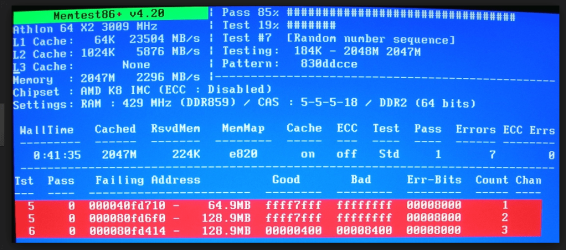
Now if it comes up with errors straight away (see pic) then you need not go any further because if you have two sticks of RAM as I am assuming you just need to test each on it's own with memtest to find which stick is bad. Then it is just a case of replacing it.

However it does take a long time to run so be prepared for a long wait, but at least it will eliminate this being a cause of your problems.
http://www.sevenforums.com/tutorials/105647-ram-test-memtest86.html if the tests come up nothing then that is one less major item causing the problems.
 

Attachments

  • MEMTESTERROR.PNG
    MEMTESTERROR.PNG
    235 KB · Views: 0

My Computer My Computer

Computer type
PC/Desktop
Computer Manufacturer/Model Number
Own build (new) Desk1 / Asus ROG Win 7 / Desk2 1st build
OS
Desk1 7 Home Prem / Desk2 10 Pro / Main lap Asus ROG 10 Pro 2 laptop Toshiba 7 Pro Asus P2520 7 & 10
CPU
Desk1 i5 3750K / Laptop i7 GTX 860M / Desk2 i5 2500
Motherboard
Desk1 Asus P877-V / Desk2 Gigabyte H67 UD3H / Laptop ?
Memory
Desk1 8GB (1866) / Desk2 16GB (1333) / Laptop 8Gb DDR3
Graphics Card(s)
Desk 1& 2NVidia GTX 650 & Laptops on board Intel
Sound Card
Desk 1 & 2 -XONAR DG Realtek High Def audio Laptop
Monitor(s) Displays
Desk 1 Benq HD 2450 / Desk2 Philips 24" / Laptop 17.5"
Screen Resolution
1920x1080 D1 & D2 & Laptop 1
Hard Drives
Desk1 Samsung 120GB 830 SSD
Asus ROG 256GB 850 Pro SSD
Desk2 Samsung 840 256 SSD
Toshiba 120GB EVO
PSU
Desk 1 Corsair HX 1050/ Laptop ? / Desk 2 Corsair HX 650
Case
Desk 1 Cooler HAF XM ? Toshiba laptop / Desk2 Coolermaster
Cooling
Fans on all Desk1 -2 Desk2 - all Coolermasters 5 Laptop ?
Keyboard
Desk 1 MS Sidewinder X6 Desk 2 MS Sidewinder X 4
Mouse
Desk 1&2 - Gigabyte MS 900 gamer - laptop - Logitec wireless
Internet Speed
ADSL2+
Other Info
One other Desktop (tester) and spare Toshba laptop both with SSD's
Running Kaspersky 2016 ISS on all machines config'd identically
Logitec audio stereo systems on each machine (x3)
Canon MG5250MFC
Router/modem TP-Link running WPA2SK
Sorry late reply Gavin but maybe a time to run a memtest mate it does not require an OS to run so all you need to make a is a bootable disk (see link) and set the BIOS to boot from the optical and let it run for at least 8 passes.

Now if it comes up with errors straight away (see pic) then you need not go any further because if you have two sticks of RAM as I am assuming you just need to test each on it's own with memtest to find which stick is bad. Then it is just a case of replacing it.

However it does take a long time to run so be prepared for a long wait, but at least it will eliminate this being a cause of your problems.
http://www.sevenforums.com/tutorials/105647-ram-test-memtest86.html if the tests come up nothing then that is one less major item causing the problems.
I've already ran 2 passes of memtest86+ with no errors showing up, do you think it could be the hard drive?
 
Last edited:

My Computer My Computer

Computer type
Laptop
Computer Manufacturer/Model Number
Toshiba Satellite A505-S6980
OS
Windows 7 Home Premium 64 Bit
CPU
Intel Core 2 Duo T6600 @ 2.4 Ghz [Mobile]
Memory
4GB DDR2 RAM
Graphics Card(s)
Integrated Graphics
Hard Drives
Standard Internal HDD - 500GB
WD USB Passport - 500GB
Antivirus
Avast! Free Liscense
Browser
Google Chrome
Sounds like the HDD is on the way out. Do you have your data backed up?
 

My Computer My Computer

Computer type
PC/Desktop
Computer Manufacturer/Model Number
Custom Built
OS
Windows 10 Pro
CPU
AMD Ryzen 5 2400G Processor with Radeon RX Vega 11 Graphics
Motherboard
ASRock X470 Master SLI/AC AM4 AMD Promontory X470 SATA 6Gb/s
Memory
G.SKILL Ripjaws V Series 16GB (2 x 8GB) 288-Pin DDR4 SDRAM D
Graphics Card(s)
2047MB NVIDIA GeForce GTX 1060 6GB (EVGA)
Sound Card
Motherboard Built in
Monitor(s) Displays
Acer R240HY bidx 23.8-Inch IPS HDMI DVI VGA (1920 x 1080) Wi
Screen Resolution
1920 x 1080
Hard Drives
1TB Sandisk SSD PLUS (Main drive)
500 GB Seagate 7200 RPM (Games)
500 GB Western Digital 7200 RPM (Virtual Machines)
PSU
CORSAIR TX Series TX650M 650W 80+ Gold Modular Power Supply
Case
CORSAIR CARBIDE SPEC-02 Mid-Tower Gaming Case, Red LED Fan
Cooling
220mm, two 120mm, and four 60mm fans
Keyboard
Wired Dell keyboard
Mouse
Wireless Logitech mouse
Internet Speed
250mb down, 30mb up
Antivirus
Panda Cloud Antivirus
Browser
Chrome-ish x64
Other Info
Your awesome for reading this.
Sounds like the HDD is on the way out. Do you have your data backed up?
some of the more important stuff I do, but after this mem test I'll back it up
 

My Computer My Computer

Computer type
Laptop
Computer Manufacturer/Model Number
Toshiba Satellite A505-S6980
OS
Windows 7 Home Premium 64 Bit
CPU
Intel Core 2 Duo T6600 @ 2.4 Ghz [Mobile]
Memory
4GB DDR2 RAM
Graphics Card(s)
Integrated Graphics
Hard Drives
Standard Internal HDD - 500GB
WD USB Passport - 500GB
Antivirus
Avast! Free Liscense
Browser
Google Chrome
Yep if the memtest is not showing after the 8 passes then as Andrew says mate get it all backed up. You can do an image or a clone really makes no difference an image is probably best but cloning is ok as long as you clone form small to large it will not usually work the other way round ie 320GB to 500GB ok 500GB - 1TB ok 1TB - 500GB no.

Two programs you can use for free and I use them all the time is Macrium and Partition Wizard the latter can also be used for surface testing of the hard drive if it comes to that.

You will find a link to Macrium in here
http://www.sevenforums.com/tutorials/73828-imaging-free-macrium.html

Partition Wizard here Best Free Partition Manager Freeware and free partition magic for Windows 7, Windows 8, Windows Vista and Windows XP 32 bit & 64 bit. MiniTool Free Partition Manager Software Home Edition.

both are really good tools to keep for future use the PW also has a data recovery section now so even better:)
 

My Computer My Computer

Computer type
PC/Desktop
Computer Manufacturer/Model Number
Own build (new) Desk1 / Asus ROG Win 7 / Desk2 1st build
OS
Desk1 7 Home Prem / Desk2 10 Pro / Main lap Asus ROG 10 Pro 2 laptop Toshiba 7 Pro Asus P2520 7 & 10
CPU
Desk1 i5 3750K / Laptop i7 GTX 860M / Desk2 i5 2500
Motherboard
Desk1 Asus P877-V / Desk2 Gigabyte H67 UD3H / Laptop ?
Memory
Desk1 8GB (1866) / Desk2 16GB (1333) / Laptop 8Gb DDR3
Graphics Card(s)
Desk 1& 2NVidia GTX 650 & Laptops on board Intel
Sound Card
Desk 1 & 2 -XONAR DG Realtek High Def audio Laptop
Monitor(s) Displays
Desk 1 Benq HD 2450 / Desk2 Philips 24" / Laptop 17.5"
Screen Resolution
1920x1080 D1 & D2 & Laptop 1
Hard Drives
Desk1 Samsung 120GB 830 SSD
Asus ROG 256GB 850 Pro SSD
Desk2 Samsung 840 256 SSD
Toshiba 120GB EVO
PSU
Desk 1 Corsair HX 1050/ Laptop ? / Desk 2 Corsair HX 650
Case
Desk 1 Cooler HAF XM ? Toshiba laptop / Desk2 Coolermaster
Cooling
Fans on all Desk1 -2 Desk2 - all Coolermasters 5 Laptop ?
Keyboard
Desk 1 MS Sidewinder X6 Desk 2 MS Sidewinder X 4
Mouse
Desk 1&2 - Gigabyte MS 900 gamer - laptop - Logitec wireless
Internet Speed
ADSL2+
Other Info
One other Desktop (tester) and spare Toshba laptop both with SSD's
Running Kaspersky 2016 ISS on all machines config'd identically
Logitec audio stereo systems on each machine (x3)
Canon MG5250MFC
Router/modem TP-Link running WPA2SK
Back
Top