
Solved Windows Explorer DOES NOT detect any data in any partitions.

ethancote

New member
Local time
12:04 AM
Messages
7
Hello,

I was unable to find answers to my dilemma so I am hoping someone here can help me out. If this question was already posted, please kindly direct me to the post for a solution.

Recently my computer encounter a virus and I decided to shut down the computer. When it booted back up, some disk scan tool was ran and it found a bunch of "Data errors" with the hard drive that was CRITICAL.

This somehow cause Windows Explorer to unable to detect any folders/files within any of my partitions.

So I used my Repair CD to install a previous Windows Image backup. When Windows 7 rebooted the hard drive critical errors were gone. However Windows Explorer is still UNABLE to detect any folders/files.

Attached is a screenshot of my Disk Management. As you can see, Disk Management is able to see all the partitions and the percentage of free space in each partition. However when I go into Windows Explorer, it keep saying "This folder is empty" regardless of which partition I click on. I am perplex.

Anyone has an idea as to what went wrong? Can someone please help me detect all my folders/files again.

Any help in this matter is greatly appreciated.

Thank you in advance.


Cheers.
 

Attachments

  • pc-trouble.gif
    pc-trouble.gif
    101.9 KB · Views: 27

My Computer My Computer

OS
Windows 7 Home Premium x64
CPU
AMD Phemon II X2 555 Processor (3.20GHz)
Motherboard
ASUS M4A89GTD PRO/USB3 AM3 DDR3
Memory
OCZ OCZ3G1333LV4GK 4GB DDR3 2X2GB DDR3
Graphics Card(s)
NVIDIA GeForce GTX 460 (768MB)
Sound Card
Realtek High Definition Audio (integrated with mobo)
Monitor(s) Displays
two 20" Samsung B2030
Hard Drives
WDC WD6401AALS-00E8B0 (640Gig)
WDC WD20EARS-00MVWB0 (200Gig)
PSU
Coolermaster GX 750W 80+ Power Supply SLI ATX12V
Case
Azza Helios 910 Black ATX Mid Tower Case
Update

Here is an update to my situation.

I went into "Organize > Folder and search options > view tab" and check "Show hidden files, folders and drive", I was able to see all the folders and files within each of the partition.

However they are abit translucent.

Anyone has any clue as to how I can make them unhidden?


Thanks.
 

My Computer My Computer

OS
Windows 7 Home Premium x64
CPU
AMD Phemon II X2 555 Processor (3.20GHz)
Motherboard
ASUS M4A89GTD PRO/USB3 AM3 DDR3
Memory
OCZ OCZ3G1333LV4GK 4GB DDR3 2X2GB DDR3
Graphics Card(s)
NVIDIA GeForce GTX 460 (768MB)
Sound Card
Realtek High Definition Audio (integrated with mobo)
Monitor(s) Displays
two 20" Samsung B2030
Hard Drives
WDC WD6401AALS-00E8B0 (640Gig)
WDC WD20EARS-00MVWB0 (200Gig)
PSU
Coolermaster GX 750W 80+ Power Supply SLI ATX12V
Case
Azza Helios 910 Black ATX Mid Tower Case
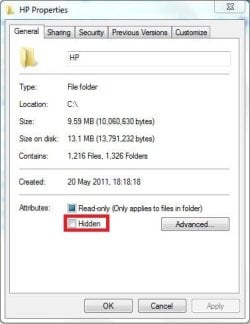
Go into the folder properties and see if hidden is checked.
 

My Computer My Computer

Computer type
PC/Desktop
Computer Manufacturer/Model Number
Skylake Special #666
OS
Windows 10 Pro x64
CPU
Intel Core i7 6700K
Motherboard
Asus Sabertooth Z170 Mark 1
Memory
GSkill TridentZ RGB 16GB 3600 16-16-16-36
Graphics Card(s)
EVGA GTX 980 Ti SC x2
Sound Card
Realtek High Definition
Monitor(s) Displays
AOC G2460PG
Screen Resolution
1920 x 1080 144Hz
Hard Drives
Samsung 860 Pro 256GB, Seagate Barracuda 4TB x2
PSU
EVGA 1000 P2, EVGA White Custom Braided Cables
Case
Corsair Vengeance C70 Gunmetal Black
Cooling
Corsair H100i v2, Corsair ML120 x2, Thermal Grizzly Kryonaut
Keyboard
Logitech G910 Orion Spectrum
Mouse
Logitech G700s
Internet Speed
Verizon Fios Quantum Gateway 75/75
Antivirus
Windows Defender, Malwarebytes Free 3.8.3
Browser
Chrome
Other Info
Corsair SP120 x4, LG Blu-ray Drive, Durabrand HT-395 100 Watt Dolby Digital Amp, Corsair H2100 Wireless 7.1 Headset
ethan,

Even on your restored image you have malware.

Please carry out following:

HOW TO USE MICROSOFT'S OFFLINE MALWARE REMOVER
Windows Defender Offline
· performs an offline scan of an infected PC to remove viruses, rootkits and other advanced malware.
· is a free standalone, bootable malware and virus remover from Microsoft.

Download Windows Defender Offline (about 785 kB)
You will have the choice of downloading the 32bit version (x86) or the 64 bit version (x64).
The link will help you determine whether you are running a 32 bit version or 64 bit version of Windows

NOTE!! You can download and prepare a 32 bit version using a 64 bit version of Windows
NOTE!! You can download and prepare a 64 bit version using a 32bit version of Windows.

You run the 32 bit version on a 32 bit version of Windows.
You run the 64 bit version on a 64 bit version of Windows.

The 32 bit download file name is: mssstool32.exe
The 64 bit download file name is: mssstool64.exe

For the curious, this program was originally name Microsoft Standalone System Sweeper.


INSTALLATION:
· Requires an Internet Connection.
· Insert 512 mB or larger USB stick into a usb port.
· Run the downloaded program--mssstool64.exe or mssstool32.exe
· NEXT button
· Choose the option On a USB flash drive that is not password protected
· NEXT button
· NEXT button
.
The install program will:
· format the usb stick using the NTFS format.
· download less than 230 mB.
· name the USB stick WDO_Media32 or WDO_Media64
· use less than 300 mB.

How to UPDATE the Windows Defender Offline USB stick:
· reinsert the usb stick
· run the installation program, mssstool64.exe or mssstool32.exe, again.
· the update will download less than 65 mB.

Since the malware database is sometimes updated several times in a day, always update before running.

PERFORM AN OFFLINE SCAN
Bootup your computer from the USB stick
Windows Defender Offline will automatically perform a quick scan.
After the quick scan finishes, Choose Full Scan
Select all of your drives

The initial, full scan can easily take several hours, but
Remember, your computer is being very thoroughly checked for all types of malware.
 

My Computer My Computer

Computer Manufacturer/Model Number
Toshiba Satellite S875D-S7239 laptop
OS
MS Windows 7 Ultimate SP1 64-bit
CPU
AMD A10-4600M
Motherboard
AMD Pumori (Socket FT1)
Memory
6.00 GB Dual-Channel DDR3 @ 798MHz (11-11-12-28)
Graphics Card(s)
AMD Radeon HD 7660G
Sound Card
High Definition Audio Device
Monitor(s) Displays
Generic PnP Monitor (1600x900@60Hz)
Screen Resolution
1600x900@60Hz
Hard Drives
SSD 119GB Corsair CSSD-V128GB2 ATA Device
Keyboard
Standard PS/2 Keyboard
Mouse
HP Wireless Optical Mobile Mouse Model FHA-3410
Internet Speed
What the local pub, local coffee shop offers.
Other Info
Optical Drive:MATSHITA BD-CMB UJ160B ATA Device


Also have an Asus ha1002xp netbook with Win 7 Ultimate installed.
Here is an update to my situation.

I went into "Organize > Folder and search options > view tab" and check "Show hidden files, folders and drive", I was able to see all the folders and files within each of the partition.

However they are abit translucent.

Anyone has any clue as to how I can make them unhidden?


Thanks.

Right-Click the translucent folder(s) > Properties

Take a look at my screenshot:
 

Attachments

  • Hidden Folders.JPG
    Hidden Folders.JPG
    29.3 KB · Views: 1

My Computer My Computer

Computer type
Laptop
I wanted to thank everyone who has kindly responded to my question!! So thank you Addram, Karlsnooks and BlueRobot!

You were all correct!

Apparently after running the Windows Defender Offline, the anti virus detected a trojan called: ASX/wimad.dt. The anti virus was able to removed the trojan.

However my folders/filers still appeared as hidden, so I follow the directions outlined above to unhide them.

Thanks again all!!
 

My Computer My Computer

OS
Windows 7 Home Premium x64
CPU
AMD Phemon II X2 555 Processor (3.20GHz)
Motherboard
ASUS M4A89GTD PRO/USB3 AM3 DDR3
Memory
OCZ OCZ3G1333LV4GK 4GB DDR3 2X2GB DDR3
Graphics Card(s)
NVIDIA GeForce GTX 460 (768MB)
Sound Card
Realtek High Definition Audio (integrated with mobo)
Monitor(s) Displays
two 20" Samsung B2030
Hard Drives
WDC WD6401AALS-00E8B0 (640Gig)
WDC WD20EARS-00MVWB0 (200Gig)
PSU
Coolermaster GX 750W 80+ Power Supply SLI ATX12V
Case
Azza Helios 910 Black ATX Mid Tower Case
Back
Top