Solved Windows explorer has stopped working

pk7677

New member
Local time
6:40 PM
Messages
11
Every single time I go to computers than clicks on my D: drive this error pops up, Windows explorer has stopped working, no idea what is causing it. Doesn't happen when I click on C drive, this only happens when I click on D drive. Any idea why? very annoying problem because I can't access my files.

Windows 7 32-bit
 

My Computer

OS
Windows 7
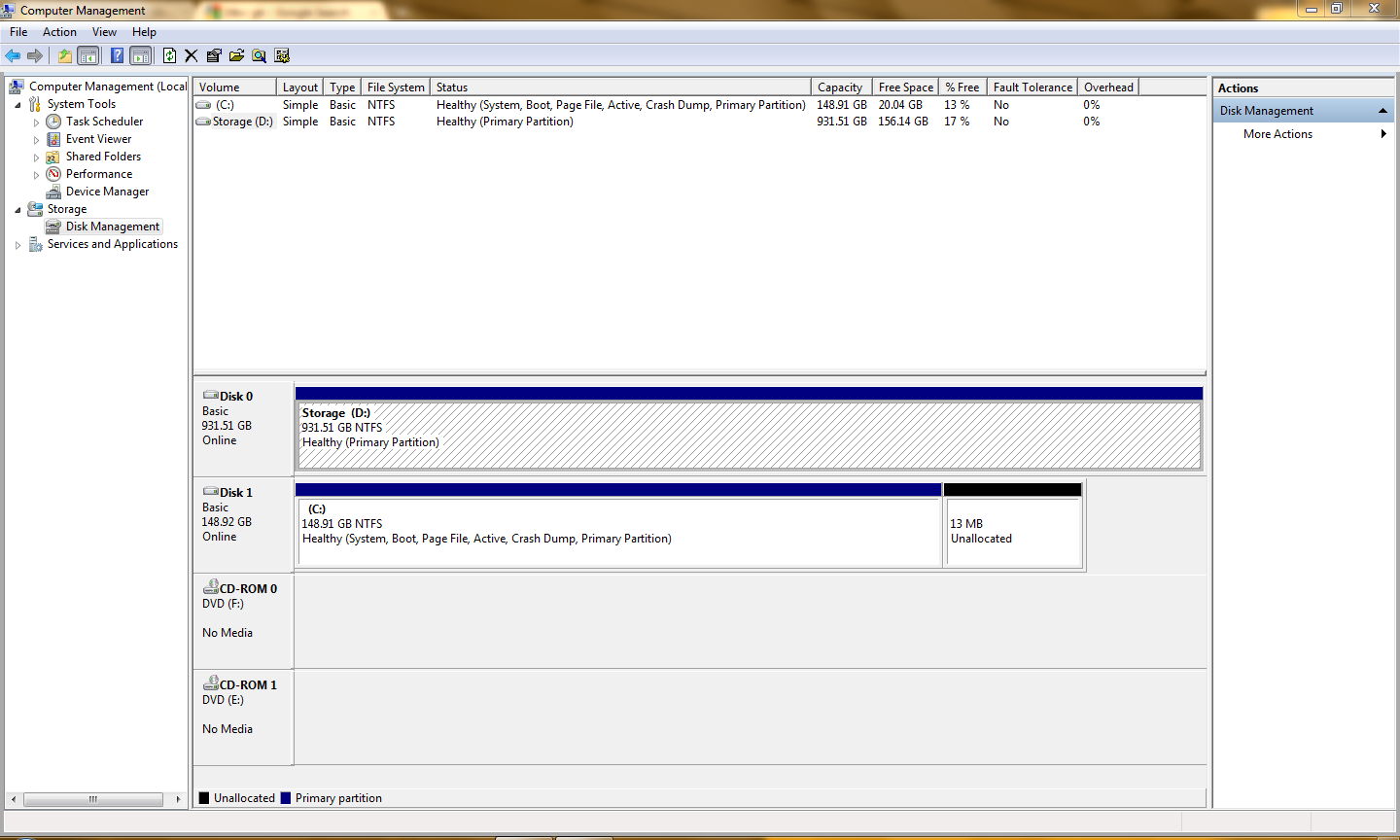
Can you post a screen shot of what you are seeing if you press "start", rightclick on "Computer" select "Manage", select "disk management" from the left hand pane displayed, then take a screenshot after making sure all available drives are shown by dragging the bottom edge of the window down to show all the drives.
 

My Computer

OS
win7
AV1iF.png

Just did a system restore and still getting this problem.
 

My Computer

OS
Windows 7
Fixed the problem, windows explorer crashes because its trying to load all the images for my hard drive, if you have 1TB or larger drive and having this problem you should read this.

Hello people, seems like some fellas out there are still having trouble with this random crashes. I have the same problem except that it occurs whenever I access my multimedia archive on my network storage. It would seem that there's a bug or something with windows that causes this problem when you access a media storage folder like mine, especially when the file size is extremely large(I archive all my movie discs there for convenience and streaming =), about 1TB of data). Windows try to generate the thumbnail images for your files and thus crashes explorer.

I've solved this by going to My Computer > click on "Organize" tab (top left) > folder and search options > view tab. Check "Always show icons, never thumbnails" option and uncheck "Display file icon on thumbnails". This stops windows from generating the images and solved the problem for me. Less visually flashy yes, but at least no need for a wipe and restart =).

Source: Windows Explorer Has Stopped Working Problem

Hope this helps and good luck!

Shadowkat.

 

My Computer

OS
Windows 7
Still no fix here

Thanks Shadowkat
thought you might be onto something, but no luck with that fix for
Windows Explorer has stopped working
 

My Computer

OS
Windows 7 Professional 64bit
CPU
Intel i7-2600
Motherboard
ASUS® P8Z68-V LX: USB 3.0, SATA 6GBs, ATI®CrossFireX
Memory
16GB SAMSUNG DUAL-DDR3 1333MHz (4 X 4GB)
Graphics Card(s)
EVGA NVIDIA GTX 650Ti SSC
Sound Card
ONBOARD 6 CHANNEL (5.1) HIGH DEF AUDIO
Monitor(s) Displays
NEC Sprectraview reference 2690 Iiyama Prolite E1906s
Hard Drives
Memory - 1st Hard Disk 120GB INTEL® 320 SERIES SSD, SATA 3 Gb/s
2nd Hard Disk 1TB WD CAVIAR GREEN WD10EARX, SATA 6 Gb/s, 64MB CACHE
PSU
CORSAIR 850W ENTHUSIAST SERIES™ TX850 V2-80 PLUS® BRONZE
Case
COOLERMASTER CM690 MKII ADVANCED CASE
Cooling
COOLIT ECO II A.L.C (ADVANCED LIQUID COOLER)
Thank you

Exactly what fixed it for me. It did it on the C drive even though my files are stored on the home server.
 

My Computer

Computer type
PC/Desktop
OS
win 7 64
Back
Top