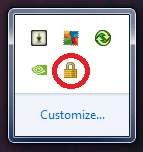
Windows Explorer icon in notifications area

sixty01

New member
Local time
5:53 AM
Messages
35
I have attached a picture for reference. Ever since I got a BSOD a couple nights ago, my PC was acting really weird. For instance my Aero was not working right and I kept getting this weird lock icon on my notifications area whenever I startup my PC. I hover over it and it says Windows Explorer and then when I try and click the icon it disappears and then reappears again. I scanned for any viruses and used Malwarebytes' Anti-Malware but found nothing. Any ideas on how to get rid of it?
 

Attachments
  • Untitled.png
    Untitled.png
    3.7 KB · Views: 76

My Computer My Computer

Computer type
PC/Desktop
OS
Windows 7 Professional x64 SP1
CPU
AMD Phenom II X4 955BE 3.6Ghz
Motherboard
BIOSTAR A880G+
Memory
Kingston 1x8GB DDR3 1333Mhz + PATRIOT G2 1x4GB DDR3 1333Mhz
Graphics Card(s)
GTX 560SE
Monitor(s) Displays
ASUS VE228H
Screen Resolution
1920x1080
Hard Drives
SanDisk SSD 128GB, Faspeed SSD 250GB
PSU
EVGA 600W Bronze
Case
Coolermaster 430 Elite
Cooling
Zerotherm FZ120
Browser
Firefox
have you tried a 'system restore' to a point before this situation occurred?
 

My Computer My Computer

Computer Manufacturer/Model Number
SALEON model 2.2b
OS
win7 ultimate 32bit
CPU
core2 Extreme QX6850-OCd to 3.15 GHz
Motherboard
ASUS P5G41-M LE
Memory
4 GB
Graphics Card(s)
NVidia 8600 GT
Monitor(s) Displays
23" acer
Hard Drives
one SATA 250GB partitioned equally in half
one SATA 160GB-internal storage
PSU
500W Thermaltake
Case
mini tower

My Computer My Computer

Computer type
PC/Desktop
Computer Manufacturer/Model Number
Self built custom
OS
64-bit Windows 11 Pro for Workstations
CPU
Intel i7-8700K OC'd to 5 GHz
Motherboard
ASUS ROG Maximus XI Formula Z390
Memory
64 GB (4x16GB) G.SKILL TridentZ RGB DDR4 3600 MHz
Graphics Card(s)
ASUS ROG-STRIX-GTX1080TI-O11G-GAMING
Sound Card
Integrated
Monitor(s) Displays
2 x Samsung Odyssey G7 27"
Screen Resolution
2560x1440
Hard Drives
1TB Samsung 990 PRO M.2,
4TB Samsung 990 PRO PRO M.2,
TerraMaster F8 SSD Plus NAS
PSU
Seasonic Prime Titanium 850W
Case
Thermaltake Core P3
Cooling
Corsair Hydro H115i
Keyboard
Logitech wireless K800
Mouse
Logitech MX Master 4
Internet Speed
2 Gb/s Download and 100 Mb/s Upload
Antivirus
Malwarebyte Anti-Malware Premium
Browser
Google Chrome
Other Info
Logitech Z625 speaker system,
Logitech BRIO 4K Pro webcam,
HP Color LaserJet Pro MFP M477fdn,
APC SMART-UPS RT 1000 XL - SURT1000XLI,
Galaxy S23 Plus phone
It looks like I have solved the issue. And it has nothing to do with resetting the notifications but something to do with actual virus/hidden threats. When I scanned with Malwarebytes software, I only did a quick scan which only scans important areas. This time I did a full scan of C:\ and the program brought up 12 hidden rootkit and trojan related threats within places I have never seen before. I removed them and did a reboot, lock icon disappears. I dont know what happened when that BSOD came on since I wasn't on a web browser at the time and I recently installed a fresh copy of Win 7, whatever it was its now dealt with and my Aero is back to normal...
 

My Computer My Computer

Computer type
PC/Desktop
OS
Windows 7 Professional x64 SP1
CPU
AMD Phenom II X4 955BE 3.6Ghz
Motherboard
BIOSTAR A880G+
Memory
Kingston 1x8GB DDR3 1333Mhz + PATRIOT G2 1x4GB DDR3 1333Mhz
Graphics Card(s)
GTX 560SE
Monitor(s) Displays
ASUS VE228H
Screen Resolution
1920x1080
Hard Drives
SanDisk SSD 128GB, Faspeed SSD 250GB
PSU
EVGA 600W Bronze
Case
Coolermaster 430 Elite
Cooling
Zerotherm FZ120
Browser
Firefox
That's great news sixty. You should continue to do a full scan of your system each day for the next few days to help make sure you are still clean.

Personally, with rootkits, I would recommend a scorched Earth approach to format and reinstall to be safe.
 

My Computer My Computer

Computer type
PC/Desktop
Computer Manufacturer/Model Number
Self built custom
OS
64-bit Windows 11 Pro for Workstations
CPU
Intel i7-8700K OC'd to 5 GHz
Motherboard
ASUS ROG Maximus XI Formula Z390
Memory
64 GB (4x16GB) G.SKILL TridentZ RGB DDR4 3600 MHz
Graphics Card(s)
ASUS ROG-STRIX-GTX1080TI-O11G-GAMING
Sound Card
Integrated
Monitor(s) Displays
2 x Samsung Odyssey G7 27"
Screen Resolution
2560x1440
Hard Drives
1TB Samsung 990 PRO M.2,
4TB Samsung 990 PRO PRO M.2,
TerraMaster F8 SSD Plus NAS
PSU
Seasonic Prime Titanium 850W
Case
Thermaltake Core P3
Cooling
Corsair Hydro H115i
Keyboard
Logitech wireless K800
Mouse
Logitech MX Master 4
Internet Speed
2 Gb/s Download and 100 Mb/s Upload
Antivirus
Malwarebyte Anti-Malware Premium
Browser
Google Chrome
Other Info
Logitech Z625 speaker system,
Logitech BRIO 4K Pro webcam,
HP Color LaserJet Pro MFP M477fdn,
APC SMART-UPS RT 1000 XL - SURT1000XLI,
Galaxy S23 Plus phone
That's great news sixty. You should continue to do a full scan of your system each day for the next few days to help make sure you are still clean.

Personally, with rootkits, I would recommend a scorched Earth approach to format and reinstall to be safe.
Well, my mistake. Its not gone after all. When I shut down the PC and turn it on again, the lock icon appears. If I reboot, it does not show up on startup. Again I looked into the notifications area menu and it says Windows Explorer next to it. Except, this time when I click the icon it disappears completely but shows up anytime I shut down and start again. I did countless full scans and found nothing. Should I just ignore it or should I go into safe mode and scan again?

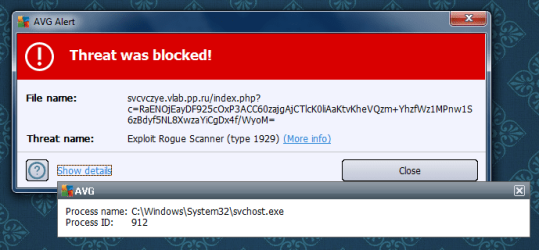
Also, my antivirus keeps picking up a rogue scanner from C:\Windows\System32\svchost.exe, any ideas here? I have attached a picture for reference.
 

Attachments

  • Untitled.png
    Untitled.png
    37.5 KB · Views: 8
Last edited:

My Computer My Computer

Computer type
PC/Desktop
OS
Windows 7 Professional x64 SP1
CPU
AMD Phenom II X4 955BE 3.6Ghz
Motherboard
BIOSTAR A880G+
Memory
Kingston 1x8GB DDR3 1333Mhz + PATRIOT G2 1x4GB DDR3 1333Mhz
Graphics Card(s)
GTX 560SE
Monitor(s) Displays
ASUS VE228H
Screen Resolution
1920x1080
Hard Drives
SanDisk SSD 128GB, Faspeed SSD 250GB
PSU
EVGA 600W Bronze
Case
Coolermaster 430 Elite
Cooling
Zerotherm FZ120
Browser
Firefox
I'd personally recommend to do a clean reinstall of Windows.
 

My Computer My Computer

Computer type
PC/Desktop
Computer Manufacturer/Model Number
Self built custom
OS
64-bit Windows 11 Pro for Workstations
CPU
Intel i7-8700K OC'd to 5 GHz
Motherboard
ASUS ROG Maximus XI Formula Z390
Memory
64 GB (4x16GB) G.SKILL TridentZ RGB DDR4 3600 MHz
Graphics Card(s)
ASUS ROG-STRIX-GTX1080TI-O11G-GAMING
Sound Card
Integrated
Monitor(s) Displays
2 x Samsung Odyssey G7 27"
Screen Resolution
2560x1440
Hard Drives
1TB Samsung 990 PRO M.2,
4TB Samsung 990 PRO PRO M.2,
TerraMaster F8 SSD Plus NAS
PSU
Seasonic Prime Titanium 850W
Case
Thermaltake Core P3
Cooling
Corsair Hydro H115i
Keyboard
Logitech wireless K800
Mouse
Logitech MX Master 4
Internet Speed
2 Gb/s Download and 100 Mb/s Upload
Antivirus
Malwarebyte Anti-Malware Premium
Browser
Google Chrome
Other Info
Logitech Z625 speaker system,
Logitech BRIO 4K Pro webcam,
HP Color LaserJet Pro MFP M477fdn,
APC SMART-UPS RT 1000 XL - SURT1000XLI,
Galaxy S23 Plus phone
I'd personally recommend to do a clean reinstall of Windows.
Should I really? I'm not having any problems with my system so far, but is it really recommended?
 

My Computer My Computer

Computer type
PC/Desktop
OS
Windows 7 Professional x64 SP1
CPU
AMD Phenom II X4 955BE 3.6Ghz
Motherboard
BIOSTAR A880G+
Memory
Kingston 1x8GB DDR3 1333Mhz + PATRIOT G2 1x4GB DDR3 1333Mhz
Graphics Card(s)
GTX 560SE
Monitor(s) Displays
ASUS VE228H
Screen Resolution
1920x1080
Hard Drives
SanDisk SSD 128GB, Faspeed SSD 250GB
PSU
EVGA 600W Bronze
Case
Coolermaster 430 Elite
Cooling
Zerotherm FZ120
Browser
Firefox
When it comes to rootkits that come back, then oh yeah. You don't want some malicious rootkit/virus that could be running in the background on your computer doing who knows what.

For example, performing illegal activities from your computer, stealing your passwords, bank account info, email account info, etc....
 

My Computer My Computer

Computer type
PC/Desktop
Computer Manufacturer/Model Number
Self built custom
OS
64-bit Windows 11 Pro for Workstations
CPU
Intel i7-8700K OC'd to 5 GHz
Motherboard
ASUS ROG Maximus XI Formula Z390
Memory
64 GB (4x16GB) G.SKILL TridentZ RGB DDR4 3600 MHz
Graphics Card(s)
ASUS ROG-STRIX-GTX1080TI-O11G-GAMING
Sound Card
Integrated
Monitor(s) Displays
2 x Samsung Odyssey G7 27"
Screen Resolution
2560x1440
Hard Drives
1TB Samsung 990 PRO M.2,
4TB Samsung 990 PRO PRO M.2,
TerraMaster F8 SSD Plus NAS
PSU
Seasonic Prime Titanium 850W
Case
Thermaltake Core P3
Cooling
Corsair Hydro H115i
Keyboard
Logitech wireless K800
Mouse
Logitech MX Master 4
Internet Speed
2 Gb/s Download and 100 Mb/s Upload
Antivirus
Malwarebyte Anti-Malware Premium
Browser
Google Chrome
Other Info
Logitech Z625 speaker system,
Logitech BRIO 4K Pro webcam,
HP Color LaserJet Pro MFP M477fdn,
APC SMART-UPS RT 1000 XL - SURT1000XLI,
Galaxy S23 Plus phone
Backup HDD Image

If you do a clean reinstall of Windows, immediately create a backup HDD image.

Once you have reinstalled your programs, create another backup HDD image.

Create your images before you start surfing the Internet or playing online games.
 

My Computer My Computer

Computer type
PC/Desktop
Computer Manufacturer/Model Number
n/a
OS
W7 Ultimate SP1, LM19.2 MATE, W10 Home 1703, W10 Pro 1703 VM, #All 64 bit
CPU
AMD Phenom II x6 1100T, 3.3 GHz
Motherboard
ASUS M4A88T-M/USB3 (AM3)
Memory
12GB DDR3 1333 G-Skill (4GB x 2), G-Skill (2GB x 2)
Graphics Card(s)
NVIDIA GeForce GTX 660
Sound Card
Realtek?
Monitor(s) Displays
Samsung S23B350
Screen Resolution
1920x1080
Hard Drives
WD Green 2TB (SATA), WD Green 3TB (SATA), WD Blue 4TB (SATA), WD Blue 6TB (SATA)
PSU
Cooler Master
Case
Antec GX300 Tower
Cooling
3x Antec TRICOOL 120mm Fans
Mouse
Wired Optical
Internet Speed
DSL
Antivirus
Avast
Browser
Pale Moon (64 bit)
Other Info
2018-12-27 Upgraded HDDs
2015-12-10 Upgraded case, graphics card, storage
2015-08-15 Upgraded motherboard & RAM
2015-07-15 Upgraded LM17.1 to LM17.2
If you do a clean reinstall of Windows, immediately create a backup HDD image.

Once you have reinstalled your programs, create another backup HDD image.

Create your images before you start surfing the Internet or playing online games.
Does the backup work if I plan on changing from a 32-bit to 64-bit? I'm asking because if backup and restore also backs up applications can they be restored on a 64-bit clean install or only on x86?
 

My Computer My Computer

Computer type
PC/Desktop
OS
Windows 7 Professional x64 SP1
CPU
AMD Phenom II X4 955BE 3.6Ghz
Motherboard
BIOSTAR A880G+
Memory
Kingston 1x8GB DDR3 1333Mhz + PATRIOT G2 1x4GB DDR3 1333Mhz
Graphics Card(s)
GTX 560SE
Monitor(s) Displays
ASUS VE228H
Screen Resolution
1920x1080
Hard Drives
SanDisk SSD 128GB, Faspeed SSD 250GB
PSU
EVGA 600W Bronze
Case
Coolermaster 430 Elite
Cooling
Zerotherm FZ120
Browser
Firefox
You could restore a 32-bit image on a 64-bit computer, but your Windows 7 would still only be 32-bit. Just for FYI, you will not be able to restore a 64-bit image on a 32-bit computer though.

If you want to use 64-bit Windows, then you would have to do a clean install using 64-bit Windows 7 installation media instead. :(
 

My Computer My Computer

Computer type
PC/Desktop
Computer Manufacturer/Model Number
Self built custom
OS
64-bit Windows 11 Pro for Workstations
CPU
Intel i7-8700K OC'd to 5 GHz
Motherboard
ASUS ROG Maximus XI Formula Z390
Memory
64 GB (4x16GB) G.SKILL TridentZ RGB DDR4 3600 MHz
Graphics Card(s)
ASUS ROG-STRIX-GTX1080TI-O11G-GAMING
Sound Card
Integrated
Monitor(s) Displays
2 x Samsung Odyssey G7 27"
Screen Resolution
2560x1440
Hard Drives
1TB Samsung 990 PRO M.2,
4TB Samsung 990 PRO PRO M.2,
TerraMaster F8 SSD Plus NAS
PSU
Seasonic Prime Titanium 850W
Case
Thermaltake Core P3
Cooling
Corsair Hydro H115i
Keyboard
Logitech wireless K800
Mouse
Logitech MX Master 4
Internet Speed
2 Gb/s Download and 100 Mb/s Upload
Antivirus
Malwarebyte Anti-Malware Premium
Browser
Google Chrome
Other Info
Logitech Z625 speaker system,
Logitech BRIO 4K Pro webcam,
HP Color LaserJet Pro MFP M477fdn,
APC SMART-UPS RT 1000 XL - SURT1000XLI,
Galaxy S23 Plus phone
Back
Top