Windows Explorer is not working properly.

krtislav

New member
Member
Local time
11:35 AM
Messages
28
Hi everybody.
Dr. Nick

I have a problem for about 1 month, and i haven't got rid of it.
When I start Windows 7, it works fine for a random time (it can be 15 minutes, it can be 5 hours)
But when it happens, i get this when I do some actions like
Opening "Computer":
Picture 1
Opening folders (missing icons):
Picture 2

And after right clicking on a file, it get buggin' and I need to restart explorer.exe

What I tried:
sfc /scannow
chkdsk
malwarebytes antimalware
Registry cleaning

Also, when i log off, and log on, it works properly, so I believe there is something running in the background that is making this happening.
What could it be?

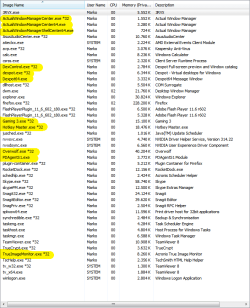
Running processes:
Picture 3

Need services??
 

My Computer

Computer type
PC/Desktop
OS
W7
CPU
AMD Phenom II x4 925 2.8 GHz
Motherboard
ASUS M4A77T
Memory
DDR3 4 GB
Graphics Card(s)
GeForce GTX 650Ti
Sound Card
ASUS Xonar DG
Monitor(s) Displays
SAMSUNG B2230
Hard Drives
EALS 1TB
PSU
CoolerMaster GX Lite 500W
Case
Vento
Mouse
Prestigio PMSG1
Antivirus
Kaspersky 2012
Browser
Firefox
Try adwCleaner removel tool: AdwCleaner Download

Post the text file here please before you click delete
 

My Computer

Computer type
PC/Desktop
Computer Manufacturer/Model Number
Dell / Lenovo g550
OS
Windows 7 Ultimate 64-bit
CPU
Intel Core 2 Duo E6550 @2.33GHz
Motherboard
foxconn g33m02
Memory
4GB DDR"
Graphics Card(s)
NVIDIA GeForce 8600 GS
Hard Drives
HDD 1 = 150GB
HDD 2 = 1.5TB
PSU
450W
Cooling
Stock fan
Internet Speed
12Mb
Antivirus
AVG Internet Security
Code:
# AdwCleaner v2.200 - Logfile created 04/15/2013 at 11:00:08
# Updated 02/04/2013 by Xplode
# Operating system : Windows 7 Home Premium Service Pack 1 (64 bits)
# User : Marko - MARSHAL
# Boot Mode : Normal
# Running from : C:\Users\Marko.Marshal\Downloads\AdwCleaner.exe
# Option [Search]


***** [Services] *****


***** [Files / Folders] *****

Folder Found : C:\ProgramData\boost_interprocess

***** [Registry] *****

Key Found : HKCU\Software\Conduit
Key Found : HKCU\Software\Softonic
Key Found : HKCU\Software\StartSearch
Key Found : HKLM\Software\Conduit
Key Found : HKLM\SOFTWARE\Wow6432Node\Classes\Interface\{79FB5FC8-44B9-4AF5-BADD-CCE547F953E5}

***** [Internet Browsers] *****

-\\ Internet Explorer v8.0.7601.17514

[OK] Registry is clean.

-\\ Mozilla Firefox v20.0.1 (en-US)

-\\ Google Chrome v26.0.1410.64

*************************

AdwCleaner[R1].txt - [889 octets] - [15/04/2013 11:00:08]

########## EOF - C:\AdwCleaner[R1].txt - [948 octets] ##########
 

My Computer

Computer type
PC/Desktop
OS
W7
CPU
AMD Phenom II x4 925 2.8 GHz
Motherboard
ASUS M4A77T
Memory
DDR3 4 GB
Graphics Card(s)
GeForce GTX 650Ti
Sound Card
ASUS Xonar DG
Monitor(s) Displays
SAMSUNG B2230
Hard Drives
EALS 1TB
PSU
CoolerMaster GX Lite 500W
Case
Vento
Mouse
Prestigio PMSG1
Antivirus
Kaspersky 2012
Browser
Firefox
Ok you can click delete on the program now.

Next step.

Did you install anything prior to this happening? Even updates on your anti virus or drivers?
 

My Computer

Computer type
PC/Desktop
Computer Manufacturer/Model Number
Dell / Lenovo g550
OS
Windows 7 Ultimate 64-bit
CPU
Intel Core 2 Duo E6550 @2.33GHz
Motherboard
foxconn g33m02
Memory
4GB DDR"
Graphics Card(s)
NVIDIA GeForce 8600 GS
Hard Drives
HDD 1 = 150GB
HDD 2 = 1.5TB
PSU
450W
Cooling
Stock fan
Internet Speed
12Mb
Antivirus
AVG Internet Security
Ok you can click delete on the program now.

Next step.

Did you install anything prior to this happening? Even updates on your anti virus or drivers?

I clicked delete, and it restarted, so i will see how that went
I think i haven't installed anything then, i was too busy to do anything serious on my computer (nobody else use it)

EDIT:
I did uninstalled lan drivers and installed a newer one.
Also, i changed a graphic card, but i removed amd drivers properly and installed a new nvidia one.
If I don't find a solution, i can handle it for another 2 months, because then I will install a Windows 8 OS, when vacation starts :D
 
Last edited:

My Computer

Computer type
PC/Desktop
OS
W7
CPU
AMD Phenom II x4 925 2.8 GHz
Motherboard
ASUS M4A77T
Memory
DDR3 4 GB
Graphics Card(s)
GeForce GTX 650Ti
Sound Card
ASUS Xonar DG
Monitor(s) Displays
SAMSUNG B2230
Hard Drives
EALS 1TB
PSU
CoolerMaster GX Lite 500W
Case
Vento
Mouse
Prestigio PMSG1
Antivirus
Kaspersky 2012
Browser
Firefox

My Computer

Computer type
PC/Desktop
Computer Manufacturer/Model Number
Dell / Lenovo g550
OS
Windows 7 Ultimate 64-bit
CPU
Intel Core 2 Duo E6550 @2.33GHz
Motherboard
foxconn g33m02
Memory
4GB DDR"
Graphics Card(s)
NVIDIA GeForce 8600 GS
Hard Drives
HDD 1 = 150GB
HDD 2 = 1.5TB
PSU
450W
Cooling
Stock fan
Internet Speed
12Mb
Antivirus
AVG Internet Security
Your icon cache seems to be corrupt. Follow this guide, download the .bat file and run it: http://www.sevenforums.com/tutorials/49819-icon-cache-rebuild.html

Where do you see this may i ask :)

OP's Picture 2.

@OP:

:ar: You have too many processes running in the background. Please check the ones I highlighted.

04.15.2013-10.png

:ar: Also try temporarily disabling Kaspersky Anti-virus. When you browse through your files, the realtime protection system scans each and every item in view before they can appear (the icons particularly). That might be taking time.

:ar: Also, I would like you to perform a Clean Startup and check if the problem persists.

Thanks,
Robo
 

My Computer

Computer type
PC/Desktop
OS
Windows 7 Home Premium x64

My Computer

Computer type
PC/Desktop
Computer Manufacturer/Model Number
Dell / Lenovo g550
OS
Windows 7 Ultimate 64-bit
CPU
Intel Core 2 Duo E6550 @2.33GHz
Motherboard
foxconn g33m02
Memory
4GB DDR"
Graphics Card(s)
NVIDIA GeForce 8600 GS
Hard Drives
HDD 1 = 150GB
HDD 2 = 1.5TB
PSU
450W
Cooling
Stock fan
Internet Speed
12Mb
Antivirus
AVG Internet Security
Where do you see this may i ask :)

OP's Picture 2.

Missed that one, sickness is killing me today :mad:

One more point is that, actually they may not be corrupt at all, I can clearly see the left pane icons - with magnifying glass icon on them - which means the icons on the right are still "loading" (result of the same delay he's facing in explorer). I suggested the OP to use the cache rebuilder so that incase he's having anything corrupt, that will automatically be repaired. :)
 

My Computer

Computer type
PC/Desktop
OS
Windows 7 Home Premium x64
Yes, seems to be nearly a memory issue or a fragment HDD. Somethings seems to be slowing it down
 

My Computer

Computer type
PC/Desktop
Computer Manufacturer/Model Number
Dell / Lenovo g550
OS
Windows 7 Ultimate 64-bit
CPU
Intel Core 2 Duo E6550 @2.33GHz
Motherboard
foxconn g33m02
Memory
4GB DDR"
Graphics Card(s)
NVIDIA GeForce 8600 GS
Hard Drives
HDD 1 = 150GB
HDD 2 = 1.5TB
PSU
450W
Cooling
Stock fan
Internet Speed
12Mb
Antivirus
AVG Internet Security

My Computer

Computer type
PC/Desktop
Computer Manufacturer/Model Number
Home made Desktop
OS
Windows 10 Pro. 64/ version 1709 Windows 7 Pro/64
CPU
Intel i7-6800K @ 4.3
Motherboard
ASUS X-99 Deluxe II
Memory
Corsair Platinum 16 gig @2400
Graphics Card(s)
EVGA GTX 1070 OC
Monitor(s) Displays
Asus 27" LED LCD/VE278Q
Screen Resolution
1920-1080 or 1280-720 HDMI
Hard Drives
INTEL SSD 730-240 Gb Sata 3.0/
PSU
EVGA Platium 1200W
Case
Phanteks Luxe Tempered Glass 8 fans/ one radiator
Cooling
XSPC/ Water Cooled CPU
Keyboard
Das 4 Professional
Mouse
Logitech M705/MX Anywhere 2-S
Internet Speed
100 mbits
Antivirus
Microsoft Security Essentials/ Malwarebytes Premium 3.0/ SAS
Browser
I.E. 11 default/Firefox/ ISP Time Warner Cable/Spectrum
Other Info
LG BluRay Burner/
Sound system-KLipsch-THX/
Icy Dock ssd Hot Swap bays.
:ar: You have too many processes running in the background. Please check the ones I highlighted.
Robo
Those processes are here there for more than 6 months, and they are just fine, but i will close them and see what happens

:ar: Also try temporarily disabling Kaspersky Anti-virus. When you browse through your files, the realtime protection system scans each and every item in view before they can appear (the icons particularly). That might be taking time.
Robo
I think that this is it, today i got tha loading screen again, closed the window, turned off kaspersky, opened it and it worked, but i will do a little more research.

Thank you, will write back
 

My Computer

Computer type
PC/Desktop
OS
W7
CPU
AMD Phenom II x4 925 2.8 GHz
Motherboard
ASUS M4A77T
Memory
DDR3 4 GB
Graphics Card(s)
GeForce GTX 650Ti
Sound Card
ASUS Xonar DG
Monitor(s) Displays
SAMSUNG B2230
Hard Drives
EALS 1TB
PSU
CoolerMaster GX Lite 500W
Case
Vento
Mouse
Prestigio PMSG1
Antivirus
Kaspersky 2012
Browser
Firefox
Last edited:

My Computer

Computer type
PC/Desktop
OS
W7
CPU
AMD Phenom II x4 925 2.8 GHz
Motherboard
ASUS M4A77T
Memory
DDR3 4 GB
Graphics Card(s)
GeForce GTX 650Ti
Sound Card
ASUS Xonar DG
Monitor(s) Displays
SAMSUNG B2230
Hard Drives
EALS 1TB
PSU
CoolerMaster GX Lite 500W
Case
Vento
Mouse
Prestigio PMSG1
Antivirus
Kaspersky 2012
Browser
Firefox
Back
Top