Windows Explorer: Navigation Pane and Preview Pane Bug

AdHawk

New member
Local time
10:58 AM
Messages
2
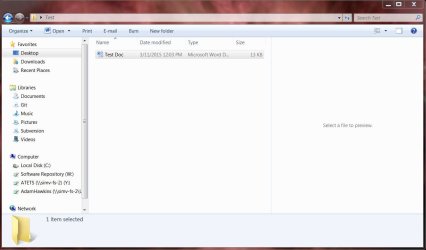
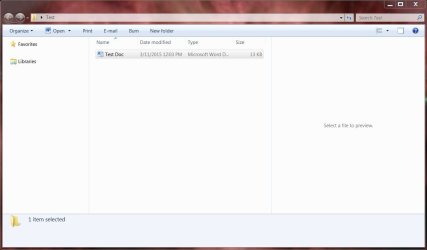
When I open an instance of windows explorer, the navigation pane show little or nothing (no drives, folders, etc.). Also the preview pane does not show a preview for any selected files (See Capture1.JPG).
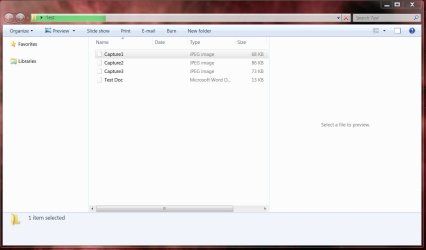
If I open a second (or higher) instance of windows explorer, the navigation pane functions properly (the preview still does not show) (See Capture2.JPG).
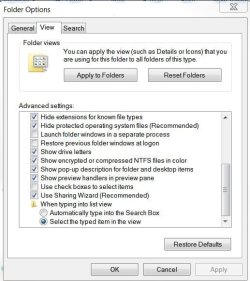
I have previews set to show (See Capture3.JPG).
Also occasionally, the file icons will be blank instead of showing the file type specific icon. When this happens, the address bar also seems to take a long time to load. The load bar will stop before reaching the end and won't finish (See Capture4.JPG).

Does anyone know what is going on or how to fix this?

FYI I am running 64 bit Windows 7 Pro.
 

Attachments
  • Capture1.JPG
    Capture1.JPG
    67.5 KB · Views: 1
  • Capture2.JPG
    Capture2.JPG
    85 KB · Views: 1
  • Capture3.JPG
    Capture3.JPG
    72.3 KB · Views: 15
  • Capture4.JPG
    Capture4.JPG
    76 KB · Views: 1

My Computer

Computer type
PC/Desktop
OS
Windows 7 Professional 64 bit
Try Explorer++ and see if you get the same problem.

Need to enable "Folders" view.

Explorer++ [Administrators].jpg

If it works then you can rule out problems with system files and it's probably a buggy shell extension.

https://explorerplusplus.com/

It's portable and runs without installation.

Let us know if navigation pane works using Explorer++
 

My Computer

Computer type
Laptop
Computer Manufacturer/Model Number
ASUS
OS
Microsoft Windows 7 Home Premium 64-bit 7601 Multiprocessor Free Service Pack 1
CPU
AMD C-60 APU with Radeon(tm) HD Graphics
Motherboard
ASUSTeK COMPUTER INC. X501U
Memory
4.00 GB
Graphics Card(s)
AMD Radeon HD 6290 Graphics
Sound Card
(1) AMD High Definition Audio Device (2) Realtek High Defi
Screen Resolution
1366 x 768 x 32 bits (4294967296 colors) @ 60 Hz
Hard Drives
Hitachi HTS545050A7E380 SATA Disk Device
Antivirus
Comodo CIS & FW, SecureAplus App Whitelisting, Threatfire
Browser
Cyberfox 64bit, Opera 64bit, Airfox
Other Info
Spy-The-Spy, HitmanPro.Alert, Norton Connect Safe, MJRegWatcher, BitDefender TrafficLight, Voodoo Shield, Zemana AntiMalware
The Navigation Pane seems to work fine in Explorer++. If it is a buggy shell extension what is the solution?
 

My Computer

Computer type
PC/Desktop
OS
Windows 7 Professional 64 bit
Buggy shell extension

There's no quick solution other than to disable all non microsoft shell extensions then re-enable them in smalll groups until the problem re-appears. It can be tricky to track down.

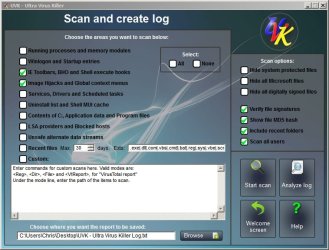
If you like you can download UVK and run a scan with the following settings applied:

UVK - Settings.jpg

Download: UVK - Ultra Virus Killer - free version.

Once installed right click the desktop icon and choose "Run as admin" then choose "Scan and Create Log"

Note: Don't run any fixes or mess about with the other features.

Upload the results. It should show anything that integrates with explorer and creates a right click context menu entry for drives, folders or files.

It's a good place to start looking.
 

My Computer

Computer type
Laptop
Computer Manufacturer/Model Number
ASUS
OS
Microsoft Windows 7 Home Premium 64-bit 7601 Multiprocessor Free Service Pack 1
CPU
AMD C-60 APU with Radeon(tm) HD Graphics
Motherboard
ASUSTeK COMPUTER INC. X501U
Memory
4.00 GB
Graphics Card(s)
AMD Radeon HD 6290 Graphics
Sound Card
(1) AMD High Definition Audio Device (2) Realtek High Defi
Screen Resolution
1366 x 768 x 32 bits (4294967296 colors) @ 60 Hz
Hard Drives
Hitachi HTS545050A7E380 SATA Disk Device
Antivirus
Comodo CIS & FW, SecureAplus App Whitelisting, Threatfire
Browser
Cyberfox 64bit, Opera 64bit, Airfox
Other Info
Spy-The-Spy, HitmanPro.Alert, Norton Connect Safe, MJRegWatcher, BitDefender TrafficLight, Voodoo Shield, Zemana AntiMalware
Back
Top