Windows Explorer Question (viewablity)

Levy23

New member
Local time
5:59 PM
Messages
9
I've honestly tried looking around but I can't quite pin down what I'm after so I'm gonna try this and see if I can get pointed in the right direction or if this thread is entirely new.

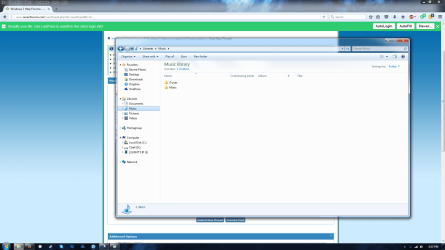
I'm using W7 Ultimate and in the Library section you have Music, pictures, etc.
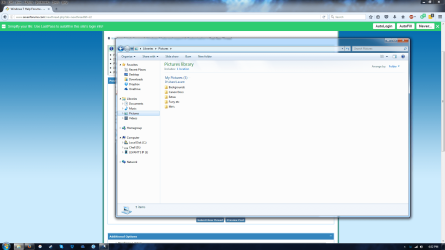
But for Pictures I have this little title tab ("My Pictures") between the folders and "Pictures Library" at the top. I know this..whatever you wanna call it, is normal. But I'm in the OCD habit of keeping things neat and pretty and for some reason My Pictures is the *only* one doing this (Images included). Is there a way to get rid of it? I did for the others originally by removing all locations but the main folder (i removed the public folders). But Pictures still keeps its tabbed location out.
 

Attachments
  • Untitled.png
    Untitled.png
    120.9 KB · Views: 5
  • Untitleds.png
    Untitleds.png
    134.8 KB · Views: 3

My Computer

Computer type
PC/Desktop
Computer Manufacturer/Model Number
Custom
OS
Windows 10 Pro
CPU
AMD RYZEN 5
Motherboard
MSI B350M Mortar Arctic
Memory
16GB
Graphics Card(s)
GeForce GTX 1060 Gaming X 6G
Sound Card
Onboard
Monitor(s) Displays
Asus
Screen Resolution
1920 x 1080
Hard Drives
120 GB Samsung SSD 840 Pro Series,
3TB WD Black HDD
256 GB WD Black M.2 2280
Case
Fractal Design Mini C
Cooling
fans
Keyboard
Wireless USB
Mouse
Wireless USB
Internet Speed
300 mbps
Antivirus
Avast
Browser
FireFox
The Main folder: Libraries is the standard, and follow by; Documents, Musics, Pictures, Movies; are standard.

Each of these folders, will have another name start with "My.."; My Documents, My Musics, My Pictures, My Videos.
All files from these folders are short-cut to your Username folder; C:\Users\username\My Videos\movies.mp4 example.
Anything you move/delete is the same as going to your C:\Users\username\My Videos to move/delete.

Also, in the "Favorites" it is same, also short-cut to your, C:\Users\username\Desktop example.

This means that these are short-cut to your Users\username\... folder.
Hence, if you delete, move, etc; will also be affected.

Tips: Do not put everything in the Desktop, such as many files, programs, etc.
If not the Windows OS will check and confirm on each short-cuts, programs, etc; on the desktop is valid or not.
This will add some time, as in second &or minutes for the Windows to complete the boot and return the control to the user.
 

My Computer

Computer type
Laptop
Computer Manufacturer/Model Number
Toshiba L630 and L735
OS
Windows 7 x64
Hard Drives
240 GB SSD
I understand and keep nothing on my desktop, actually. But my concern isn't placement but this decription object that only shows up in My Pictures and not any other 'My...' locations. I thought I got rid of it once (by deleting the 'Public' folders cause they were always empty' so it had no reason to display a header when there was only one location being linked) but either I've been oblivious all this time or something happened lately that made it show back up (just before I noticed it, I did accidently drag...i think My Music into the Pictures group (that holds the subset of my Pictures) and added it to that location. But I removed the location as per last time but it either stayed or has nothing to do with that bumble.

That being said, I CAN directly click on "My..." below the groupings and it doesn't show this head in any of them. But I never used to go that route so I know it isn't just happenstance.
 

My Computer

Computer type
PC/Desktop
Computer Manufacturer/Model Number
Custom
OS
Windows 10 Pro
CPU
AMD RYZEN 5
Motherboard
MSI B350M Mortar Arctic
Memory
16GB
Graphics Card(s)
GeForce GTX 1060 Gaming X 6G
Sound Card
Onboard
Monitor(s) Displays
Asus
Screen Resolution
1920 x 1080
Hard Drives
120 GB Samsung SSD 840 Pro Series,
3TB WD Black HDD
256 GB WD Black M.2 2280
Case
Fractal Design Mini C
Cooling
fans
Keyboard
Wireless USB
Mouse
Wireless USB
Internet Speed
300 mbps
Antivirus
Avast
Browser
FireFox
If you go to C:\Users

There is several folders, beside your account name.

You simply cannot delete the Pubic folder, and other folders in it.

It will re- create, as it is part of Windows design, upon boot-up.

These folders are control &or re-created by the registry, as in HKEY_USERS

Registry only have 3 main HKEY_xxx with each do have a role.
 

My Computer

Computer type
Laptop
Computer Manufacturer/Model Number
Toshiba L630 and L735
OS
Windows 7 x64
Hard Drives
240 GB SSD
Sorry, perhaps a miswording but yea, I know I cannot *delete* the folder, but I mean I removed it as a location in My Pictures, My Music, etc. I removed the public folder connections but for some reason this header in Pictures continues to show unlike the rest.
 

My Computer

Computer type
PC/Desktop
Computer Manufacturer/Model Number
Custom
OS
Windows 10 Pro
CPU
AMD RYZEN 5
Motherboard
MSI B350M Mortar Arctic
Memory
16GB
Graphics Card(s)
GeForce GTX 1060 Gaming X 6G
Sound Card
Onboard
Monitor(s) Displays
Asus
Screen Resolution
1920 x 1080
Hard Drives
120 GB Samsung SSD 840 Pro Series,
3TB WD Black HDD
256 GB WD Black M.2 2280
Case
Fractal Design Mini C
Cooling
fans
Keyboard
Wireless USB
Mouse
Wireless USB
Internet Speed
300 mbps
Antivirus
Avast
Browser
FireFox
Sorry, perhaps a miswording but yea, I know I cannot *delete* the folder, but I mean I removed it as a location in My Pictures, My Music, etc. I removed the public folder connections but for some reason this header in Pictures continues to show unlike the rest.

For this, i did not do this method.

Basically, if you do anything on the folders, desktop, my ...;
The registry may re-created as most of the folders.

I would say it is in the Registry HKEY_USERS
Hence it will create upon when Windows OS boot-up.
Each User (not all) do have its own NTUSER file to define.
You can check on this file C:\Users\username folder.
Not going further than this.
 

My Computer

Computer type
Laptop
Computer Manufacturer/Model Number
Toshiba L630 and L735
OS
Windows 7 x64
Hard Drives
240 GB SSD
Back
Top