Windows Explorer Status Bar: does not show file size

This debate actually generated some excellent information for those of us who, until now, didn't know about the shortcuts mentioned, not to mention the other great info given. Thank you all. I suggest we keep writing to Microsoft to let them know that users WANT these deleted features (and the many others) kept in Windows 7.
 

My Computer My Computer

At a glance

Vista 64 bit and 32 bit (SP2)Intel(R) Core(TM)2 Duo Processor T9400 (2.53 GHz4GB DDR2 System Memory (2 Dimm)512 MB NVIDIA GeForce 9600M GT
Computer Manufacturer/Model Number
HP Pavillion dv5t (generation 1)
OS
Vista 64 bit and 32 bit (SP2)
CPU
Intel(R) Core(TM)2 Duo Processor T9400 (2.53 GHz
Memory
4GB DDR2 System Memory (2 Dimm)
Graphics Card(s)
512 MB NVIDIA GeForce 9600M GT
Monitor(s) Displays
15.4" diagonal WSXGA+ High-Definition HP BrightView Widescre
Screen Resolution
1680 x 1050
Hard Drives
320GB 5400RPM SATA Hard Drive with HP ProtectSmart Hard Drive Protection
Keyboard
Built-in HP
Mouse
Built in - Synaptics TouchPad V6.5 on PS/2 Port
Internet Speed
Max
Other Info
~ Intel Next-Gen Wireless-N Mini-card w/Bluetooth ~ Blu-Ray ROM DVD+/-R/RW ~ Integ. HDTV Hybrid Tuner ~ 12 Cell Battery ~ MS Office (Home Premium) 2007 ~
I have been very unhappy with the OP problem as well. A basic Windows function (that even mac :sick: has). MS really lit a match in the dynamite shed on this one:rolleyes:. Solution: install the open source Windows Classic Explorer:

Welcome to Classic Shell

You will get your classic status bar back :cool:, can hide the oversized (and frustratingly unhelpful) Details Pane, and be happy with Windows again:party:. It shows remaining disk size as well as the sum of the size of folder contents/selected files/folders - even in the Recycle Bin. Restores what MS tried to rob us of. I am running it on Win 7 64-bit.

They also have a classic start menu, but I am fine with the Win 7 start menu so I unchecked it during the install.

Now if they only had a donate link! (I am not affiliated with them at all).

Regards and Happy New Year.

MYD

Thanks a lot for this great tip!.

__________________________________

Came here to mention Classic Shell but it already has been!

I love it. And looking at the project it has some great ideas to be added in the future. The discovery of this is what pushed me to finally switch to Windows 7.

Brought back options that should have been left as options... and gives more options itself! Awesome :D

+1.
Glad there is such a solution.

__________________________________

No it doesn't. It's Visual Effects, not Folder Options. The picture of said page is posted within this topic here:
http://www.sevenforums.com/625475-post80.html

My "Perfermance Options" dialog box doesn't look same with yours. Actually the only difference is that the "Show preview and filters" option is missing in mine! :cry:

Your screenshot:
systempropertiesgg3.jpg


My screenshot:
performanceoptions.png

+1.
Mine is looking the same - I don't have "show preview and fiters in folder".

__________________________________

Save your current theme, and then role back to it if the option isn't available. Why would you be using the Classic theme and missing out on all the enhancements and usability of Aero, not to mention the fact it offloads some of the UI work to the graphics card, instead of forcing the CPU to do it all?

I love the classic theme, and I also love to disable anything that consumes more cpu / memory / free space than actually needed for a minimized and light resource configuration.

__________________________________

This debate actually generated some excellent information for those of us who, until now, didn't know about the shortcuts mentioned, not to mention the other great info given. Thank you all. I suggest we keep writing to Microsoft to let them know that users WANT these deleted features (and the many others) kept in Windows 7.

+1. There are really useful information in this post.

And as for writing microsoft, here is a quote originally posted by VegasDen at:
http://www.sevenforums.com/general-discussion/20172-free-remaining-space-status-bar.html#post216918

I did a little searching and see that even though it may be trivial to some...it is a major thorn in the side of many users that MS removed this from Windows 7. There must be a dozen different threads on Technet alone about that.

This is the reasoning per a Technet Moderator:
The free space reporting for the Status Bar was removed when the new Libraries were included in the OS. Because of the way the Status Bar reports free space and because it was designed long before the Libraries were conceived, it was seen to be reporting inaccurate information about the free space on the drives. There was a choice of completely recoding the way the Status Bar reported the free space or simply removing that capability. Since there are many other ways to see the free space for a drive, they decided to remove that code.

Another reason is that the Status Bar has always been close to useless when reporting free space, since it is not a realtime component. If the free space on a drive changes, the Status Bar will not reflect the new free space number until there is a refresh of Windows Explorer.

The Status Bar was not completely removed, because it is still useful since it is an easy way to see the number of parent objects in a folder.
 
Last edited:

My Computer My Computer

At a glance

Windows 7 Ultimate 32bitAMD Phenom II x4 965 3.4GHzG.SKILL F3-16000CL8D-4GBPIS (2GBx2)Inno3d GTX480 1.5GB GDDR5
OS
Windows 7 Ultimate 32bit
CPU
AMD Phenom II x4 965 3.4GHz
Motherboard
Gigabyte GA-890FXA-UD5 rev2.0
Memory
G.SKILL F3-16000CL8D-4GBPIS (2GBx2)
Graphics Card(s)
Inno3d GTX480 1.5GB GDDR5
Monitor(s) Displays
LG FLATRON W2486L
Screen Resolution
1920x1080@60Hz
Hard Drives
Western Digital Caviar Black WD1002FAEX 1TB 64MB 7200RPM Sata III x3
PSU
Enermax MODU82+ 625W
Case
Thermaltake Element G Middle Tower
Double posted in accident. Sorry.
 

My Computer My Computer

At a glance

Windows 7 Ultimate 32bitAMD Phenom II x4 965 3.4GHzG.SKILL F3-16000CL8D-4GBPIS (2GBx2)Inno3d GTX480 1.5GB GDDR5
OS
Windows 7 Ultimate 32bit
CPU
AMD Phenom II x4 965 3.4GHz
Motherboard
Gigabyte GA-890FXA-UD5 rev2.0
Memory
G.SKILL F3-16000CL8D-4GBPIS (2GBx2)
Graphics Card(s)
Inno3d GTX480 1.5GB GDDR5
Monitor(s) Displays
LG FLATRON W2486L
Screen Resolution
1920x1080@60Hz
Hard Drives
Western Digital Caviar Black WD1002FAEX 1TB 64MB 7200RPM Sata III x3
PSU
Enermax MODU82+ 625W
Case
Thermaltake Element G Middle Tower
No it doesn't. It's Visual Effects, not Folder Options. The picture of said page is posted within this topic here:
http://www.sevenforums.com/625475-post80.html

My "Perfermance Options" dialog box doesn't look same with yours. Actually the only difference is that the "Show preview and filters" option is missing in mine! :cry:

Your screenshot:
systempropertiesgg3.jpg


My screenshot:
performanceoptions.png
I was have the same problem, but I use Windows Vista and at least under "Folder and search options" this option presented but was inaccessible (greyed). And like in your case it was missing from "Visual Effects" window. But I have resolved it! Use XP Tweaker 2.0.0 build 81 for Vista (but only for fix this trouble!), tab "Security" - "Explorer". You will found option "Use Classic Explorer Style" or like this (i have russian version of this program). Just unchek it and restart Explorer. Option will come back. :)
 

My Computer My Computer

At a glance

Windows 92
OS
Windows 92
I was have the same problem, but I use Windows Vista and at least under "Folder and search options" this option presented but was inaccessible (greyed). And like in your case it was missing from "Visual Effects" window. But I have resolved it! Use XP Tweaker 2.0.0 build 81 for Vista (but only for fix this trouble!), tab "Security" - "Explorer". You will found option "Use Classic Explorer Style" or like this (i have russian version of this program). Just unchek it and restart Explorer. Option will come back. :)

Thanks a lot for this.
I preffer to stay without 3rd party utilities, unless something is really missing.
Might help others though...
 

My Computer My Computer

At a glance

Windows 7 Ultimate 32bitAMD Phenom II x4 965 3.4GHzG.SKILL F3-16000CL8D-4GBPIS (2GBx2)Inno3d GTX480 1.5GB GDDR5
OS
Windows 7 Ultimate 32bit
CPU
AMD Phenom II x4 965 3.4GHz
Motherboard
Gigabyte GA-890FXA-UD5 rev2.0
Memory
G.SKILL F3-16000CL8D-4GBPIS (2GBx2)
Graphics Card(s)
Inno3d GTX480 1.5GB GDDR5
Monitor(s) Displays
LG FLATRON W2486L
Screen Resolution
1920x1080@60Hz
Hard Drives
Western Digital Caviar Black WD1002FAEX 1TB 64MB 7200RPM Sata III x3
PSU
Enermax MODU82+ 625W
Case
Thermaltake Element G Middle Tower
Just another "thanks" post for the Classic Shell recommendation. I fully expected it to revert my shell back to Windows 95 appearance, but it didn't. It just added the information I was after!

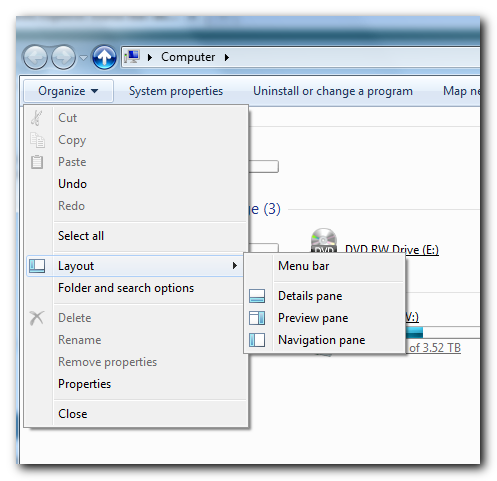
Also, for some clarity, I noticed a couple people are hung up on how to get the infobar to show up. The infobar is the supposed replacement for our beloved Status Bar. If you really want to use the infobar, go in an Explorer window, go to Organize > Layout > Details Pane.

tUA2j.png
 

My Computer My Computer

At a glance

Windows 7 Professional 64-bitCore i7 1.6GHz
Computer Manufacturer/Model Number
HP Pavilion dv6
OS
Windows 7 Professional 64-bit
CPU
Core i7 1.6GHz

My Computer My Computer

At a glance

Windows 7 Ultimate x64 SP1Core2 Duo4 GBGM965 on-board
Computer Manufacturer/Model Number
Toshiba L355D
OS
Windows 7 Ultimate x64 SP1
CPU
Core2 Duo
Motherboard
Intel
Memory
4 GB
Graphics Card(s)
GM965 on-board
Sound Card
RealTek on-board
Monitor(s) Displays
19"+17"(laptop)
Screen Resolution
1440x900 (x 2)
Hard Drives
500GB Ext. 200GB Internal
PSU
N/A
Case
N/A
Cooling
N/A
I just started using Classic Shell and I am loving it. Brings back all the functionality that I am missing PLUS a few more options for the start menu that XP and Win 7 is missing!
GREAT!
Microsoft: Why isn't this coming straight out of the box like that? Much easier to use and more modification options....

BTW: The developer of Classic shell is also having a site here:
http://classicshell.sourceforge.net/

CHECK THE VERSION NUMBER BEFORE DOWNLOADING!

On the previous posts it lists partially websites pointing you to version 1 of classic shell, at time of my posting version 3.0 is the current version!!!!

The content on sourceforge seem to be the one most up to date (And you do not need to register to download the software)

And the author is having a donate button on this page!
(there is no donate button on the original posted link as complained by the poster)
 
Last edited:

My Computer My Computer

At a glance

Windows 7 Ultimate x64 (Home)/ Win 7 Enterpri...Phenom Black II x4 3.2GHz16GBOnboard
Computer type
PC/Desktop
Computer Manufacturer/Model Number
Custom
OS
Windows 7 Ultimate x64 (Home)/ Win 7 Enterprise 32 Bit (Work)
CPU
Phenom Black II x4 3.2GHz
Motherboard
Gigabyte 880GA-UD3H
Memory
16GB
Graphics Card(s)
Onboard
Sound Card
Onboard
Monitor(s) Displays
2x 22" Asus
Screen Resolution
1680 x 1050 (16:10)
Hard Drives
1x 120GB Samsung SSD (for C Drive)
1x 55GB Adata SSD (for personal data and mail)
2x 2TB Seagate (after 2 1/2 years one is on the brink of dying!), (Backup, Pictures and Music)
1x 2TB Hitachi (External, 2nd Backup)
1x 2TB Samsung (TV recording)
PSU
Fanless 95+
Cooling
only CPU fan left :-)
Antivirus
Avira
Browser
Opera 12.54 (don't like the new one...but have it also)
Info bar causes explorer crashes if using ffdshow and trying to open folders containing x264 encoded video files.
That's why status bar could use more information. Or maybe a way to disable preview in info bar.
 

My Computer My Computer

At a glance

Windows 7 Ultimate x64
OS
Windows 7 Ultimate x64
I don't know why every os is becoming more and more for retarded people.
God damn that movie "idiocracy" was right.
 

My Computer My Computer

At a glance

Windows 7 Ultimate x64
OS
Windows 7 Ultimate x64
I haven't seen the movie, but I have to agree with you.
Now it looks like you made me really curious to see what that movie is all about....
 

My Computer My Computer

At a glance

Windows 7 Ultimate x64 (Home)/ Win 7 Enterpri...Phenom Black II x4 3.2GHz16GBOnboard
Computer type
PC/Desktop
Computer Manufacturer/Model Number
Custom
OS
Windows 7 Ultimate x64 (Home)/ Win 7 Enterprise 32 Bit (Work)
CPU
Phenom Black II x4 3.2GHz
Motherboard
Gigabyte 880GA-UD3H
Memory
16GB
Graphics Card(s)
Onboard
Sound Card
Onboard
Monitor(s) Displays
2x 22" Asus
Screen Resolution
1680 x 1050 (16:10)
Hard Drives
1x 120GB Samsung SSD (for C Drive)
1x 55GB Adata SSD (for personal data and mail)
2x 2TB Seagate (after 2 1/2 years one is on the brink of dying!), (Backup, Pictures and Music)
1x 2TB Hitachi (External, 2nd Backup)
1x 2TB Samsung (TV recording)
PSU
Fanless 95+
Cooling
only CPU fan left :-)
Antivirus
Avira
Browser
Opera 12.54 (don't like the new one...but have it also)
I have been very unhappy with the OP problem as well. A basic Windows function (that even mac :sick: has). MS really lit a match in the dynamite shed on this one:rolleyes:. Solution: install the open source Windows Classic Explorer:

Welcome to Classic Shell

You will get your classic status bar back :cool:, can hide the oversized (and frustratingly unhelpful) Details Pane, and be happy with Windows again:party:. It shows remaining disk size as well as the sum of the size of folder contents/selected files/folders - even in the Recycle Bin. Restores what MS tried to rob us of. I am running it on Win 7 64-bit.

They also have a classic start menu, but I am fine with the Win 7 start menu so I unchecked it during the install.

Now if they only had a donate link! (I am not affiliated with them at all).

Regards and Happy New Year.

MYD

Sorry to bump a old thread, but this has solved one of the most annoying problems everyone who read this thread.

I am not affiliated with the author in any way but I do highly encourage people do donate whatever you can, the author has remedied a great inconvenience for us all. Cheers! :thumbsup:
 
Last edited:

My Computer My Computer

At a glance

Windows 7 Ultimate x64 SP1Core i7 2600k (4.6GHz)16GB G.SKILL Ares 1600MHzMSI R6970 Lightning
Computer type
PC/Desktop
Computer Manufacturer/Model Number
Less is more
OS
Windows 7 Ultimate x64 SP1
CPU
Core i7 2600k (4.6GHz)
Motherboard
ASUS P8Z68 Deluxe (3603)
Memory
16GB G.SKILL Ares 1600MHz
Graphics Card(s)
MSI R6970 Lightning
Sound Card
Asus Xonar Essence ST (UNi drivers 1.41)
Monitor(s) Displays
Samsung P2570, CrossOver 27Q LED-P
Screen Resolution
1920*1080, 2560*1440
Hard Drives
256GB OCZ Vector, 2x Hitachi 4TB (7K4000), Hitachi 3TB (7K3000 & 5K3000)
PSU
Seasonic X750
Case
Lian-Li PC-P80N
Cooling
NZXT HAVIK 140 (2x GELID Wing12PL Push/Pull)
Keyboard
CM Storm Trigger (Brown Switch)
Mouse
Logitech G400
Internet Speed
55Mbps/10Mbps
Other Info
Speakers - Klipsch ProMedia 2.1
Headphones - Sennheiser HD595
Router - ASUS RT-N66U
Webcam - Logitech C910
Simple explorer BHO?

Hi all,

After about 1.5 years being frustrated by the new status bar behavior, I found this thread (and others) and saw a lot of other people frustrated by it as well.

So, since I am a software developer, I went and wrote a simple explorer extension to make the status bar show the file size, similar to how it did before. It is quite simple and does nothing except this one feature. If there is enough interest in it, I will publish it somewhere with source code, so anybody else can go ahead and make it more interesting if they want.

Please let me know if you are interested and I will get it uploaded.

Thanks,

Chris
 

My Computer My Computer

At a glance

Windows 7 Professional
Computer type
PC/Desktop
OS
Windows 7 Professional

My Computer My Computer

At a glance

Windows 7 Home 64, Vista Ultimate 64
Computer Manufacturer/Model Number
Me :) I build all my PCs
OS
Windows 7 Home 64, Vista Ultimate 64
I am also interested in a solution! Please post.
MANY THANKS in advance if you do so!
:thumbsup:
 

My Computer My Computer

At a glance

Windows 7 Ultimate x64 (Home)/ Win 7 Enterpri...Phenom Black II x4 3.2GHz16GBOnboard
Computer type
PC/Desktop
Computer Manufacturer/Model Number
Custom
OS
Windows 7 Ultimate x64 (Home)/ Win 7 Enterprise 32 Bit (Work)
CPU
Phenom Black II x4 3.2GHz
Motherboard
Gigabyte 880GA-UD3H
Memory
16GB
Graphics Card(s)
Onboard
Sound Card
Onboard
Monitor(s) Displays
2x 22" Asus
Screen Resolution
1680 x 1050 (16:10)
Hard Drives
1x 120GB Samsung SSD (for C Drive)
1x 55GB Adata SSD (for personal data and mail)
2x 2TB Seagate (after 2 1/2 years one is on the brink of dying!), (Backup, Pictures and Music)
1x 2TB Hitachi (External, 2nd Backup)
1x 2TB Samsung (TV recording)
PSU
Fanless 95+
Cooling
only CPU fan left :-)
Antivirus
Avira
Browser
Opera 12.54 (don't like the new one...but have it also)
Hi all,

As promised, I got the code cleaned up and posted onto google code. There is also a binary installer for those who are unable to compile it themselves. I have only tested it on a 64-bit US-English Windows 7 Professional SP1. It should work just fine on 32-bit systems as well. If you have issues please feel free to comment here or on the google code project page and I will do my best to help.

file-size - Windows 7 shell extension to show the size of the selected file(s) on the status bar. - Google Project Hosting

Thanks,

Chris
 

My Computer My Computer

At a glance

Windows 7 Professional
Computer type
PC/Desktop
OS
Windows 7 Professional
Thanks Chris for posting.
However when I install it (Win 7 Ultimate 64Bit Edition) I get the error
"Unable to register DLL/OCX: RegSvr32 failed with exit Code 0x3"
Any idea what is going wrong?
 

My Computer My Computer

At a glance

Windows 7 Ultimate x64 (Home)/ Win 7 Enterpri...Phenom Black II x4 3.2GHz16GBOnboard
Computer type
PC/Desktop
Computer Manufacturer/Model Number
Custom
OS
Windows 7 Ultimate x64 (Home)/ Win 7 Enterprise 32 Bit (Work)
CPU
Phenom Black II x4 3.2GHz
Motherboard
Gigabyte 880GA-UD3H
Memory
16GB
Graphics Card(s)
Onboard
Sound Card
Onboard
Monitor(s) Displays
2x 22" Asus
Screen Resolution
1680 x 1050 (16:10)
Hard Drives
1x 120GB Samsung SSD (for C Drive)
1x 55GB Adata SSD (for personal data and mail)
2x 2TB Seagate (after 2 1/2 years one is on the brink of dying!), (Backup, Pictures and Music)
1x 2TB Hitachi (External, 2nd Backup)
1x 2TB Samsung (TV recording)
PSU
Fanless 95+
Cooling
only CPU fan left :-)
Antivirus
Avira
Browser
Opera 12.54 (don't like the new one...but have it also)
Hi marwerno,

Thanks for reporting this issue. I think I fixed the problem and have posted an updated version of everything on the google code project page. Please try again and let me know if you run into any further problems. Note that you may have to uninstall the old version first, and you may need to reboot your PC in-between the uninstall/reinstall.

Thanks,

Chris
 

My Computer My Computer

At a glance

Windows 7 Professional
Computer type
PC/Desktop
OS
Windows 7 Professional
just installed (on 32-bit). no problems so far. thanks :)
 

My Computer My Computer

At a glance

Windows 7 Home Premium 32bitAMD Athlon II X2 250 Processor 3.00 GHz2Gb DDR2onboard
Computer type
PC/Desktop
Computer Manufacturer/Model Number
custom
OS
Windows 7 Home Premium 32bit
CPU
AMD Athlon II X2 250 Processor 3.00 GHz
Motherboard
Gigabyte
Memory
2Gb DDR2
Graphics Card(s)
onboard
Sound Card
onboard
Monitor(s) Displays
Viewsonic VA2448m-LED 23.6" LED
Screen Resolution
1920 x 1080
Hard Drives
internal: 1.5 TB Samsung Spinpoint
external: Samsung 2TB USB3.0; 1.5TB Samsung G3 Station
PSU
350w
Case
CoolerMaster
Keyboard
Microsoft Desktop 800
Mouse
Microsoft Desktop 800
Internet Speed
1Mbps
Antivirus
MSE
Browser
Firefox
Other Info
3.4 rating on the "Windows Experience Index"
This is amazing ChrisJR u solved my problem buddy keep it up
 

My Computer My Computer

At a glance

Windows 7 Ultimate x64Intel(R) Xeon(R) E5450 (Quad Core @ 3.00GHZ)FB-DDR2 Total: 16 Gb1) ATI Radeon HD 2400 2) Nvidia GeForce GT 420
Computer type
PC/Desktop
Computer Manufacturer/Model Number
HP
OS
Windows 7 Ultimate x64
CPU
Intel(R) Xeon(R) E5450 (Quad Core @ 3.00GHZ)
Motherboard
HP - Chipset Intel 0A98h Model No 5400B (XU1 PROCESSOR)
Memory
FB-DDR2 Total: 16 Gb
Graphics Card(s)
1) ATI Radeon HD 2400 2) Nvidia GeForce GT 420
Sound Card
Creative X-Fi Audio Processor (WDM)
Monitor(s) Displays
Acer Monitor
Screen Resolution
1024x768@29Hz
Hard Drives
1 X 931GB SATA
1 X 148GB Device ATA
1 x 3725GB USB Device SATA
2 X 1863GB SATA
6 X 2794GB USB Device SATA
PSU
800 Watt Power Supply
Case
Hewlett-Packard HP XW8600 Workstation Case
Cooling
2 fans at back, 1 on top of memory, CPU & PSU Fans
Keyboard
Logitech Illuminated Keyboard K740
Mouse
Logitech Trackman Marble
Internet Speed
30 Mbps
Antivirus
Emsisoft Anti-Malware, Eset Smart Security, MSE
Browser
Chrome
Back
Top