Windows Features - Turn On or Off

How to Turn Windows 7 Features On or Off


   Information
Some programs and features included with Windows 7 must be turned on before you can use them. Certain other features are turned on by default. This will show you how to turn the features you select on or off.
   Note
New Windows Features to Turn On or Off in Windows 7:
  • Games - Internet Games
  • Internet Explorer 9
  • Internet Information Services - FTP Server
  • Internet Information Services Hostable Web Core
  • Media Features
  • Microsoft .NET Framework 3.51
  • Services for NFS (Network File System)
  • Subsystem for UNIX-based Applications
  • TIFF IFilter
  • Windows Gadget Platform
  • Windows Search
  • XPS Services
  • XPS Viewer
   Tip

  • A blue box indicates that you have the main feature selected and turned on, but not all of the subfeatures under the expanded main feature are checked.
  • If the box is checked for the main feature, then it means that all of the subfeatures under the expanded main feature are checked and turned on as well.
If Windows Features is empty, then see:

The "Windows Features" dialog box is empty in Windows 7 or Windows Vista, or you receive an error message that includes the following code when you try to use Windows Update: "0x80073712"

   Warning
Turning off a feature does not uninstall the feature, and it does not reduce the amount of hard disk space used by the Windows 7 feature. The features remain stored on your hard disk so you can turn them back on if you want to later.


Here's How:
1. Do step 2 or 3 below.

2. Open the Start Menu, type Windows Features in the search box, and press Enter.
A) Go to step 4.
OR

3. Open the Control Panel (icons view), and click on the Programs and Features icon.
A) In the left pane, click on the Turn Windows features on or off link. (See screenshot below)
Step1.jpg
B) Go to step 4.
4. If prompted by UAC, click on Yes to approve.

5. If open, you can close the Programs and Features window now. (See screenshot above)

6. To Turn On a Windows Feature
A) Check the selected feature. (See screenshots below step 8)
NOTE: Some Windows features are grouped together in folders, and some folders contain subfolders with additional features. If a check box is partially checked or is dimmed, then some of the items inside the folder are turned on and some are turned off. To expand and view the contents of a folder, double-click it. Hovering the mouse pointer over a folder will give you a pop-up desciption of the feature.
7. To Turn Off a Windows Feature
A) Uncheck the selected feature. (See screenshots below step 8)
8. When done, click on OK. (See screenshots below)
NOTE: These are the default settings in Windows Features.
Features-1.jpgFeatures-2.jpg
9. After turning on or off a feature, you may be prompted to restart the computer.
That's it,
Shawn


Last edited:
Thanks! I was looking for something like this! Works great!
 

My Computer

Computer Manufacturer/Model Number
HP Pavilion slimline 3300f
OS
windows 7 pro 64 bit
CPU
AMD Athlon(tm) 64 x2 Dual Core Processor 5000+ 2.60 GHz
Memory
2 gb
Monitor(s) Displays
Samsung SyncMaster 191T
Screen Resolution
1200px by 1024px
Hard Drives
500 gb
Internet Speed
1500kb/s
You're welcome Adgower. :)
 

My Computer

Computer type
PC/Desktop
Computer Manufacturer/Model Number
Self built custom
OS
64-bit Windows 11 Pro for Workstations
CPU
Intel i7-8700K OC'd to 5 GHz
Motherboard
ASUS ROG Maximus XI Formula Z390
Memory
64 GB (4x16GB) G.SKILL TridentZ RGB DDR4 3600 MHz
Graphics Card(s)
ASUS ROG-STRIX-GTX1080TI-O11G-GAMING
Sound Card
Integrated
Monitor(s) Displays
2 x Samsung Odyssey G7 27"
Screen Resolution
2560x1440
Hard Drives
1TB Samsung 990 PRO M.2,
4TB Samsung 990 PRO PRO M.2,
TerraMaster F8 SSD Plus NAS
PSU
Seasonic Prime Titanium 850W
Case
Thermaltake Core P3
Cooling
Corsair Hydro H115i
Keyboard
Logitech wireless K800
Mouse
Logitech MX Master 4
Internet Speed
2 Gb/s Download and 100 Mb/s Upload
Antivirus
Malwarebyte Anti-Malware Premium
Browser
Google Chrome
Other Info
Logitech Z625 speaker system,
Logitech BRIO 4K Pro webcam,
HP Color LaserJet Pro MFP M477fdn,
APC SMART-UPS RT 1000 XL - SURT1000XLI,
Galaxy S23 Plus phone
Goodbye Internet Explorer 8 and Goodbye Tablet PC Components! :party:
 

My Computer

Computer Manufacturer/Model Number
HP Pavilion dv6815nr Notebook
OS
7 Home Premium x86
CPU
AMD Turion 64 X2 Mobille Technology TL-60 2.0GHz
Memory
3GB
Graphics Card(s)
NVIDIA GeForce 7150M / nForce630M
Sound Card
Conexant High Definition SmartAudio 221
Screen Resolution
1280 x 800
Hard Drives
Samsung 147GB
Mouse
Synaptics TouchPad
Other Info
Norton Security Suite (360)
Somethings wrong with mine....It says loading and then the box turns white but nothing is in it. I am running Ultimate 32-Bit
 

My Computer

Computer Manufacturer/Model Number
Compaq
OS
Windows 7 Ultimate 32-Bit (x86)
CPU
Intel Pentium Dual Core T3400
Motherboard
Wistron 3612
Memory
3GB DDR2
Graphics Card(s)
nVidia 9200M GE and Mobile Intel 4 Series Express Chipset
Sound Card
Conexant High Defininition SmartAudio 221
Screen Resolution
1366x768
Hard Drives
SAMSUNG HM251JI ATA 250GB
Internet Speed
160KBps
Hello Isaac,

See if the suggestions in the link in the yellow tip box at the top of the tutorial may be able to help fix it for you.

Hope this helps,
Shawn
 

My Computer

Computer type
PC/Desktop
Computer Manufacturer/Model Number
Self built custom
OS
64-bit Windows 11 Pro for Workstations
CPU
Intel i7-8700K OC'd to 5 GHz
Motherboard
ASUS ROG Maximus XI Formula Z390
Memory
64 GB (4x16GB) G.SKILL TridentZ RGB DDR4 3600 MHz
Graphics Card(s)
ASUS ROG-STRIX-GTX1080TI-O11G-GAMING
Sound Card
Integrated
Monitor(s) Displays
2 x Samsung Odyssey G7 27"
Screen Resolution
2560x1440
Hard Drives
1TB Samsung 990 PRO M.2,
4TB Samsung 990 PRO PRO M.2,
TerraMaster F8 SSD Plus NAS
PSU
Seasonic Prime Titanium 850W
Case
Thermaltake Core P3
Cooling
Corsair Hydro H115i
Keyboard
Logitech wireless K800
Mouse
Logitech MX Master 4
Internet Speed
2 Gb/s Download and 100 Mb/s Upload
Antivirus
Malwarebyte Anti-Malware Premium
Browser
Google Chrome
Other Info
Logitech Z625 speaker system,
Logitech BRIO 4K Pro webcam,
HP Color LaserJet Pro MFP M477fdn,
APC SMART-UPS RT 1000 XL - SURT1000XLI,
Galaxy S23 Plus phone
But here's the thing there is no error..And I just tried the scan and it said nothing was found...Will I have to reinput my key if I repair...It seems I have lost it.
 

My Computer

Computer Manufacturer/Model Number
Compaq
OS
Windows 7 Ultimate 32-Bit (x86)
CPU
Intel Pentium Dual Core T3400
Motherboard
Wistron 3612
Memory
3GB DDR2
Graphics Card(s)
nVidia 9200M GE and Mobile Intel 4 Series Express Chipset
Sound Card
Conexant High Defininition SmartAudio 221
Screen Resolution
1366x768
Hard Drives
SAMSUNG HM251JI ATA 250GB
Internet Speed
160KBps
Isaac,

No, you will not lose anything doing a repair install to fix this. :)
 

My Computer

Computer type
PC/Desktop
Computer Manufacturer/Model Number
Self built custom
OS
64-bit Windows 11 Pro for Workstations
CPU
Intel i7-8700K OC'd to 5 GHz
Motherboard
ASUS ROG Maximus XI Formula Z390
Memory
64 GB (4x16GB) G.SKILL TridentZ RGB DDR4 3600 MHz
Graphics Card(s)
ASUS ROG-STRIX-GTX1080TI-O11G-GAMING
Sound Card
Integrated
Monitor(s) Displays
2 x Samsung Odyssey G7 27"
Screen Resolution
2560x1440
Hard Drives
1TB Samsung 990 PRO M.2,
4TB Samsung 990 PRO PRO M.2,
TerraMaster F8 SSD Plus NAS
PSU
Seasonic Prime Titanium 850W
Case
Thermaltake Core P3
Cooling
Corsair Hydro H115i
Keyboard
Logitech wireless K800
Mouse
Logitech MX Master 4
Internet Speed
2 Gb/s Download and 100 Mb/s Upload
Antivirus
Malwarebyte Anti-Malware Premium
Browser
Google Chrome
Other Info
Logitech Z625 speaker system,
Logitech BRIO 4K Pro webcam,
HP Color LaserJet Pro MFP M477fdn,
APC SMART-UPS RT 1000 XL - SURT1000XLI,
Galaxy S23 Plus phone
Hi,
Is it safe to turn off all the features? Will it increase my computer's performance in any way?

Thanks.
--
Incredible India
 

My Computer

Computer Manufacturer/Model Number
Samsung NP - N140 - KA01IN
OS
Windows 7 HP x86
CPU
Intel Atom N270 @ 1.60GHz
Memory
1 GB - DDR2
Graphics Card(s)
Intel Graphics Media Accelerator 945
Sound Card
--None--
Monitor(s) Displays
10.1" non-gloss TFT screen @ 32bits per pixel
Screen Resolution
1024x600 @ 60 Hz
Hard Drives
Fujitsu MHZ2160BH-G2 160GB 5400 RPM 8MB Cache 2.5" SATA 3.0Gb/s
PSU
--None--
Case
--None--
Cooling
--None--
Keyboard
Inbuilt Keyboard
Mouse
Zebronics (ZEB - OM150) USB mouse
Internet Speed
2 mbps (mega bits) i.e., around 210 KBps (Kilo Bytes)
Hello Jacksparrow, and welcome to Seven Forums.

No. It would not be safe to turn off all of the features. You would only want to turn off the ones that you do not use. If you are not sure, then it's best to leave them at default to avoid turning a feature off that you may not know that you needed.

You will not gain any hard drive space by turning off a feature, but you may gain a very slight increase in performance by not having features, that may run in the background as a process, that you do not use.

Hope this helps,
Shawn
 

My Computer

Computer type
PC/Desktop
Computer Manufacturer/Model Number
Self built custom
OS
64-bit Windows 11 Pro for Workstations
CPU
Intel i7-8700K OC'd to 5 GHz
Motherboard
ASUS ROG Maximus XI Formula Z390
Memory
64 GB (4x16GB) G.SKILL TridentZ RGB DDR4 3600 MHz
Graphics Card(s)
ASUS ROG-STRIX-GTX1080TI-O11G-GAMING
Sound Card
Integrated
Monitor(s) Displays
2 x Samsung Odyssey G7 27"
Screen Resolution
2560x1440
Hard Drives
1TB Samsung 990 PRO M.2,
4TB Samsung 990 PRO PRO M.2,
TerraMaster F8 SSD Plus NAS
PSU
Seasonic Prime Titanium 850W
Case
Thermaltake Core P3
Cooling
Corsair Hydro H115i
Keyboard
Logitech wireless K800
Mouse
Logitech MX Master 4
Internet Speed
2 Gb/s Download and 100 Mb/s Upload
Antivirus
Malwarebyte Anti-Malware Premium
Browser
Google Chrome
Other Info
Logitech Z625 speaker system,
Logitech BRIO 4K Pro webcam,
HP Color LaserJet Pro MFP M477fdn,
APC SMART-UPS RT 1000 XL - SURT1000XLI,
Galaxy S23 Plus phone
Features explanations

What I have been seeking all night is a good description of the features...I know you can mouse-over them and get the pop-up description, however I find the pop-up description fairly vauge and at times, uses terms that I do not know the meaning of...is there a way to put them back to default if they are messed around with??
 

My Computer

Computer Manufacturer/Model Number
Custom
OS
Windows 7 Ultimate
CPU
Intel E8400 Wolfdale 3.0 @ 4.0 OC
Motherboard
MSI P7N SLI Platinum
Memory
Corsair 1024 X 2
Graphics Card(s)
NVIDIA 260 GTX OC2
Sound Card
Onboard Realtek
Monitor(s) Displays
22" Viewsonic LCD
Screen Resolution
1680 X1050 @ 59 Hz
Hard Drives
2 X Western Digital 750G RAID 0 Setup
PSU
Antec 850W
Case
Antec Coolmaster-full tower
Cooling
Stock Intel CPU / 4 X 5" Case fans
Keyboard
Saitek Eclipse II
Mouse
Logitech Optical
Internet Speed
Cable 2.2 MB/750 KB
Hello Hondadogie, and welcome to Seven Forums.

I find that doing a Google search with the Windows Feature in quotes gives you the best results on finding out more details about it.

Unfortunately you can only manually change the settings back to default. The screenshots under step 7 in the tutorial are the default settings in Windows Features to help.

Hope this helps,
Shawn
 

My Computer

Computer type
PC/Desktop
Computer Manufacturer/Model Number
Self built custom
OS
64-bit Windows 11 Pro for Workstations
CPU
Intel i7-8700K OC'd to 5 GHz
Motherboard
ASUS ROG Maximus XI Formula Z390
Memory
64 GB (4x16GB) G.SKILL TridentZ RGB DDR4 3600 MHz
Graphics Card(s)
ASUS ROG-STRIX-GTX1080TI-O11G-GAMING
Sound Card
Integrated
Monitor(s) Displays
2 x Samsung Odyssey G7 27"
Screen Resolution
2560x1440
Hard Drives
1TB Samsung 990 PRO M.2,
4TB Samsung 990 PRO PRO M.2,
TerraMaster F8 SSD Plus NAS
PSU
Seasonic Prime Titanium 850W
Case
Thermaltake Core P3
Cooling
Corsair Hydro H115i
Keyboard
Logitech wireless K800
Mouse
Logitech MX Master 4
Internet Speed
2 Gb/s Download and 100 Mb/s Upload
Antivirus
Malwarebyte Anti-Malware Premium
Browser
Google Chrome
Other Info
Logitech Z625 speaker system,
Logitech BRIO 4K Pro webcam,
HP Color LaserJet Pro MFP M477fdn,
APC SMART-UPS RT 1000 XL - SURT1000XLI,
Galaxy S23 Plus phone
I have ms. office 2010 that including XPS fuction. (i dont even know what is XPS)

If i uninstall XPS feature on seven, will it has effect on my ms. office XPS?

Thanx before.
 

My Computer

Computer Manufacturer/Model Number
Alienware m11x
OS
XP Pro SP2 x86 & Seven x64 Enterprise
CPU
Intel Core i5 520UM
Memory
4 GiGs PC3-8500 Dual-Channel DDR3
Graphics Card(s)
Nvidia GeForce GT 335M Discrete Graphics (1GB GDDR3)
Monitor(s) Displays
Flat & Flip 11.6" WXGA WideHD 1366x768 LED Backlit
Hard Drives
Western Digital 250GB SATAII
Internet Speed
!!!deadly slow!!!
Hello Viruzth,

This can help tell you more about XPS files.

Open XML Paper Specification - Wikipedia, the free encyclopedia

I would recommend to leave the XPS options in Windows Features checked and turned on in case you need it. You will not save any hard drive space by unchecking them.

Hope this helps,
Shawn
 

My Computer

Computer type
PC/Desktop
Computer Manufacturer/Model Number
Self built custom
OS
64-bit Windows 11 Pro for Workstations
CPU
Intel i7-8700K OC'd to 5 GHz
Motherboard
ASUS ROG Maximus XI Formula Z390
Memory
64 GB (4x16GB) G.SKILL TridentZ RGB DDR4 3600 MHz
Graphics Card(s)
ASUS ROG-STRIX-GTX1080TI-O11G-GAMING
Sound Card
Integrated
Monitor(s) Displays
2 x Samsung Odyssey G7 27"
Screen Resolution
2560x1440
Hard Drives
1TB Samsung 990 PRO M.2,
4TB Samsung 990 PRO PRO M.2,
TerraMaster F8 SSD Plus NAS
PSU
Seasonic Prime Titanium 850W
Case
Thermaltake Core P3
Cooling
Corsair Hydro H115i
Keyboard
Logitech wireless K800
Mouse
Logitech MX Master 4
Internet Speed
2 Gb/s Download and 100 Mb/s Upload
Antivirus
Malwarebyte Anti-Malware Premium
Browser
Google Chrome
Other Info
Logitech Z625 speaker system,
Logitech BRIO 4K Pro webcam,
HP Color LaserJet Pro MFP M477fdn,
APC SMART-UPS RT 1000 XL - SURT1000XLI,
Galaxy S23 Plus phone
wow
another super guide!!!
but
7. When done, click on OK. (See screenshots below)
NOTE: These are the default settings in Windows Features.
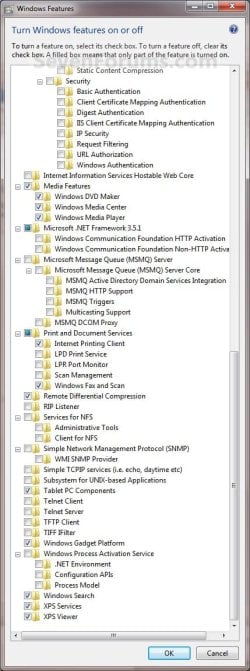
the default are only in the screenshot
is there not a feature in w7 to restore default?
 

My Computer

Computer type
PC/Desktop
OS
windows 7 ultimate 64bit
Hello Drugo,

Nope. Only manually setting them back to default. :(
 

My Computer

Computer type
PC/Desktop
Computer Manufacturer/Model Number
Self built custom
OS
64-bit Windows 11 Pro for Workstations
CPU
Intel i7-8700K OC'd to 5 GHz
Motherboard
ASUS ROG Maximus XI Formula Z390
Memory
64 GB (4x16GB) G.SKILL TridentZ RGB DDR4 3600 MHz
Graphics Card(s)
ASUS ROG-STRIX-GTX1080TI-O11G-GAMING
Sound Card
Integrated
Monitor(s) Displays
2 x Samsung Odyssey G7 27"
Screen Resolution
2560x1440
Hard Drives
1TB Samsung 990 PRO M.2,
4TB Samsung 990 PRO PRO M.2,
TerraMaster F8 SSD Plus NAS
PSU
Seasonic Prime Titanium 850W
Case
Thermaltake Core P3
Cooling
Corsair Hydro H115i
Keyboard
Logitech wireless K800
Mouse
Logitech MX Master 4
Internet Speed
2 Gb/s Download and 100 Mb/s Upload
Antivirus
Malwarebyte Anti-Malware Premium
Browser
Google Chrome
Other Info
Logitech Z625 speaker system,
Logitech BRIO 4K Pro webcam,
HP Color LaserJet Pro MFP M477fdn,
APC SMART-UPS RT 1000 XL - SURT1000XLI,
Galaxy S23 Plus phone
Hello Drugo,

Nope. Only manually setting them back to default. :(
i could be not exported , i mean with the regkey?:sarc:

thanks for the super tutorial
 

My Computer

Computer type
PC/Desktop
OS
windows 7 ultimate 64bit
Drugo,

Yes, but not easily at all. You would have to use the registry settings added by Group Policy to turn them on or off. It's just to much to squeeze into one tutorial. This is the main reason why I included screenshots for the default settings. :(

.....but for the basics:

You could search through the existing Tutorials for the "How to Turn On and Off......." tutorials for a feature you want turned on or off to have the REG files for it.

Otherwise, you could go through Group Policy under "Windows Components" to turn a feature on or off.
 

My Computer

Computer type
PC/Desktop
Computer Manufacturer/Model Number
Self built custom
OS
64-bit Windows 11 Pro for Workstations
CPU
Intel i7-8700K OC'd to 5 GHz
Motherboard
ASUS ROG Maximus XI Formula Z390
Memory
64 GB (4x16GB) G.SKILL TridentZ RGB DDR4 3600 MHz
Graphics Card(s)
ASUS ROG-STRIX-GTX1080TI-O11G-GAMING
Sound Card
Integrated
Monitor(s) Displays
2 x Samsung Odyssey G7 27"
Screen Resolution
2560x1440
Hard Drives
1TB Samsung 990 PRO M.2,
4TB Samsung 990 PRO PRO M.2,
TerraMaster F8 SSD Plus NAS
PSU
Seasonic Prime Titanium 850W
Case
Thermaltake Core P3
Cooling
Corsair Hydro H115i
Keyboard
Logitech wireless K800
Mouse
Logitech MX Master 4
Internet Speed
2 Gb/s Download and 100 Mb/s Upload
Antivirus
Malwarebyte Anti-Malware Premium
Browser
Google Chrome
Other Info
Logitech Z625 speaker system,
Logitech BRIO 4K Pro webcam,
HP Color LaserJet Pro MFP M477fdn,
APC SMART-UPS RT 1000 XL - SURT1000XLI,
Galaxy S23 Plus phone
Brink

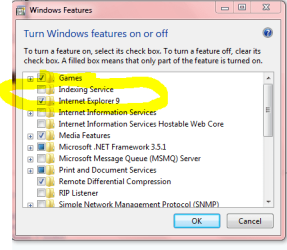
Indexing Service.
Do you know if it is to be checked or unchecked?
Mine is unchecked always has been as far as I know but I'm unsure what it does. Something to do with Windows Explorer I'm guessing?
Couldn't find any info here on the forum though it may be here.

If your not sure that is okay.
I'll do some looking around MS tomorrow.

Mike
 

Attachments

  • Indexing Service.PNG
    Indexing Service.PNG
    41.5 KB · Views: 3,443

My Computer

Computer Manufacturer/Model Number
Hopalong/ Godzilla
OS
Windows7 Pro 64bit SP-1; Windows XP Pro 32bit
CPU
Intel Core i7-870 Lynnfield 2.93GHz LGA 1156 95W Quad-Core
Motherboard
ASUS P7P55D-E PRO
Memory
8GB@1400MHz Crucial Ballistix DDR3-1600 4x2GB
Graphics Card(s)
ASUS ENGTX460 DirectCU/2DI/1GD5 1GB 256-bit GDDR5
Sound Card
VIA Onboard
Monitor(s) Displays
Asus VS248H-P 24"; Samsung SyncMaster 941BW 19"ws
Screen Resolution
1920x1080; 1440x900
Hard Drives
Samsung 830 120GB SSD
Intel 320 120GB SSD
Western Digital Caviar Black WD7501AALS 750GB 7200 RPM SATA 3.0Gb/s
Western Digital Caviar Black WD6401AALS 640GB 7200 RPM SATA 3.0Gb/s
PSU
COOLER MASTER Silent Pro RS850-AMBAJ3-US 850W Modular
Case
COOLER MASTER HAF 932 RC-932-KKN5-GP Black
Cooling
Scythe "Mugen-2 Rev.B" (2 ScytheKaze-Jyuni PWM fans)
Keyboard
Logitech K-320
Mouse
Kensington
Antivirus
Avast Inernet Suite
Browser
IE 9 ; Chrome
Back
Top