
Windows File Explorer shows wrong time for updated file

ruggb

New member
Member
Local time
7:57 PM
Messages
79
In File Explorer - navigate to a folder in Documents, a recently saved file by Sketchup application shows date = 9/28/17 6:48 PM
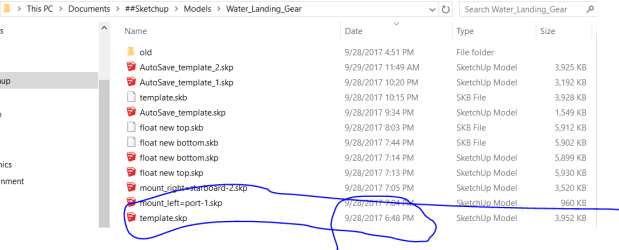
navigated.PNG

do a search for the same file, date shows = 9/29/17 1:32 PM << this one is correct.

searched.PNG

Open either file and they are the same content.

This happened last night also. When I got up this AM and looked by navigating to it, it showed the correct time.

I can't remember if this has happened with another app or if it just started happening as I have not been working with another app in the last few days.

Don't know how it could be app related since it appeared correct the next day.

There was no internet connection when this happened. There is now and it is the same.
I just created these attachments.

Any ideas?
 

My Computer

OS
windows 7
Hi Ruggb,

Those are 2 different locations for starters.

And i suspect you started to create the template at 6.45
but didnt actually use until the next day.


Roy
 

My Computer

Computer type
PC/Desktop
Computer Manufacturer/Model Number
medionl/Aspire 6930G/acer x55a
OS
W7 home premium 32bit/W7HP 64bit/w10 tp insider ring
CPU
E5300 dual core
Motherboard
medion MS7366
Memory
3gb
Graphics Card(s)
Nvidia Geforce 7100 Nforce 630i
Monitor(s) Displays
avixc
Internet Speed
n (isp resticted to 72)
Antivirus
mse/pands
Browser
palemoon
Other Info
Belkin Fd7050 n USB using Railink RT2870 drivers, more upto date
I don't know why you think those are different locations????
If I click on the path in FE it shows the same thing as shown in the search.
MS just thinks it is easier to confuse you by showing a different format.
I guess they were right. So here is a bigger picture.

view.PNG

I was working on the file created yesterday and resaved it many times since then.
Obviously, I saved it just b4 I was confronted by this anomaly.

It actually has not changed since I posted this.
If I search for the file is shows correct and if I open file location it highlights the file with the wrong date/time.
It is the same file, same location, different date/time. Apparently there is ANOTHER new bug in windoz that is showing the creation date in one view and the modified date in another.
YES, I just confirmed that by using another file.

The search shows the modified date and the navigation shows the created date.
Nice feature, not.
 
Last edited:

My Computer

OS
windows 7
Right click on the top menu (name, date, type etc) and choose Date Modified.
 

My Computers

System One System Two

  • Computer type
    PC/Desktop
    Computer Manufacturer/Model Number
    custom build
    OS
    Windows 7 HP 64
    CPU
    i5 6600K - 800MHz to 4200MHz
    Motherboard
    GA-Z170-HD3P
    Memory
    4+4G GSkill DDR4 3000
    Graphics Card(s)
    IG - Intel 530
    Monitor(s) Displays
    Samsung 226BW
    Screen Resolution
    1680x1050
    Hard Drives
    (1) -1 SM951 – 128GB M.2 AHCI PCIe SSD drive for Windows 7 and Lubuntu
    (2) -1 WD SATA 3 - 1T for Data
    (3) -1 WD SATA 3 - 1T for backup
    PSU
    Thermaltake 450W TR2 gold
    Keyboard
    Old and good Chicony mechanical keyboard
    Mouse
    Logitech mX performance - 9 buttons (had to disable some)
    Internet Speed
    500Mb/s
    Browser
    Firefox 64
    Other Info
    TinyWall firewall
  • Computer type
    Laptop
    System Manufacturer/Model Number
    Asus Q550LF
    OS
    Windows 7 Pro
    CPU
    i7-4500U 800MHz to 3.0GHz
    Motherboard
    Asus Q550LF
    Memory
    (4+4)G DDR3 1600
    Graphics Card(s)
    IG intel 4400 + NVIDIA GeForce GT 745M
    Sound Card
    Realtek
    Monitor(s) Displays
    LG Display LP156WF4-SPH1
    Screen Resolution
    1920 x 1080
    Hard Drives
    BX500 120G SSD for Windows and programs +
    1T HDD for data
    Internet Speed
    500 Mb/s
    Browser
    Firefox
    Other Info
    TinyWall firewall
that gives me another column that I have never had/used.
The issue is consistency.
The date column has always been last modified date. Now it has changed to creation date, which for a default is totally useless. If I search at the folder level or look in the folder I get a creation date and if I search above the folder level I get a last modified date.

I would say MS right hand doesn't know what its left hand is doing. That's a revelation!
 

My Computer

OS
windows 7
You can make a kind of view from one folder to be applied to all folders.
On Explorer open a folder with the columns you want to see on all folders. Open Tools menu, choose folder options - View tab and hit Apply to all folders.
 

My Computers

System One System Two

  • Computer type
    PC/Desktop
    Computer Manufacturer/Model Number
    custom build
    OS
    Windows 7 HP 64
    CPU
    i5 6600K - 800MHz to 4200MHz
    Motherboard
    GA-Z170-HD3P
    Memory
    4+4G GSkill DDR4 3000
    Graphics Card(s)
    IG - Intel 530
    Monitor(s) Displays
    Samsung 226BW
    Screen Resolution
    1680x1050
    Hard Drives
    (1) -1 SM951 – 128GB M.2 AHCI PCIe SSD drive for Windows 7 and Lubuntu
    (2) -1 WD SATA 3 - 1T for Data
    (3) -1 WD SATA 3 - 1T for backup
    PSU
    Thermaltake 450W TR2 gold
    Keyboard
    Old and good Chicony mechanical keyboard
    Mouse
    Logitech mX performance - 9 buttons (had to disable some)
    Internet Speed
    500Mb/s
    Browser
    Firefox 64
    Other Info
    TinyWall firewall
  • Computer type
    Laptop
    System Manufacturer/Model Number
    Asus Q550LF
    OS
    Windows 7 Pro
    CPU
    i7-4500U 800MHz to 3.0GHz
    Motherboard
    Asus Q550LF
    Memory
    (4+4)G DDR3 1600
    Graphics Card(s)
    IG intel 4400 + NVIDIA GeForce GT 745M
    Sound Card
    Realtek
    Monitor(s) Displays
    LG Display LP156WF4-SPH1
    Screen Resolution
    1920 x 1080
    Hard Drives
    BX500 120G SSD for Windows and programs +
    1T HDD for data
    Internet Speed
    500 Mb/s
    Browser
    Firefox
    Other Info
    TinyWall firewall
Now that I have figured out what the problem is, Yes, I can screw around with file explorer and create a workaround to show me what was previously correct and consistent.
Why do you want to tell me how to put band-aids around an MS screw up?
Obviously, it will still be broken. How does one get MS to fix it? I have not managed to get anything fixed yet. It is always written off as design intent.
 

My Computer

OS
windows 7
Back
Top