External Harddrive crashes windows file explorer

shoyruuu

New member
Local time
4:25 PM
Messages
3
Hi everybody,

so, I've been looking on the internet for a solution, i found similar cases but it often stayed unsolved or the solution didnt work for me.

Yesterday I was saving some files on my external Hard Drive (a Toshiba, if it may be relevant), it was working as usual but suddenly, it made the windows explorer crash.

So the symptoms are : whenever I try to open it, or right click on its icon, the windows explorer freezes and only comes back if i unplug the device. I also cannot access the Disk Management anymore when its plugged.

What I've tried so far is :
- uninstalling every USB Device pilot with a small soft i dont remember the name : it reinstalled the pilot when I plugged back the harddrive without any trouble, but I still counldn't access it.
- analyze it with Seatools : it simply couldn't detect it
- desactivate the device then reactivate : no effect
- using Minitool partition wizard : that was more interesting : it struggled to detect it but ultimately i could see the disc. No problem detected, I could even see my files inside but it was really slow. Today, I sadly cant even see it anymore....

Does anybody has another idea ? I would really like to recover my files. The device is not even that old, I've been using it for 2-3 years now, only to save pics and files from time to time. I'd really appreciate your help :)

Thanks
 

My Computer

Computer type
PC/Desktop
OS
W7 32b
Please give full details of your Toshiba External drive.

Model Number, capacity, whether it is a desktop external powered by an AC adapter or a USB powered portable external .

If it shows up in My Computer post a screenshot of it. ( Plug in only your Toshiba drive. Remove all other external drives/pendrives.)

In Device Manager, expand Disk drives and post a screenshot. Right click > Properties. Does it show the device working properly?

Your Toshiba drive should also appear as USB Mass Storage Device under Universal Serial Bus Controllers. Is the device working properly?

Do other external drives work properly on your PC?

Have you tried the Toshiba External on another working PC? If not do that and report what happens.
 

My Computer

OS
Windows 7 Home Premium 32 bit
Hi jumanji,

its a Store basics 1To, USB powered.

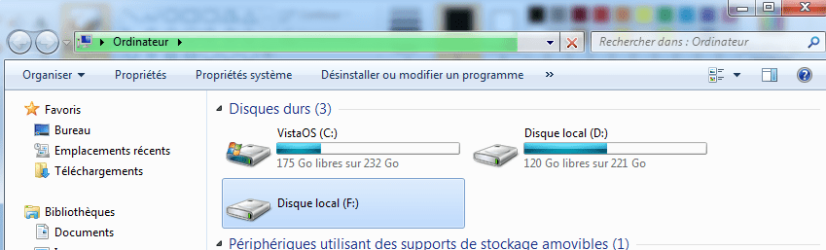
Here s a screenshot of My Computer (its in french, like the following pics, sorry :) ). The D is a partition of the internal disk. F is supposed to be the Toshiba harddrive, instead it says "Local Disk".

mycomputer.png

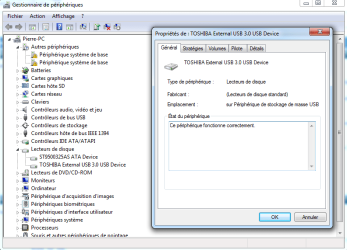
The device manager doesnt show any problem, "the device works properly". Except those 2 "Base system peripherics" that I didn't notice before, I don't know if it's related.

device manager.png

Every other storage or non storage device works like a charm on every USB port. Unfortunately, I couldn't try the harddrive on another computer yet, I don't have any other available today.
 

My Computer

Computer type
PC/Desktop
OS
W7 32b
I also do not know what those question mark devices are. I shall leave it to other experts to dwelve on it and advise you.

Do try your external HDD on another PC and when you do, look at the My Computer, Device Manager and also Windows Disk Management and report.

Now check whether a Linux Live USB can see the drive and its contents. Create a Lucid Puppy pendrive boot from it and see.

See my post here. http://www.sevenforums.com/hardware...ly-unrecognisable-hard-drive.html#post2936753

Since you would have already created a Lucid Puppy drive straightaway go to the topic Recovering files from the non-bootable Internal Drive: (leaving aside whatever is written above that topic, not applicable) in this thread Lucid Puppy way to recover files from a non-bootable computer on how-to. In your case it will be your external drive.
 

My Computer

OS
Windows 7 Home Premium 32 bit
Also you could try right clicking on that drive's icon using Explorer++

http://www.sevenforums.com/performa...-computer-window-post2864579.html#post2864579

If there happens to be a problem with a shell extension then Explorer++ might work.

Try to get an explorer crash dump as per this post:

http://www.sevenforums.com/bsod-hel...ouse-photo-image-post3258546.html#post3258546

Maybe the dump will point to something specific. It would be better if you could check if the drive works okay on another machine.
 
Last edited:

My Computer

Computer type
Laptop
Computer Manufacturer/Model Number
ASUS
OS
Microsoft Windows 7 Home Premium 64-bit 7601 Multiprocessor Free Service Pack 1
CPU
AMD C-60 APU with Radeon(tm) HD Graphics
Motherboard
ASUSTeK COMPUTER INC. X501U
Memory
4.00 GB
Graphics Card(s)
AMD Radeon HD 6290 Graphics
Sound Card
(1) AMD High Definition Audio Device (2) Realtek High Defi
Screen Resolution
1366 x 768 x 32 bits (4294967296 colors) @ 60 Hz
Hard Drives
Hitachi HTS545050A7E380 SATA Disk Device
Antivirus
Comodo CIS & FW, SecureAplus App Whitelisting, Threatfire
Browser
Cyberfox 64bit, Opera 64bit, Airfox
Other Info
Spy-The-Spy, HitmanPro.Alert, Norton Connect Safe, MJRegWatcher, BitDefender TrafficLight, Voodoo Shield, Zemana AntiMalware
Hi everybody,

I've tried the device on another computer, same problem.

I've tried to open it with explorer++ but it also didn't work.

I've then tried to get a crash dump but I couldn't get any :sarc: Basically, whenever I try to access the device, explorer freezes, loads for a long time, then gets "unavailable" like on the following pic.
explorer.png
If I don't do anything, it just stays like that.
So i closed it, I got the typical windows notification "Explorer did not answer, what do you wanna do - close - wait - etc...". I closed but couldn't find any Localdump folder in my C. I restarted after merging though.

I will try the Lucid Puppy tomorrow, but I start to think that my drive is KO.
 

My Computer

Computer type
PC/Desktop
OS
W7 32b
I've tried to open it with explorer++ but it also didn't work.

I've then tried to get a crash dump but I couldn't get any :sarc:

That means that it isn't a problem with third party software that uses a shell extension. It was worth checking.

As for how to check your drive or get files from it - others can comment.
 

My Computer

Computer type
Laptop
Computer Manufacturer/Model Number
ASUS
OS
Microsoft Windows 7 Home Premium 64-bit 7601 Multiprocessor Free Service Pack 1
CPU
AMD C-60 APU with Radeon(tm) HD Graphics
Motherboard
ASUSTeK COMPUTER INC. X501U
Memory
4.00 GB
Graphics Card(s)
AMD Radeon HD 6290 Graphics
Sound Card
(1) AMD High Definition Audio Device (2) Realtek High Defi
Screen Resolution
1366 x 768 x 32 bits (4294967296 colors) @ 60 Hz
Hard Drives
Hitachi HTS545050A7E380 SATA Disk Device
Antivirus
Comodo CIS & FW, SecureAplus App Whitelisting, Threatfire
Browser
Cyberfox 64bit, Opera 64bit, Airfox
Other Info
Spy-The-Spy, HitmanPro.Alert, Norton Connect Safe, MJRegWatcher, BitDefender TrafficLight, Voodoo Shield, Zemana AntiMalware
Back
Top