
Windows Firewall - Add or Remove an Exception

How to Add or Remove Windows Firewall Exception in Windows 7 and Windows 8

   Information
This will show you how to add or remove a program or feature for each type of network location type (ex: Private or Public) to allow the program or feature through Windows Firewall.

   Warning
When you add a program to the list of allowed programs in a firewall you allow a particular program to send information to or from your computer through the firewall. Allowing a program to communicate through a firewall (sometimes called unblocking) is like opening a tiny door in the firewall.

Each time you allow a program to communicate through a firewall, your computer becomes a bit less secure. The more allowed programs your firewall has, the more opportunities there are for hackers or malicious software to use one of those openings to spread a worm, access your files, or use your computer to spread malicious software to others.

To help decrease your security risk:
  • Only allow a program when you really need to, and remove programs from the list of allowed programs that you no longer need.
  • Never allow a program that you do not recognize to communicate through the firewall.


Here's How:

1. Open the Control Panel (icons view), and click/tap on the Windows Firewall icon.

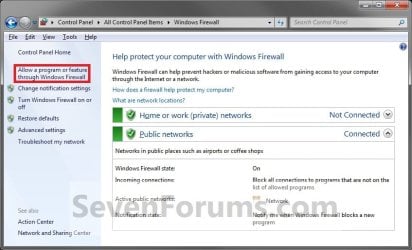
2. Click/tap on the Allow a program through Windows Firewall link in the left pane. (see screenshot below)
Windows_Firewall.jpg
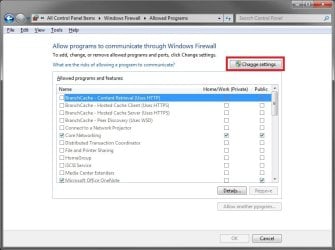
3. Click/tap on the Change settings button. (see screenshot below)
NOTE: If the Change settings button is grayed out, then it has already been clicked on.
Change_Settings.jpg
4. Do step 5, 6, or 7 below for what you would like to do.

5. To Allow or Unallow an Existing Exception
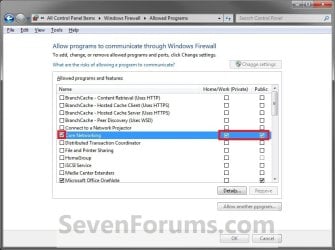
A) On the left side, check the program exception Name box to allow, or uncheck to unallow through Windows Firewall. (see screenshot below)

B) If you allowed the program exception, then check (allow) or uncheck (unallow) the box for each Private or Public network location you want the program to have access through Windows Firewall. (see screenshot below)
Allow-1.jpg
6. To Add a Program Exception
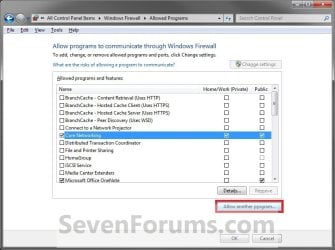
A) Click on the Allow another program button. (see screenshot below)
Add_Program-1.jpg

B) If the Program is Listed (see screenshot below step 6D)
  • Click/tap on the program to highlight it.
  • Go to step 6D.
C) If the Program is Not Listed (see screenshot below step 6D)
  • Click/tap on the Browse button.
  • Navigate to the program's exe file location, usually in a C:\Program Files folder, and click on the program's exe file to select (highlight) it and click on the Open button.
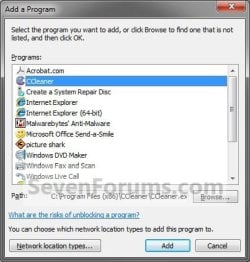
D) Click/tap on the Add button. (see screenshot below)
Add_Program-2.jpg
E) Do step 5 to allow to unallow this program exception. (see screenshot below)
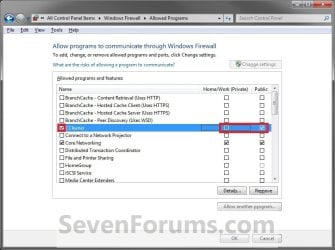
Add_Program-3.jpg
7. To Remove a Program Exception
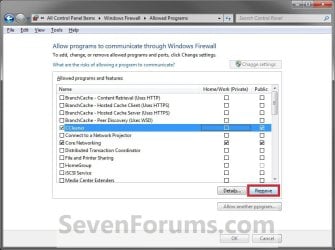
A) Click/tap on the program exception name to select (highlight) it and click on the Remove button if not grayed out. (see screenshot below)
NOTE: Usually you will only be able to remove a program that you have added from step 6.
Remove-1.jpg
B) Click/tap on Yes to approve removing the program from the exception list.
8. When done, click/tap on OK. (see screenshot below either step 5B or 6E)

9. Close the Windows Firewall window if you like. (see screenshot below step 3)


That's it,
Shawn


Last edited:
Hi,

I tried to follow up your instructions, but the 'Change Settings' button on the firewall 'allow program' dialog in disabled.

Any ideas?

Thank.
 
Last edited by a moderator:

My Computer

OS
Windows 7
Hello Meirostein, and welcome to Seven Forums.

This is normal at step 6. You can still make changes by checking or unchecking what you like, then click on OK when done.

Hope this helps,
Shawn
 

My Computer

Computer type
PC/Desktop
Computer Manufacturer/Model Number
Self built custom
OS
64-bit Windows 11 Pro for Workstations
CPU
Intel i7-8700K OC'd to 5 GHz
Motherboard
ASUS ROG Maximus XI Formula Z390
Memory
64 GB (4x16GB) G.SKILL TridentZ RGB DDR4 3600 MHz
Graphics Card(s)
ASUS ROG-STRIX-GTX1080TI-O11G-GAMING
Sound Card
Integrated
Monitor(s) Displays
2 x Samsung Odyssey G7 27"
Screen Resolution
2560x1440
Hard Drives
1TB Samsung 990 PRO M.2,
4TB Samsung 990 PRO PRO M.2,
TerraMaster F8 SSD Plus NAS
PSU
Seasonic Prime Titanium 850W
Case
Thermaltake Core P3
Cooling
Corsair Hydro H115i
Keyboard
Logitech wireless K800
Mouse
Logitech MX Master 4
Internet Speed
2 Gb/s Download and 100 Mb/s Upload
Antivirus
Malwarebyte Anti-Malware Premium
Browser
Google Chrome
Other Info
Logitech Z625 speaker system,
Logitech BRIO 4K Pro webcam,
HP Color LaserJet Pro MFP M477fdn,
APC SMART-UPS RT 1000 XL - SURT1000XLI,
Galaxy S23 Plus phone
Hi Brink,

And what about adding a port exception. how can I do that?

Thanks for your help!
 

My Computer

OS
Windows 7
They removed that option from the default Windows Firewall, and moved it to Windows Firewall with Advanced Security instead.

  1. In the left pane, click Advanced settings. If you are prompted for an administrator password or confirmation, type the password or provide confirmation.
  2. In the Windows Firewall with Advanced Security dialog box, in the left pane, click Inbound Rules, and then, in the right pane, click New Rule.
  3. Follow the onscreen instructions in the New Inbound Rule wizard.
Hope this helps. :)
 

My Computer

Computer type
PC/Desktop
Computer Manufacturer/Model Number
Self built custom
OS
64-bit Windows 11 Pro for Workstations
CPU
Intel i7-8700K OC'd to 5 GHz
Motherboard
ASUS ROG Maximus XI Formula Z390
Memory
64 GB (4x16GB) G.SKILL TridentZ RGB DDR4 3600 MHz
Graphics Card(s)
ASUS ROG-STRIX-GTX1080TI-O11G-GAMING
Sound Card
Integrated
Monitor(s) Displays
2 x Samsung Odyssey G7 27"
Screen Resolution
2560x1440
Hard Drives
1TB Samsung 990 PRO M.2,
4TB Samsung 990 PRO PRO M.2,
TerraMaster F8 SSD Plus NAS
PSU
Seasonic Prime Titanium 850W
Case
Thermaltake Core P3
Cooling
Corsair Hydro H115i
Keyboard
Logitech wireless K800
Mouse
Logitech MX Master 4
Internet Speed
2 Gb/s Download and 100 Mb/s Upload
Antivirus
Malwarebyte Anti-Malware Premium
Browser
Google Chrome
Other Info
Logitech Z625 speaker system,
Logitech BRIO 4K Pro webcam,
HP Color LaserJet Pro MFP M477fdn,
APC SMART-UPS RT 1000 XL - SURT1000XLI,
Galaxy S23 Plus phone
You're welcome. :)
 

My Computer

Computer type
PC/Desktop
Computer Manufacturer/Model Number
Self built custom
OS
64-bit Windows 11 Pro for Workstations
CPU
Intel i7-8700K OC'd to 5 GHz
Motherboard
ASUS ROG Maximus XI Formula Z390
Memory
64 GB (4x16GB) G.SKILL TridentZ RGB DDR4 3600 MHz
Graphics Card(s)
ASUS ROG-STRIX-GTX1080TI-O11G-GAMING
Sound Card
Integrated
Monitor(s) Displays
2 x Samsung Odyssey G7 27"
Screen Resolution
2560x1440
Hard Drives
1TB Samsung 990 PRO M.2,
4TB Samsung 990 PRO PRO M.2,
TerraMaster F8 SSD Plus NAS
PSU
Seasonic Prime Titanium 850W
Case
Thermaltake Core P3
Cooling
Corsair Hydro H115i
Keyboard
Logitech wireless K800
Mouse
Logitech MX Master 4
Internet Speed
2 Gb/s Download and 100 Mb/s Upload
Antivirus
Malwarebyte Anti-Malware Premium
Browser
Google Chrome
Other Info
Logitech Z625 speaker system,
Logitech BRIO 4K Pro webcam,
HP Color LaserJet Pro MFP M477fdn,
APC SMART-UPS RT 1000 XL - SURT1000XLI,
Galaxy S23 Plus phone
Remove Programs from Firewall?

I have a question? I uninstalled a printer and I want to remove the program from my firewall - I clicked "Change Settings" and when I highlight the particular program I want to remove, the "Remove" button becomes unusable. As I scroll down the list, it will become usable for some and not for others. How do I get rid of these programs from my firewall list?

Thanks!
Katie
 

My Computer

Computer Manufacturer/Model Number
Sony Vaio / PCG - 7142L
OS
Sony Vaio Laptop
CPU
laptop
Hello Katie, and welcome to Seven Forums.

For those, about the only thing I know that you can do is to uncheck them from the far left side to not have them filtered with the Firewall anymore. I'll look into seeing if there's a way to remove them from the registry, and will post back if I find a way.

Hope this helps some,
Shawn
 

My Computer

Computer type
PC/Desktop
Computer Manufacturer/Model Number
Self built custom
OS
64-bit Windows 11 Pro for Workstations
CPU
Intel i7-8700K OC'd to 5 GHz
Motherboard
ASUS ROG Maximus XI Formula Z390
Memory
64 GB (4x16GB) G.SKILL TridentZ RGB DDR4 3600 MHz
Graphics Card(s)
ASUS ROG-STRIX-GTX1080TI-O11G-GAMING
Sound Card
Integrated
Monitor(s) Displays
2 x Samsung Odyssey G7 27"
Screen Resolution
2560x1440
Hard Drives
1TB Samsung 990 PRO M.2,
4TB Samsung 990 PRO PRO M.2,
TerraMaster F8 SSD Plus NAS
PSU
Seasonic Prime Titanium 850W
Case
Thermaltake Core P3
Cooling
Corsair Hydro H115i
Keyboard
Logitech wireless K800
Mouse
Logitech MX Master 4
Internet Speed
2 Gb/s Download and 100 Mb/s Upload
Antivirus
Malwarebyte Anti-Malware Premium
Browser
Google Chrome
Other Info
Logitech Z625 speaker system,
Logitech BRIO 4K Pro webcam,
HP Color LaserJet Pro MFP M477fdn,
APC SMART-UPS RT 1000 XL - SURT1000XLI,
Galaxy S23 Plus phone
Hello Katie, and welcome to Seven Forums.

For those, about the only thing I know that you can do is to uncheck them from the far left side to not have them filtered with the Firewall anymore. I'll look into seeing if there's a way to remove them from the registry, and will post back if I find a way.

Hope this helps some,
Shawn

Hi Katie & Shawn, you can also remove unwanted/uninstalled programs left in the Windows Firewall from what's been quoted earlier.
Just search the uninstalled program, highlight it then remove with the red "X".

This way they will be removed from the general Windows Firewall list.:)

Brink said:
They removed that option from the default Windows Firewall, and moved it to Windows Firewall with Advanced Security instead.

  1. In the left pane, click Advanced settings. If you are prompted for an administrator password or confirmation, type the password or provide confirmation.
  2. In the Windows Firewall with Advanced Security dialog box, in the left pane, click Inbound Rules & Outbound Rules
  3. ...Search for the uninstalled/undesired Program, highlight it then remove it from the list
Hope this helps.
smile.gif
 

My Computer

Computer type
PC/Desktop
Computer Manufacturer/Model Number
Custom Build
OS
Windows 7 Professional SP1 - x64 [Non-UEFI Boot]
CPU
Ivy Bridge Core i5 3570K (Delidded)
Motherboard
Asus P8Z77-V LE PLUS
Memory
G.Skill "Ares" DDR3 PC3-12800 - 1600MHz (16Gb)
Graphics Card(s)
Asus Dual-RX480-O4G
Sound Card
Creative Sound Blaster Z w/5.1 sound system
Monitor(s) Displays
Asus IPS 23"
Screen Resolution
16/9
Hard Drives
Internal:
500Go Sata 6Gb/s (x2)
500Go Sata 3Gb/s (x2)
SSD 60Go Sata 6Gb/s
PSU
In Win C 900W Series 80+ Platinum
Case
Thermaltake Chaser A71
Cooling
Custom Water Cooling Loop
Keyboard
Cooler Master QuickFire XTi
Mouse
Razer Imperator 2012 (4G)
Antivirus
MSE
Browser
IE 11.0.xxx Rtm
Other Info
"Raid0" with Intel Smart Response Technology (HDD/SSD)
everytime i turn my comp on i have to make a new inbound and outbound firewall ruke for virtual dj, is there a way i can make these permanent rules instead of having to input them everytime??

thanks in advance people
 

My Computer

Computer Manufacturer/Model Number
samsung s3520
OS
windows home premium 64bit
CPU
intel i3 @2.10ghz
Memory
6.gb ram
I am trying to unallow a program from communicating through the internet according to this very well explained tutorial, but it puts itself back as allowed. I changed the marked cases from Public to Private and it changes itself back to public or adds a new allowing entry for public. Then I went to the Advanced Firewall (not on this tutorial) and enabled the firewall for that program for any protocol type and for domain, private and public. It changes itself, creates new entries on both firewall controls (normal and advanced) windows. The simple one has now six entries than cannot be deleted. How can I unallow definitely and keep it that way, please?
 

My Computer

Computer type
PC/Desktop
Computer Manufacturer/Model Number
Home assembled
OS
Windows 7 Ultimate 64-bit SP1
CPU
AMD Athlon 64 II X3 440
Motherboard
M4A785TD-V EVO
Memory
Kingston kit 4GB DDR3 1333MHz (KVR1333D3N9K2/4)
Monitor(s) Displays
ASUS AS VH198S
Screen Resolution
1440x900
Hard Drives
Crucial MX300 2.5" SSD SATA,
Western Digital Caviar Black WD1002FAEX SATA-III,
Samsung HD161HJ SATA-II,
Seagate Barracuda ST3120022A ATA,
Western Digital WD800BB ATA.
Case
Standard
Cooling
Standard
Keyboard
Safeway SW-20
Mouse
Logitech Anywhere, Logitech MX Anywhere 2S, Technet M006
Internet Speed
130 Mbs fiber
Antivirus
Avast Premier
Browser
Firefox, Ice Dragon and Opera
Other Info
PCI ATA-133 Adapter,
Parallel Port Card PCI - PU005V2.
Hello Neophile,

You might see if using the free version of Windows 7 Firewall Control may help make it easier to set Windows Firewall (advanced) for this.

Hope this helps,
Shawn
 
Last edited:

My Computer

Computer type
PC/Desktop
Computer Manufacturer/Model Number
Self built custom
OS
64-bit Windows 11 Pro for Workstations
CPU
Intel i7-8700K OC'd to 5 GHz
Motherboard
ASUS ROG Maximus XI Formula Z390
Memory
64 GB (4x16GB) G.SKILL TridentZ RGB DDR4 3600 MHz
Graphics Card(s)
ASUS ROG-STRIX-GTX1080TI-O11G-GAMING
Sound Card
Integrated
Monitor(s) Displays
2 x Samsung Odyssey G7 27"
Screen Resolution
2560x1440
Hard Drives
1TB Samsung 990 PRO M.2,
4TB Samsung 990 PRO PRO M.2,
TerraMaster F8 SSD Plus NAS
PSU
Seasonic Prime Titanium 850W
Case
Thermaltake Core P3
Cooling
Corsair Hydro H115i
Keyboard
Logitech wireless K800
Mouse
Logitech MX Master 4
Internet Speed
2 Gb/s Download and 100 Mb/s Upload
Antivirus
Malwarebyte Anti-Malware Premium
Browser
Google Chrome
Other Info
Logitech Z625 speaker system,
Logitech BRIO 4K Pro webcam,
HP Color LaserJet Pro MFP M477fdn,
APC SMART-UPS RT 1000 XL - SURT1000XLI,
Galaxy S23 Plus phone
Thank you very much Brink, and sorry for the delayed answer. It works quite well. It is a very good firewall that allows to control everything, but it took me quite some time and many trials to use. It is complicated because there is no help and it doesn't say what the commands do, to what they correspond, so we have to learn by trial and error. Further more, the little help available, both online or included is very badly written, almost not understandable, what is really a pity for such a good application.
 

My Computer

Computer type
PC/Desktop
Computer Manufacturer/Model Number
Home assembled
OS
Windows 7 Ultimate 64-bit SP1
CPU
AMD Athlon 64 II X3 440
Motherboard
M4A785TD-V EVO
Memory
Kingston kit 4GB DDR3 1333MHz (KVR1333D3N9K2/4)
Monitor(s) Displays
ASUS AS VH198S
Screen Resolution
1440x900
Hard Drives
Crucial MX300 2.5" SSD SATA,
Western Digital Caviar Black WD1002FAEX SATA-III,
Samsung HD161HJ SATA-II,
Seagate Barracuda ST3120022A ATA,
Western Digital WD800BB ATA.
Case
Standard
Cooling
Standard
Keyboard
Safeway SW-20
Mouse
Logitech Anywhere, Logitech MX Anywhere 2S, Technet M006
Internet Speed
130 Mbs fiber
Antivirus
Avast Premier
Browser
Firefox, Ice Dragon and Opera
Other Info
PCI ATA-133 Adapter,
Parallel Port Card PCI - PU005V2.
You're most welcome Neophile. The "Windows 7 Firewall Controll" program sure does help to make using and setting "Windows Firewall with Advanced Security" a lot easier to do.
 

My Computer

Computer type
PC/Desktop
Computer Manufacturer/Model Number
Self built custom
OS
64-bit Windows 11 Pro for Workstations
CPU
Intel i7-8700K OC'd to 5 GHz
Motherboard
ASUS ROG Maximus XI Formula Z390
Memory
64 GB (4x16GB) G.SKILL TridentZ RGB DDR4 3600 MHz
Graphics Card(s)
ASUS ROG-STRIX-GTX1080TI-O11G-GAMING
Sound Card
Integrated
Monitor(s) Displays
2 x Samsung Odyssey G7 27"
Screen Resolution
2560x1440
Hard Drives
1TB Samsung 990 PRO M.2,
4TB Samsung 990 PRO PRO M.2,
TerraMaster F8 SSD Plus NAS
PSU
Seasonic Prime Titanium 850W
Case
Thermaltake Core P3
Cooling
Corsair Hydro H115i
Keyboard
Logitech wireless K800
Mouse
Logitech MX Master 4
Internet Speed
2 Gb/s Download and 100 Mb/s Upload
Antivirus
Malwarebyte Anti-Malware Premium
Browser
Google Chrome
Other Info
Logitech Z625 speaker system,
Logitech BRIO 4K Pro webcam,
HP Color LaserJet Pro MFP M477fdn,
APC SMART-UPS RT 1000 XL - SURT1000XLI,
Galaxy S23 Plus phone
Windows firewall crashes when "Allow another program..."

Itunes can't connect to the Itunes store and it's diagnostics says the program is not allowed by Windows Firewall even though it listed and allowed, both Private and Public.
I wanted to delete it and add it again, but the "Change Settings" button is grayed out for "Remove", and when I click on the "Allow another program..." button, nothing happens other than after a minute or two I get a message that the program is no longer responding and I have to use Task Manager to close it out.

Any suggestions?
 

My Computer

OS
Windows 7 64bit business
Hello Sek, and welcome to Seven Forums.

Usually you will not be able to remove a program from the exception list unless you added it from step 6. The only other way is to uninstall and reinstall the program.

Do you have any other antivirus or security program installed that may be blocking it?
 

My Computer

Computer type
PC/Desktop
Computer Manufacturer/Model Number
Self built custom
OS
64-bit Windows 11 Pro for Workstations
CPU
Intel i7-8700K OC'd to 5 GHz
Motherboard
ASUS ROG Maximus XI Formula Z390
Memory
64 GB (4x16GB) G.SKILL TridentZ RGB DDR4 3600 MHz
Graphics Card(s)
ASUS ROG-STRIX-GTX1080TI-O11G-GAMING
Sound Card
Integrated
Monitor(s) Displays
2 x Samsung Odyssey G7 27"
Screen Resolution
2560x1440
Hard Drives
1TB Samsung 990 PRO M.2,
4TB Samsung 990 PRO PRO M.2,
TerraMaster F8 SSD Plus NAS
PSU
Seasonic Prime Titanium 850W
Case
Thermaltake Core P3
Cooling
Corsair Hydro H115i
Keyboard
Logitech wireless K800
Mouse
Logitech MX Master 4
Internet Speed
2 Gb/s Download and 100 Mb/s Upload
Antivirus
Malwarebyte Anti-Malware Premium
Browser
Google Chrome
Other Info
Logitech Z625 speaker system,
Logitech BRIO 4K Pro webcam,
HP Color LaserJet Pro MFP M477fdn,
APC SMART-UPS RT 1000 XL - SURT1000XLI,
Galaxy S23 Plus phone
Windows Defender and Malware anti malware
 

My Computer

OS
Windows 7 64bit business
Nar, those shouldn't be blocking it.
 

My Computer

Computer type
PC/Desktop
Computer Manufacturer/Model Number
Self built custom
OS
64-bit Windows 11 Pro for Workstations
CPU
Intel i7-8700K OC'd to 5 GHz
Motherboard
ASUS ROG Maximus XI Formula Z390
Memory
64 GB (4x16GB) G.SKILL TridentZ RGB DDR4 3600 MHz
Graphics Card(s)
ASUS ROG-STRIX-GTX1080TI-O11G-GAMING
Sound Card
Integrated
Monitor(s) Displays
2 x Samsung Odyssey G7 27"
Screen Resolution
2560x1440
Hard Drives
1TB Samsung 990 PRO M.2,
4TB Samsung 990 PRO PRO M.2,
TerraMaster F8 SSD Plus NAS
PSU
Seasonic Prime Titanium 850W
Case
Thermaltake Core P3
Cooling
Corsair Hydro H115i
Keyboard
Logitech wireless K800
Mouse
Logitech MX Master 4
Internet Speed
2 Gb/s Download and 100 Mb/s Upload
Antivirus
Malwarebyte Anti-Malware Premium
Browser
Google Chrome
Other Info
Logitech Z625 speaker system,
Logitech BRIO 4K Pro webcam,
HP Color LaserJet Pro MFP M477fdn,
APC SMART-UPS RT 1000 XL - SURT1000XLI,
Galaxy S23 Plus phone
Big question is why Windows Firewall crashes when I try to add another program..
Actually itunes can't connect even when firewall is turned off
 

My Computer

OS
Windows 7 64bit business
Back
Top