Windows Firewall - Add or Remove an Exception

How to Add or Remove Windows Firewall Exception in Windows 7 and Windows 8

   Information
This will show you how to add or remove a program or feature for each type of network location type (ex: Private or Public) to allow the program or feature through Windows Firewall.

   Warning
When you add a program to the list of allowed programs in a firewall you allow a particular program to send information to or from your computer through the firewall. Allowing a program to communicate through a firewall (sometimes called unblocking) is like opening a tiny door in the firewall.

Each time you allow a program to communicate through a firewall, your computer becomes a bit less secure. The more allowed programs your firewall has, the more opportunities there are for hackers or malicious software to use one of those openings to spread a worm, access your files, or use your computer to spread malicious software to others.

To help decrease your security risk:
  • Only allow a program when you really need to, and remove programs from the list of allowed programs that you no longer need.
  • Never allow a program that you do not recognize to communicate through the firewall.


Here's How:

1. Open the Control Panel (icons view), and click/tap on the Windows Firewall icon.

2. Click/tap on the Allow a program through Windows Firewall link in the left pane. (see screenshot below)
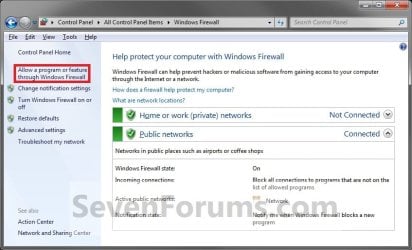
Windows_Firewall.jpg
3. Click/tap on the Change settings button. (see screenshot below)
NOTE: If the Change settings button is grayed out, then it has already been clicked on.
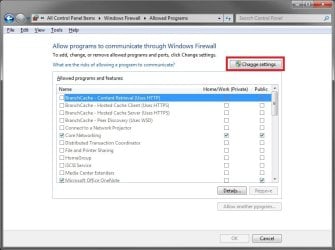
Change_Settings.jpg
4. Do step 5, 6, or 7 below for what you would like to do.

5. To Allow or Unallow an Existing Exception
A) On the left side, check the program exception Name box to allow, or uncheck to unallow through Windows Firewall. (see screenshot below)

B) If you allowed the program exception, then check (allow) or uncheck (unallow) the box for each Private or Public network location you want the program to have access through Windows Firewall. (see screenshot below)
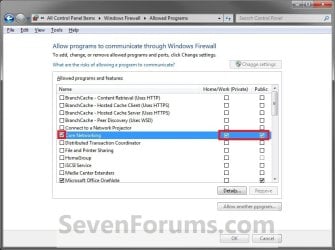
Allow-1.jpg
6. To Add a Program Exception
A) Click on the Allow another program button. (see screenshot below)
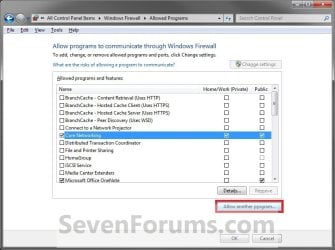
Add_Program-1.jpg

B) If the Program is Listed (see screenshot below step 6D)
  • Click/tap on the program to highlight it.
  • Go to step 6D.
C) If the Program is Not Listed (see screenshot below step 6D)
  • Click/tap on the Browse button.
  • Navigate to the program's exe file location, usually in a C:\Program Files folder, and click on the program's exe file to select (highlight) it and click on the Open button.
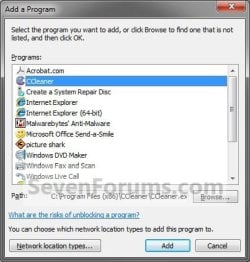
D) Click/tap on the Add button. (see screenshot below)
Add_Program-2.jpg
E) Do step 5 to allow to unallow this program exception. (see screenshot below)
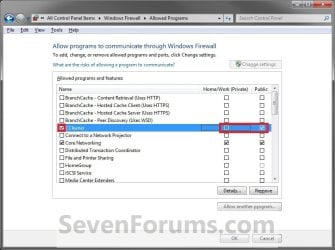
Add_Program-3.jpg
7. To Remove a Program Exception
A) Click/tap on the program exception name to select (highlight) it and click on the Remove button if not grayed out. (see screenshot below)
NOTE: Usually you will only be able to remove a program that you have added from step 6.
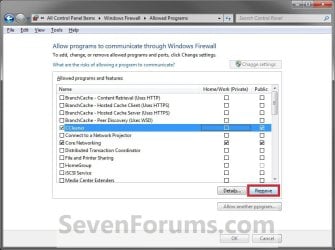
Remove-1.jpg
B) Click/tap on Yes to approve removing the program from the exception list.
8. When done, click/tap on OK. (see screenshot below either step 5B or 6E)

9. Close the Windows Firewall window if you like. (see screenshot below step 3)


That's it,
Shawn


Last edited:
Sek,

Just to be safe, I would recommend to do a full scan of your system with Malwarebytes free (if not the one you already have) to see if it finds anything.

You might also run a sfc /scannow command to see if it may be able to find and fix any bad system files that may be responsible.

I'm afraid that I don't know amything about iTunes other than a lot of people have issues with it.
 

My Computer

Computer type
PC/Desktop
Computer Manufacturer/Model Number
Self built custom
OS
64-bit Windows 11 Pro for Workstations
CPU
Intel i7-8700K OC'd to 5 GHz
Motherboard
ASUS ROG Maximus XI Formula Z390
Memory
64 GB (4x16GB) G.SKILL TridentZ RGB DDR4 3600 MHz
Graphics Card(s)
ASUS ROG-STRIX-GTX1080TI-O11G-GAMING
Sound Card
Integrated
Monitor(s) Displays
2 x Samsung Odyssey G7 27"
Screen Resolution
2560x1440
Hard Drives
1TB Samsung 990 PRO M.2,
4TB Samsung 990 PRO PRO M.2,
TerraMaster F8 SSD Plus NAS
PSU
Seasonic Prime Titanium 850W
Case
Thermaltake Core P3
Cooling
Corsair Hydro H115i
Keyboard
Logitech wireless K800
Mouse
Logitech MX Master 4
Internet Speed
2 Gb/s Download and 100 Mb/s Upload
Antivirus
Malwarebyte Anti-Malware Premium
Browser
Google Chrome
Other Info
Logitech Z625 speaker system,
Logitech BRIO 4K Pro webcam,
HP Color LaserJet Pro MFP M477fdn,
APC SMART-UPS RT 1000 XL - SURT1000XLI,
Galaxy S23 Plus phone
Shawn,

Thanks for this very helpful tutorial bro.

One query-- Can I add an entire folder to the Firewall Exception list such that all incoming/outbound connections from any of the files inside that folder are blocked? I know such is possible with Windows Defender. Please advise. Thanks.
 

My Computer

OS
Windows 7
Hello Troy,

Sorry, but only programs/applications can be added to the Windows Firewall exception list. :(
 

My Computer

Computer type
PC/Desktop
Computer Manufacturer/Model Number
Self built custom
OS
64-bit Windows 11 Pro for Workstations
CPU
Intel i7-8700K OC'd to 5 GHz
Motherboard
ASUS ROG Maximus XI Formula Z390
Memory
64 GB (4x16GB) G.SKILL TridentZ RGB DDR4 3600 MHz
Graphics Card(s)
ASUS ROG-STRIX-GTX1080TI-O11G-GAMING
Sound Card
Integrated
Monitor(s) Displays
2 x Samsung Odyssey G7 27"
Screen Resolution
2560x1440
Hard Drives
1TB Samsung 990 PRO M.2,
4TB Samsung 990 PRO PRO M.2,
TerraMaster F8 SSD Plus NAS
PSU
Seasonic Prime Titanium 850W
Case
Thermaltake Core P3
Cooling
Corsair Hydro H115i
Keyboard
Logitech wireless K800
Mouse
Logitech MX Master 4
Internet Speed
2 Gb/s Download and 100 Mb/s Upload
Antivirus
Malwarebyte Anti-Malware Premium
Browser
Google Chrome
Other Info
Logitech Z625 speaker system,
Logitech BRIO 4K Pro webcam,
HP Color LaserJet Pro MFP M477fdn,
APC SMART-UPS RT 1000 XL - SURT1000XLI,
Galaxy S23 Plus phone
You're welcome. :)
 

My Computer

Computer type
PC/Desktop
Computer Manufacturer/Model Number
Self built custom
OS
64-bit Windows 11 Pro for Workstations
CPU
Intel i7-8700K OC'd to 5 GHz
Motherboard
ASUS ROG Maximus XI Formula Z390
Memory
64 GB (4x16GB) G.SKILL TridentZ RGB DDR4 3600 MHz
Graphics Card(s)
ASUS ROG-STRIX-GTX1080TI-O11G-GAMING
Sound Card
Integrated
Monitor(s) Displays
2 x Samsung Odyssey G7 27"
Screen Resolution
2560x1440
Hard Drives
1TB Samsung 990 PRO M.2,
4TB Samsung 990 PRO PRO M.2,
TerraMaster F8 SSD Plus NAS
PSU
Seasonic Prime Titanium 850W
Case
Thermaltake Core P3
Cooling
Corsair Hydro H115i
Keyboard
Logitech wireless K800
Mouse
Logitech MX Master 4
Internet Speed
2 Gb/s Download and 100 Mb/s Upload
Antivirus
Malwarebyte Anti-Malware Premium
Browser
Google Chrome
Other Info
Logitech Z625 speaker system,
Logitech BRIO 4K Pro webcam,
HP Color LaserJet Pro MFP M477fdn,
APC SMART-UPS RT 1000 XL - SURT1000XLI,
Galaxy S23 Plus phone
I'm trying to add a game through the firewall called warframe but when ever I can't even click it...

I already know how to add programs through, I've done it in the pass with other games but for some reason now I can't even click on the firewall settings or anything related to firewalls, I click it and nothing happens, and yes I am on an admin account, it's the only account there is on my computer
 

My Computer

Computer type
PC/Desktop
Computer Manufacturer/Model Number
zt
OS
Windows 7 Home Premium 64-bit
Memory
4 GB
Graphics Card(s)
AMD Radeon HD 7700
Browser
Google Chrome
Hello mochilli, and welcome to Seven Forums.

Were you able to click on the Change settings button from step 4 to elevate (get a UAC prompt) and then be able to add the exception for the game's .exe file?
 

My Computer

Computer type
PC/Desktop
Computer Manufacturer/Model Number
Self built custom
OS
64-bit Windows 11 Pro for Workstations
CPU
Intel i7-8700K OC'd to 5 GHz
Motherboard
ASUS ROG Maximus XI Formula Z390
Memory
64 GB (4x16GB) G.SKILL TridentZ RGB DDR4 3600 MHz
Graphics Card(s)
ASUS ROG-STRIX-GTX1080TI-O11G-GAMING
Sound Card
Integrated
Monitor(s) Displays
2 x Samsung Odyssey G7 27"
Screen Resolution
2560x1440
Hard Drives
1TB Samsung 990 PRO M.2,
4TB Samsung 990 PRO PRO M.2,
TerraMaster F8 SSD Plus NAS
PSU
Seasonic Prime Titanium 850W
Case
Thermaltake Core P3
Cooling
Corsair Hydro H115i
Keyboard
Logitech wireless K800
Mouse
Logitech MX Master 4
Internet Speed
2 Gb/s Download and 100 Mb/s Upload
Antivirus
Malwarebyte Anti-Malware Premium
Browser
Google Chrome
Other Info
Logitech Z625 speaker system,
Logitech BRIO 4K Pro webcam,
HP Color LaserJet Pro MFP M477fdn,
APC SMART-UPS RT 1000 XL - SURT1000XLI,
Galaxy S23 Plus phone
Hi, and thanks I can literally only do step one. I can't even click firewall
 

My Computer

Computer type
PC/Desktop
Computer Manufacturer/Model Number
zt
OS
Windows 7 Home Premium 64-bit
Memory
4 GB
Graphics Card(s)
AMD Radeon HD 7700
Browser
Google Chrome
Do you have a 3rd party firewall program installed that may have disabled Windows Firewall?
 

My Computer

Computer type
PC/Desktop
Computer Manufacturer/Model Number
Self built custom
OS
64-bit Windows 11 Pro for Workstations
CPU
Intel i7-8700K OC'd to 5 GHz
Motherboard
ASUS ROG Maximus XI Formula Z390
Memory
64 GB (4x16GB) G.SKILL TridentZ RGB DDR4 3600 MHz
Graphics Card(s)
ASUS ROG-STRIX-GTX1080TI-O11G-GAMING
Sound Card
Integrated
Monitor(s) Displays
2 x Samsung Odyssey G7 27"
Screen Resolution
2560x1440
Hard Drives
1TB Samsung 990 PRO M.2,
4TB Samsung 990 PRO PRO M.2,
TerraMaster F8 SSD Plus NAS
PSU
Seasonic Prime Titanium 850W
Case
Thermaltake Core P3
Cooling
Corsair Hydro H115i
Keyboard
Logitech wireless K800
Mouse
Logitech MX Master 4
Internet Speed
2 Gb/s Download and 100 Mb/s Upload
Antivirus
Malwarebyte Anti-Malware Premium
Browser
Google Chrome
Other Info
Logitech Z625 speaker system,
Logitech BRIO 4K Pro webcam,
HP Color LaserJet Pro MFP M477fdn,
APC SMART-UPS RT 1000 XL - SURT1000XLI,
Galaxy S23 Plus phone
no i don't think so
 

My Computer

Computer type
PC/Desktop
Computer Manufacturer/Model Number
zt
OS
Windows 7 Home Premium 64-bit
Memory
4 GB
Graphics Card(s)
AMD Radeon HD 7700
Browser
Google Chrome
Last edited:

My Computer

Computer type
PC/Desktop
Computer Manufacturer/Model Number
Self built custom
OS
64-bit Windows 11 Pro for Workstations
CPU
Intel i7-8700K OC'd to 5 GHz
Motherboard
ASUS ROG Maximus XI Formula Z390
Memory
64 GB (4x16GB) G.SKILL TridentZ RGB DDR4 3600 MHz
Graphics Card(s)
ASUS ROG-STRIX-GTX1080TI-O11G-GAMING
Sound Card
Integrated
Monitor(s) Displays
2 x Samsung Odyssey G7 27"
Screen Resolution
2560x1440
Hard Drives
1TB Samsung 990 PRO M.2,
4TB Samsung 990 PRO PRO M.2,
TerraMaster F8 SSD Plus NAS
PSU
Seasonic Prime Titanium 850W
Case
Thermaltake Core P3
Cooling
Corsair Hydro H115i
Keyboard
Logitech wireless K800
Mouse
Logitech MX Master 4
Internet Speed
2 Gb/s Download and 100 Mb/s Upload
Antivirus
Malwarebyte Anti-Malware Premium
Browser
Google Chrome
Other Info
Logitech Z625 speaker system,
Logitech BRIO 4K Pro webcam,
HP Color LaserJet Pro MFP M477fdn,
APC SMART-UPS RT 1000 XL - SURT1000XLI,
Galaxy S23 Plus phone
alright, thanks for the help in advance
 

Attachments

  • apps installed.png
    apps installed.png
    133.1 KB · Views: 199

My Computer

Computer type
PC/Desktop
Computer Manufacturer/Model Number
zt
OS
Windows 7 Home Premium 64-bit
Memory
4 GB
Graphics Card(s)
AMD Radeon HD 7700
Browser
Google Chrome
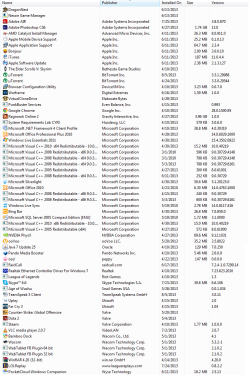
I don't see a 3rd party firewall program installed. You might do a full scan of your system with Windows Defender Offline at boot just to help make sure it's clean.

If you are clean, then you could try doing a system restore using a restore point (if available) dated when you know Windows Firewall was working properly to see if that will fix the issue.
 

My Computer

Computer type
PC/Desktop
Computer Manufacturer/Model Number
Self built custom
OS
64-bit Windows 11 Pro for Workstations
CPU
Intel i7-8700K OC'd to 5 GHz
Motherboard
ASUS ROG Maximus XI Formula Z390
Memory
64 GB (4x16GB) G.SKILL TridentZ RGB DDR4 3600 MHz
Graphics Card(s)
ASUS ROG-STRIX-GTX1080TI-O11G-GAMING
Sound Card
Integrated
Monitor(s) Displays
2 x Samsung Odyssey G7 27"
Screen Resolution
2560x1440
Hard Drives
1TB Samsung 990 PRO M.2,
4TB Samsung 990 PRO PRO M.2,
TerraMaster F8 SSD Plus NAS
PSU
Seasonic Prime Titanium 850W
Case
Thermaltake Core P3
Cooling
Corsair Hydro H115i
Keyboard
Logitech wireless K800
Mouse
Logitech MX Master 4
Internet Speed
2 Gb/s Download and 100 Mb/s Upload
Antivirus
Malwarebyte Anti-Malware Premium
Browser
Google Chrome
Other Info
Logitech Z625 speaker system,
Logitech BRIO 4K Pro webcam,
HP Color LaserJet Pro MFP M477fdn,
APC SMART-UPS RT 1000 XL - SURT1000XLI,
Galaxy S23 Plus phone
Back
Top