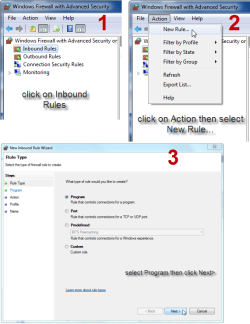
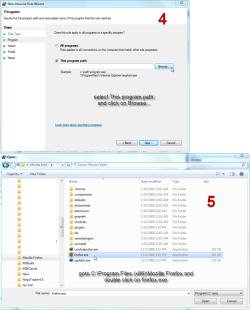
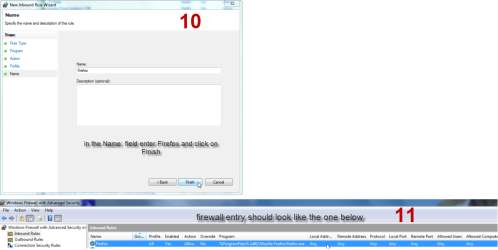
Not sure if anyone had seen this...but there is a pretty powerful Firewall built into Windows. It filters both inbound & outbound traffic...comparible to any commercial firewall out there. You have to be pretty specific with your rule setting...
Don't go to Control panel ...instead in "run/search" type: wf.msc
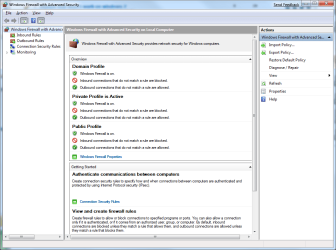
Here's what it looks like:
Attachments
windows_firewall_with_advanced_security.png
40.8 KB
· Views: 687
My Computer
Computer Manufacturer/Model Number
Home Made / Numero Uno
OS
Win7 x64 Ultimate RTM
CPU
Intel i7 920
Motherboard
Gigabyte GA-EX58-UD4P
Memory
G.SKILL 6GB DDR3 1333
Graphics Card(s)
VisionTek ATI 4870 512 x2 (Crossfire)
Sound Card
Onboard Realtek HD
Monitor(s) Displays
HP W2408 24 inch
Screen Resolution
1920x1200
Hard Drives
WD VelociRaptor x2 (Raid 0)
Western Digital Caviar Black WD1001FALS 1TB (2 partitions)
You can also go to Control Panel-Administrative Tools-Windows Firewall With Advanced Security or go to Control Panel-Windows Firewall-Advanced Settings.
My Computer
Computer type
PC/Desktop
Computer Manufacturer/Model Number
Airbot 2.0
OS
Windows 7 Ultimate x64 SP1
CPU
Core i7 920 (D0) @ 4Ghz, *26c idle *65c full load on air
Motherboard
Asus P6X58D Premium - Sata 6Gb/s - USB 3.0
Memory
12GB DDR3 Corsair Dominator -CMD12GX3M6A1600C8 at 1600MHz
Graphics Card(s)
Zotac Geforce GTX 770
Sound Card
ASUS Xonar D2X
Monitor(s) Displays
1 LG 24" Flatron W2453V-PF 1 Samsung 24" P2450H both 2ms RT
I've tried configuring WF and even downloaded VFC by Sphinx to help with using it like any software firewall, i.e. protecting both incoming and outgoing traffic.
All to no avail I'm afraid. Just too complicated for me. Back to the default settings, otherwise half my stuff doesn't work. Why can't MS design it to use Yes/No permission pop-ups like any other application?
Fired off yet another Feedback Form.
My Computer
Computer type
PC/Desktop
Computer Manufacturer/Model Number
Alienware® ALX X58
OS
Win 7 Ult SP1/Win 10 Pro (all x64)
CPU
Intel® Core™ i7-975 Extreme O/C to 4.02 GHz, 8MB Cache
Motherboard
Asus® P6T Deluxe V2 X58 LGA1366
Memory
24GB Corsair Vengeance DDR3 SDRAM at 1600MHz - 6 x 4096MB
Bump...does anyone know how to configure outbound? Whenever I enable it I lose all internet connection and I've looked everywhere but can't find a place to put an exception. The VFC tool fails to prompt for this exception.
I created a new rule which allows all programs outbound connection, but I'm sure that defeats the security somehow.
My Computer
Computer type
PC/Desktop
Computer Manufacturer/Model Number
Alienware® ALX X58
OS
Win 7 Ult SP1/Win 10 Pro (all x64)
CPU
Intel® Core™ i7-975 Extreme O/C to 4.02 GHz, 8MB Cache
Motherboard
Asus® P6T Deluxe V2 X58 LGA1366
Memory
24GB Corsair Vengeance DDR3 SDRAM at 1600MHz - 6 x 4096MB
Bump...does anyone know how to configure outbound? Whenever I enable it I lose all internet connection and I've looked everywhere but can't find a place to put an exception. The VFC tool fails to prompt for this exception.
I created a new rule which allows all programs outbound connection, but I'm sure that defeats the security somehow.
Thanks. I see I'll have to make more specific rules outbound than a mere "allow all" one that I have now. I'm using the Vista Firewall Control tool but it doesn't seem to want to help with outbound, only inbound. I guess one has to pay for that privilege.
My Computer
Computer type
PC/Desktop
Computer Manufacturer/Model Number
Alienware® ALX X58
OS
Win 7 Ult SP1/Win 10 Pro (all x64)
CPU
Intel® Core™ i7-975 Extreme O/C to 4.02 GHz, 8MB Cache
Motherboard
Asus® P6T Deluxe V2 X58 LGA1366
Memory
24GB Corsair Vengeance DDR3 SDRAM at 1600MHz - 6 x 4096MB




 In other words, not average consumer friendly...