Windows FireWall Advanced

VegasDen

New member
Power User
VIP
Local time
10:56 AM
Messages
54
Location
Las Vegas, NV
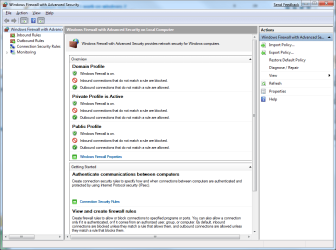
Not sure if anyone had seen this...but there is a pretty powerful Firewall built into Windows. It filters both inbound & outbound traffic...comparible to any commercial firewall out there. You have to be pretty specific with your rule setting...

Don't go to Control panel ...instead in "run/search" type: wf.msc

Here's what it looks like:
 

Attachments

  • windows_firewall_with_advanced_security.png
    windows_firewall_with_advanced_security.png
    102.7 KB · Views: 687

My Computer

Computer Manufacturer/Model Number
Home Made / Numero Uno
OS
Win7 x64 Ultimate RTM
CPU
Intel i7 920
Motherboard
Gigabyte GA-EX58-UD4P
Memory
G.SKILL 6GB DDR3 1333
Graphics Card(s)
VisionTek ATI 4870 512 x2 (Crossfire)
Sound Card
Onboard Realtek HD
Monitor(s) Displays
HP W2408 24 inch
Screen Resolution
1920x1200
Hard Drives
WD VelociRaptor x2 (Raid 0)
Western Digital Caviar Black WD1001FALS 1TB (2 partitions)
PSU
KINGWIN Mach 1 1000w
Case
Antec 900
Cooling
Air - Coolmaster V8 CPU Heatsink
Keyboard
Microsoft Basic (love it)
Mouse
Logitech 518
Internet Speed
Not as fast as I would like
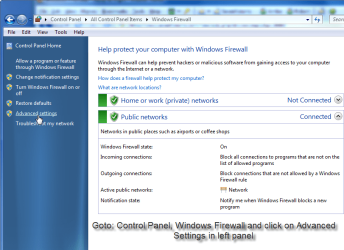
You can also go to Control Panel-Administrative Tools-Windows Firewall With Advanced Security or go to Control Panel-Windows Firewall-Advanced Settings.
 

My Computer

Computer type
PC/Desktop
Computer Manufacturer/Model Number
Airbot 2.0
OS
Windows 7 Ultimate x64 SP1
CPU
Core i7 920 (D0) @ 4Ghz, *26c idle *65c full load on air
Motherboard
Asus P6X58D Premium - Sata 6Gb/s - USB 3.0
Memory
12GB DDR3 Corsair Dominator -CMD12GX3M6A1600C8 at 1600MHz
Graphics Card(s)
Zotac Geforce GTX 770
Sound Card
ASUS Xonar D2X
Monitor(s) Displays
1 LG 24" Flatron W2453V-PF 1 Samsung 24" P2450H both 2ms RT
Screen Resolution
1920x1080@60hz
Hard Drives
1 Samsung 250GB 840 Evo SSD
1 OCZ Vertex2 180GB SSD
1 TB Samsung Spinpoint F1 7200RPM 32MB cache
2 500GB WD Caviar Blacks 7200RPM 32MB cache (WD5001AALS)

Pioneer DVD Burner DVR-S18M
PSU
Corsair HX1000W
Case
Cooler Master HAF 932
Cooling
Case Fans *3 230mm, *1 140mm/CPU - *Tuniq Tower 120 Extreme
Keyboard
Logitech Wireless MK700
Mouse
Logitech Wireless MK700
Internet Speed
DL 15 Mbps UL 0.98 Mbps
Antivirus
None
Browser
Firefox Nightly
Other Info
Processor-7.7 *RAM- 7.9 *Graphics-7.9 *Gaming Graphics- 7.9 *SSD- 7.8 W.E.I final score= 7.7
*Phone- LG Nexus 5

My Computer

Computer type
PC/Desktop
Computer Manufacturer/Model Number
Self built custom
OS
64-bit Windows 11 Pro for Workstations
CPU
Intel i7-8700K OC'd to 5 GHz
Motherboard
ASUS ROG Maximus XI Formula Z390
Memory
64 GB (4x16GB) G.SKILL TridentZ RGB DDR4 3600 MHz
Graphics Card(s)
ASUS ROG-STRIX-GTX1080TI-O11G-GAMING
Sound Card
Integrated
Monitor(s) Displays
2 x Samsung Odyssey G7 27"
Screen Resolution
2560x1440
Hard Drives
1TB Samsung 990 PRO M.2,
4TB Samsung 990 PRO PRO M.2,
TerraMaster F8 SSD Plus NAS
PSU
Seasonic Prime Titanium 850W
Case
Thermaltake Core P3
Cooling
Corsair Hydro H115i
Keyboard
Logitech wireless K800
Mouse
Logitech MX Master 4
Internet Speed
2 Gb/s Download and 100 Mb/s Upload
Antivirus
Malwarebyte Anti-Malware Premium
Browser
Google Chrome
Other Info
Logitech Z625 speaker system,
Logitech BRIO 4K Pro webcam,
HP Color LaserJet Pro MFP M477fdn,
APC SMART-UPS RT 1000 XL - SURT1000XLI,
Galaxy S23 Plus phone
I've tried configuring WF and even downloaded VFC by Sphinx to help with using it like any software firewall, i.e. protecting both incoming and outgoing traffic.

All to no avail I'm afraid. Just too complicated for me. Back to the default settings, otherwise half my stuff doesn't work. Why can't MS design it to use Yes/No permission pop-ups like any other application?

Fired off yet another Feedback Form.
 

My Computer

Computer type
PC/Desktop
Computer Manufacturer/Model Number
Alienware® ALX X58
OS
Win 7 Ult SP1/Win 10 Pro (all x64)
CPU
Intel® Core™ i7-975 Extreme O/C to 4.02 GHz, 8MB Cache
Motherboard
Asus® P6T Deluxe V2 X58 LGA1366
Memory
24GB Corsair Vengeance DDR3 SDRAM at 1600MHz - 6 x 4096MB

Graphics Card(s)
1792 MB NVIDIA® GeForce® GTX 295 Dual Core
Sound Card
Onboard Soundmax® High-Definition 7.1 Performance Audio
Monitor(s) Displays
Samsung XL2370 LED backlit 23" W/S 2ms response time
Screen Resolution
1920 X 1080
Hard Drives
2 x 500gb SATA II
1 x 1TB SATA II
1 external eSATA LaCie 3TB
(Non-RAID)
PSU
Alienware® 1200 Watt Multi-GPU
Case
Alienware® P2 ALX Chassis with AlienIce™ 3.0 Video Cooling
Cooling
Alienware® High-Perf. Liquid Cooling + Acoustic Dampening
Keyboard
Microsoft® Wireless Entertainment 8000 + Logitech® G15 Wired
Mouse
Microsoft® Wireless Laser 8000 + Logitech® G9 Wired
Internet Speed
1Gb/s
Antivirus
McAfee LiveSafe
Browser
Firefox - latest
Other Info
Using non-RAID on purpose as I find RAID to be too temperamental.
Now set to AHCI
Bump...does anyone know how to configure outbound? Whenever I enable it I lose all internet connection and I've looked everywhere but can't find a place to put an exception. The VFC tool fails to prompt for this exception.

I created a new rule which allows all programs outbound connection, but I'm sure that defeats the security somehow.
 

My Computer

Computer type
PC/Desktop
Computer Manufacturer/Model Number
Alienware® ALX X58
OS
Win 7 Ult SP1/Win 10 Pro (all x64)
CPU
Intel® Core™ i7-975 Extreme O/C to 4.02 GHz, 8MB Cache
Motherboard
Asus® P6T Deluxe V2 X58 LGA1366
Memory
24GB Corsair Vengeance DDR3 SDRAM at 1600MHz - 6 x 4096MB
Graphics Card(s)
1792 MB NVIDIA® GeForce® GTX 295 Dual Core
Sound Card
Onboard Soundmax® High-Definition 7.1 Performance Audio
Monitor(s) Displays
Samsung XL2370 LED backlit 23" W/S 2ms response time
Screen Resolution
1920 X 1080
Hard Drives
2 x 500gb SATA II
1 x 1TB SATA II
1 external eSATA LaCie 3TB
(Non-RAID)
PSU
Alienware® 1200 Watt Multi-GPU
Case
Alienware® P2 ALX Chassis with AlienIce™ 3.0 Video Cooling
Cooling
Alienware® High-Perf. Liquid Cooling + Acoustic Dampening
Keyboard
Microsoft® Wireless Entertainment 8000 + Logitech® G15 Wired
Mouse
Microsoft® Wireless Laser 8000 + Logitech® G9 Wired
Internet Speed
1Gb/s
Antivirus
McAfee LiveSafe
Browser
Firefox - latest
Other Info
Using non-RAID on purpose as I find RAID to be too temperamental.
Now set to AHCI

My Computer

Computer Manufacturer/Model Number
Home Made / Numero Uno
OS
Win7 x64 Ultimate RTM
CPU
Intel i7 920
Motherboard
Gigabyte GA-EX58-UD4P
Memory
G.SKILL 6GB DDR3 1333
Graphics Card(s)
VisionTek ATI 4870 512 x2 (Crossfire)
Sound Card
Onboard Realtek HD
Monitor(s) Displays
HP W2408 24 inch
Screen Resolution
1920x1200
Hard Drives
WD VelociRaptor x2 (Raid 0)
Western Digital Caviar Black WD1001FALS 1TB (2 partitions)
PSU
KINGWIN Mach 1 1000w
Case
Antec 900
Cooling
Air - Coolmaster V8 CPU Heatsink
Keyboard
Microsoft Basic (love it)
Mouse
Logitech 518
Internet Speed
Not as fast as I would like
Tell me about it....
a_hit3.gif


Thanks for the links.....:sarc::confused::D
 

My Computer

Computer type
PC/Desktop
Computer Manufacturer/Model Number
Alienware® ALX X58
OS
Win 7 Ult SP1/Win 10 Pro (all x64)
CPU
Intel® Core™ i7-975 Extreme O/C to 4.02 GHz, 8MB Cache
Motherboard
Asus® P6T Deluxe V2 X58 LGA1366
Memory
24GB Corsair Vengeance DDR3 SDRAM at 1600MHz - 6 x 4096MB
Graphics Card(s)
1792 MB NVIDIA® GeForce® GTX 295 Dual Core
Sound Card
Onboard Soundmax® High-Definition 7.1 Performance Audio
Monitor(s) Displays
Samsung XL2370 LED backlit 23" W/S 2ms response time
Screen Resolution
1920 X 1080
Hard Drives
2 x 500gb SATA II
1 x 1TB SATA II
1 external eSATA LaCie 3TB
(Non-RAID)
PSU
Alienware® 1200 Watt Multi-GPU
Case
Alienware® P2 ALX Chassis with AlienIce™ 3.0 Video Cooling
Cooling
Alienware® High-Perf. Liquid Cooling + Acoustic Dampening
Keyboard
Microsoft® Wireless Entertainment 8000 + Logitech® G15 Wired
Mouse
Microsoft® Wireless Laser 8000 + Logitech® G9 Wired
Internet Speed
1Gb/s
Antivirus
McAfee LiveSafe
Browser
Firefox - latest
Other Info
Using non-RAID on purpose as I find RAID to be too temperamental.
Now set to AHCI
Bump...does anyone know how to configure outbound? Whenever I enable it I lose all internet connection and I've looked everywhere but can't find a place to put an exception. The VFC tool fails to prompt for this exception.

I created a new rule which allows all programs outbound connection, but I'm sure that defeats the security somehow.

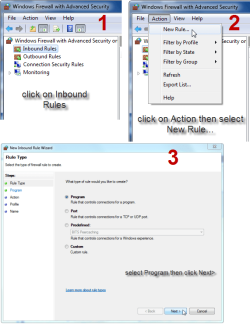
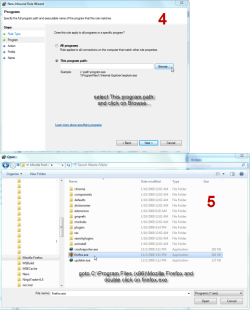
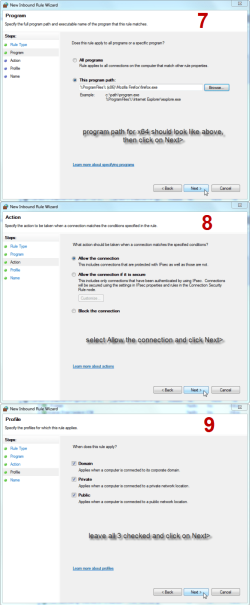
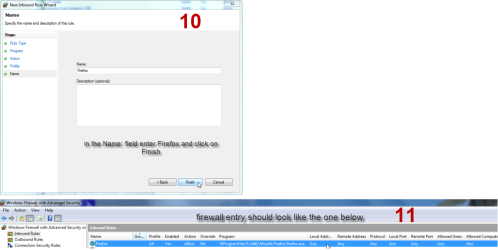
Here is an example of allowing Firefox through inbound rules on an x64 Windows 7 install. Just do the same steps for outbound:

just noticed I misnumbered steps, there is no step 6 go from step 5 to step 7
 

Attachments

  • 1.png
    1.png
    143.9 KB · Views: 155
  • 2.png
    2.png
    99.4 KB · Views: 274
  • 3.png
    3.png
    183.5 KB · Views: 252
  • 4.png
    4.png
    204.2 KB · Views: 244
  • 5.png
    5.png
    114.3 KB · Views: 185
Last edited:

My Computer

Computer Manufacturer/Model Number
Home built by the best!
OS
Windows 7 x64
CPU
Intel C2D E6600
Motherboard
Gigabyte EP45-DS3R
Memory
Patriot DDR2 2 x 2GB 4-4-4-12 timings
Graphics Card(s)
Sapphire 4830
Sound Card
Auzentech Meridian
Monitor(s) Displays
Dell Ultrasharp 2709W
Screen Resolution
1920 x 1200
Hard Drives
Western Digital VelociRaptor 150GB SATA 10000RPM 16MB Cache
Western Digital RE3 1TB SATAII 7200RPM 32M Buffer
PSU
PC Power & Cooling Silencer 750 Quad 750W ATX V2.2
Case
Antec Sonata II
Cooling
2 x Scythe S-Flex 120mm (1200rpm) FDB Bearing Chassis Fan
Keyboard
Logitech Cordless LX700
Mouse
Logitech MX Revolution
Internet Speed
8 mbps
Thanks. I see I'll have to make more specific rules outbound than a mere "allow all" one that I have now. I'm using the Vista Firewall Control tool but it doesn't seem to want to help with outbound, only inbound. I guess one has to pay for that privilege.
 

My Computer

Computer type
PC/Desktop
Computer Manufacturer/Model Number
Alienware® ALX X58
OS
Win 7 Ult SP1/Win 10 Pro (all x64)
CPU
Intel® Core™ i7-975 Extreme O/C to 4.02 GHz, 8MB Cache
Motherboard
Asus® P6T Deluxe V2 X58 LGA1366
Memory
24GB Corsair Vengeance DDR3 SDRAM at 1600MHz - 6 x 4096MB
Graphics Card(s)
1792 MB NVIDIA® GeForce® GTX 295 Dual Core
Sound Card
Onboard Soundmax® High-Definition 7.1 Performance Audio
Monitor(s) Displays
Samsung XL2370 LED backlit 23" W/S 2ms response time
Screen Resolution
1920 X 1080
Hard Drives
2 x 500gb SATA II
1 x 1TB SATA II
1 external eSATA LaCie 3TB
(Non-RAID)
PSU
Alienware® 1200 Watt Multi-GPU
Case
Alienware® P2 ALX Chassis with AlienIce™ 3.0 Video Cooling
Cooling
Alienware® High-Perf. Liquid Cooling + Acoustic Dampening
Keyboard
Microsoft® Wireless Entertainment 8000 + Logitech® G15 Wired
Mouse
Microsoft® Wireless Laser 8000 + Logitech® G9 Wired
Internet Speed
1Gb/s
Antivirus
McAfee LiveSafe
Browser
Firefox - latest
Other Info
Using non-RAID on purpose as I find RAID to be too temperamental.
Now set to AHCI
Back
Top