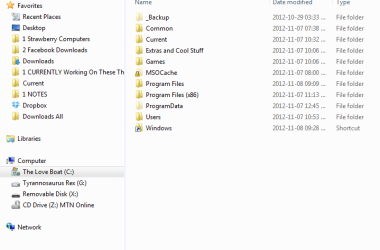
"c:\Windows" is not displayed but of course present in searches
"
c:\Windows" is not displayed but of course present in searches.:huh:
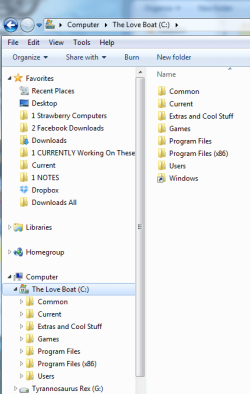
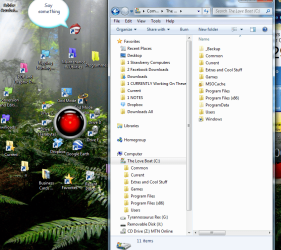
PS, notice the SHORTCUT to Windows I placed on C:\ (the root). Can you see the missing Windows folder on the left of the screen shot?!
I see this post was
never resolved
. Anyone out there who can help please?

:grouphug::busted:
I just reinstalled Win 7 Ultimate 64bit about a week ago (some irksome problems could not be resolved on the web in my searches mostly the Windows Update 50050008 error


icnic

.
Well everything is going incredibly well until two days ago when suddenly I noticed C:\Windows is not displayed. GAWD! I can find it and access it in searches etc. but whatever I do does nothing to reinstate the entry in the list of directories and folders in C: . :shock:

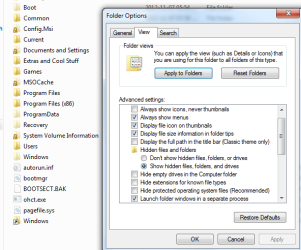
I tried the obvious like showing hidden files in "Folder Options". I un-tick the "Hide protected operating system files (recommended)" and apply the setting with success until I re-enter "Folder Settings" and the Windows systems has reset it back to this option entry ticked.

:banghead:
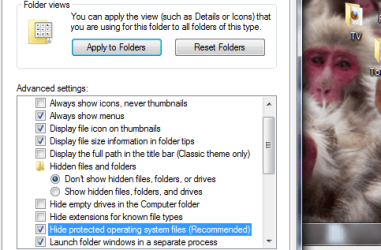
Any solution for that btw?

I see it suggested to "show operating system files and folders" which I cannot find anywhere to activate so haven't done that. (d):drool:
Well I restored my system. The problem came right

(even though after 2.5 hours it told me it couldn't restore lol
icnic:
COMPUTERicnic: SAYSicnic: NO ) but suddenly this morning the elusive folder is playing
HIDE-AND-SEEK again.:haha::warn::warn::warn::lock:


Can't imagine that my new install of Windows is already corrupt! Must be a simple thing I am missing but it's turning out to be an unresolved
stinker like
'error 5005008'. Mmmmm
:sarc:

:busted::grouphug:
:mad2
d):haha::drool:



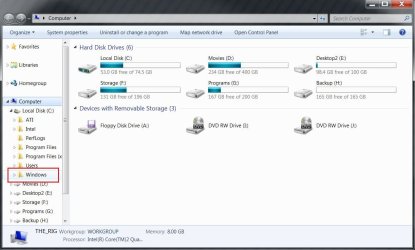

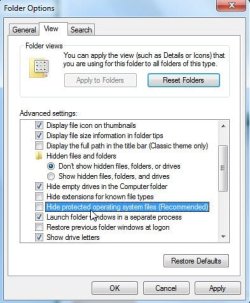


 :huh:
:huh:


 :roflmao::devil2: