Windows folder missing

edithegodfather

New member
Member
Local time
5:09 PM
Messages
61
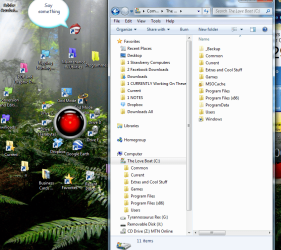
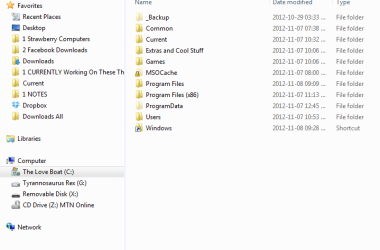
Hey guys i don't know when this happened but i found myself one day looking for windows/temp and the windows folder was missing in C . I got to temp by searching for it but how can i make windows folder reappear?
I also have "view hidden folders" set on so there should be no issue normally.
 

My Computer

OS
windows 7
The actual location of the temp folder is C:\users\username\Appdata\local\temp, where username is your user account name. Here's an easy way to get to the Temp folder. Click the Start orb, then type "%tmp%" without quotes in the Run Box.
 

My Computer

Computer Manufacturer/Model Number
Too many to describe...
OS
Windows 7 x64 pro/ Windows 7 x86 Pro/ XP SP3 x86
C:\Users\(UserName)\AppData\Local\Temp
substitute UserName above with your account name

Hope this helps

Regards
 

My Computer

Computer Manufacturer/Model Number
Custom
OS
Win7 HP (x64)/Win7 Ultimate (x64)
CPU
Core i7 920
Motherboard
Intel X58
Memory
6 x 2GB Corsair XMS3
Graphics Card(s)
CF HD4890
Sound Card
Asus Xonar
Monitor(s) Displays
Dell 2408WFP
Screen Resolution
1920 x 1200
Hard Drives
2 x 150GB WDC Velociraptors (Raid 0)
1 x 1TB Seagate
1 x 1.5TB Seagate
PSU
Corsair HX1000W
Case
Antec 1200
Keyboard
Razer Lycosa/N52te
Mouse
Razer Lachesis
Lol Bill2 - +1


Regards
 

My Computer

Computer Manufacturer/Model Number
Custom
OS
Win7 HP (x64)/Win7 Ultimate (x64)
CPU
Core i7 920
Motherboard
Intel X58
Memory
6 x 2GB Corsair XMS3
Graphics Card(s)
CF HD4890
Sound Card
Asus Xonar
Monitor(s) Displays
Dell 2408WFP
Screen Resolution
1920 x 1200
Hard Drives
2 x 150GB WDC Velociraptors (Raid 0)
1 x 1TB Seagate
1 x 1.5TB Seagate
PSU
Corsair HX1000W
Case
Antec 1200
Keyboard
Razer Lycosa/N52te
Mouse
Razer Lachesis
when you tick show hidden files, did you tick also "show operating system files"?
 

My Computer

OS
window's 7
CPU
core 2 quad
Motherboard
gigabyte
Memory
2gb corsair
Graphics Card(s)
ati hd4850
Monitor(s) Displays
lg
Screen Resolution
1600 X 900
Case
power logic
Other Info
none of the spec above is accurate
To navigate to windows folder enter %windir% in explorer address bar.
 

My Computer

OS
Windows 6.1
The actual location of the temp folder is C:\users\username\Appdata\local\temp, where username is your user account name. Here's an easy way to get to the Temp folder. Click the Start orb, then type "%tmp%" without quotes in the Run Box.


You can also use the start menu "Search programs and files" box.
 

My Computer

Computer Manufacturer/Model Number
* BFK Customs *
OS
W 7 64-bit Ultimate
CPU
Intel Q9550 Yorkfield
Motherboard
ASUS P5Q Pro
Memory
8GB Dominator 8500C5D
Graphics Card(s)
ATI : XFX 5870
Sound Card
Realtek HD Audio 7-1
Monitor(s) Displays
1x 47" LCD HDMI & 3x 26" LCD HDMI
Screen Resolution
1920x1080P & 1920x1200
Hard Drives
1x 80GB Intel X25-M G2 SSD : 1x 500GB & 1x 640GB WD Caviar Black(s)
PSU
Corsair 620HX
Case
Cooler Master RC-690
Cooling
Tuniq Tower 120, 2x 140mm and 3x 120mm case fans
Keyboard
Microsoft 500
Mouse
Razer Diamondback 3G
Internet Speed
14 Mb/s
Other Info
1x Koutech 3Gb/s SATA HDD Hot Swap Rack
No, guys, the problem was how to make windows folder show up in C , not how to get to something in it.
Also there's no 'show operating system files' option :-/ .
 

My Computer

OS
windows 7
Hello edithegodfather.


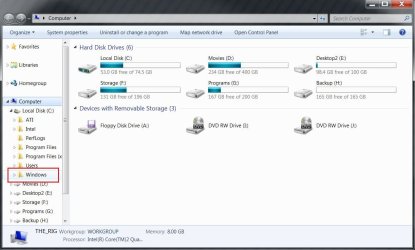
So you don't get the "Windows" in C: like in the snip below?
click the snip to enlarge
Windows.JPG
 

My Computer

Computer Manufacturer/Model Number
* BFK Customs *
OS
W 7 64-bit Ultimate
CPU
Intel Q9550 Yorkfield
Motherboard
ASUS P5Q Pro
Memory
8GB Dominator 8500C5D
Graphics Card(s)
ATI : XFX 5870
Sound Card
Realtek HD Audio 7-1
Monitor(s) Displays
1x 47" LCD HDMI & 3x 26" LCD HDMI
Screen Resolution
1920x1080P & 1920x1200
Hard Drives
1x 80GB Intel X25-M G2 SSD : 1x 500GB & 1x 640GB WD Caviar Black(s)
PSU
Corsair 620HX
Case
Cooler Master RC-690
Cooling
Tuniq Tower 120, 2x 140mm and 3x 120mm case fans
Keyboard
Microsoft 500
Mouse
Razer Diamondback 3G
Internet Speed
14 Mb/s
Other Info
1x Koutech 3Gb/s SATA HDD Hot Swap Rack
you mean the windows icon on the hard drive C? Correct me if i'm wrong?
 

My Computer

OS
window's 7
CPU
core 2 quad
Motherboard
gigabyte
Memory
2gb corsair
Graphics Card(s)
ati hd4850
Monitor(s) Displays
lg
Screen Resolution
1600 X 900
Case
power logic
Other Info
none of the spec above is accurate
Also there's no 'show operating system files' option :-/ .


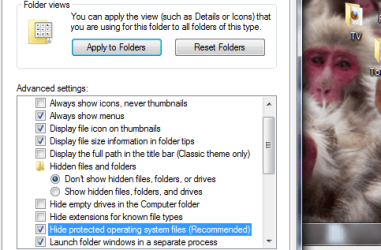
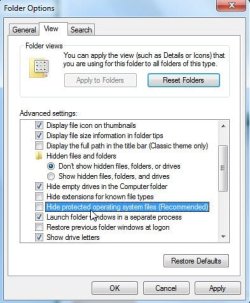
You don't have this in Folder Options?

hideprotectedosfiles-2010-06-01_134740.jpg
 

My Computers

System One System Two

  • Computer type
    PC/Desktop
    OS
    7 X64
    CPU
    i5 8400
    Motherboard
    gigabyte b365m ds3h
    Memory
    2x8gb 3200mhz
    Hard Drives
    various
    PSU
    pure power 11 400w cm
    Case
    Coolermaster
    Cooling
    cryorig m9i
  • Computer type
    PC/Desktop
    OS
    7x64
    CPU
    g5400
    Motherboard
    ga b365m ds3h
    Memory
    8gb ddr4 2400
    PSU
    xfx pro 450w
Ow, now i see, i was looking for something else. Thnx man.
 

My Computer

OS
windows 7
"c:\Windows" is not displayed but of course present in searches

"c:\Windows" is not displayed but of course present in searches.:huh:
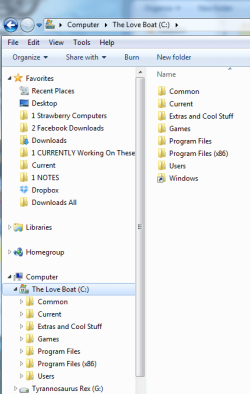

Windows missing on C.png

PS, notice the SHORTCUT to Windows I placed on C:\ (the root). Can you see the missing Windows folder on the left of the screen shot?!

I see this post was never resolved:(. Anyone out there who can help please?:ditto::grouphug::busted:

I just reinstalled Win 7 Ultimate 64bit about a week ago (some irksome problems could not be resolved on the web in my searches mostly the Windows Update 50050008 error :rolleyes::picnic:).

Well everything is going incredibly well until two days ago when suddenly I noticed C:\Windows is not displayed. GAWD! I can find it and access it in searches etc. but whatever I do does nothing to reinstate the entry in the list of directories and folders in C: . :shock::what:

I tried the obvious like showing hidden files in "Folder Options". I un-tick the "Hide protected operating system files (recommended)" and apply the setting with success until I re-enter "Folder Settings" and the Windows systems has reset it back to this option entry ticked. :hot::banghead: Can't remove the tick.png Any solution for that btw? :confused:

I see it suggested to "show operating system files and folders" which I cannot find anywhere to activate so haven't done that. (d):drool:

Well I restored my system. The problem came right :dinesh: (even though after 2.5 hours it told me it couldn't restore lol :picnic: COMPUTER:picnic: SAYS:picnic: NO ) but suddenly this morning the elusive folder is playing HIDE-AND-SEEK again.:haha::warn::warn::warn::lock::sleep::sick::cry:

Can't imagine that my new install of Windows is already corrupt! Must be a simple thing I am missing but it's turning out to be an unresolved stinker like 'error 5005008'. Mmmmm :p:rolleyes::sarc::sleepy::busted::grouphug::ditto::what::mad2:(d):haha::drool:
 
Last edited:

My Computer

OS
Windows 7 Ultimate x64
CPU
Intel Quad Core 2.5GHz each
Motherboard
beats me
Memory
4
Graphics Card(s)
none
Sound Card
Realtek
Monitor(s) Displays
HP w1907v
Hard Drives
500Gb C Drive (operating system)
1 Tb internal G Drive
PSU
Yes
Case
?
Cooling
Usual fan
OK! So this is my quick update:

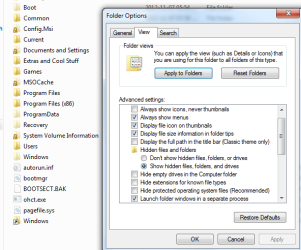
I realised that I hadn't pressed the "Show Hidden Files, Folders and Drives" just above it. I did that and un-ticked "Hide protected operating system files" again. I PRESSED APPLIED and this is what it all looked like ...

New.png clearer close up.png

When I then close the "Folder Options" again, it looks like this and the scalawag :devil: VINDOWZ hast taken a long hike again. NINJA

wtf.png blah blah blah.png

MMmMmM I LURV this operating system (^^,) :party::party:...:sick:
 
Last edited:

My Computer

OS
Windows 7 Ultimate x64
CPU
Intel Quad Core 2.5GHz each
Motherboard
beats me
Memory
4
Graphics Card(s)
none
Sound Card
Realtek
Monitor(s) Displays
HP w1907v
Hard Drives
500Gb C Drive (operating system)
1 Tb internal G Drive
PSU
Yes
Case
?
Cooling
Usual fan
Solved! WOOHOO

OK! So the solution for me was to go into the administrator account set up by Windows by activating it. I did this through the programme called "Ultimate Window Tweaker" which is free (you can get it in a lot of places through Google but I got it here: Ultimate Windows Tweaker, a TweakUI for Windows 7 & Vista).

Then I change Folder Options in there (the Administrator account) and those stick. That didn't happen in my normal account (the changes kept reverting back).

Some other tweaker must have changed the properties of the Windows directory to 'read only' or 'private/protected' or something so you have to make protected operating system files and folders visible in the Folder Options in your administrator account. I might have changed ownership too which may have sort of messed things up but I am Mr Experimenter learning by trial and error. After all, I can't BREAK the hardware or at least I think! lol:geek::huh::zip::eek::o:doh::thumbsup::roflmao::devil2::orb::info:

I actually prefer most of those hidden folders to remain hidden so I will just use a shortcut in the C root to access "Windows" and leave it at that.

At least I know that Windows is not corrupt!

As an after-thought though ... has anyone got a clearer idea of what I may have done to change C:\Windows to be hidden, read-only or protected??

PPS., thewindowsclub link I provided seems to have a fix for Windows Update not working that in my months of searching I didn't come across. It might work coz nuttin else seemed to:cool:
 
Last edited:

My Computer

OS
Windows 7 Ultimate x64
CPU
Intel Quad Core 2.5GHz each
Motherboard
beats me
Memory
4
Graphics Card(s)
none
Sound Card
Realtek
Monitor(s) Displays
HP w1907v
Hard Drives
500Gb C Drive (operating system)
1 Tb internal G Drive
PSU
Yes
Case
?
Cooling
Usual fan
Back
Top