Hi , I've been trying to fix this problem for almost two days now reading forums after forums from various different forums and still haven't found a fix.
Basically when I turn the volume all the way down to zero sound still plays through the speaker. Its annoying and I can't find a solid fix for it. Im on Windows 7 Pro 64-bit SP1. I've seen and tried to install Realtek which does fix the problem but add another where it will play audio from both my speakers and headset simultaneously which is way more annoying. Im not sure if this will help but I've noticed that when looking at the volume mixer option when sound is playing and the volume is set to zero there is this gray bar that keeps rising up and down along side the playing audio.
If anyone knows a fix I would really like to know. Thanks
Hello and welcome 00kazuto first up I see it is a workstation and my immediate thought is that this is a work computer? if so do you have admin rights to alter settings?
My Computer
At a glance
Desk1 7 Home Prem / Desk2 10 Pro / Main lap A...Desk1 i5 3750K / Laptop i7 GTX 860M / Desk2 i...Desk1 8GB (1866) / Desk2 16GB (1333) / Laptop...Desk 1& 2NVidia GTX 650 & Laptops on board Intel
Computer type
PC/Desktop
Computer Manufacturer/Model Number
Own build (new) Desk1 / Asus ROG Win 7 / Desk2 1st build
OS
Desk1 7 Home Prem / Desk2 10 Pro / Main lap Asus ROG 10 Pro 2 laptop Toshiba 7 Pro Asus P2520 7 & 10
One other Desktop (tester) and spare Toshba laptop both with SSD's
Running Kaspersky 2016 ISS on all machines config'd identically
Logitec audio stereo systems on each machine (x3)
Canon MG5250MFC
Router/modem TP-Link running WPA2SK
Hello and welcome 00kazuto first up I see it is a workstation and my immediate thought is that this is a work computer? if so do you have admin rights to alter settings?
Ok mate now the first thing to do is to run these please SFC /SCANNOW Command - System File Checker Disk Check < if necessary include the /f switch and if this does not make any improvement then just run this switch instead /r in the command line as per Option2
Run these in safe mode and the sfc often best run for two to three runs – you can leave out the /r switch in ckdsk if you feel it not necessary
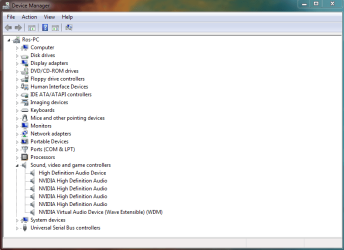
Now can you go to the Device Manager and see if there are any yellow triangles against any of the devices please - if there are any please post back what they are or better still a pic of that screen - you can use this if you like I find it the quickest and easiest method. How to Use the Snipping Tool in Vista as by the y I keep this snipping tool on my taskbar -makes using it very quick
My Computer
At a glance
Desk1 7 Home Prem / Desk2 10 Pro / Main lap A...Desk1 i5 3750K / Laptop i7 GTX 860M / Desk2 i...Desk1 8GB (1866) / Desk2 16GB (1333) / Laptop...Desk 1& 2NVidia GTX 650 & Laptops on board Intel
Computer type
PC/Desktop
Computer Manufacturer/Model Number
Own build (new) Desk1 / Asus ROG Win 7 / Desk2 1st build
OS
Desk1 7 Home Prem / Desk2 10 Pro / Main lap Asus ROG 10 Pro 2 laptop Toshiba 7 Pro Asus P2520 7 & 10
One other Desktop (tester) and spare Toshba laptop both with SSD's
Running Kaspersky 2016 ISS on all machines config'd identically
Logitec audio stereo systems on each machine (x3)
Canon MG5250MFC
Router/modem TP-Link running WPA2SK
No worries re reply mate am not gong anywhere in a rush
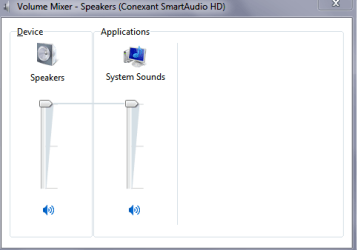
Now backing up in the first post you mentioned a grey bar moving up and down can you post a pic of that and does it look anything like the audio mixer on my machine here - have a look at my pics.
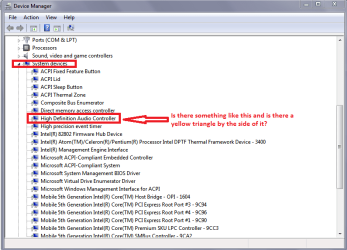
Also have a look at system devices in the Device manager see pics (your system devices may look a little different than mine).
Edit: Did you run those other scans??
Attachments
AUDIO MIX.PNG
7 KB
· Views: 8
AUDIO MIX 2.PNG
20.1 KB
· Views: 1
My Computer
At a glance
Desk1 7 Home Prem / Desk2 10 Pro / Main lap A...Desk1 i5 3750K / Laptop i7 GTX 860M / Desk2 i...Desk1 8GB (1866) / Desk2 16GB (1333) / Laptop...Desk 1& 2NVidia GTX 650 & Laptops on board Intel
Computer type
PC/Desktop
Computer Manufacturer/Model Number
Own build (new) Desk1 / Asus ROG Win 7 / Desk2 1st build
OS
Desk1 7 Home Prem / Desk2 10 Pro / Main lap Asus ROG 10 Pro 2 laptop Toshiba 7 Pro Asus P2520 7 & 10
One other Desktop (tester) and spare Toshba laptop both with SSD's
Running Kaspersky 2016 ISS on all machines config'd identically
Logitec audio stereo systems on each machine (x3)
Canon MG5250MFC
Router/modem TP-Link running WPA2SK