Windows is not installed on the drive from which it boots!?

cavuplo

New member
Local time
7:40 AM
Messages
7
I have 2 HDD, Disk0 and Disk1.
Disk0 is supposed to have my personal data, Disk1 the OS.
Disk0 has 3 partitions (H:/ I:/ J:/ ) and Disk1 has 3 partitions too (C:/ D:/ E:/ ).

One month ago I installed Win7 but erased my Disk0 by mistake and probably (very unlikely though! see below) started installing on there when I realized something looked wrong, canceled, then formatted Disk1 and installed there, on the first partition (I blame the badly designed Windows installer, Linux does it better).

Fortunately, I recovered my data from Disk0 (only partition tables must have got wiped out) after Win7 finished installing on Disk1 with a recovery tool.

I'm about to format Disk0 now (at least the first partition) but I noticed something weird on my Disk0 (data) hard drive.
I have system files, of which creation dates match the day I installed Win7 (and recovered my partitions too).

PycSL.jpg

Note: disregard found.000, that's a file chkdsk must have created back when I used WinXP or something.
Note2: columns are "Date modified" and "Date Created", YY/MM/DD

I'm new to Win7 but I'm guessing these system files I see here should be on my System drive, not another drive, right?

Here is what I have on my C:/ where Win7 is installed:

n3e2c.jpg

Am I missing some (hidden) system files there?

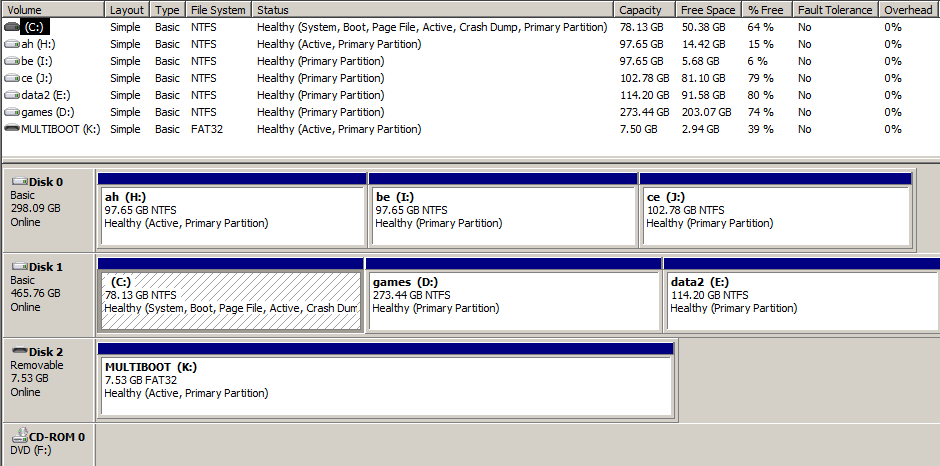
Here is what I have in the Disk Manager:
4N6aj.jpg


I am confused. H:/ is marked as "System", which shouldn't be.


I am afraid that formatting H:/ might prevent me from booting anymore.
In such a case, will I have to either:
1) format C:/ and re-install Win7 ?
2) use recovery console and repair from there ?

The second solution would be fine by me since my Win7 installation DVD is on a USB drive (I installed from there).

As a side note, I am super confused as why one drive (SATA) is Disk1 and the other (IDE) is Disk0. I had to fiddle in my BIOS to end up booting on the right one (which I suspect is Disk0!). If I ever had to remove my IDE HDD, would I end up not being able to boot Win7?


Remark: I got suspicious of that when trying to encrypt my system drive with TrueCrypt and TC says it couldn't handle a system that "does not appear to be installed on the drive from which it boots".


---------------- SOLUTION --------------
* I disconnected my IDE cable.
* Reboot then set my USB key as HDD to boot on
* Started windows 7 installation process which immediately found the error and started fixing it, then ask for reboot.
* Second reboot, then second repair which I had to select in the recovery environment menu this time. Error got fixed again.
* Reconnected my IDE HDD.
* Re-set my usual boot configuration in BIOS (first drive being my SATA holding C:/, second drive being my IDE holding H:/ )
* Works fine! Thank you!
 
Last edited:

My Computer My Computer

At a glance

Win7 Pro x64 SP1Intel Quad Core Q6600 2.4Ghz6GB: Corsair CM2X1024-6400C5DHX + G.Skill F2-...Nvidia GTX 560 TI
Computer Manufacturer/Model Number
Self built?
OS
Win7 Pro x64 SP1
CPU
Intel Quad Core Q6600 2.4Ghz
Motherboard
Asus P5E
Memory
6GB: Corsair CM2X1024-6400C5DHX + G.Skill F2-6400CL4D-2GBPK
Graphics Card(s)
Nvidia GTX 560 TI
Sound Card
onboard :(
Monitor(s) Displays
17"
Screen Resolution
1280*1024
Hard Drives
Hitachi 320GB HDT725032VLAT80 PATA (IDE)
Hitachi 500GB HDP725050GLA360 SATA
PSU
Corsair 500W
Case
Antec
Mouse
MS Intellimouse
Other Info
I like Linux butter!
Disk 0 always gets the bootmgr
It's been a source of many complaints.
The only way around it is to make sure the disk you are putting windows on is in the disk 0 position or the only drive installed at the time of the format.
 

My Computer My Computer

At a glance

Windows 7 x64Intel i7 2600kG.skill Ripjaw 16gigs @ 1866Nvidia gtx580 (evga)
Computer Manufacturer/Model Number
Insane hobo technologies. ;-)
OS
Windows 7 x64
CPU
Intel i7 2600k
Motherboard
Asrock z68 extreme 4 gen 3
Memory
G.skill Ripjaw 16gigs @ 1866
Graphics Card(s)
Nvidia gtx580 (evga)
Sound Card
Integrated HD audio + hdmi
Monitor(s) Displays
24" ASUS widescreen + 42" insignia
Screen Resolution
1080p (1920x1080)
Hard Drives
128 Samsung 830
256 Samsung 840
3 x 1tb storage drive (various)
1 western digital 1tb (eSATA)
1 Seagate 1tb (eSATA)
PSU
1 kilowatt SLI/Crossfire rated Silverstone modular
Case
NZXT Phantom + additional 220 fan
Cooling
Zalmann
Keyboard
Microsoft wireless 3000 (v2)
Mouse
MS - wireless 5000 (bluetrack)
Internet Speed
depends on if you ask me or my provider.
Other Info
The above information is provided as is, and the author assumes no responsibility for issues it may cause with your sanity or fanboyism.
Ouch. This is worse than I thought. Another poor design decision by the Microsoft engineers? >:(
Are they even aware of that problem? (I sure hope so)

Thanks for the replies, I'll follow that tutorial and keep this updated.

Will this be a problem if I keep the current boot loader on my second HDD though (my current Disk0)? (probably a stupid question, if I choose to boot on Disk1 in the BIOS, right?)
 

My Computer My Computer

At a glance

Win7 Pro x64 SP1Intel Quad Core Q6600 2.4Ghz6GB: Corsair CM2X1024-6400C5DHX + G.Skill F2-...Nvidia GTX 560 TI
Computer Manufacturer/Model Number
Self built?
OS
Win7 Pro x64 SP1
CPU
Intel Quad Core Q6600 2.4Ghz
Motherboard
Asus P5E
Memory
6GB: Corsair CM2X1024-6400C5DHX + G.Skill F2-6400CL4D-2GBPK
Graphics Card(s)
Nvidia GTX 560 TI
Sound Card
onboard :(
Monitor(s) Displays
17"
Screen Resolution
1280*1024
Hard Drives
Hitachi 320GB HDT725032VLAT80 PATA (IDE)
Hitachi 500GB HDP725050GLA360 SATA
PSU
Corsair 500W
Case
Antec
Mouse
MS Intellimouse
Other Info
I like Linux butter!
Ouch. This is worse than I thought. Another poor design decision by the Microsoft engineers? >:(
Are they even aware of that problem? (I sure hope so)

What MS problem?
 

My Computer My Computer

At a glance

ME/XP/Vista/Win7
OS
ME/XP/Vista/Win7
I was referring to this:

Disk 0 always gets the bootmgr
It's been a source of many complaints.

Perhaps not an MS problem? (I have no clue of what I'm talking about haha)
It's alright, I'll get over it. This is not like there is no way around this after all. Thanks again. :)
 

My Computer My Computer

At a glance

Win7 Pro x64 SP1Intel Quad Core Q6600 2.4Ghz6GB: Corsair CM2X1024-6400C5DHX + G.Skill F2-...Nvidia GTX 560 TI
Computer Manufacturer/Model Number
Self built?
OS
Win7 Pro x64 SP1
CPU
Intel Quad Core Q6600 2.4Ghz
Motherboard
Asus P5E
Memory
6GB: Corsair CM2X1024-6400C5DHX + G.Skill F2-6400CL4D-2GBPK
Graphics Card(s)
Nvidia GTX 560 TI
Sound Card
onboard :(
Monitor(s) Displays
17"
Screen Resolution
1280*1024
Hard Drives
Hitachi 320GB HDT725032VLAT80 PATA (IDE)
Hitachi 500GB HDP725050GLA360 SATA
PSU
Corsair 500W
Case
Antec
Mouse
MS Intellimouse
Other Info
I like Linux butter!
It is always best to install to Disk 0.
 

My Computer My Computer

At a glance

ME/XP/Vista/Win7
OS
ME/XP/Vista/Win7
I agree. Actually, if I were able to tell which was which or even change that at Win7 installation time, I would have. I am fairly sure that my "OS drive" was Disk0 under WinXP, then ended up being Disk1 eventually, but I could be wrong.

Is there any limitation that would justify having bootmgr ending up on Disk0 whatever you do? I don't understand why it doesn't write it to the drive I'm installing the OS to, or at least give the user a choice somewhere.
 
Last edited:

My Computer My Computer

At a glance

Win7 Pro x64 SP1Intel Quad Core Q6600 2.4Ghz6GB: Corsair CM2X1024-6400C5DHX + G.Skill F2-...Nvidia GTX 560 TI
Computer Manufacturer/Model Number
Self built?
OS
Win7 Pro x64 SP1
CPU
Intel Quad Core Q6600 2.4Ghz
Motherboard
Asus P5E
Memory
6GB: Corsair CM2X1024-6400C5DHX + G.Skill F2-6400CL4D-2GBPK
Graphics Card(s)
Nvidia GTX 560 TI
Sound Card
onboard :(
Monitor(s) Displays
17"
Screen Resolution
1280*1024
Hard Drives
Hitachi 320GB HDT725032VLAT80 PATA (IDE)
Hitachi 500GB HDP725050GLA360 SATA
PSU
Corsair 500W
Case
Antec
Mouse
MS Intellimouse
Other Info
I like Linux butter!
Boot files are install to the first HD drive.
Which is also the first HD Drive, pluged in the first SATA port on the MOBO.
Showing in Windows as Disk0.
 

My Computer My Computer

At a glance

ME/XP/Vista/Win7
OS
ME/XP/Vista/Win7
My current Disk0 is actually an IDE HDD (my MOBO is an ASUSP5E and there is some sort of mini-IDE driver starting after POST which detect my IDE drive accordingly). Disk1 is my only SATA HDD.
 

My Computer My Computer

At a glance

Win7 Pro x64 SP1Intel Quad Core Q6600 2.4Ghz6GB: Corsair CM2X1024-6400C5DHX + G.Skill F2-...Nvidia GTX 560 TI
Computer Manufacturer/Model Number
Self built?
OS
Win7 Pro x64 SP1
CPU
Intel Quad Core Q6600 2.4Ghz
Motherboard
Asus P5E
Memory
6GB: Corsair CM2X1024-6400C5DHX + G.Skill F2-6400CL4D-2GBPK
Graphics Card(s)
Nvidia GTX 560 TI
Sound Card
onboard :(
Monitor(s) Displays
17"
Screen Resolution
1280*1024
Hard Drives
Hitachi 320GB HDT725032VLAT80 PATA (IDE)
Hitachi 500GB HDP725050GLA360 SATA
PSU
Corsair 500W
Case
Antec
Mouse
MS Intellimouse
Other Info
I like Linux butter!
If they allowed/supported puting boot files on any drive, think about how complex the drive/os selection would be at boot time.

I mean it may be handy for master ninja power users, but in reality it would be way overkill for the other 99.99999%

At least your /allowed/ to install OSes on other hard drives which does come in handy... It could easily be much worse... :)
 

My Computer My Computer

At a glance

Windows 7 x64 Ultimatei7 96012 Gig Corsair DominatorNvidia 480
Computer Manufacturer/Model Number
Scratch built
OS
Windows 7 x64 Ultimate
CPU
i7 960
Motherboard
Asus P6X58D
Memory
12 Gig Corsair Dominator
Graphics Card(s)
Nvidia 480
Sound Card
Maudio Delta 44 + breakout box
Monitor(s) Displays
Dell UltraSharp U2410 24in and Samsung 21 dual monitors
Screen Resolution
1920x1200 and 1280x1024
Hard Drives
Primary: Intel X-25M G2 160G SSD
Secondary: Segate baracuda 1.0 TB
HDs in AHCI mode.
PSU
Corasair TX850
Case
Cooler Master HAF
Cooling
Corsair H50
Keyboard
Logitech G15 + N52 game pad
Mouse
Logitech MX518
Internet Speed
15kbs down 4.5kbps up
Other Info
WEI 7.6
CPU & RAM 7.6
Graphics 7.9
Hard disk 7.7
It sure allows to install the OS wherever you want (otherwise that would be ridiculous), but why doesn't it allow to choose where to install boot files, or at least specify "on the same drive as OS installation"?

I did not see dialog box letting me (the user) know where these crucial files were written to! I find this somewhat shady and not user-friendly at all. That's a lack of transparency, which I qualify as a problem or a poor design decision.

Am I wrong? Or did I misunderstood you there?
I have never had any problems with Linux installations for example, even with dual booting windows (not trying to demonstrate anything there).
 
Last edited:

My Computer My Computer

At a glance

Win7 Pro x64 SP1Intel Quad Core Q6600 2.4Ghz6GB: Corsair CM2X1024-6400C5DHX + G.Skill F2-...Nvidia GTX 560 TI
Computer Manufacturer/Model Number
Self built?
OS
Win7 Pro x64 SP1
CPU
Intel Quad Core Q6600 2.4Ghz
Motherboard
Asus P5E
Memory
6GB: Corsair CM2X1024-6400C5DHX + G.Skill F2-6400CL4D-2GBPK
Graphics Card(s)
Nvidia GTX 560 TI
Sound Card
onboard :(
Monitor(s) Displays
17"
Screen Resolution
1280*1024
Hard Drives
Hitachi 320GB HDT725032VLAT80 PATA (IDE)
Hitachi 500GB HDP725050GLA360 SATA
PSU
Corsair 500W
Case
Antec
Mouse
MS Intellimouse
Other Info
I like Linux butter!
Gah...

[Edit] Or maybe I misinterpreted your post? [/edit]
 

My Computer My Computer

At a glance

Windows 7 x64 Ultimatei7 96012 Gig Corsair DominatorNvidia 480
Computer Manufacturer/Model Number
Scratch built
OS
Windows 7 x64 Ultimate
CPU
i7 960
Motherboard
Asus P6X58D
Memory
12 Gig Corsair Dominator
Graphics Card(s)
Nvidia 480
Sound Card
Maudio Delta 44 + breakout box
Monitor(s) Displays
Dell UltraSharp U2410 24in and Samsung 21 dual monitors
Screen Resolution
1920x1200 and 1280x1024
Hard Drives
Primary: Intel X-25M G2 160G SSD
Secondary: Segate baracuda 1.0 TB
HDs in AHCI mode.
PSU
Corasair TX850
Case
Cooler Master HAF
Cooling
Corsair H50
Keyboard
Logitech G15 + N52 game pad
Mouse
Logitech MX518
Internet Speed
15kbs down 4.5kbps up
Other Info
WEI 7.6
CPU & RAM 7.6
Graphics 7.9
Hard disk 7.7
It sure allows to install the OS wherever you want (otherwise that would be ridiculous), but why doesn't it allow to choose where to install boot files, or at least specify "on the same drive as OS installation"?

I did not see dialog box letting me (the user) know where these crucial files were written to! I find this somewhat shady and not user-friendly at all. That's a lack of transparency, which I qualify as a problem or a poor design decision.

Am I wrong? Or did I misunderstood you there?
I have never had any problems with Linux installations for example, even with dual booting windows (not trying to demonstrate anything there).
You are probably right. The way the installer acts is very confusing and the 100MB active partition is also something that a lot of people wrestle with. But that's the way it is.

Therefore it is best to install with only one hard disk connected and to a prefefined active primary partition. That way you can trick the installer.
 

My Computer My Computer

At a glance

Vista, Windows7, Mint Mate, Zorin, Windows 8from 1.6GHz Duo to i7
Computer Manufacturer/Model Number
HP, Dell, Gateway, Toshiba - 4 laptops and 2 desktops
OS
Vista, Windows7, Mint Mate, Zorin, Windows 8
CPU
from 1.6GHz Duo to i7
Monitor(s) Displays
2x HP w2207
Hard Drives
5x HDD, 7x SSD, 12x Externals
Keyboard
with trackball - no mices
Mouse
Trackball mice
Internet Speed
DSL 6000
Follow these steps to recover System Active boot files to Win7 partition on Disk1.

Boot into System Recovery Options, open a Command Line, use Diskpart to mark Win7 partition Active and H partition Inactive: Partition - Mark as Active (Method Two)

Next power down to unplug Disk0 so it cannot interfere with repairs. Normally you would swap its cable to Disk1 so that Win7 partition is now on Disk0 but this may not be possible since one is IDE and the other SATA.

Now boot back into DVD or Repair CD to run Startup Repair up to 3 Separate Times with reboots to write the System boot files to the Active partition until it starts on its own.

You can also mark Active/Inactive with a picture of your HD using free Partition Wizard bootable CD, then click on HD to highlight it, from Disk tab select Rebuild MBR, Apply, reboot. This may preclude the need to run Repairs.

As long as no other partition gets marked Active, further repairs to Win7 should not derail the System boot files again. It's always best however to have Win7 on Disk0 which can be assured by unplugging all other HD's during install.
 
Here is what I did (added this to my first post for future reference):
* I disconnected my IDE cable.
* Reboot then set my USB key as HDD to boot on
* Started windows 7 installation process which immediately found the error and started fixing it, then ask for reboot.
* Second reboot, then second repair which I had to select in the recovery environment menu this time. Error got fixed again.
* Reconnected my IDE HDD.
* Re-set my usual boot configuration in BIOS (first drive being my SATA holding C:/, second drive being my IDE holding H:/ )
* Works fine!

All in all I only did two startup repairs. Yesterday I accidentally marked C: partition as active, perhaps this why it works already (I'm almost sure it wasn't Active until I took the screenshot yesterday). By the way I have just set H: as inactive as explained here. (thank you gregrocker)

My problem is now gone. I could not find anything that would allow me to set Disk1 as Disk0, so it still is the same configuration as before, only now my boot files (bootmgr and all that) are now on C:/ on Disk1. See below. It still Disk1. Oh well.

TsLuF.png

Note: nevermind the multiboot drive, it's my USB key where the Win7 dvd is. Also H: is now Inactive.

Thanks for your help folks, it wasn't a big issue but I hope this thread will prove useful to other users in the future.


PS: bonus weirdness.
 

My Computer My Computer

At a glance

Win7 Pro x64 SP1Intel Quad Core Q6600 2.4Ghz6GB: Corsair CM2X1024-6400C5DHX + G.Skill F2-...Nvidia GTX 560 TI
Computer Manufacturer/Model Number
Self built?
OS
Win7 Pro x64 SP1
CPU
Intel Quad Core Q6600 2.4Ghz
Motherboard
Asus P5E
Memory
6GB: Corsair CM2X1024-6400C5DHX + G.Skill F2-6400CL4D-2GBPK
Graphics Card(s)
Nvidia GTX 560 TI
Sound Card
onboard :(
Monitor(s) Displays
17"
Screen Resolution
1280*1024
Hard Drives
Hitachi 320GB HDT725032VLAT80 PATA (IDE)
Hitachi 500GB HDP725050GLA360 SATA
PSU
Corsair 500W
Case
Antec
Mouse
MS Intellimouse
Other Info
I like Linux butter!
Be sure to mark H Inactive as listed in the steps I gave you. You can now do this using Diskpart from an Elevated Command Prompt.

This will help prevent Repair from rewriting System files to the first partition marked Active as it will do.
 
Back
Top