Windows keeps changing the order of my hard disks

gbswales

New member
Local time
10:38 PM
Messages
8
About 6 months ago I rebuilt my system which now has

INTERNALLY
128GB Corsair SSD = C Drive plus unlettered boot partition
2TB Samsung drive split into two partitions which is storage and truecrypt area (the first partition is my data drive)
2TB Samsung drive (media and films)
250GB western digital which is my system back up drive for main and incremental backups

EXTERNALLY (permenantly connecte)
3TB Go Flex drive which is my data back up
2GB flash drive for a specific programme that runs from it

I use Paraagon Back up and recovery 10.2 (free edition)
with a system drive back up and alternat daily incremental back ups scheduled

After a few days of running the back ups successfully I wake up to find an invalid partition messag. Which I eventually traced back to the SSD drive (still happily working as boot and system disk) which in Disc Mananger (win 7 pro) had changed drive number at the last reboot. For some reason it was showing as drive 2 but had changed back to drive 0 as I would expect it to be. So ran a new back up, set new scheduled incremental and again this ran fine for 3 back ups - until I had occasion to turn my PC off. The next time the back up ran I got the same error message and found the drive had switched back to being drive 2 again.

I have not done anything (other than reboot) that should change this
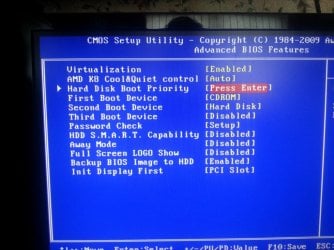
The discs show in the right order in the BIOS and are set in the right boot sequence as well CDROM/SDD/HDD

The SSD is the master on SATA port 2 one of the 2TB is slave on the same port
the other two hard drives are master and slave on SATA port 3 - they were simply connceted to the most accessible ports but I made sure the SSD was first in the sequence. zero is used up by the IDE Optical drives (master and slave) and both ports 1 are empty

I am fanatical about backing up and so concerned about it failing like this. There has been previous thread but was nearly a year old so it reccommended a new one.

It is a gigabyte motherboard (fairly new) with an AMD dual core processor (the other article reccommended an intel specific fix so didnt help)

any ideas as how I can FIX the drive numbers - I really dont care if it is showing as 0 or 2 just as long as it always stays the same
 

My Computer My Computer

At a glance

Windows 7 proAMD athlon 64 x2 4200+ 2.2GHz4gbATI Radeon HD 4600
Computer Manufacturer/Model Number
custom
OS
Windows 7 pro
CPU
AMD athlon 64 x2 4200+ 2.2GHz
Motherboard
gigabyte
Memory
4gb
Graphics Card(s)
ATI Radeon HD 4600
Sound Card
on board
Monitor(s) Displays
2 x gnr 19" widescreen
Hard Drives
Main 2x 1TB hitachi
back up 1 x seagate 1TB and 1x WD 500GB
PSU
700watt
Please post back a screenshot of your maximized Disk Management drive map and listings:

1. Type Disk Management in Start Search box.
2. Open Disk Mgmt. window and maximize it.
3. Type Snipping Tool in Start Search box.
4. Open Snipping Tool, choose Rectangular Snip, draw a box around full map and all listings.
5, Save Snip, attach using paper clip in Reply Box.

Tell us what is on each partition if they are not labeled or label them in the Explorer Properties box of each.
 
The SSD is the master on SATA port 2 one of the 2TB is slave on the same port
the other two hard drives are master and slave on SATA port 3 - they were simply connceted to the most accessible ports but I made sure the SSD was first in the sequence. zero is used up by the IDE Optical drives (master and slave) and both ports 1 are empty

Master, Slave ? IDE used Master, Slave on the one cable, but SATA? Don't they each have their own port and don't have jumpers. One drive per cable per port?
 

My Computer My Computer

At a glance

Windows 10 Education 64 bitAMD Phenom II X4 980 Black Edition Deneb 3.7GHz8GB 4GBx2 Kingston PC10600 DDR3 1333 MemoryZotac NVIDIA Geforce GT640 2 Gig DDR3 PCIe
Computer type
PC/Desktop
Computer Manufacturer/Model Number
Home Built
OS
Windows 10 Education 64 bit
CPU
AMD Phenom II X4 980 Black Edition Deneb 3.7GHz
Motherboard
Asus M4N68T-M V2 µATX Motherboard
Memory
8GB 4GBx2 Kingston PC10600 DDR3 1333 Memory
Graphics Card(s)
Zotac NVIDIA Geforce GT640 2 Gig DDR3 PCIe
Sound Card
VIA VT1708s High Definition Audio 8-channel Onboard
Monitor(s) Displays
22" LG E2242 1080p and 2 19" I-INC AG191D
Screen Resolution
1280x1024 - 1920x1080 - 1280x1024
Hard Drives
Crucial M100 256 GB SSD and 500 GB WD Blue SATA
PSU
Thermaltake TR 620
Case
Power Up Black ATX Mid-Tower Case
Cooling
Stock heatsink and fan
Keyboard
Logitech Wireless K350 Wave
Mouse
Logitech Wireless M570 Trackman Wheel
Internet Speed
80 Mbps Down 30 Mbps Up
Antivirus
Windows Defender
Browser
Internet Explorer 11
Other Info
HP DVD1040e Lightscribe - External USB2
Response to answers

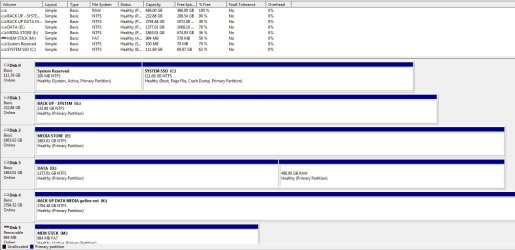
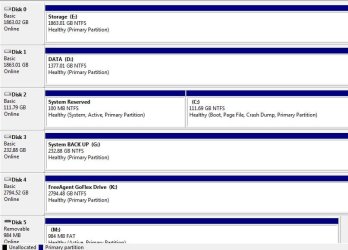
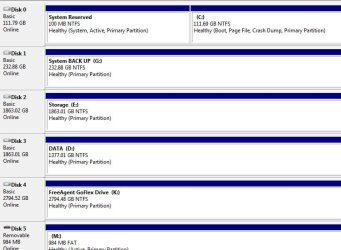
Thanks (both) for responses - I have attached a screenshot of the full disc manager - it doesnt all fit on the screen but the only things below are the two physical and one virtual optical drives both on IDE. Today the C drive is correctly shown as Drive 0 so the back up runs. However as you can see from the other screenshots it can alternate between being drive 0 and drive 2 - the only thing that happened between these two screen shots was a system restart. Looking at the screenshots I notice that other drives randomly change letters too

Sorry I did realise that they were not actually master a slave drives, being SATA, but this is simply how they labelled in the BIOS - I will restart my system now and post a list of how they appear in BIOS
 

Attachments

  • DISC PARTITIONS.jpg
    DISC PARTITIONS.jpg
    110.7 KB · Views: 23
  • c is disc 2.jpg
    c is disc 2.jpg
    49.6 KB · Views: 20
  • c is disc 0 again.jpg
    c is disc 0 again.jpg
    47.3 KB · Views: 17

My Computer My Computer

At a glance

Windows 7 proAMD athlon 64 x2 4200+ 2.2GHz4gbATI Radeon HD 4600
Computer Manufacturer/Model Number
custom
OS
Windows 7 pro
CPU
AMD athlon 64 x2 4200+ 2.2GHz
Motherboard
gigabyte
Memory
4gb
Graphics Card(s)
ATI Radeon HD 4600
Sound Card
on board
Monitor(s) Displays
2 x gnr 19" widescreen
Hard Drives
Main 2x 1TB hitachi
back up 1 x seagate 1TB and 1x WD 500GB
PSU
700watt
BIOS screenshot

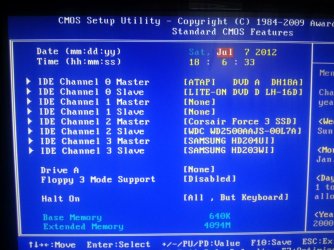
I have attached a photo of the BIOS screen
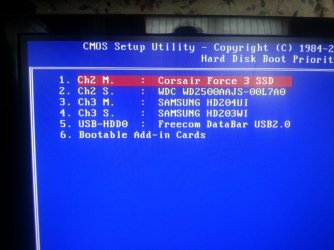
The ordering here never changes with the SSD at channel 2
the next one is the back up drive which is an older drive so may be slower to read than the others and the two samsungs come next - I dont know which is which because they are identical drives. On this reboot the ordering remained OK

ADDED two more shots from BIOS screen showing boot order and HD disc order
 

Attachments

  • 2012-07-07 18.05.54 (Medium).jpg
    2012-07-07 18.05.54 (Medium).jpg
    111.8 KB · Views: 13
  • disc boot priority.jpg
    disc boot priority.jpg
    75.6 KB · Views: 8
  • boot order.jpg
    boot order.jpg
    104.5 KB · Views: 10

My Computer My Computer

At a glance

Windows 7 proAMD athlon 64 x2 4200+ 2.2GHz4gbATI Radeon HD 4600
Computer Manufacturer/Model Number
custom
OS
Windows 7 pro
CPU
AMD athlon 64 x2 4200+ 2.2GHz
Motherboard
gigabyte
Memory
4gb
Graphics Card(s)
ATI Radeon HD 4600
Sound Card
on board
Monitor(s) Displays
2 x gnr 19" widescreen
Hard Drives
Main 2x 1TB hitachi
back up 1 x seagate 1TB and 1x WD 500GB
PSU
700watt
That's weird how the BIOS lists the SATA ports as IDE Channel master and Slave? I've never seen that before. Maybe because the BIOS is set to IDE mode instead of AHCI mode? How old is that Motherboard, what's the make and model number? It looks like two whole channels are swapping. Disk 0 and 1 become 2 and 3, while 2 and 3 become 1 and 2. IDE Channel 2 and 3 get reversed somehow. The drives are getting detected in the wrong order during the post. BIOS battery low maybe? I think I would reset the BIOS to failsafe defaults and then manually set your date, time, boot order etc.
 

My Computer My Computer

At a glance

Windows 10 Education 64 bitAMD Phenom II X4 980 Black Edition Deneb 3.7GHz8GB 4GBx2 Kingston PC10600 DDR3 1333 MemoryZotac NVIDIA Geforce GT640 2 Gig DDR3 PCIe
Computer type
PC/Desktop
Computer Manufacturer/Model Number
Home Built
OS
Windows 10 Education 64 bit
CPU
AMD Phenom II X4 980 Black Edition Deneb 3.7GHz
Motherboard
Asus M4N68T-M V2 µATX Motherboard
Memory
8GB 4GBx2 Kingston PC10600 DDR3 1333 Memory
Graphics Card(s)
Zotac NVIDIA Geforce GT640 2 Gig DDR3 PCIe
Sound Card
VIA VT1708s High Definition Audio 8-channel Onboard
Monitor(s) Displays
22" LG E2242 1080p and 2 19" I-INC AG191D
Screen Resolution
1280x1024 - 1920x1080 - 1280x1024
Hard Drives
Crucial M100 256 GB SSD and 500 GB WD Blue SATA
PSU
Thermaltake TR 620
Case
Power Up Black ATX Mid-Tower Case
Cooling
Stock heatsink and fan
Keyboard
Logitech Wireless K350 Wave
Mouse
Logitech Wireless M570 Trackman Wheel
Internet Speed
80 Mbps Down 30 Mbps Up
Antivirus
Windows Defender
Browser
Internet Explorer 11
Other Info
HP DVD1040e Lightscribe - External USB2
When I read your message it reminded me of something I had seen in the BIOs once but since I didnt understand it I had left it alone.
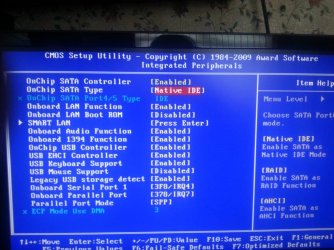
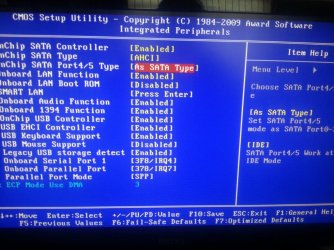
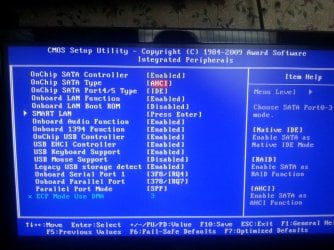
The integrated peripherals screen had the settings shown in image 1 but I remember that onchip sata type had a setting that could be changed to AHCI so I tried changing this and then found that it allowed me to cahnge onchip sata port 4/5 type to [as SATA type] see screenshot 2. However when I tried to boot I got the Disk error in screenshot 3.

After a bit of trial and error I found that each time I changed one of these two settings it altered my boot sequence to USB data bar first. Once I had sussed this I tried again.

This time it got as far as starting the windows 7 start up logo but then crashed with a blue screen (too fast to read any of the screen)

So I went back and changed just the second setting back screenshot 4 (and reset the boot drive order) but I got the same flashed blue screen each time I did this. As windows tried to start it did offer to "repair the boot up" however I am always cautious about letting windows do anything like this, and since I was fairly certain none of the boot up files were damaged I hit restart normally but got the same blue screen flash.

Changed everything back to my original settings and it booted up just fine which suggests to me I was probably right not to let windows repair itself.

I bought the motherboard new about 18months - 2years ago but that may be no indication of how old it really is, since I got it to replace to replace one which had failed and had to hunt around for one that was the right specs for my processor and memory as I couldnt afford to upgrade those at the time

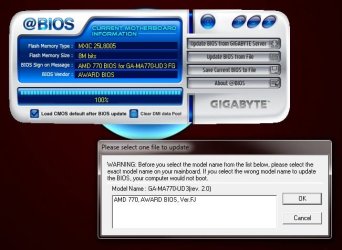
Is it likely that updating the bios using the gigabyte @Bios windows tool, would likely improve it - for me updating bios is a last resort as I always worry about being left with a dead motherboard. At least this tool connects to the their servers and only offers me one uption (screenshot 5)
 

Attachments

  • 1 original settings.jpg
    1 original settings.jpg
    110.9 KB · Views: 9
  • 2 changing both.jpg
    2 changing both.jpg
    117.4 KB · Views: 8
  • 3disc fail.jpg
    3disc fail.jpg
    89.5 KB · Views: 10
  • 4one setting change only.jpg
    4one setting change only.jpg
    124.9 KB · Views: 10
  • 5 @bios tool.jpg
    5 @bios tool.jpg
    45.5 KB · Views: 11

My Computer My Computer

At a glance

Windows 7 proAMD athlon 64 x2 4200+ 2.2GHz4gbATI Radeon HD 4600
Computer Manufacturer/Model Number
custom
OS
Windows 7 pro
CPU
AMD athlon 64 x2 4200+ 2.2GHz
Motherboard
gigabyte
Memory
4gb
Graphics Card(s)
ATI Radeon HD 4600
Sound Card
on board
Monitor(s) Displays
2 x gnr 19" widescreen
Hard Drives
Main 2x 1TB hitachi
back up 1 x seagate 1TB and 1x WD 500GB
PSU
700watt

My Computer My Computer

At a glance

Windows 10 Education 64 bitAMD Phenom II X4 980 Black Edition Deneb 3.7GHz8GB 4GBx2 Kingston PC10600 DDR3 1333 MemoryZotac NVIDIA Geforce GT640 2 Gig DDR3 PCIe
Computer type
PC/Desktop
Computer Manufacturer/Model Number
Home Built
OS
Windows 10 Education 64 bit
CPU
AMD Phenom II X4 980 Black Edition Deneb 3.7GHz
Motherboard
Asus M4N68T-M V2 µATX Motherboard
Memory
8GB 4GBx2 Kingston PC10600 DDR3 1333 Memory
Graphics Card(s)
Zotac NVIDIA Geforce GT640 2 Gig DDR3 PCIe
Sound Card
VIA VT1708s High Definition Audio 8-channel Onboard
Monitor(s) Displays
22" LG E2242 1080p and 2 19" I-INC AG191D
Screen Resolution
1280x1024 - 1920x1080 - 1280x1024
Hard Drives
Crucial M100 256 GB SSD and 500 GB WD Blue SATA
PSU
Thermaltake TR 620
Case
Power Up Black ATX Mid-Tower Case
Cooling
Stock heatsink and fan
Keyboard
Logitech Wireless K350 Wave
Mouse
Logitech Wireless M570 Trackman Wheel
Internet Speed
80 Mbps Down 30 Mbps Up
Antivirus
Windows Defender
Browser
Internet Explorer 11
Other Info
HP DVD1040e Lightscribe - External USB2
  • Like
Reactions: Arc
Back
Top