Windows Live email in windows 7 message rules do not work.

thenderson

New member
Local time
5:14 PM
Messages
4
I made about 10 rules that I have been using for years in other programs. I made them in windows live mail and they do not work. You apply them and they don't touch anything. All 10 don't do anything. I do tech support for a telecom company. I hear this from others too. Whats going on?
 

My Computer My Computer

Computer Manufacturer/Model Number
asus
OS
windows 7 ultimate
CPU
amd phenom II x4 955 processor 3.20 gh
Motherboard
asus
Memory
4gb
Graphics Card(s)
nvidia gforce 6600
Sound Card
built in
Monitor(s) Displays
dell 17"
Hard Drives
1tb internal (primary) Western digital 7200 rpm, 250gb WD, 500gb WD, all 7200 rpm
PS... big mistake killing Outlook Express . Best package for your basic customer. This new one and some of the others do not consider the Elderly people out there.
 

My Computer My Computer

Computer Manufacturer/Model Number
asus
OS
windows 7 ultimate
CPU
amd phenom II x4 955 processor 3.20 gh
Motherboard
asus
Memory
4gb
Graphics Card(s)
nvidia gforce 6600
Sound Card
built in
Monitor(s) Displays
dell 17"
Hard Drives
1tb internal (primary) Western digital 7200 rpm, 250gb WD, 500gb WD, all 7200 rpm
The message rules should work the same in WLM as in OE or WM. But there are more places to move stuff, what with the group of folders for each email account plus the storage folder. I miss OE also, but at least I used WM in Vista for a few years which made the transition a little less jarring. WLM just has a lot of new features that hide the basic functions of previous versions, but they are there.
 

My Computer My Computer

Computer type
PC/Desktop
Computer Manufacturer/Model Number
OQO 2+
OS
Windows 8 Pro w/MC 32-bit
CPU
Intel Atom 1.86 GHz
Motherboard
OQO 2+
Memory
2 GB
Graphics Card(s)
Intel GMA 500
Sound Card
IDT
Monitor(s) Displays
LCD
Screen Resolution
800 x 480 (portable) 1280 x 1024 (docked)
Hard Drives
64 GB SSD
PSU
9 Ah Battery (portable) or OQO Brick (docked)
Case
Shirt Pocket Sized
Cooling
Tiny Fan
Keyboard
Slide out (portable) DiNovo Edge (docked)
Mouse
Eraser head (portable) Logitech Bluetooth (docked)
Internet Speed
WWAN or 802.11G (portable) T1 (docked)
Browser
IE 10
Other Info
DVD-RW OQO Docking Station
BUT, they do not work.
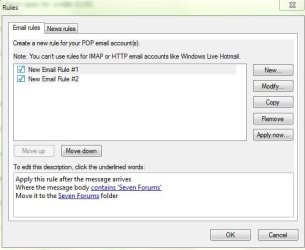
I have three rules added. They don't filter anything
 

My Computer My Computer

OS
XP Pro Dual booting with Windows 7 Pro 64 bit
CPU
2.67 gigahertz Intel Core2 Quad Q8400
Motherboard
Intel DP45SG
Memory
3324 Megabytes Usable Installed Memory
Graphics Card(s)
ATI 5850
Sound Card
X-fi
Monitor(s) Displays
22" Wide
Screen Resolution
1680x1050
Hard Drives
1250.26 Gigabytes Usable SATA Hard Drive Capacity
879.71 Gigabytes Hard Drive Free Space
Internet Speed
Extremely fast
You are one step up on me.... I can't get my rules in.. I get to the point of setting up the rule and want to use that rule and "move to specific folder" but the only folder option I am given is the OUTBOX and it won't let me add a folder. Any suggestions would be appreciated...

CM:cry:
 

My Computer My Computer

Computer Manufacturer/Model Number
Gateway
OS
Windows 7
Doesnt seem to be an issue with Microsoft...

We keep saying they do not work and they say they should work.. Where does it end? You should fix broken things or get out of the business.
 

My Computer My Computer

Computer Manufacturer/Model Number
asus
OS
windows 7 ultimate
CPU
amd phenom II x4 955 processor 3.20 gh
Motherboard
asus
Memory
4gb
Graphics Card(s)
nvidia gforce 6600
Sound Card
built in
Monitor(s) Displays
dell 17"
Hard Drives
1tb internal (primary) Western digital 7200 rpm, 250gb WD, 500gb WD, all 7200 rpm
We keep saying they do not work and they say they should work.. Where does it end? You should fix broken things or get out of the business.
Who should fix it ? This isn't Microsoft you know but a private forum for people using Windows 7.:)
 

My Computer My Computer

Computer type
PC/Desktop
Computer Manufacturer/Model Number
Acer Aspire XC-704 x64 bit/ Asus K55A Notebook PC/HP Envy x360 Convertible 15-bq0xx
OS
Windows 10 64bit/Windows 10 64bit/Windows 10 64bit
CPU
Intel Pentium J3710 @ 60GHz/Intel B820,1.7GHz/AMD A9 Radeon
Motherboard
Acer Aspire XC-704 (SOCKET 0)/Asus/HP 8312 (Socket FP4)
Memory
8.00GB DDR3 @ 1599MHz/8GB 2 x 4GB DDR3/8.00GB Dual-Channel
Graphics Card(s)
Intel HD Graphics/Intel/512MB ATI AMD Radeon R5 Graphics (HP
Sound Card
Realtek High Definition Audio/Onboard/AMD High Definition Au
Monitor(s) Displays
Acer LCD K222HQL /Asus 15.6/Generic PnP Monitor (1920x1080@6
Screen Resolution
1920x1080@59Hz/1366 x 768/1920x1080@60Hz
Hard Drives
1863GBWesternn Digital WDC/Asus/119GB SanDisk SD8SN8U-128G-1006 (SSD)
931GB Hitachi HGST HTS721010A9E630 (SATA)
Keyboard
Microsoft Natural Ergonomic Keyboard 4000 (UK)/Inbuilt/Inbui
Mouse
Microsoft Optical Wheel Mouse/Same plus Touchpad/Same + Pad
Internet Speed
Infinity 2 up to 76 Mbps
Antivirus
MSE/MSE/MSE and all 3 have MalwareBytes Premium
Browser
Edge, Firefox/Edge, Firefox/Edge, Firefox, Chrome
Other Info
Seagate Expansion 500GB External Desktop Drive
Seagate Expansion Portable Drives 500GB and 1TB
Epson XP-332 Wireless Printer
I have absolutely no problems with creating and using rules in Windows Live Mail.

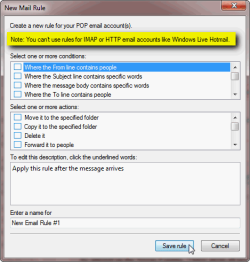
Important thing to remember is that rules work only for POP accounts. If the account is IMAP, the rules do not work as is very clearly told in for instance New Rule Wizard in WLM:

WLM_rules_1.png

If your email account is an IMAP account, you need to do the sorting using your email accounts web interface.

Kari
 

My Computer My Computer

Computer type
Laptop
Computer Manufacturer/Model Number
HP ENVY 17-1150eg
OS
Windows 10 Pro x64 EN-GB
CPU
1.6 GHz Intel Core i7-720QM Processor
Memory
6 GB
Graphics Card(s)
ATI Mobility Radeon HD 5850 Graphics
Sound Card
Beats sound system with integrated subwoofer
Monitor(s) Displays
17" laptop display, 22" LED and 32" Full HD TV through HDMI
Screen Resolution
1600*900 (1), 1920*1080 (2&3)
Hard Drives
Internal: 2 x 500 GB SATA Hard Disk Drive 7200 rpm
External: 2TB for backups, 3TB USB3 network drive for media
Cooling
As Envy runs a bit warm, I have it on a Cooler Master pad
Keyboard
Logitech diNovo Media Desktop Laser (bluetooth)
Mouse
Logitech Performance Mouse MX
Internet Speed
50/10 Mbps VDSL
Antivirus
Windows Defender 4.3.9431.0
Browser
Maxthon 3.5.2., IE11
I have created 2 rules for some random reason and they both work fine,
 

Attachments

  • Capture.JPG
    Capture.JPG
    34.1 KB · Views: 17

My Computer My Computer

Computer Manufacturer/Model Number
Home Build.
OS
Windows 7 Home Pre
CPU
Q8200 Intell 2.333
Motherboard
Asus P5Q3 Delux
Memory
DDR3 1333 4gig
Graphics Card(s)
Ati HD4870
Sound Card
Onboard Soundmax. 7.1
Monitor(s) Displays
1, 20" Samsung
Screen Resolution
1600/900
PSU
Good enough
Case
Le Shark
Cooling
FAN FAN FAN FAN, Thermaltake Minitype 90 with speed fan 4.
Keyboard
Standard, Gaming Wolfking
Mouse
Cm-storm-inferno-wired-gaming-mouse
Internet Speed
Sky Crappy upto 20meg I get a whapping 5.8mbs.
I was told that this forum was associated with Microsoft so my bad. The conversation is going on there too. Fair enough..
My congrats on making a nice forum that looks like they made it.. Good job!

I can show hundreds of forums postings talking about the Windows live issue, so its real. Its hit and miss on which ones work. I do Tech Support for a Telecom company and hear it a lot. But preaching to the choir here for some. I'll beat on Microsoft about it. I love Windows 7 but it has issues....
 

My Computer My Computer

Computer Manufacturer/Model Number
asus
OS
windows 7 ultimate
CPU
amd phenom II x4 955 processor 3.20 gh
Motherboard
asus
Memory
4gb
Graphics Card(s)
nvidia gforce 6600
Sound Card
built in
Monitor(s) Displays
dell 17"
Hard Drives
1tb internal (primary) Western digital 7200 rpm, 250gb WD, 500gb WD, all 7200 rpm
I was told that this forum was associated with Microsoft so my bad. The conversation is going on there too. Fair enough..
My congrats on making a nice forum that looks like they made it.. Good job!

I can show hundreds of forums postings talking about the Windows live issue, so its real. Its hit and miss on which ones work. I do Tech Support for a Telecom company and hear it a lot. But preaching to the choir here for some. I'll beat on Microsoft about it. I love Windows 7 but it has issues....
That's OK an easy mistake, I know that the new version of Windows Live Mail has some issues but for some they are not that bad and just like all things something that can be overcome.

With any new technology there are bound to be glitches that have to be ironed out, nothing in this world is perfect.;)

If you do come across a solution please feel free to post it here so we can all benefit. :)
 

My Computer My Computer

Computer type
PC/Desktop
Computer Manufacturer/Model Number
Acer Aspire XC-704 x64 bit/ Asus K55A Notebook PC/HP Envy x360 Convertible 15-bq0xx
OS
Windows 10 64bit/Windows 10 64bit/Windows 10 64bit
CPU
Intel Pentium J3710 @ 60GHz/Intel B820,1.7GHz/AMD A9 Radeon
Motherboard
Acer Aspire XC-704 (SOCKET 0)/Asus/HP 8312 (Socket FP4)
Memory
8.00GB DDR3 @ 1599MHz/8GB 2 x 4GB DDR3/8.00GB Dual-Channel
Graphics Card(s)
Intel HD Graphics/Intel/512MB ATI AMD Radeon R5 Graphics (HP
Sound Card
Realtek High Definition Audio/Onboard/AMD High Definition Au
Monitor(s) Displays
Acer LCD K222HQL /Asus 15.6/Generic PnP Monitor (1920x1080@6
Screen Resolution
1920x1080@59Hz/1366 x 768/1920x1080@60Hz
Hard Drives
1863GBWesternn Digital WDC/Asus/119GB SanDisk SD8SN8U-128G-1006 (SSD)
931GB Hitachi HGST HTS721010A9E630 (SATA)
Keyboard
Microsoft Natural Ergonomic Keyboard 4000 (UK)/Inbuilt/Inbui
Mouse
Microsoft Optical Wheel Mouse/Same plus Touchpad/Same + Pad
Internet Speed
Infinity 2 up to 76 Mbps
Antivirus
MSE/MSE/MSE and all 3 have MalwareBytes Premium
Browser
Edge, Firefox/Edge, Firefox/Edge, Firefox, Chrome
Other Info
Seagate Expansion 500GB External Desktop Drive
Seagate Expansion Portable Drives 500GB and 1TB
Epson XP-332 Wireless Printer
I can show hundreds of forums postings talking about the Windows live issue, so its real. Its hit and miss on which ones work.
Please give some links to these discussions. I mean to discussions where the subject is discussed and issue remains also after that OP has learned that on Windows Mail and Windows Live Mail rules do not apply on IMAP accounts.

As I mentioned earlier, you need a POP mail account to use rules. On IMAP accounts you need to use your mail services web interface to sort (create rules), Windows Live Mail or other email client then synchronizes the folder structure showing messages on the folders where you sorted them on web interface of your mail service.

If you want to use rules with IMAP account you need for instance Outlook 2010 which can handle IMAP rules.

Although old page, this still is IMO one of the best explanations on difference between IMAP and POP mail: What is the Difference between POP and IMAP Mail Server?

I'm using three computers daily, all having Windows Live Mail which I use for my Hotmail / Live / MSN addresses. These emails are set up to use POP3 instead of IMAP and leave a message to server for 30 days, so I can be sure that all three Live Mail clients stay in sync. All using the same set of rules, never had an issue.

Kari
 

My Computer My Computer

Computer type
Laptop
Computer Manufacturer/Model Number
HP ENVY 17-1150eg
OS
Windows 10 Pro x64 EN-GB
CPU
1.6 GHz Intel Core i7-720QM Processor
Memory
6 GB
Graphics Card(s)
ATI Mobility Radeon HD 5850 Graphics
Sound Card
Beats sound system with integrated subwoofer
Monitor(s) Displays
17" laptop display, 22" LED and 32" Full HD TV through HDMI
Screen Resolution
1600*900 (1), 1920*1080 (2&3)
Hard Drives
Internal: 2 x 500 GB SATA Hard Disk Drive 7200 rpm
External: 2TB for backups, 3TB USB3 network drive for media
Cooling
As Envy runs a bit warm, I have it on a Cooler Master pad
Keyboard
Logitech diNovo Media Desktop Laser (bluetooth)
Mouse
Logitech Performance Mouse MX
Internet Speed
50/10 Mbps VDSL
Antivirus
Windows Defender 4.3.9431.0
Browser
Maxthon 3.5.2., IE11
Why do the message rules stop working?

Please! Does anyone have a solution to this! it's so frustrating. this has happened over and over again on all my computers. The Message rules just stop working at random. Is there any way to fix this ? I've searched all over the internet and this is a common problem. Is it just a bug we have to live with? hmmmm another microsoft mystery!
 

My Computer My Computer

OS
Illinois
Back
Top