Windows Live Essentials Beta due for release

Status
Not open for further replies.
In the Photo Gallery, when you group pics by Face Recognition (in the batch processing part), sometimes it looses the name of the person (you come back the next day and start up the PC, resume working on this, and you see some people in the name tags are gone!).

And when you merge two people (because of mispelled names or whatnot), it sometimes works, sometimes doesn't.

Not ready for primetime yet !

Its a beta for a reason, that reason being they didn't feel it was ready to be released as a final product. You should submit feedback regarding any bugs/quirks you find with Windows Live Essentials.

I understood it was a beta. I was just making jest at it not being ready for primetime.

Where can you send back feedback to Microsoft for this release?
 

My Computer

Computer Manufacturer/Model Number
Gateway DX4720-03
OS
Windows 7 64bit
CPU
Pentium dual-core E5200(2.50GHz) 2MB L2 Cache 2MB FSB 800MHz
Memory
4 GB of DDR2 667/800 MHz SDRAM
Graphics Card(s)
NVIDIA GeForce 7100 Integrated Graphics
Sound Card
8-Channel (7.1) High Definition Audio
Monitor(s) Displays
Gateway 19'' flat-screen monitor
Screen Resolution
1024 X 768
Hard Drives
640GB SATA II, 16MB Cache 7200 RPM
500GB Parallel ATA hard disk 5400 RPM
Case
16.34" x 7.09" x 11.22" 24.25 lbs
Keyboard
Premium Multimedia Keyboard
Mouse
USB Optical 2-Button Wheel Mouse
Internet Speed
Cable Internet Road Runner
Other Info
18X DVD+/-R/RW SuperMulti Drive featuring Labelflash Technology

10/100/1000 Mbps Ethernet LAN

300W

Card Reader - 15-in-1 High Speed Digital Media Card Reader w/Smart Copy Button
Compact Flash I & II, IBM Microdrive, Secure Digital (SD & Mini SD), Multi Media Card (MMC, MMC Plus, RS-MMC, and MMC Mobile), Memory Stick (MS, MS Duo, MS Pro, and MS Pro Duo), xD-Picture Card, SmartMedia Card
In the Photo Gallery, when you group pics by Face Recognition (in the batch processing part), sometimes it looses the name of the person (you come back the next day and start up the PC, resume working on this, and you see some people in the name tags are gone!).

And when you merge two people (because of mispelled names or whatnot), it sometimes works, sometimes doesn't.

Not ready for primetime yet !

Which is why it's a public beta, NOT a general release.

Did I say it was a general release? I just pointed out that is was not ready at this point, at all.

Too many bugs.

And I was just pointing out that it's not expected to be ready at this point. I am pleased to report I have encountered no bugs at all with Photo Gallery or Mail, just a few with Messenger.
 

My Computer

Computer Manufacturer/Model Number
Alienware X51
OS
Windows 7 Home Premium x64
CPU
Intel Core i7-2600 @3.40GHz
Memory
8.00GB DDR3
Graphics Card(s)
NVIDIA GeForce GTX 555 w/1.0GB RAM
Monitor(s) Displays
BenQ XL2420TX
Screen Resolution
1920x1080@120Hz
Hard Drives
1TB
PSU
330-watt
Keyboard
Logitech Wireless Illuminated Keyboard K800
Mouse
Razer Orochi
Internet Speed
Campus Internet
it clearly says the beta is for vista/7 only, not sure if the final release will support xp anyway, not going to be supported in few years..

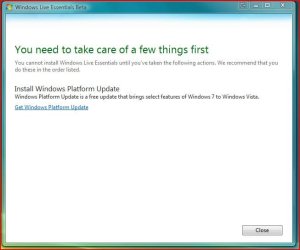
On Vista the installer froze and then come up with "Description of the Platform Update for Windows Server 2008 and the Platform Update for Windows Vista" on the MS page that opened. Description of the Platform Update for Windows Server 2008 and the Platform Update for Windows Vista

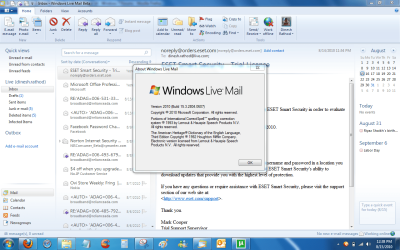
That was remedied fast and now of course on the 32bit Vista everything seems to be running normally. For reducing to the compact view the arrow in the second image here show the view button next to where it says "inbox" on Messenger.

Another thing to have displayed is the menu bar at the top for ease at getting into the options.
 

Attachments

  • Windows Platform Update.jpg
    Windows Platform Update.jpg
    34.8 KB · Views: 8
  • Beta Essentials on Vista.jpg
    Beta Essentials on Vista.jpg
    27.4 KB · Views: 2
Last edited:

My Computers

System One System Two

  • Computer type
    PC/Desktop
    Computer Manufacturer/Model Number
    Custom builds = 2
    OS
    W7 Ultimate x64/W10 Pro x64/W11 Pro Triple Boot - Main PC W7 Remote PC Micro ATX W7 Pro x64/W11 Pro
    CPU
    AMD Phenom II X4 975 Deneb 3.6ghz - 965 2nd remote pc
    Motherboard
    Gigabyte GA-790XTA-UD4-Gigabyte GA-880GM-D2H remote pc
    Memory
    Kingston Hyper X DDR3 1600 1.5v 16gb - Hyper X Fury 8gb 2nd
    Graphics Card(s)
    MSI HD Radeon 5750 1gb - MSI HD Radeon 6450 on mini tower
    Sound Card
    Creative Labs X-Fi Xtreme Audio P - Realtek onooard 2nd case
    Monitor(s) Displays
    ASUS VW199T-P 19" HP 2082a Main-HP 2082a 20" remote pc
    Screen Resolution
    Asus 1440x900 - HP 1600x900
    Hard Drives
    WD Black 1TB HD per OS W7, W10, and pending W11 presently on 500gb OS Drive - Pending Triple 1TB HDs for Spanned Storage/backup volume
    Single 2TB external USB enclosure, single 1TB System 7 Host/Boot drive, Pending 8TB external HD for system image b
    PSU
    Corsair 750TX - primary / Corsair CX600 - second
    Case
    Antec 900-2 - SSD compatible / NZXT Vulcan mini tower
    Cooling
    Zalman CNPS9900A
    Keyboard
    AZIO L70 Backlit Letters Gaming - ONN Cordless/USB
    Mouse
    MSI DS200 Programmable, Logitech Cordless
    Internet Speed
    30mbps upgrade - primary hard wired - mini tower usb WiFi
    Antivirus
    GFI VIPRE Internet Security 2014 on W7 2016 beta on W10,
    Browser
    Cyberfox, WaterFox 64bit FF variants, FireFox x64, Pale Moon
    Other Info
    Accomdata fan cooled usb 2.0 PIDE/Sata II, III external enclosure.
    Sambient usb/eSata PATA/Sata II, III external enclosure.
  • Computer type
    PC/Desktop
    System Manufacturer/Model Number
    CUSTOM ASSEMBLY
    OS
    W7 Pro x64/W11 Pro
    CPU
    AMD Deneb 3.6ghz - 965
    Motherboard
    Gigabyte GA-880GM-D2H remote pc
    Memory
    Kingston Hyper X Fury 8gb
    Graphics Card(s)
    MSI HD Radeon 6450 DVI Output
    Sound Card
    Realtek onooard Creative or Other separate PENDING
    Monitor(s) Displays
    VIZIO 32" LCD TV Separate LCD Pending
    Screen Resolution
    1600x1080
    Hard Drives
    WD 500GB OS Host/Boot WD Green 1TB Storage/Backup
    PSU
    Corsair 600W - THERMALTAKE 600W spare case
    Case
    NZXT Vulcan mini tower
    Cooling
    Twin 120mm Top Fans - 240mm Side Cover
    Keyboard
    ONN Cordless/USB Logitech Cordless
    Mouse
    ONN USB/Cordless - Logitech Cordless
    Internet Speed
    DSL 5G
    Browser
    MS Edge, FireFox, WaterFox x64, FireFox Nightly
    Other Info
    OS Testing-Remote Access to Main TeamViewer
During the brief install here it was also found a bit awkward with the inflexible window size which lists all contact catagories and any Live groups. The one thing you can do for those planning to keep this release on is keep submitting some feedback of any bugs or suggestions for improvement.

Do not have a feedback button...or is it hidding somewhere?

I'm not against telling them for those Huge buttons (even if i can reduce the ribbon), I do much respect legacy blinds, but as far as i know i'm 100% on both:sarc:

To send feedback you have to enable the menu bar in messenger ad its under the help option :)
 

My Computer

OS
Vista/Windows 7
During the brief install here it was also found a bit awkward with the inflexible window size which lists all contact catagories and any Live groups. The one thing you can do for those planning to keep this release on is keep submitting some feedback of any bugs or suggestions for improvement.

Do not have a feedback button...or is it hidding somewhere?

I'm not against telling them for those Huge buttons (even if i can reduce the ribbon), I do much respect legacy blinds, but as far as i know i'm 100% on both:sarc:

To send feedback you have to enable the menu bar in messenger ad its under the help option :)

The problem first seen on the 64bit 7 seems to have been 64bit related there for some reason since everything is acting as it should on the 32bit Vista install added on lately. The feedback page from the help secondary menu on messenger brings you to https://feedback.live.com/eform.aspx?productkey=wlmessenger&scrx=1

They just got an earful on seeing results on the previous version while problems abundant on the 7 64bit?! That one is still a puzzle however.
 

My Computers

System One System Two

  • Computer type
    PC/Desktop
    Computer Manufacturer/Model Number
    Custom builds = 2
    OS
    W7 Ultimate x64/W10 Pro x64/W11 Pro Triple Boot - Main PC W7 Remote PC Micro ATX W7 Pro x64/W11 Pro
    CPU
    AMD Phenom II X4 975 Deneb 3.6ghz - 965 2nd remote pc
    Motherboard
    Gigabyte GA-790XTA-UD4-Gigabyte GA-880GM-D2H remote pc
    Memory
    Kingston Hyper X DDR3 1600 1.5v 16gb - Hyper X Fury 8gb 2nd
    Graphics Card(s)
    MSI HD Radeon 5750 1gb - MSI HD Radeon 6450 on mini tower
    Sound Card
    Creative Labs X-Fi Xtreme Audio P - Realtek onooard 2nd case
    Monitor(s) Displays
    ASUS VW199T-P 19" HP 2082a Main-HP 2082a 20" remote pc
    Screen Resolution
    Asus 1440x900 - HP 1600x900
    Hard Drives
    WD Black 1TB HD per OS W7, W10, and pending W11 presently on 500gb OS Drive - Pending Triple 1TB HDs for Spanned Storage/backup volume
    Single 2TB external USB enclosure, single 1TB System 7 Host/Boot drive, Pending 8TB external HD for system image b
    PSU
    Corsair 750TX - primary / Corsair CX600 - second
    Case
    Antec 900-2 - SSD compatible / NZXT Vulcan mini tower
    Cooling
    Zalman CNPS9900A
    Keyboard
    AZIO L70 Backlit Letters Gaming - ONN Cordless/USB
    Mouse
    MSI DS200 Programmable, Logitech Cordless
    Internet Speed
    30mbps upgrade - primary hard wired - mini tower usb WiFi
    Antivirus
    GFI VIPRE Internet Security 2014 on W7 2016 beta on W10,
    Browser
    Cyberfox, WaterFox 64bit FF variants, FireFox x64, Pale Moon
    Other Info
    Accomdata fan cooled usb 2.0 PIDE/Sata II, III external enclosure.
    Sambient usb/eSata PATA/Sata II, III external enclosure.
  • Computer type
    PC/Desktop
    System Manufacturer/Model Number
    CUSTOM ASSEMBLY
    OS
    W7 Pro x64/W11 Pro
    CPU
    AMD Deneb 3.6ghz - 965
    Motherboard
    Gigabyte GA-880GM-D2H remote pc
    Memory
    Kingston Hyper X Fury 8gb
    Graphics Card(s)
    MSI HD Radeon 6450 DVI Output
    Sound Card
    Realtek onooard Creative or Other separate PENDING
    Monitor(s) Displays
    VIZIO 32" LCD TV Separate LCD Pending
    Screen Resolution
    1600x1080
    Hard Drives
    WD 500GB OS Host/Boot WD Green 1TB Storage/Backup
    PSU
    Corsair 600W - THERMALTAKE 600W spare case
    Case
    NZXT Vulcan mini tower
    Cooling
    Twin 120mm Top Fans - 240mm Side Cover
    Keyboard
    ONN Cordless/USB Logitech Cordless
    Mouse
    ONN USB/Cordless - Logitech Cordless
    Internet Speed
    DSL 5G
    Browser
    MS Edge, FireFox, WaterFox x64, FireFox Nightly
    Other Info
    OS Testing-Remote Access to Main TeamViewer
I like this new beta. It puts everything together and I like that.
And it also fixed a long term problem I had with the previous version. As I have Messenger starting with computer and autologging in, it didn't work with previous version, every day I got the annoying "Windows Live Messenger has stopped working" window, I got so tired of trying to solve the problem, I even re-installed Windows and still the same problem. But now it got fixed with this new version :)
 

My Computer

Computer Manufacturer/Model Number
Acer M3201
OS
Windows 7 Home Premium x64
CPU
AMD Athlon II 240
Memory
6GB
Graphics Card(s)
Ati Radeon HD 4650
Sound Card
Realtek Audio HD
Monitor(s) Displays
HP w1907v
Screen Resolution
1400x900
Hard Drives
Buffalo External USB 1000GB
Seagate SATA 1000 GB
Keyboard
Acer SK-9625
Mouse
Microsoft Habu Gaming Mouse
Internet Speed
100/5 Mbit/s
I never have WLM set to autologin or automatically connect and never run into problems with the present version. When going to install the beta on a recent Vista install that went on without a hitch but doesn't see the same options.
 

My Computers

System One System Two

  • Computer type
    PC/Desktop
    Computer Manufacturer/Model Number
    Custom builds = 2
    OS
    W7 Ultimate x64/W10 Pro x64/W11 Pro Triple Boot - Main PC W7 Remote PC Micro ATX W7 Pro x64/W11 Pro
    CPU
    AMD Phenom II X4 975 Deneb 3.6ghz - 965 2nd remote pc
    Motherboard
    Gigabyte GA-790XTA-UD4-Gigabyte GA-880GM-D2H remote pc
    Memory
    Kingston Hyper X DDR3 1600 1.5v 16gb - Hyper X Fury 8gb 2nd
    Graphics Card(s)
    MSI HD Radeon 5750 1gb - MSI HD Radeon 6450 on mini tower
    Sound Card
    Creative Labs X-Fi Xtreme Audio P - Realtek onooard 2nd case
    Monitor(s) Displays
    ASUS VW199T-P 19" HP 2082a Main-HP 2082a 20" remote pc
    Screen Resolution
    Asus 1440x900 - HP 1600x900
    Hard Drives
    WD Black 1TB HD per OS W7, W10, and pending W11 presently on 500gb OS Drive - Pending Triple 1TB HDs for Spanned Storage/backup volume
    Single 2TB external USB enclosure, single 1TB System 7 Host/Boot drive, Pending 8TB external HD for system image b
    PSU
    Corsair 750TX - primary / Corsair CX600 - second
    Case
    Antec 900-2 - SSD compatible / NZXT Vulcan mini tower
    Cooling
    Zalman CNPS9900A
    Keyboard
    AZIO L70 Backlit Letters Gaming - ONN Cordless/USB
    Mouse
    MSI DS200 Programmable, Logitech Cordless
    Internet Speed
    30mbps upgrade - primary hard wired - mini tower usb WiFi
    Antivirus
    GFI VIPRE Internet Security 2014 on W7 2016 beta on W10,
    Browser
    Cyberfox, WaterFox 64bit FF variants, FireFox x64, Pale Moon
    Other Info
    Accomdata fan cooled usb 2.0 PIDE/Sata II, III external enclosure.
    Sambient usb/eSata PATA/Sata II, III external enclosure.
  • Computer type
    PC/Desktop
    System Manufacturer/Model Number
    CUSTOM ASSEMBLY
    OS
    W7 Pro x64/W11 Pro
    CPU
    AMD Deneb 3.6ghz - 965
    Motherboard
    Gigabyte GA-880GM-D2H remote pc
    Memory
    Kingston Hyper X Fury 8gb
    Graphics Card(s)
    MSI HD Radeon 6450 DVI Output
    Sound Card
    Realtek onooard Creative or Other separate PENDING
    Monitor(s) Displays
    VIZIO 32" LCD TV Separate LCD Pending
    Screen Resolution
    1600x1080
    Hard Drives
    WD 500GB OS Host/Boot WD Green 1TB Storage/Backup
    PSU
    Corsair 600W - THERMALTAKE 600W spare case
    Case
    NZXT Vulcan mini tower
    Cooling
    Twin 120mm Top Fans - 240mm Side Cover
    Keyboard
    ONN Cordless/USB Logitech Cordless
    Mouse
    ONN USB/Cordless - Logitech Cordless
    Internet Speed
    DSL 5G
    Browser
    MS Edge, FireFox, WaterFox x64, FireFox Nightly
    Other Info
    OS Testing-Remote Access to Main TeamViewer
I'm thinking of trying the the live mail beta. Does it install over my current live mail or do I need to uninstall windows live mail first?
 

My Computer

Computer Manufacturer/Model Number
Sony Vaio VPCF11LFX
OS
Windows 7 Ultimate 64 bit
CPU
Intel I7 Q720
Memory
4 Gig
Graphics Card(s)
Nvidia GeForce 310M
Sound Card
Realtec
Hard Drives
Intel SSD G2 160 gig
Internet Speed
12 Mb
I'm thinking of trying the the live mail beta. Does it install over my current live mail or do I need to uninstall windows live mail first?
Its good if you remove the current build before installing the new beta version.
 

My Computer

Computer Manufacturer/Model Number
Samsung NP530U4B-S02IN
OS
Windows® 8 Pro (64-bit)
CPU
Intel® Core™ i5 Processor 2467M (1.60GHz, 3MB L3 Cache)
Motherboard
Samsung Electronics
Memory
6GB DDR3 System Memory at 1,333MHz (on BD 4GB + 2GB x 1)
Graphics Card(s)
AMD Radeon™ HD7550M 1GB DDR3 (Ext. Graphic)
Sound Card
Realtek High Definition Audio
Monitor(s) Displays
35.56cm (14.0) SuperBright 300nit HD LED Display
Screen Resolution
1366x768
Hard Drives
1TB S-ATA II Hard Drive (5400RPM) with ExpressCache 16GB SSD
Internet Speed
sucks
Antivirus
Microsoft Security Essentials
Browser
Google Chrome (Sync enabled)
Once that was installed on Vista here being a second OS presently on I simply logged in as usual. Here it went right on like an update where later I simply reverted back to the present version which retained some extras added on recently.

On the 64bit 7 however that's where it somehow clashed with something to see two other working softwares trashed still without any explaination for it. :(

Fortunately I had already made an image to bring everything back when that install went bad. I recommend a clean install of any beta however to prevent any possible mishaps like the first saw here! :eek:
 

My Computers

System One System Two

  • Computer type
    PC/Desktop
    Computer Manufacturer/Model Number
    Custom builds = 2
    OS
    W7 Ultimate x64/W10 Pro x64/W11 Pro Triple Boot - Main PC W7 Remote PC Micro ATX W7 Pro x64/W11 Pro
    CPU
    AMD Phenom II X4 975 Deneb 3.6ghz - 965 2nd remote pc
    Motherboard
    Gigabyte GA-790XTA-UD4-Gigabyte GA-880GM-D2H remote pc
    Memory
    Kingston Hyper X DDR3 1600 1.5v 16gb - Hyper X Fury 8gb 2nd
    Graphics Card(s)
    MSI HD Radeon 5750 1gb - MSI HD Radeon 6450 on mini tower
    Sound Card
    Creative Labs X-Fi Xtreme Audio P - Realtek onooard 2nd case
    Monitor(s) Displays
    ASUS VW199T-P 19" HP 2082a Main-HP 2082a 20" remote pc
    Screen Resolution
    Asus 1440x900 - HP 1600x900
    Hard Drives
    WD Black 1TB HD per OS W7, W10, and pending W11 presently on 500gb OS Drive - Pending Triple 1TB HDs for Spanned Storage/backup volume
    Single 2TB external USB enclosure, single 1TB System 7 Host/Boot drive, Pending 8TB external HD for system image b
    PSU
    Corsair 750TX - primary / Corsair CX600 - second
    Case
    Antec 900-2 - SSD compatible / NZXT Vulcan mini tower
    Cooling
    Zalman CNPS9900A
    Keyboard
    AZIO L70 Backlit Letters Gaming - ONN Cordless/USB
    Mouse
    MSI DS200 Programmable, Logitech Cordless
    Internet Speed
    30mbps upgrade - primary hard wired - mini tower usb WiFi
    Antivirus
    GFI VIPRE Internet Security 2014 on W7 2016 beta on W10,
    Browser
    Cyberfox, WaterFox 64bit FF variants, FireFox x64, Pale Moon
    Other Info
    Accomdata fan cooled usb 2.0 PIDE/Sata II, III external enclosure.
    Sambient usb/eSata PATA/Sata II, III external enclosure.
  • Computer type
    PC/Desktop
    System Manufacturer/Model Number
    CUSTOM ASSEMBLY
    OS
    W7 Pro x64/W11 Pro
    CPU
    AMD Deneb 3.6ghz - 965
    Motherboard
    Gigabyte GA-880GM-D2H remote pc
    Memory
    Kingston Hyper X Fury 8gb
    Graphics Card(s)
    MSI HD Radeon 6450 DVI Output
    Sound Card
    Realtek onooard Creative or Other separate PENDING
    Monitor(s) Displays
    VIZIO 32" LCD TV Separate LCD Pending
    Screen Resolution
    1600x1080
    Hard Drives
    WD 500GB OS Host/Boot WD Green 1TB Storage/Backup
    PSU
    Corsair 600W - THERMALTAKE 600W spare case
    Case
    NZXT Vulcan mini tower
    Cooling
    Twin 120mm Top Fans - 240mm Side Cover
    Keyboard
    ONN Cordless/USB Logitech Cordless
    Mouse
    ONN USB/Cordless - Logitech Cordless
    Internet Speed
    DSL 5G
    Browser
    MS Edge, FireFox, WaterFox x64, FireFox Nightly
    Other Info
    OS Testing-Remote Access to Main TeamViewer
I'm thinking of trying the the live mail beta. Does it install over my current live mail or do I need to uninstall windows live mail first?

When you install the Beta it will update any existing programs. I had Live Mail, Photo Gallery and Movie Maker installed and the Beta updated all of them and they work great. That way you won't have to set up your mail again and all you mail is still there. Its best to backup (export) your mail and contacts before just in case.

Jim :geek:
 

My Computer

Computer type
PC/Desktop
Computer Manufacturer/Model Number
Home Built
OS
Windows 8.1 Pro w/Media Center 64bit, Windows 7 HP 64bit
CPU
Phenom II X6 1100T
Motherboard
ASUS M5A99X EVO
Memory
Crucial Balistic 8gb DDR3-1866 CL9
Graphics Card(s)
MSI R6850 Cyclone IGD5 PE
Sound Card
On Board
Monitor(s) Displays
ASUS VE258Q 25" LED with DVI-HDMI-DisplayPort
Screen Resolution
1920 x 1080
Hard Drives
Two WD Cavier Black 2TB Sata III, WD My Book Essential 2TB USB 3.0
PSU
Seasonic X650 80 Plus GOLD Modular
Case
Corsair 400R
Cooling
Antec Kuhler H2O 620, Two 120mm and four 140mm
Keyboard
Logitech K120
Mouse
Logitech Marble Mouse USB, Logitech Precision Game Pad
Internet Speed
15MB
Antivirus
Norton IS 2013, Malwarebytes Pro Beta 2
Browser
IE-11, FF-27
Other Info
APC UPS ES 750, Netgear WNR3500L Gigabit & Wireless N Router with SamKnows Test Program, Motorola SB6120 Gigabit Cable Modem. Brother HL-2170W Laser Printer, Epson V300 Scanner
I just installed Windows Live Essentials beta last night and I seriously love it :) Windows Live Mail and Messenger as well as Writer (which I use quite a lot) look so much better and they are much easier to use, I was never bothered with the whole ribbon thing of Office 2007 but, its growing on me now and with the Windows Live Essentials looking fluid with one another now, Windows 7's Wordpad doesn't look out of place :)

I really don't think many people can complain about Microsoft or their free products considering they have revamped their free programs for us to make it easier for us to use. Hopefully the next Windows OS comes with the final version of Windows Live Essentials beta and Microsoft Security Essentials as standard and preferably with the option to install/uninstall individual unwanted elements :)
 

My Computer

Computer Manufacturer/Model Number
Hp Compaq CQ56 156SA
OS
windows 7 Home Premium 64 Bit
CPU
AMD V140
Memory
2GB
Graphics Card(s)
ATI Mobility Radeon HD 4250
Sound Card
Realtek
Monitor(s) Displays
Generic
Screen Resolution
1366 x 768
Hard Drives
Hitachi
Mouse
Wireless LG
Internet Speed
Finger-licking good
Other Info
Windows 7 Home Premium Pre-Installed.
Old Machine: HP Pavilion DV6 1120sa (R.I.P)
Having installed and used for a few days i must say i think its annoying!!. In the end i have gone back to MS Outlook which i find far far easier to use and tolerate.:mad:
 

My Computer

Computer Manufacturer/Model Number
Acer Aspire 5738z
OS
Windows 7 Home Premium x64
CPU
Pentium Dual-Core T4400 2.2GHz
Memory
4GB
Monitor(s) Displays
15.6"
Hard Drives
320G Internal
1TB External
Internet Speed
21MB = 2.2MB per Second
I'm liking it so far. Like all new things it may take some getting used to although it is not that much different from the previous iteration. I'm looking forward to seeing the final product. Has anyone heard anything on a date? I saw a time line somewhere once but I can't find it and I was wondering if maybe that had been updated since.

I love the ribbon UI in WLMail!
 

My Computer

OS
Windows 7
CPU
AMD Phenom II X4 925 @ 2.8GHz
Motherboard
Gigabyte M68M-S2
Memory
4 GB Kingston DDR2
Graphics Card(s)
ZOTAC GeForce GTX 260 Core 216
Sound Card
Realtek OnBoard
Monitor(s) Displays
20" HP S2031a & Acer 19" AL1916W
Screen Resolution
1600x900 & 1440x900
Hard Drives
160 GB Hitachi Deskstar
250 GB Seagate Barracuda
PSU
Corsair TX 650
Case
Xclio
Cooling
Air
Keyboard
Logitech Wireless K250 Dark Fleur
Mouse
Logitech MX Revolution
Internet Speed
30 Mbps Cable
Just to be clear, I can install the Beta Live Mail over my existing Live Mail?
 

My Computer

Computer Manufacturer/Model Number
Sony Vaio VPCF11LFX
OS
Windows 7 Ultimate 64 bit
CPU
Intel I7 Q720
Memory
4 Gig
Graphics Card(s)
Nvidia GeForce 310M
Sound Card
Realtec
Hard Drives
Intel SSD G2 160 gig
Internet Speed
12 Mb
Just to be clear, I can install the Beta Live Mail over my existing Live Mail?

Yes you can. I did it and worked great. The installation will show you all the programs in the package and let you choose. If a program is already installed it will let you update.

Jim :geek:
 

My Computer

Computer type
PC/Desktop
Computer Manufacturer/Model Number
Home Built
OS
Windows 8.1 Pro w/Media Center 64bit, Windows 7 HP 64bit
CPU
Phenom II X6 1100T
Motherboard
ASUS M5A99X EVO
Memory
Crucial Balistic 8gb DDR3-1866 CL9
Graphics Card(s)
MSI R6850 Cyclone IGD5 PE
Sound Card
On Board
Monitor(s) Displays
ASUS VE258Q 25" LED with DVI-HDMI-DisplayPort
Screen Resolution
1920 x 1080
Hard Drives
Two WD Cavier Black 2TB Sata III, WD My Book Essential 2TB USB 3.0
PSU
Seasonic X650 80 Plus GOLD Modular
Case
Corsair 400R
Cooling
Antec Kuhler H2O 620, Two 120mm and four 140mm
Keyboard
Logitech K120
Mouse
Logitech Marble Mouse USB, Logitech Precision Game Pad
Internet Speed
15MB
Antivirus
Norton IS 2013, Malwarebytes Pro Beta 2
Browser
IE-11, FF-27
Other Info
APC UPS ES 750, Netgear WNR3500L Gigabit & Wireless N Router with SamKnows Test Program, Motorola SB6120 Gigabit Cable Modem. Brother HL-2170W Laser Printer, Epson V300 Scanner
Just to be clear, I can install the Beta Live Mail over my existing Live Mail?

Yes you can. I did it and worked great. The installation will show you all the programs in the package and let you choose. If a program is already installed it will let you update.

Jim :geek:
Thanks. Your're right. I downloaded it with no problems. So far, so good. I like what I see in the new Live Mail.
 

My Computer

Computer Manufacturer/Model Number
Sony Vaio VPCF11LFX
OS
Windows 7 Ultimate 64 bit
CPU
Intel I7 Q720
Memory
4 Gig
Graphics Card(s)
Nvidia GeForce 310M
Sound Card
Realtec
Hard Drives
Intel SSD G2 160 gig
Internet Speed
12 Mb
is there any problems with the messenger as thats all i use or should i wait until the final release
 

My Computer

Computer Manufacturer/Model Number
acer aspire x3950
OS
windows 7 home prem 64 bit
CPU
i3 530
Memory
4 gig ddr 3
Graphics Card(s)
onboard i only play game using onlive cloud gaming
Sound Card
onboard
Monitor(s) Displays
i-inc 19 wide screen
Hard Drives
640 gig
PSU
250
Case
small form
Cooling
fan
Keyboard
logitech
Mouse
motor mouse
Internet Speed
50 meg
Other Info
Firefox nightly 64bit
Does Junk filter work with live mail

I've installed Live Mail and the Junk Filter is not working. Anyone having trouble with this? It worked fine Live Mail 1.0 (stable ver).
 

My Computer

Computer Manufacturer/Model Number
Sony Vaio VPCF11LFX
OS
Windows 7 Ultimate 64 bit
CPU
Intel I7 Q720
Memory
4 Gig
Graphics Card(s)
Nvidia GeForce 310M
Sound Card
Realtec
Hard Drives
Intel SSD G2 160 gig
Internet Speed
12 Mb
Working fine here..

Capture.PNG
 

My Computer

Computer Manufacturer/Model Number
Samsung NP530U4B-S02IN
OS
Windows® 8 Pro (64-bit)
CPU
Intel® Core™ i5 Processor 2467M (1.60GHz, 3MB L3 Cache)
Motherboard
Samsung Electronics
Memory
6GB DDR3 System Memory at 1,333MHz (on BD 4GB + 2GB x 1)
Graphics Card(s)
AMD Radeon™ HD7550M 1GB DDR3 (Ext. Graphic)
Sound Card
Realtek High Definition Audio
Monitor(s) Displays
35.56cm (14.0) SuperBright 300nit HD LED Display
Screen Resolution
1366x768
Hard Drives
1TB S-ATA II Hard Drive (5400RPM) with ExpressCache 16GB SSD
Internet Speed
sucks
Antivirus
Microsoft Security Essentials
Browser
Google Chrome (Sync enabled)
Status
Not open for further replies.
Back
Top