
cfguy100
New member
Windows Live is Hijacking Outlook (Program) for "Send Mail" Links ...
Hi Everyone,
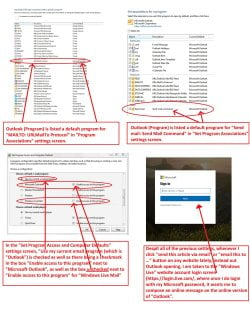
I use Microsoft Outlook (offline program version installed on my computer) as my default mail client, and is even listed as the default program for "Send mail: Send Mail Command" in "Set Program Associations"; "MAILTO: URLMailTo Protocol" in "Program Associations", and in "Set Program Access and Computer Defaults", "Use my current email program (which is "Outlook") is checked as well as there being a checkmark in the box "Enable access to this program" next to "Microsoft Outlook", as well as the box unchecked next to "Enable access to this program" for "Windows Live Mail" (please see annotated attached screenshot showing these settings. Thanks.)
However, whenever I click "send email to …" or "email this" button on any website lately, instead out Outlook opening, I am taken to the "Windows Live" website account login screen (Sign in to your Microsoft account - screenshot also attached), where once I do login with my Microsoft password, it wants me to compose an online message on the online version of "Outlook".
Does anyone know anything that I might be doing wrong, or perhaps a setting that I might have overlooked somewhere that is forcing my "send an email" command to "Window Live" online version of Outlook instead of my offline Outlook program?
Thanks so much for your help and advice with this issue.
-CFguy
Hi Everyone,
I use Microsoft Outlook (offline program version installed on my computer) as my default mail client, and is even listed as the default program for "Send mail: Send Mail Command" in "Set Program Associations"; "MAILTO: URLMailTo Protocol" in "Program Associations", and in "Set Program Access and Computer Defaults", "Use my current email program (which is "Outlook") is checked as well as there being a checkmark in the box "Enable access to this program" next to "Microsoft Outlook", as well as the box unchecked next to "Enable access to this program" for "Windows Live Mail" (please see annotated attached screenshot showing these settings. Thanks.)
However, whenever I click "send email to …" or "email this" button on any website lately, instead out Outlook opening, I am taken to the "Windows Live" website account login screen (Sign in to your Microsoft account - screenshot also attached), where once I do login with my Microsoft password, it wants me to compose an online message on the online version of "Outlook".
Does anyone know anything that I might be doing wrong, or perhaps a setting that I might have overlooked somewhere that is forcing my "send an email" command to "Window Live" online version of Outlook instead of my offline Outlook program?
Thanks so much for your help and advice with this issue.
-CFguy
Attachments
My Computer
- Computer type
- PC/Desktop
- Computer Manufacturer/Model Number
- HP® (H6U144AA#ABA) Pavilion 500-164 Desktop PC
- OS
- Windows 7 Professional 64 bit
- CPU
- AMD® A8-6500, Richland® 32nm Technology
- Motherboard
- MSI® 2AE0 (P0)
- Memory
- 8.00GB Single-Channel DDR3 @ 798MHz
- Graphics Card(s)
- ATI® AMD® Radeon® HD 8570D (HP®) 768MB
- Sound Card
- IDT® High Definition Audio CODEC
- Monitor(s) Displays
- ASUS® PB278 (1920x1080@60Hz)
- Hard Drives
- Inetneral: TOSHIBA® DT01ACA200 ATA Device (SATA) 1863GB
External: Western Digital® WD My Book® 1230 USB Device (USB (SATA)) 2794GB
- Case
- Tower - 14.48 inches (H) x 6.91 inches (W) x 15.35 inchs (L)
- Cooling
- Fan - Speed 1006 RPM
- Keyboard
- Dell® Desktop Keyboard Model: SK-8185
- Mouse
- Logitech® Anywhere™ Mouse Model: 810-000858
- Internet Speed
- Ping: 26 Ms; Download: 5.71 Mbps; Upload: 0.461 Mbps
- Antivirus
- Norton Internet Security® Version 22.10.1.10
- Browser
- Google® Chrome® Version 60.0.3112.113 (x64)


