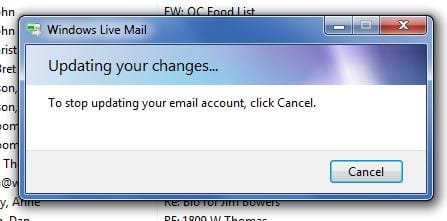
Windows live mail 2011 "updating your changes" constantly... grrr

alexgirth

New member
Local time
10:04 AM
Messages
12
Windows live mail 2011 "updating your changes" constantly... grrr

Not loving the new situation here.
WLM 2011 is dragging its feet like a reluctant child! I have one hotmail account and one gmail account set up. When I click on a different folder to 'see' what's inside that mailbox, a little window pops up in centre screen saying ' Updating your changes' and 'to stop updating your email account, click cancel'.

My laptop is a pretty spec'd out gaming notebook from ASUS (G50V) so no RAM issues or general slowness ever normally occurs. It is definitely WLM. I have even disabled the extra level of virus scanning by AVG free edition to see if it was a conflict there. Nope.

2 Questions - 1> How do I troubleshoot this? 2> Is this worth troubleshooting or should I just move to thunderbird or another simple email client. I have Office 2007 (which comes with the full Outlook) but I disliked this even more than the current version (at the time) of WLM, so have uninstalled it. Too much stuff on the screen - I want it simple and clean. Lookswise, WLM is just fine! But damn.... SOOOOO slow.

Help and any clever sarcasm welcome :D
 

My Computer My Computer

Computer Manufacturer/Model Number
asus g50v
OS
windows 7 home premium x64
I have read many similar comments, and have had the same thoughts in my mind. Not happy with the new Live Mail
Here is a list of some of the good ones. I like Thunderbird.
I do not think its worth the trouble to fix what you have
Top 12 Free Email Programs for Windows - About Email
 

My Computer My Computer

Computer type
PC/Desktop
Computer Manufacturer/Model Number
Dell XPS 420
OS
Windows 10, Home Clean Install
CPU
Intel Core2 processsor Q8200(2.33Ghz 1333FSB) Quad Core Tech
Motherboard
Dell
Memory
6 gb
Graphics Card(s)
ATI Radeon 256MB HD3650
Sound Card
Intergrated 7.1 Channel Audio
Monitor(s) Displays
Dell SP2009W 20"
Hard Drives
640 GB Serial ATA Hard drive
Cooling
Fan
Keyboard
Dell USB Keyboard
Mouse
Dell Premium Optical USB
Internet Speed
DSL 2.85
cool. Ok then, thunderbird it is. Ta
 

My Computer My Computer

Computer Manufacturer/Model Number
asus g50v
OS
windows 7 home premium x64
I think it is a good choice. I may be there, soon, too. I had Outlook Express, Windows Mail, Live Mail and like it. I do not like 2011
 

My Computer My Computer

Computer type
PC/Desktop
Computer Manufacturer/Model Number
Dell XPS 420
OS
Windows 10, Home Clean Install
CPU
Intel Core2 processsor Q8200(2.33Ghz 1333FSB) Quad Core Tech
Motherboard
Dell
Memory
6 gb
Graphics Card(s)
ATI Radeon 256MB HD3650
Sound Card
Intergrated 7.1 Channel Audio
Monitor(s) Displays
Dell SP2009W 20"
Hard Drives
640 GB Serial ATA Hard drive
Cooling
Fan
Keyboard
Dell USB Keyboard
Mouse
Dell Premium Optical USB
Internet Speed
DSL 2.85
I can say that Thunderbird is great so far. I didn't like the look of the program so much but there are various themes you can download, like with firefox. I now have the 'leopard' theme (based on mac OS leopard) and it looks great.

So.. recommended.
 

My Computer My Computer

Computer Manufacturer/Model Number
asus g50v
OS
windows 7 home premium x64
Glad that you like it. I, dont really care about looks with any software. I like easy and dependable. Use it for a while then get back to us. If you give us a thumbs up, I will suggest it in lieu of giving the list. I know I like it.
 

My Computer My Computer

Computer type
PC/Desktop
Computer Manufacturer/Model Number
Dell XPS 420
OS
Windows 10, Home Clean Install
CPU
Intel Core2 processsor Q8200(2.33Ghz 1333FSB) Quad Core Tech
Motherboard
Dell
Memory
6 gb
Graphics Card(s)
ATI Radeon 256MB HD3650
Sound Card
Intergrated 7.1 Channel Audio
Monitor(s) Displays
Dell SP2009W 20"
Hard Drives
640 GB Serial ATA Hard drive
Cooling
Fan
Keyboard
Dell USB Keyboard
Mouse
Dell Premium Optical USB
Internet Speed
DSL 2.85

My Computer My Computer

Computer Manufacturer/Model Number
My own Custom Build: Asus, Corsair, Transcend, AMD, PNY, Ultra
OS
W7 64 Bit
CPU
AMD Phenom x4 4000Mhz
Memory
8 GB DDR-2
Graphics Card(s)
PNY-NVIDIA GeForce GTX 460 1GB GDDR5 PCI-e
Monitor(s) Displays
Dual: Flatron L1942T
Hard Drives
C: Drive (Agility 2 Solid State Drive 60 GB)
D: Drive (HDD Internal Western Digital 640 GB)
PSU
650 Watt
Cooling
Corsair Hydro H6 Liquid Cooler
Internet Speed
25 mbps down - 3 mbps up

My Computer My Computer

Computer type
PC/Desktop
Computer Manufacturer/Model Number
OQO 2+
OS
Windows 8 Pro w/MC 32-bit
CPU
Intel Atom 1.86 GHz
Motherboard
OQO 2+
Memory
2 GB
Graphics Card(s)
Intel GMA 500
Sound Card
IDT
Monitor(s) Displays
LCD
Screen Resolution
800 x 480 (portable) 1280 x 1024 (docked)
Hard Drives
64 GB SSD
PSU
9 Ah Battery (portable) or OQO Brick (docked)
Case
Shirt Pocket Sized
Cooling
Tiny Fan
Keyboard
Slide out (portable) DiNovo Edge (docked)
Mouse
Eraser head (portable) Logitech Bluetooth (docked)
Internet Speed
WWAN or 802.11G (portable) T1 (docked)
Browser
IE 10
Other Info
DVD-RW OQO Docking Station
Did anyone figure out a fix for the "updating your changes" in WLM? The solutions in this thread are to get a completely different program or revert back to the old version. Is there no setting or config option to stop this updating?
 

My Computer My Computer

OS
Windows 7 Ultimate x64
...Is there no setting or config option to stop this updating?
Have you tried a repair of Windows Live Essentials via Programs and Features? It should repair all installed components of Live Essentials, including Mail.
 

My Computer My Computer

Computer type
PC/Desktop
Computer Manufacturer/Model Number
OQO 2+
OS
Windows 8 Pro w/MC 32-bit
CPU
Intel Atom 1.86 GHz
Motherboard
OQO 2+
Memory
2 GB
Graphics Card(s)
Intel GMA 500
Sound Card
IDT
Monitor(s) Displays
LCD
Screen Resolution
800 x 480 (portable) 1280 x 1024 (docked)
Hard Drives
64 GB SSD
PSU
9 Ah Battery (portable) or OQO Brick (docked)
Case
Shirt Pocket Sized
Cooling
Tiny Fan
Keyboard
Slide out (portable) DiNovo Edge (docked)
Mouse
Eraser head (portable) Logitech Bluetooth (docked)
Internet Speed
WWAN or 802.11G (portable) T1 (docked)
Browser
IE 10
Other Info
DVD-RW OQO Docking Station
Same problem

I have bought a new laptop last month, it is Sony vaio E series with Windows 7 Home basic/ intel i5 processor/ 4GB ram etc..) , and having the same problem in windows mail as said above, its always shows updating changes please wait or cancel.. While on clicking folders like sent items or any other folder in widows mail. I am searching for the solution and have updated windows live essentials several times, but till the problem not cured. If anyone has the solution please reply to this forum.

Thanks in advance...:cool:
 

My Computer My Computer

Computer Manufacturer/Model Number
SONY VAIO VPCEG2AEN/B
OS
windows 7 home basic
CPU
Intel® Core™ i5-2430M Processor 2.40 GHz with Turbo Bo
Memory
4 GB (4 GB (SO-DIMM) x 1) DDR3 SDRAM*2 (upgradeable up to 8
Graphics Card(s)
Intel® HD Graphics 3000
Sound Card
Internal, Stereo speakers
Screen Resolution
14 (35.6 cms) wide (WXGA: 1366x768) TFT colour display (VAIO
Hard Drives
320 GB*4 (Serial ATA, 5400 rpm)
Keyboard
19.05 mm key pitch/2.0 mm keystroke, 86 keys
Mouse
Touchpad (Gesture supported)
Internet Speed
Maximum transmission speed: 150 Mbps*7, Maximum receipt spee
...having the same problem in windows mail as said above...:cool:
Have you tried a repair via programs and features as suggested in previous post.
 

My Computer My Computer

Computer type
PC/Desktop
Computer Manufacturer/Model Number
OQO 2+
OS
Windows 8 Pro w/MC 32-bit
CPU
Intel Atom 1.86 GHz
Motherboard
OQO 2+
Memory
2 GB
Graphics Card(s)
Intel GMA 500
Sound Card
IDT
Monitor(s) Displays
LCD
Screen Resolution
800 x 480 (portable) 1280 x 1024 (docked)
Hard Drives
64 GB SSD
PSU
9 Ah Battery (portable) or OQO Brick (docked)
Case
Shirt Pocket Sized
Cooling
Tiny Fan
Keyboard
Slide out (portable) DiNovo Edge (docked)
Mouse
Eraser head (portable) Logitech Bluetooth (docked)
Internet Speed
WWAN or 802.11G (portable) T1 (docked)
Browser
IE 10
Other Info
DVD-RW OQO Docking Station
I have one hotmail account and one gmail account set up

You may consider setting gmail account to POP and I dont think you will experience this '' issue ''anymore.
Hope this helps
 

My Computer My Computer

OS
Windows 7 Home Premium 64
Matter Solved?

I too was experiencing the dreaded "Updating your changes..." message on a rather frequent basis and didn't know why. It's been driving me nuts. I think I finally figured it out. The solution is simple, but may not be pleasing to some. Read on...

At first, I thought it had something to do with being signed into Windows Live, so I logged out and never logged back in again (as I have no use for Windows Live's web based services). The problem persisted.

After reading the preceding post, it dawned on me that it might have everything to do with the fact that I was accessing my email via IMAP servers. I switched over to POP3 and the problem disappeared. Poof, gone. No mas.

It's that simple folks. My email experience using WLM 2011 since making that change is markedly different.

PS I use Yahoo! Mail, but assume this solution would also work for Gmail, etc.
 

Attachments

  • Windows Live Mail.jpg
    Windows Live Mail.jpg
    14.7 KB · Views: 26

My Computer My Computer

OS
Win7 64
WLM misfiiring... is Thunderbird that much more reliable?

I've switched back and forth between Thunderbird and WLM. Neither is perfect. Right now when I compose email in Thunderbird the font changes sizes by itself while I'm typing and I have to constantly resize the type to make it look professional.

My wife uses WLM 2011 on her Win7 laptop. Right now it keeps giving her the 0x800CCC0f error message and at other times it keeps trying to "upate" the account needlessly. I've tried "repairing" and uninstalling/reinstalling through the control panel and each time it has the same problems. Next I will try to find an older version of WLM to download.

Since email is one function that everyone who owns a computer uses, why doesn't someone make a simple, fool-proof, reliable program? I'd pay money for it!

Best wishes to all Seven users.
 

My Computer My Computer

Computer Manufacturer/Model Number
Dell 2330
OS
Win7 64 bit
Memory
8 gigs
Hard Drives
2 TB
I've switched back and forth between Thunderbird and WLM. Neither is perfect. Right now when I compose email in Thunderbird the font changes sizes by itself while I'm typing and I have to constantly resize the type to make it look professional.

My wife uses WLM 2011 on her Win7 laptop. Right now it keeps giving her the 0x800CCC0f error message and at other times it keeps trying to "upate" the account needlessly. I've tried "repairing" and uninstalling/reinstalling through the control panel and each time it has the same problems. Next I will try to find an older version of WLM to download.

Since email is one function that everyone who owns a computer uses, why doesn't someone make a simple, fool-proof, reliable program?
I have no experience with Thunderbird but in Windows email programs, using html formatting, the font sometimes changes to a font used nearby. When it bothers me, I copy the text of the email into Notepad, then copy from Notepad to the email body after deleting everything.

You could try Googling the error number to get some ideas of what to do. I've used Outlook Express, Windows Mail, and now WLM 2009 and rarely see any error messages unless it has to do with a server problem. When first setting up an account it's easy to not get all the details right and all you can do is carefully copy the settings from another PC that is working right or maybe get some guidance from your email service provider's website.

I think the problem with email programs is that there are too many and coming out with a new one usually means more undiscovered bugs. Microsoft perfected the email client with Outlook Express and Windows Mail but it was still complicated to setup and backup contacts, messages, settings, and rules. So they tried to simplify things by making them even more complicated to set up, but at least you had the option of putting contacts and large photos or photo collections on their servers with WLM. Lots of people simplified things by using Gmail or Hotmail instead, which aren't clients at all but websites (webmail) that hold all your stuff that you can see from any computer.
 

My Computer My Computer

Computer type
PC/Desktop
Computer Manufacturer/Model Number
OQO 2+
OS
Windows 8 Pro w/MC 32-bit
CPU
Intel Atom 1.86 GHz
Motherboard
OQO 2+
Memory
2 GB
Graphics Card(s)
Intel GMA 500
Sound Card
IDT
Monitor(s) Displays
LCD
Screen Resolution
800 x 480 (portable) 1280 x 1024 (docked)
Hard Drives
64 GB SSD
PSU
9 Ah Battery (portable) or OQO Brick (docked)
Case
Shirt Pocket Sized
Cooling
Tiny Fan
Keyboard
Slide out (portable) DiNovo Edge (docked)
Mouse
Eraser head (portable) Logitech Bluetooth (docked)
Internet Speed
WWAN or 802.11G (portable) T1 (docked)
Browser
IE 10
Other Info
DVD-RW OQO Docking Station
As I've had this problem a few times and searched on it only to always find this thread, I thought I'd post what has worked a few times for me. This will help me, and hopefully some others navigating here too.

> First remove IMAP account creating issue. For me, I could tell which one it was because WLM was struggling to download from it.

> Then restart machine (not log off but restart)

> Add IMAP account back. Make sure all settings are correct as provided by ISP. If you get any wrong, you may have to remove account and restart your machine again.

This has worked for me more than once. Hope it does for you.
 

My Computer My Computer

Computer type
PC/Desktop
OS
Windows 7 Home Premium x64
Man, this problem happens all the time and this is 2015 already. So I use Gmail, IMAP. That has to be it. I kind of like the IMAP but to know you can remove it, restart PC, then reinstall the IMAP server correctly will solve it is a new and very interesting twist. I shall try it and if it works, I will report back here for others. If I switch to POP3, then not worth commenting on anymore. Thanks for working this out guys. :geek:
 

My Computer My Computer

Computer type
PC/Desktop
Computer Manufacturer/Model Number
Built from Maximum PC magazine article
OS
Windows 10 Pro via free update.
CPU
Intel Core i7 3820
Motherboard
Gigabyte X79-UP4
Memory
16,384 MB DDR3-SDRAM
Graphics Card(s)
NVIDIA GeForce GTX 770
Hard Drives
1) - C:/ 500 Gb Samsung SSD 840
2) - 1 Tb SATA drives
1) - 4 Tb SATA Drive
1) - t Tb USB External BU Drive
Antivirus
Avast Free Antivirus 2014.9.0.2006
Browser
Firefox
Back
Top