Windows Live Mail Account Pop Up

woodsman2

New member
Local time
10:14 AM
Messages
1
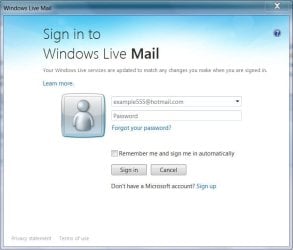
A Windows Live Mail Account pop-up comes on every time I open my Live Mail emails. I went through the List Icon (upper Left corner). This only takes it off temporarily. Comes back later. How do I remove it permanently. At first my email address was in the user space and no password. Here lately no user name in user space. How can I permanently delete. Note: I am 76 yrs. old and new to computers and I thank you in advance Woodsman2
 

My Computer My Computer

At a glance

windows7 home premium 32 bit?
Computer type
PC/Desktop
Computer Manufacturer/Model Number
hp
OS
windows7 home premium 32 bit?
Hi woodsman2, welcome to 7F! :)

Is this the pop-up?

wlm1.jpg

I don't believe you can delete it. It has to be there to sign-in.

Try inputting your user name and password, Make sure you have the proper email address and password spelling, when complete, click on the Remember me box if it doesn't automatically do it for you.

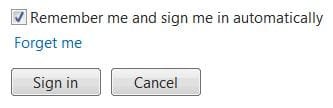
Be careful when signing-in. there is a forget me link right above the sign-in button, you may have inadvertently clicked that to start this problem you're having. I'm hoping that if you sign-in it will reset the "Forget Me" action.

wlm2.JPG


Can you describe the "list icon" a little better, maybe point it out on this?

If you click on the attachment it may open in a new tab, if you click on it there it might get larger and better to see. This depends on the browser you're using.

If it doesn't go to a new tab or get larger, study it, when done click on the browser back button to the left of the www. address bar to return to your thread.
wlm3.JPG
 

My Computer My Computer

At a glance

Originally Win 7 Hm Prem x64 Ver 6.1.7600 Bui...Intel i3 530 2.93GHz, 2933MHz 2 Cores 4 Logic...6GB of 1,333MHz DDR3 SDRAM32MB Intel Graphics Media Accelerator HD IGChip
Computer type
PC/Desktop
Computer Manufacturer/Model Number
Gateway DX4831-01e (Mid-Tower Desktop)
OS
Originally Win 7 Hm Prem x64 Ver 6.1.7600 Build 7601-SP1 | Upgraded to Windows 10 December 14, 2019
CPU
Intel i3 530 2.93GHz, 2933MHz 2 Cores 4 Logical Processors
Motherboard
Gateway H57M01 133 megahertz
Memory
6GB of 1,333MHz DDR3 SDRAM
Graphics Card(s)
32MB Intel Graphics Media Accelerator HD IGChip
Sound Card
Realtek High Definition Audio
Monitor(s) Displays
Gateway HX2000 20inch TFT active matrix TN
Screen Resolution
1600 x 900 x 59 hertz
Hard Drives
WDC WD10EADS-00M2B0 [HDD] (1000.20 GB) -- drive 0,
HL-DT-ST DVDRAM GH41N [CD-ROM dr]
Four card readers, and Four USB 2.0
PSU
300watts.
Case
Mid-Tower Desktop
Cooling
Stock from Gateway
Keyboard
Natural Ergonomic Keyboard 4000, see Other Info
Mouse
Orig. Gateway wore out now using Insignia USB wired optical
Internet Speed
Vz FIOS 10ms png 57.64Mbps down 65.53Mbps up Speedtest.org
Antivirus
Zamana Anti-logger with Anti-malware, MSE, Windows Firewall,
Browser
IE11.0.9600.19399-Upd ver11.0.135, Firefox 68.0.1 x64
Other Info
System Specs by Belarc.

BIOS: American Megatrends Inc. P01-A0 11/17/2009

Replaced the MS 'Natural' Standard PS/2 Enhanced 101-102 Keyboard with a new Natural Ergonomic Keyboard 4000 on August 1st 2014.

Canon Pixma MG3222 Printer.

Updated to IE11 on 12102015 | Fios Quantum Router g1100

Additional AV: SpywareBlaster, manual Mbam, SAS
Back
Top