Windows Live Mail - 'An error has ocurred' message.

Saska

New member
Local time
4:04 PM
Messages
2
Location
N.W.England
I used Windows Outlook Express for as long as it was available with NO problems EVER !. I had a new PC custom built with Win.7 Home Premium 64 bit installed. (My old PC 'died').I downloaded & installed Win.Live Mail & i've had serious trouble with it ever since. Every week,3 or 4 times,when i try to send or open an e-mail,i get the message :- ''A problem ocurred when trying to send / open this message'' . It's not a problem with any Anti-virus etc.that i have,when it first ocurred all i had was M/soft Security Essentials, that was in the first week i had Live Mail installed. I've 'repaired' it countless times,i've also un-installed & re-installed it almost as many times. It's a short term fix - period !. I also have problems with trying to delete "received" e-mails at times. I did find is that if i move them to the 'deleted' folder,usually i can deleted them.
I have to say that having searched the I/net for solutions to my own problem, & having seen the vast number of 'other' problems that other users have,that Live Mail is seriously faulty !. Not only that,but as users,as usual,we're left to try to help one another without any 'hands on' help from M/soft.
I'm sure that M/soft are well aware of this problem,but i haven't found one 'fix' from them. Maybe i'm looking in the wrong place,but i haven't found one on here,
Saska
 

My Computer My Computer

Computer type
PC/Desktop
Computer Manufacturer/Model Number
Custom build
OS
Windows 7 Home Premium 64 bit
CPU
AMD (Trinity) A8-5600K Black Edition 3.60GHz (3.90GHz Turbo)
Motherboard
GIGABYTE GA-F2A85X-D3H AMD A85X (Socket FM2) ATX Motherboard
Hard Drives
500GB Seagate Barracuda ST500DM002 3.5" SATA III Hard Drive - HDD
Antivirus
AVG Spybot / S & D / Microsoft Security Essentials
Browser
IE8 / Firefox v 30.0
Had similiar problem with WLM on a W7 pro 32 bit pc.

Saska,


  1. Make sure you back up your email accts.
  2. Export your email acct IAF settings.
  3. Create a restore point.
  4. The image below show the name of the WLM version I installed and it works fine.
klx
 

Attachments

  • this works 70.jpg
    this works 70.jpg
    2.8 KB · Views: 6

My Computer My Computer

Computer type
PC/Desktop
Computer Manufacturer/Model Number
locally made
OS
w7 pro 32 bit w/XP virt enabled.
CPU
AMD A6-3650
Motherboard
ASUS F1A55-M CSM
Memory
4 GB DDR3 RAM
Graphics Card(s)
NVIDIA GeForce 210
Sound Card
NVIDIA High Definition Audio
Monitor(s) Displays
28" HD monitor
Screen Resolution
1680 x 1050 x 32 bits (4294967296 colors) @ 59 Hz
Hard Drives
2 x 500 GB Western Digital Blue Hard Drive
PSU
?
Case
?
Cooling
3-4 fans
Keyboard
big yellow keys
Mouse
logitec
Internet Speed
60 mb
Antivirus
panda
Browser
ff
Other Info
scanner, webcam, bw printer, fax modem, cd/dvd burner, PC usb ports: 2 usb3, 6 usb2 plus 7 port usb hub, 2 tb usb3, 1 Tb usb3, 500Mb usb2, 120Mb USB2 portable drives, asst of flash drives 250 Mb to 32 Gb. backup PC, office
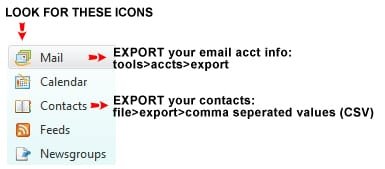
Hi klxdrt - When i figure out how to do the 'export' bit,i'll give it a try - i also need to find the e-mail password i've been using. So many passwords,so many pieces of paper !!. :confused: Many thanks indeed,
Saska;)
 

My Computer My Computer

Computer type
PC/Desktop
Computer Manufacturer/Model Number
Custom build
OS
Windows 7 Home Premium 64 bit
CPU
AMD (Trinity) A8-5600K Black Edition 3.60GHz (3.90GHz Turbo)
Motherboard
GIGABYTE GA-F2A85X-D3H AMD A85X (Socket FM2) ATX Motherboard
Hard Drives
500GB Seagate Barracuda ST500DM002 3.5" SATA III Hard Drive - HDD
Antivirus
AVG Spybot / S & D / Microsoft Security Essentials
Browser
IE8 / Firefox v 30.0
Follow thes steps:

Saska,

If you follow the image below, that will get you going.
Exporting MAIL exports an AIF file which contains your email setup, email address, PASSWORD plus all server settings.

Exporting CONTACTS exports a CVS file of your email contacts which you can import into your new email client.
Also, if you still need to find your email password and all related info, google "nirsoft", I think they have a free app that allows recovery.

cheers,

klx
 

Attachments

  • instructions.jpg
    instructions.jpg
    9.1 KB · Views: 7

My Computer My Computer

Computer type
PC/Desktop
Computer Manufacturer/Model Number
locally made
OS
w7 pro 32 bit w/XP virt enabled.
CPU
AMD A6-3650
Motherboard
ASUS F1A55-M CSM
Memory
4 GB DDR3 RAM
Graphics Card(s)
NVIDIA GeForce 210
Sound Card
NVIDIA High Definition Audio
Monitor(s) Displays
28" HD monitor
Screen Resolution
1680 x 1050 x 32 bits (4294967296 colors) @ 59 Hz
Hard Drives
2 x 500 GB Western Digital Blue Hard Drive
PSU
?
Case
?
Cooling
3-4 fans
Keyboard
big yellow keys
Mouse
logitec
Internet Speed
60 mb
Antivirus
panda
Browser
ff
Other Info
scanner, webcam, bw printer, fax modem, cd/dvd burner, PC usb ports: 2 usb3, 6 usb2 plus 7 port usb hub, 2 tb usb3, 1 Tb usb3, 500Mb usb2, 120Mb USB2 portable drives, asst of flash drives 250 Mb to 32 Gb. backup PC, office
Back
Top