Windows Live Mail Beta

milleras

New member
Hi
I have just installed the new beta Live Mail for win 7 and cannot find the menu button anywhere which on first version was on top ribbon bar so I cannot import, export select (select all) etc

Hopefully someone can point me in the right direction ???, check the help and it shows menu button should be on ribbon???

Tony Miller
 

My Computer

Computer Manufacturer/Model Number
Toshiba Satellite L350D-215
OS
win7
Here you go:

Capture.PNG
 

My Computer

Computer Manufacturer/Model Number
Custom
OS
Windows 7 Professional x64
CPU
Intel i7 2600K OC'd @ 4620 MHz
Motherboard
Asus P8Z68-V Pro
Memory
16GB GSkill Sniper 2133 Mhz (4x4GB)
Graphics Card(s)
EVGA GeForce GTX 480 SuperClocked+
Sound Card
Realtek High Definition Audio
Monitor(s) Displays
2x Acer S273HLbmii 27"
Screen Resolution
2 x 1920x1080
Hard Drives
64GB Crucial M4 SSD

Storage: Hitachi 1TB 5400RPM, Samsung 1.5TB 5400RPM
PSU
Corsair HW Series 750w (modular)
Case
Cooler Master HAF 932 Advanced Blue Edition
Cooling
CM Hyper 212+ CPU cooler, 3x 230mm + 1x 140mm case fans
Keyboard
Logitech MK320 (wireless)
Mouse
Logitech MK320 (wireless)
Internet Speed
30 Mb/s : 2 Mb/s
Windows Livve Mail Beta

Hi
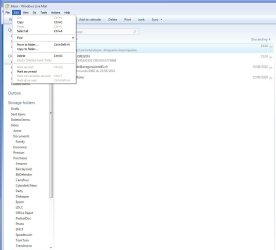
Thanks for that assistance however what I still cannot find is the select all under edit header.

maybe I am missing it can you assist me a little more and advise how to do select all
 

Attachments

  • Mail1.JPG
    Mail1.JPG
    85.4 KB · Views: 50

My Computer

Computer Manufacturer/Model Number
Toshiba Satellite L350D-215
OS
win7
Hi
Thanks for that assistance however what I still cannot find is the select all under edit header.

maybe I am missing it can you assist me a little more and advise how to do select all
Select All is showing in the drop down list that you have showing on your screen shot, is that not what you mean ?
 

My Computer

Computer type
PC/Desktop
Computer Manufacturer/Model Number
Acer Aspire XC-704 x64 bit/ Asus K55A Notebook PC/HP Envy x360 Convertible 15-bq0xx
OS
Windows 10 64bit/Windows 10 64bit/Windows 10 64bit
CPU
Intel Pentium J3710 @ 60GHz/Intel B820,1.7GHz/AMD A9 Radeon
Motherboard
Acer Aspire XC-704 (SOCKET 0)/Asus/HP 8312 (Socket FP4)
Memory
8.00GB DDR3 @ 1599MHz/8GB 2 x 4GB DDR3/8.00GB Dual-Channel
Graphics Card(s)
Intel HD Graphics/Intel/512MB ATI AMD Radeon R5 Graphics (HP
Sound Card
Realtek High Definition Audio/Onboard/AMD High Definition Au
Monitor(s) Displays
Acer LCD K222HQL /Asus 15.6/Generic PnP Monitor (1920x1080@6
Screen Resolution
1920x1080@59Hz/1366 x 768/1920x1080@60Hz
Hard Drives
1863GBWesternn Digital WDC/Asus/119GB SanDisk SD8SN8U-128G-1006 (SSD)
931GB Hitachi HGST HTS721010A9E630 (SATA)
Keyboard
Microsoft Natural Ergonomic Keyboard 4000 (UK)/Inbuilt/Inbui
Mouse
Microsoft Optical Wheel Mouse/Same plus Touchpad/Same + Pad
Internet Speed
Infinity 2 up to 76 Mbps
Antivirus
MSE/MSE/MSE and all 3 have MalwareBytes Premium
Browser
Edge, Firefox/Edge, Firefox/Edge, Firefox, Chrome
Other Info
Seagate Expansion 500GB External Desktop Drive
Seagate Expansion Portable Drives 500GB and 1TB
Epson XP-332 Wireless Printer
windows live mail beta

Hi
No that is the current version ribbon not the beta version
 

My Computer

Computer Manufacturer/Model Number
Toshiba Satellite L350D-215
OS
win7
right-click in a message body...
 

My Computer

Computer Manufacturer/Model Number
Gateway FX-510X
OS
Windows 7 Ultimate x64 RTM
CPU
Intel(R) Pentium(R) D CPU 3.00GHz
Motherboard
Intel OEMD975XW2G1
Memory
6 GB dual channel DDR2 333 MHz
Graphics Card(s)
NVIDIA GeForce 7800 GTX 256 MB
Sound Card
Creative X-Fi Fatal1ty Extreme Gamer
Monitor(s) Displays
15" Planar PL170 LCD, 17" Gateway FPD1965 LCD
Screen Resolution
1280 x 1024
Hard Drives
64 GB SSD Crucial
2000 GB internal WDC
500 GB internal WDC
Hi
No that is the current version ribbon not the beta version
Terminology confusion. The current version doesn't have anything Microsoft would call a "ribbon"; that word is reserved for the new beta version. But I know what you're looking for since I just checked my current WLM version. To do exactly what you want may require that you find a way to add the old "menu bar" with "edit...select all". Lacking that, you could revert to the alternate method of clicking the first email and then "shift clicking" the last which causes all to be selected, just as has been the case with Windows for a long time.
 

My Computer

Computer type
PC/Desktop
Computer Manufacturer/Model Number
OQO 2+
OS
Windows 8 Pro w/MC 32-bit
CPU
Intel Atom 1.86 GHz
Motherboard
OQO 2+
Memory
2 GB
Graphics Card(s)
Intel GMA 500
Sound Card
IDT
Monitor(s) Displays
LCD
Screen Resolution
800 x 480 (portable) 1280 x 1024 (docked)
Hard Drives
64 GB SSD
PSU
9 Ah Battery (portable) or OQO Brick (docked)
Case
Shirt Pocket Sized
Cooling
Tiny Fan
Keyboard
Slide out (portable) DiNovo Edge (docked)
Mouse
Eraser head (portable) Logitech Bluetooth (docked)
Internet Speed
WWAN or 802.11G (portable) T1 (docked)
Browser
IE 10
Other Info
DVD-RW OQO Docking Station
Hi
I have just installed the new beta Live Mail for win 7 and cannot find the menu button anywhere which on first version was on top ribbon bar so I cannot import, export select (select all) etc

Hopefully someone can point me in the right direction ???, check the help and it shows menu button should be on ribbon???

Tony Miller
Select All button:

I have installed the latest version of Windows Live Mail Wave 4 Beta version a few days ago.

"Select All" option is found in the top right of the Ribbon, (which replaces Menu bar in older versions), with the Message tab opened in the very top menu.


Select All.PNG


Download engine Windows Live Mail Wave 4 Beta.

If anyone if downloading the latest Windows Mail Live Wave 4 Beta and using the normal Windows Live downloader wlsetup-web it forces you to download the entire Windows Live program range, and you then have to uninstall the ones you don't want.​

Attached is a link wlsetup-webc which allows you to choose which programs you download from the Windows Live range of programs.

Save it to your desktop by clicking the wlsetup-webc.exe icon in Attached Files just below. To run it simply click the downloaded link on your desktop.​

Cheers PB​
 

Attachments

Last edited:

My Computer

Computer Manufacturer/Model Number
Self-assembled
OS
Win7 Ultimate 64bit Retail
CPU
Intel i7 960 quad core
Motherboard
Intel DX58SO2 Extreme
Memory
12 GB Kingston DDR 3 1300
Graphics Card(s)
PCI Express Gigabyte GTX 550 Ti
Sound Card
Gigabyte GTX 550 Ti Graphics/5 Sound card
Monitor(s) Displays
Samsung WS Syncmaster S23A350H
Screen Resolution
1920 x 1080
Hard Drives
OS on 128 GB Corsair SSD SATA 3 + Storage on 1 TB Western Digital Black SATA 2
Case
Cooler Master CM690 II Advanced Mid Tower
Cooling
CPU, top, front and rear extractor fans
Keyboard
Microsoft Intellitype Wireless Multimedia
Mouse
Microsoft Intellipoint2 Wireless
Internet Speed
100 MB/sec Theoretical max. Actual average 0.5MB/sec
Other Info
Back-up PC with Vista Ultimate OEM 32bit. Intel i5 2400 Quad Core CPU, DH67CL mobo, 8 GB Kingston DDR3 1300 RAM,
Hi
I have just installed the new beta Live Mail for win 7 and cannot find the menu button anywhere which on first version was on top ribbon bar so I cannot import, export select (select all) etc

Hopefully someone can point me in the right direction ???, check the help and it shows menu button should be on ribbon???

Tony Miller
Select All button:

I have installed the latest version of Windows Live Mail Wave 4 Beta version a few days ago.

"Select All" option is found in the top right of the Ribbon, (which replaces Menu bar in older versions), with the Message tab opened in the very top menu.


Download engine Windows Live Mail Wave 4 Beta.

If anyone if downloading the latest Windows Mail Live Wave 4 Beta and using the normal Windows Live downloader wlsetup-web it forces you to download the entire Windows Live program range, and you then have to uninstall the ones you don't want.​

Attached is a link wlsetup-webc which allows you to choose which programs you download from the Windows Live range of programs.

Save it to your desktop by clicking the wlsetup-webc.exe icon in Attached Files just below. To run it simply click the downloaded link on your desktop.​

Cheers PB​

They have updated the site and the Download button now gives you wlsetup-webc.exe file which gives you the choices. It will also update the previous versions on you system.

Jim :geek:
 

My Computer

Computer type
PC/Desktop
Computer Manufacturer/Model Number
Home Built
OS
Windows 8.1 Pro w/Media Center 64bit, Windows 7 HP 64bit
CPU
Phenom II X6 1100T
Motherboard
ASUS M5A99X EVO
Memory
Crucial Balistic 8gb DDR3-1866 CL9
Graphics Card(s)
MSI R6850 Cyclone IGD5 PE
Sound Card
On Board
Monitor(s) Displays
ASUS VE258Q 25" LED with DVI-HDMI-DisplayPort
Screen Resolution
1920 x 1080
Hard Drives
Two WD Cavier Black 2TB Sata III, WD My Book Essential 2TB USB 3.0
PSU
Seasonic X650 80 Plus GOLD Modular
Case
Corsair 400R
Cooling
Antec Kuhler H2O 620, Two 120mm and four 140mm
Keyboard
Logitech K120
Mouse
Logitech Marble Mouse USB, Logitech Precision Game Pad
Internet Speed
15MB
Antivirus
Norton IS 2013, Malwarebytes Pro Beta 2
Browser
IE-11, FF-27
Other Info
APC UPS ES 750, Netgear WNR3500L Gigabit & Wireless N Router with SamKnows Test Program, Motorola SB6120 Gigabit Cable Modem. Brother HL-2170W Laser Printer, Epson V300 Scanner
They have updated the site and the Download button now gives you wlsetup-webc.exe file which gives you the choices. It will also update the previous versions on you system.

Jim :geek:
Thanks for the heads up Jim, handy to know that. Funny thing is I was talking to Jeff Putt from MS Australia today and he had an older version of WLM, so I emailed him the link that was shown in my previous post. He was a bit blown away that he hadn't been auto advised of the latest version, as he's in charge of certain MS program controls Australia wide. So go figure, eh!

Cheers PB :D
 
Last edited:

My Computer

Computer Manufacturer/Model Number
Self-assembled
OS
Win7 Ultimate 64bit Retail
CPU
Intel i7 960 quad core
Motherboard
Intel DX58SO2 Extreme
Memory
12 GB Kingston DDR 3 1300
Graphics Card(s)
PCI Express Gigabyte GTX 550 Ti
Sound Card
Gigabyte GTX 550 Ti Graphics/5 Sound card
Monitor(s) Displays
Samsung WS Syncmaster S23A350H
Screen Resolution
1920 x 1080
Hard Drives
OS on 128 GB Corsair SSD SATA 3 + Storage on 1 TB Western Digital Black SATA 2
Case
Cooler Master CM690 II Advanced Mid Tower
Cooling
CPU, top, front and rear extractor fans
Keyboard
Microsoft Intellitype Wireless Multimedia
Mouse
Microsoft Intellipoint2 Wireless
Internet Speed
100 MB/sec Theoretical max. Actual average 0.5MB/sec
Other Info
Back-up PC with Vista Ultimate OEM 32bit. Intel i5 2400 Quad Core CPU, DH67CL mobo, 8 GB Kingston DDR3 1300 RAM,
Work around to: Format background missing in Beta WinLiveMail Wave 4

Format Background Missing in WinLiveMail Wave 4 Beta:

Forgot to mention in previous post, Microsoft informed me today that the feature to Format the background of an email with Color, Picture or Sound is missing in Windows Live Mail, Wave 4, Beta version. The MS guy said he would bring it to the attention of the Windows Live team, but couldn't promise it would be addressed in the current version.

Ironicially it was available in the earlier versions of WLM by allowing the Menu bar to be visible, then adding it via the same command used in Windows Mail: Menu bar --> Format --> Background --> Then choosing Color, Picture or Background.

Work around:

1. Enable WinMail app in Windows 7 using the revised method in tutorial: "How to Reinstate Windows Mail on Windows 7" found here.

2. Set WinLiveMail Wave 4 Beta as default.

3. Create a new email in WinMail and format the background.

4. Click Save As, and choose Desktop or storage folder as destination.

5. When it is re-opened, it will be opened by WinLiveMail, with the background included. It can then be edited and forwarded.

Hope this helps those who use back ground a lot like I do.

Feedback to Microsfot re Windows Live Mail.

The link found here allows you to send feedback to the Windows Live Team re any issues with Windows Live Mail Beta or any other WinLive issue.

Cheers PB
 
Last edited:

My Computer

Computer Manufacturer/Model Number
Self-assembled
OS
Win7 Ultimate 64bit Retail
CPU
Intel i7 960 quad core
Motherboard
Intel DX58SO2 Extreme
Memory
12 GB Kingston DDR 3 1300
Graphics Card(s)
PCI Express Gigabyte GTX 550 Ti
Sound Card
Gigabyte GTX 550 Ti Graphics/5 Sound card
Monitor(s) Displays
Samsung WS Syncmaster S23A350H
Screen Resolution
1920 x 1080
Hard Drives
OS on 128 GB Corsair SSD SATA 3 + Storage on 1 TB Western Digital Black SATA 2
Case
Cooler Master CM690 II Advanced Mid Tower
Cooling
CPU, top, front and rear extractor fans
Keyboard
Microsoft Intellitype Wireless Multimedia
Mouse
Microsoft Intellipoint2 Wireless
Internet Speed
100 MB/sec Theoretical max. Actual average 0.5MB/sec
Other Info
Back-up PC with Vista Ultimate OEM 32bit. Intel i5 2400 Quad Core CPU, DH67CL mobo, 8 GB Kingston DDR3 1300 RAM,
Hi
I have just installed the new beta Live Mail for win 7 and cannot find the menu button anywhere which on first version was on top ribbon bar so I cannot import, export select (select all) etc

Hopefully someone can point me in the right direction ???, check the help and it shows menu button should be on ribbon???

Tony Miller
Select All button:

I have installed the latest version of Windows Live Mail Wave 4 Beta version a few days ago.

"Select All" option is found in the top right of the Ribbon, (which replaces Menu bar in older versions), with the Message tab opened in the very top menu.


Download engine Windows Live Mail Wave 4 Beta.

If anyone if downloading the latest Windows Mail Live Wave 4 Beta and using the normal Windows Live downloader wlsetup-web it forces you to download the entire Windows Live program range, and you then have to uninstall the ones you don't want.​

Attached is a link wlsetup-webc which allows you to choose which programs you download from the Windows Live range of programs.​

Save it to your desktop by clicking the wlsetup-webc.exe icon in Attached Files just below. To run it simply click the downloaded link on your desktop.​


Cheers PB​


That "select all" button is only for the email message you're currently working in - what the OP (and I) are looking for is the "select all" funtion that allows you to select a group of email messages for deletion, move, etc., so you don't have to mark them one at a time, like in the older versions.

RWN
 

My Computer

OS
Windows 7 Ultimate
CPU
AMD Sempron LE-1150 2.0 Ghz
Motherboard
Gigabyte GA-M61PME-S2
Graphics Card(s)
ATi Radeon HD 3650
Sound Card
Realtek HD Onboard Audio
Monitor(s) Displays
HP 1702
Screen Resolution
1280x1024
Keyboard
Logitech Wireless
Mouse
Logitech Wireless
Internet Speed
7 MB DSL
Hi
I have just installed the new beta Live Mail for win 7 and cannot find the menu button anywhere which on first version was on top ribbon bar so I cannot import, export select (select all) etc

Hopefully someone can point me in the right direction ???, check the help and it shows menu button should be on ribbon???

Tony Miller
Select All button:

I have installed the latest version of Windows Live Mail Wave 4 Beta version a few days ago.

"Select All" option is found in the top right of the Ribbon, (which replaces Menu bar in older versions), with the Message tab opened in the very top menu.


Download engine Windows Live Mail Wave 4 Beta.

If anyone if downloading the latest Windows Mail Live Wave 4 Beta and using the normal Windows Live downloader wlsetup-web it forces you to download the entire Windows Live program range, and you then have to uninstall the ones you don't want.​

Attached is a link wlsetup-webc which allows you to choose which programs you download from the Windows Live range of programs.​

Save it to your desktop by clicking the wlsetup-webc.exe icon in Attached Files just below. To run it simply click the downloaded link on your desktop.​


Cheers PB​


That "select all" button is only for the email message you're currently working in - what the OP (and I) are looking for is the "select all" funtion that allows you to select a group of email messages for deletion, move, etc., so you don't have to mark them one at a time, like in the older versions.

RWN
I noticed that also and I am unable to find it anywhere else. Don't remember where is was in the old version. Maybe MS will add it when this ver is release.

Jim :cool:
 

My Computer

Computer type
PC/Desktop
Computer Manufacturer/Model Number
Home Built
OS
Windows 8.1 Pro w/Media Center 64bit, Windows 7 HP 64bit
CPU
Phenom II X6 1100T
Motherboard
ASUS M5A99X EVO
Memory
Crucial Balistic 8gb DDR3-1866 CL9
Graphics Card(s)
MSI R6850 Cyclone IGD5 PE
Sound Card
On Board
Monitor(s) Displays
ASUS VE258Q 25" LED with DVI-HDMI-DisplayPort
Screen Resolution
1920 x 1080
Hard Drives
Two WD Cavier Black 2TB Sata III, WD My Book Essential 2TB USB 3.0
PSU
Seasonic X650 80 Plus GOLD Modular
Case
Corsair 400R
Cooling
Antec Kuhler H2O 620, Two 120mm and four 140mm
Keyboard
Logitech K120
Mouse
Logitech Marble Mouse USB, Logitech Precision Game Pad
Internet Speed
15MB
Antivirus
Norton IS 2013, Malwarebytes Pro Beta 2
Browser
IE-11, FF-27
Other Info
APC UPS ES 750, Netgear WNR3500L Gigabit & Wireless N Router with SamKnows Test Program, Motorola SB6120 Gigabit Cable Modem. Brother HL-2170W Laser Printer, Epson V300 Scanner

My Computer

Computer type
PC/Desktop
Computer Manufacturer/Model Number
OQO 2+
OS
Windows 8 Pro w/MC 32-bit
CPU
Intel Atom 1.86 GHz
Motherboard
OQO 2+
Memory
2 GB
Graphics Card(s)
Intel GMA 500
Sound Card
IDT
Monitor(s) Displays
LCD
Screen Resolution
800 x 480 (portable) 1280 x 1024 (docked)
Hard Drives
64 GB SSD
PSU
9 Ah Battery (portable) or OQO Brick (docked)
Case
Shirt Pocket Sized
Cooling
Tiny Fan
Keyboard
Slide out (portable) DiNovo Edge (docked)
Mouse
Eraser head (portable) Logitech Bluetooth (docked)
Internet Speed
WWAN or 802.11G (portable) T1 (docked)
Browser
IE 10
Other Info
DVD-RW OQO Docking Station
To robertwnielsen re:
That "select all" button is only for the email message you're currently working in - what the OP (and I) are looking for is the "select all" funtion that allows you to select a group of email messages for deletion, move, etc., so you don't have to mark them one at a time, like in the older versions.

RWN
I only used WLM for the first time shortly before the beta came out, so I never really got acquainted with it. How exactly did that other "select all" option work? Did it highlight the email group based on date received, recipient email address, type of email, etc?

Or was it the equivalent of highlighting one email and holding down the shift key and using the up/down arrows or page up/page down keys to highlight a group?
 

My Computer

Computer Manufacturer/Model Number
Self-assembled
OS
Win7 Ultimate 64bit Retail
CPU
Intel i7 960 quad core
Motherboard
Intel DX58SO2 Extreme
Memory
12 GB Kingston DDR 3 1300
Graphics Card(s)
PCI Express Gigabyte GTX 550 Ti
Sound Card
Gigabyte GTX 550 Ti Graphics/5 Sound card
Monitor(s) Displays
Samsung WS Syncmaster S23A350H
Screen Resolution
1920 x 1080
Hard Drives
OS on 128 GB Corsair SSD SATA 3 + Storage on 1 TB Western Digital Black SATA 2
Case
Cooler Master CM690 II Advanced Mid Tower
Cooling
CPU, top, front and rear extractor fans
Keyboard
Microsoft Intellitype Wireless Multimedia
Mouse
Microsoft Intellipoint2 Wireless
Internet Speed
100 MB/sec Theoretical max. Actual average 0.5MB/sec
Other Info
Back-up PC with Vista Ultimate OEM 32bit. Intel i5 2400 Quad Core CPU, DH67CL mobo, 8 GB Kingston DDR3 1300 RAM,
To robertwnielsen re:
That "select all" button is only for the email message you're currently working in - what the OP (and I) are looking for is the "select all" funtion that allows you to select a group of email messages for deletion, move, etc., so you don't have to mark them one at a time, like in the older versions.

RWN

To poppa bear re:
I only used WLM for the first time shortly before the beta came out, so I never really got acquainted with it. How exactly did that other "select all" option work? Did it highlight the email group based on date received, recipient email address, type of email, etc?


Or was it the equivalent of highlighting one email and holding down the shift key and using the up/down arrows or page up/page down keys to highlight a group?


It was more the second one - it was in the File - Edit menu in the menu bar across the top. It was (to me, at least) more convenient than deleting each mesage individually.

RWN
 

My Computer

OS
Windows 7 Ultimate
CPU
AMD Sempron LE-1150 2.0 Ghz
Motherboard
Gigabyte GA-M61PME-S2
Graphics Card(s)
ATi Radeon HD 3650
Sound Card
Realtek HD Onboard Audio
Monitor(s) Displays
HP 1702
Screen Resolution
1280x1024
Keyboard
Logitech Wireless
Mouse
Logitech Wireless
Internet Speed
7 MB DSL
It was more the second one - it was in the File - Edit menu in the menu bar across the top. It was (to me, at least) more convenient than deleting each mesage individually.

RWN
Well lets hope they bring it back when they shift from Beta to final version. I've been communicating with Microsoft Australia but I don't know how much push they have when it comes to what's put in, left out. As mentioned in an earlier post they left out Format Background Color, Picture or Sound. The more people that make a noise the more chance we've got to get some meaningful changes.

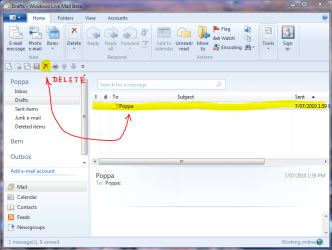
In the meantime, I just highlight the top email, hold down the shift key, then use the Down Arrow/Down Page key to highlight the group, then hit the Delete "X" button in the Quick Access bar.


QA Delete.PNG

It's quicker to use this delete button rather than the other large delete button above the Quick Access bar, because it has a drop down menu asking you to choose "delete" or "junk email".

Cheers PB
 
Last edited:

My Computer

Computer Manufacturer/Model Number
Self-assembled
OS
Win7 Ultimate 64bit Retail
CPU
Intel i7 960 quad core
Motherboard
Intel DX58SO2 Extreme
Memory
12 GB Kingston DDR 3 1300
Graphics Card(s)
PCI Express Gigabyte GTX 550 Ti
Sound Card
Gigabyte GTX 550 Ti Graphics/5 Sound card
Monitor(s) Displays
Samsung WS Syncmaster S23A350H
Screen Resolution
1920 x 1080
Hard Drives
OS on 128 GB Corsair SSD SATA 3 + Storage on 1 TB Western Digital Black SATA 2
Case
Cooler Master CM690 II Advanced Mid Tower
Cooling
CPU, top, front and rear extractor fans
Keyboard
Microsoft Intellitype Wireless Multimedia
Mouse
Microsoft Intellipoint2 Wireless
Internet Speed
100 MB/sec Theoretical max. Actual average 0.5MB/sec
Other Info
Back-up PC with Vista Ultimate OEM 32bit. Intel i5 2400 Quad Core CPU, DH67CL mobo, 8 GB Kingston DDR3 1300 RAM,
It was more the second one - it was in the File - Edit menu in the menu bar across the top. It was (to me, at least) more convenient than deleting each mesage individually.

RWN
.
<Ctrl + A> still works...
 

My Computer

Computer type
PC/Desktop
OS
Windows 7 x64
CPU
Intel Core2 Extreme Q6850 3.00GHz
Motherboard
EVGA 132-CK-NF79
Memory
8 GB
Graphics Card(s)
Radeon R7 260X
Sound Card
Xonar DS
Hard Drives
Hitachi Deskstar 1 tb
It was more the second one - it was in the File - Edit menu in the menu bar across the top. It was (to me, at least) more convenient than deleting each mesage individually.

RWN
.
<Ctrl + A> still works...

I just third <Ctrl + A> and it selects all the messages in the folder.
Thanks for the tip.

Jim :geek:
 

My Computer

Computer type
PC/Desktop
Computer Manufacturer/Model Number
Home Built
OS
Windows 8.1 Pro w/Media Center 64bit, Windows 7 HP 64bit
CPU
Phenom II X6 1100T
Motherboard
ASUS M5A99X EVO
Memory
Crucial Balistic 8gb DDR3-1866 CL9
Graphics Card(s)
MSI R6850 Cyclone IGD5 PE
Sound Card
On Board
Monitor(s) Displays
ASUS VE258Q 25" LED with DVI-HDMI-DisplayPort
Screen Resolution
1920 x 1080
Hard Drives
Two WD Cavier Black 2TB Sata III, WD My Book Essential 2TB USB 3.0
PSU
Seasonic X650 80 Plus GOLD Modular
Case
Corsair 400R
Cooling
Antec Kuhler H2O 620, Two 120mm and four 140mm
Keyboard
Logitech K120
Mouse
Logitech Marble Mouse USB, Logitech Precision Game Pad
Internet Speed
15MB
Antivirus
Norton IS 2013, Malwarebytes Pro Beta 2
Browser
IE-11, FF-27
Other Info
APC UPS ES 750, Netgear WNR3500L Gigabit & Wireless N Router with SamKnows Test Program, Motorola SB6120 Gigabit Cable Modem. Brother HL-2170W Laser Printer, Epson V300 Scanner

My Computer

OS
Windows 7 Ultimate
CPU
AMD Sempron LE-1150 2.0 Ghz
Motherboard
Gigabyte GA-M61PME-S2
Graphics Card(s)
ATi Radeon HD 3650
Sound Card
Realtek HD Onboard Audio
Monitor(s) Displays
HP 1702
Screen Resolution
1280x1024
Keyboard
Logitech Wireless
Mouse
Logitech Wireless
Internet Speed
7 MB DSL
Back
Top