
Windows Live Mail downloads thousands of old messages from yahoo mail

Gyrobob

New member
Local time
5:43 PM
Messages
4
A week ago, Windows Live Mail started downloading ALL the messages (new and old) from my Yahoo mail account every time I checked for mail.

How do I get it to download only new messages? I want it to not download messages that have already been downloaded.

I discovered a tedious workaround, but it is a pain. I ask WLM to get mail, watch while it starts getting the mail, then hit stop when I notice it is starting to download old mail. Then I go to VIEW, select HIDE READ MESSAGES, delete the old messages that were just downloaded again, then go back to SHOW ALL MESSAGES.

A related question,... is there anyway for WLM to tell yahoo to delete a message once it has been sent to WLM?

Anyway, I need some help to figure out how to get WLM to download new messages only.

Thanks much for any suggestions,..

Bob
 

My Computer My Computer

At a glance

Windows7 64bit home premium ver 6.1, build 76...16 GB
Computer Manufacturer/Model Number
ZT 7618Mi
OS
Windows7 64bit home premium ver 6.1, build 7601, SP1
Memory
16 GB
Antivirus
Norton 360
Other Info
Windows Live Mail 2012 build 16.4.3528.0331
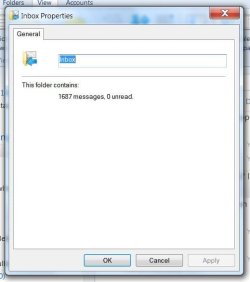
Thanks, but I already tried that. It suggests this procedure:
1. from your windows live mail client:
2. right click the folder you want to synchronize (ie., inbox, etc)
3. click properties
4. click "synchronize" tab
5. check "when synchronizing this folder, download"
6. select "new messages" instead of "all messages"

When I try that, I get as far as step 3. At that point step 4 is impossible because there is no synchronize tab.
 

Attachments

  • email prob WLM & yahoo.JPG
    email prob WLM & yahoo.JPG
    29.9 KB · Views: 17

My Computer My Computer

At a glance

Windows7 64bit home premium ver 6.1, build 76...16 GB
Computer Manufacturer/Model Number
ZT 7618Mi
OS
Windows7 64bit home premium ver 6.1, build 7601, SP1
Memory
16 GB
Antivirus
Norton 360
Other Info
Windows Live Mail 2012 build 16.4.3528.0331
I referred you to that link because I don't have Windows Live Mail on this system. I have Windows Mail.

I think those instructions are for a IMAP account. I searched on "synchronize in Windows Mail" in the Windows Mail Help. It comes up with IMAP accounts and in the frequently asked questions, this is what it says-

"Make sure that you're connected to the Internet, and then click an IMAP account in the Folders list.

In the main window, select one or more folders.

Click Settings, and then do one of the following:

To download all messages, click All Messages.

To download only new messages, click New Messages Only.

To download only headers, click Headers Only.

To download no messages, click Don't Synchronize."

It doesn't provide an option like that when using POP3 accounts.
 

My Computer My Computer

At a glance

Windows 7 Pro SP1 64 bit8 GB
Computer type
Laptop
Computer Manufacturer/Model Number
Dell M6500 Precision Work Station
OS
Windows 7 Pro SP1 64 bit
Memory
8 GB
Screen Resolution
1920x
Internet Speed
30 Mbps
Antivirus
Norton Security
Browser
IE 11
With all due respect, you should switch to Thunderbird email. Live Mail is no longer supported. My internet provider actually recommends Thunderbird, and advises against continuing with Live Mail. you're setting yourself up for all kinds of problems by staying with an outdated email client.
 

My Computer My Computer

At a glance

Windows 7 x64 SP1AMD Athlon 64 X2 6000+ / 3.0 GHz6 GB
Computer type
PC/Desktop
Computer Manufacturer/Model Number
Gateway GT5656
OS
Windows 7 x64 SP1
CPU
AMD Athlon 64 X2 6000+ / 3.0 GHz
Motherboard
NVIDIA GeForce 6150 SE
Memory
6 GB
Monitor(s) Displays
Lenovo LED
Screen Resolution
1920 X 1080
Hard Drives
Windows on 500 GB spinner; Ubuntu 16 on Sandisk 250GB SSD; Bodhi5 on Samsung 250GB SSD; another old spinner for fooling around.
PSU
Original that came with computer
Keyboard
Logitech wireless
Mouse
Logitech wireless
Antivirus
Microsoft Sec Essentials
Browser
Vivaldi
Back
Top