
Windows Live Mail - Export and Import Email Accounts

How to Export and Import Email Accounts in Windows Live Mail


   Information
This tutorial will show you how to export (backup) and import (restore) your email accounts in Windows Live Mail.


OPTION ONE

Export or Backup Email Accounts in Windows Live Mail


1. Open Windows Live Mail.

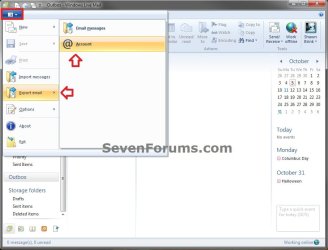
2. Click on the Tools icon drop down arrow (or press Alt+F), select Export email, and click on Account. (see screenshot below)
Step1.jpg
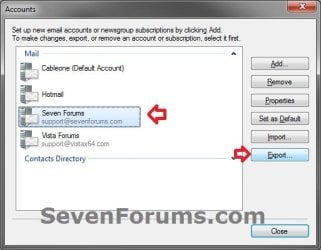
3. Select the email account that you want to backup, then click on the Export button. (see screenshot below)
Step2.jpg
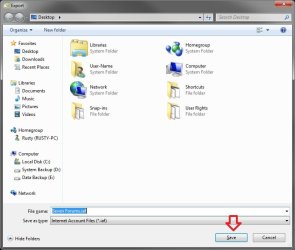
4. Navigate to where you want to save the .iaf file (exported account) at, type in a name if you do not like the default name, and click on Save. (see screenshot below)
Step3.jpg
5. Save the .iaf file to a safe location. This .iaf file is what is needed to restore your email account with in Windows Live Mail.

   Warning
The exported email account will not have it's password included in the export. Be sure to keep the password for this email account written down somewhere safe to help remember it to manually enter it back in the account's properties when imported below.


6. Repeat step 2 to 5 for any other email account that you wish to backup by exporting it.

7. When finished, click on the Close button. (see screenshot below step 3)


OPTION TWO

Import or Restore Email Accounts in Windows Live Mail


1. Open Windows Live Mail.

2. Click on the Tools icon drop down arrow (or press Alt+F), select Export email, and click on Account. (see screenshot below)
Step1.jpg
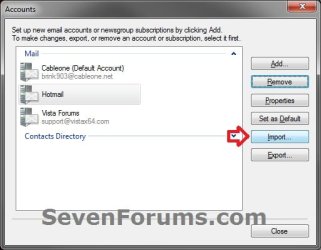
3. Click on the Import button. (see screenshot below)
Import-2.jpg
4. Navigate to and select the exported email account's .iaf file from OPTION ONE above, and click on Open. (see screenshot below)
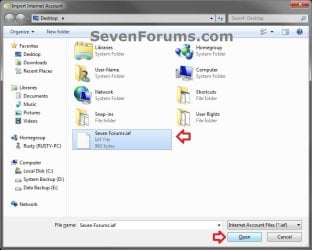
Import-3.jpg
5. Click on the Close button. (see screenshot below)
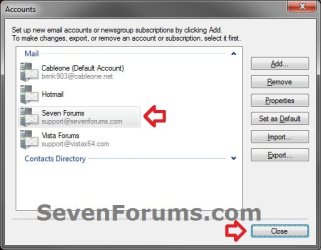
Import-4.jpg
6. Since the now imported email account's .iaf file does not contain the password, you will need to enter the email account's password using either step 7 (POP account) or step 8 (IMAP account) as an example based on what type of email account it is.

7. If this is a "POP" Email Account Type
A) You will now be prompted to enter the password for the email account. Enter the password, check the Remember Password box, and click on OK. (see screenshot below)
Import_POP_Account.jpg
B) Go to step 9.
8. If this is a "IMAP" Email Account Type
A) Click on OK for the error message. (see screenshot below)
NOTE: You only got this message since it is trying to connect and log in without the email account's password entered yet.
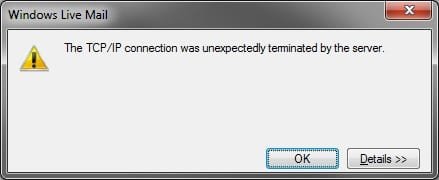
Import_IMAP-1.jpg
B) In the left pane of Windows Live Mail, right click on the imported email account (ex: Seven Forums), and click on Properties. (see screenshot below)
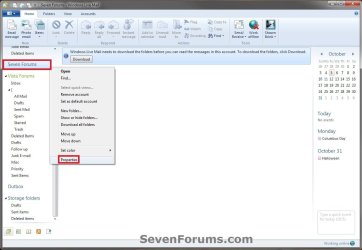
Import_IMAP-2.jpg
C) Click on the Servers tab, enter the password, check the Remember Password box, and click on OK. (see screenshot below)
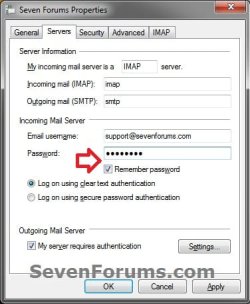
Import_IMAP-3.jpg
D) Click on the Download button for the imported email account. (see screenshot below)
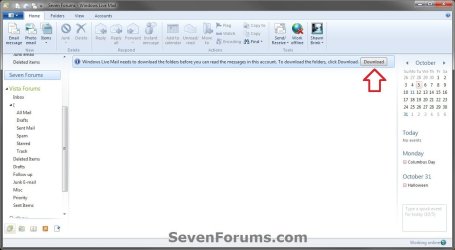
Import_IMAP-4.jpg
E) After the email account is finished syncing, click on OK. (see screenshot below)
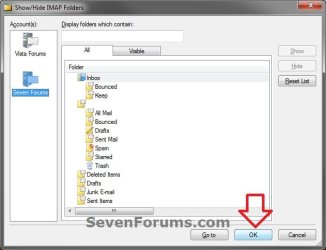
Import_IMAP-5.jpg
9. The email account is now imported into Windows Live Mail with password entered.

10. Repeat these steps for any other exported email account that you want to import back into Windows Live Mail.
That's it,
Shawn


Last edited:
Brink, that's all very well for Windows Live Mail 2011. But what about WLM 2009? How do you import an .iaf file into that version?
 

My Computer My Computer

At a glance

Win7 Ultimate SP1Intel Core i5 9400 Coffee Lake 14nm16G DDR4NVidia GeForce GTX 960
Computer type
PC/Desktop
Computer Manufacturer/Model Number
My build
OS
Win7 Ultimate SP1
CPU
Intel Core i5 9400 Coffee Lake 14nm
Motherboard
Asus Prime H310M-E R2.0 (LGA1151)
Memory
16G DDR4
Graphics Card(s)
NVidia GeForce GTX 960
Sound Card
Realtek High Definition Audio (mobo)
Monitor(s) Displays
Asus PA248 24" 16:10 format
Screen Resolution
1920x1200@59Hz
Hard Drives
1863GB Seagate ST2000DM
3726GB Seagate ST4000DM
1863GB Seagate ST2000DM
6TB Seagate
465GB NVMe Samsung SSD 970
PSU
750G2
Case
Tower
Cooling
Standard
Keyboard
USB
Mouse
USB
Internet Speed
920Mbs/480Mbs
Antivirus
Malwarebytes
Browser
Firefox
Hello Teckneeculler,

I haven't tried it in the 2009 version, but you should be able to click on Tools (menu bar (Alt+M and click on Show Menu bar)) and Accounts. Afterwards, pick up at step 3 in the tutorial to import the .iaf file.

Hope this helps,
Shawn
 

My Computer My Computer

At a glance

64-bit Windows 11 Pro for WorkstationsIntel i7-8700K OC'd to 5 GHz64 GB (4x16GB) G.SKILL TridentZ RGB DDR4 3600...ASUS ROG-STRIX-GTX1080TI-O11G-GAMING
Computer type
PC/Desktop
Computer Manufacturer/Model Number
Self built custom
OS
64-bit Windows 11 Pro for Workstations
CPU
Intel i7-8700K OC'd to 5 GHz
Motherboard
ASUS ROG Maximus XI Formula Z390
Memory
64 GB (4x16GB) G.SKILL TridentZ RGB DDR4 3600 MHz
Graphics Card(s)
ASUS ROG-STRIX-GTX1080TI-O11G-GAMING
Sound Card
Integrated
Monitor(s) Displays
2 x Samsung Odyssey G7 27"
Screen Resolution
2560x1440
Hard Drives
1TB Samsung 990 PRO M.2,
4TB Samsung 990 PRO PRO M.2,
TerraMaster F8 SSD Plus NAS
PSU
Seasonic Prime Titanium 850W
Case
Thermaltake Core P3
Cooling
Corsair Hydro H115i
Keyboard
Logitech wireless K800
Mouse
Logitech MX Master 4
Internet Speed
2 Gb/s Download and 100 Mb/s Upload
Antivirus
Malwarebyte Anti-Malware Premium
Browser
Google Chrome
Other Info
Logitech Z625 speaker system,
Logitech BRIO 4K Pro webcam,
HP Color LaserJet Pro MFP M477fdn,
APC SMART-UPS RT 1000 XL - SURT1000XLI,
Galaxy S23 Plus phone
Thanks, Brink.
OK, the option is there to import .iaf files but, for some unknown reason, it won't import .iaf files from WLM 2011.
Thing is, I have a guy who hates 2011, and wants me put back 2009. So I did the exports from 2011 (messages, contacts, iaf) then imported the messages and contacts ok, but 2009 balks at importing the iaf files and just reports "...an error".
Anyone else run across this? That's importing WLM 2011 iaf setting files into WLM 2009?

Sheesh, if I didn't think WLM was a load of c**p before, I certainly do now. I can't understand why people want to make things harder for themselves. Outlook Express is a perfectly adequate, largely glitchless mail client.

OK, I can understand why Bill Gates keeps bringing out overblown, overpriced junkware, 'cos he 'needs' the money, but there's no excuse for anyone intelligent enough to have a choice in the matter.

Grrrrrr! :-(
 

My Computer My Computer

At a glance

Win7 Ultimate SP1Intel Core i5 9400 Coffee Lake 14nm16G DDR4NVidia GeForce GTX 960
Computer type
PC/Desktop
Computer Manufacturer/Model Number
My build
OS
Win7 Ultimate SP1
CPU
Intel Core i5 9400 Coffee Lake 14nm
Motherboard
Asus Prime H310M-E R2.0 (LGA1151)
Memory
16G DDR4
Graphics Card(s)
NVidia GeForce GTX 960
Sound Card
Realtek High Definition Audio (mobo)
Monitor(s) Displays
Asus PA248 24" 16:10 format
Screen Resolution
1920x1200@59Hz
Hard Drives
1863GB Seagate ST2000DM
3726GB Seagate ST4000DM
1863GB Seagate ST2000DM
6TB Seagate
465GB NVMe Samsung SSD 970
PSU
750G2
Case
Tower
Cooling
Standard
Keyboard
USB
Mouse
USB
Internet Speed
920Mbs/480Mbs
Antivirus
Malwarebytes
Browser
Firefox
Windows 7: Migration to Win Live Mail, how to transfer files ?

Hi!
When I tried to follow this email account transfer method, the new computer (Win7) cannot import the .iaf file from the old computer (Vista) due to the presence of the account with the same specifications.
Therefore I have deleted the Windows Live Essential from the new computer and installed it again without creating any new account. But when I tried to import the .iaf file, it complained the same problem. Hence I cannot import all the email account and its content from the old machine.
What can I do?
 

My Computer My Computer

At a glance

Vista business sp2 32bitIntel(R) Core(TM)2 CPU T5600 @ 1.83GHz (2 CPU...2038MB RAMMobile Intel(R) 945GM Express Chipset Family
Computer type
Laptop
Computer Manufacturer/Model Number
Lenovo 3000 V100
OS
Vista business sp2 32bit
CPU
Intel(R) Core(TM)2 CPU T5600 @ 1.83GHz (2 CPUs), ~
Memory
2038MB RAM
Graphics Card(s)
Mobile Intel(R) 945GM Express Chipset Family
Hard Drives
Fujitsu MHV2120BH PL
Antivirus
Microsoft Essential 2011
Browser
IE9
Hello Nanatsuaazu, and welcome to Seven Forums.

You might see if deleting all files inside the hidden C:\Users\(user-name)\AppData\Local\Microsoft\Windows Live Mail folder may allow you to import the IAF files afterwards.

Hope this helps, :)
Shawn
 

My Computer My Computer

At a glance

64-bit Windows 11 Pro for WorkstationsIntel i7-8700K OC'd to 5 GHz64 GB (4x16GB) G.SKILL TridentZ RGB DDR4 3600...ASUS ROG-STRIX-GTX1080TI-O11G-GAMING
Computer type
PC/Desktop
Computer Manufacturer/Model Number
Self built custom
OS
64-bit Windows 11 Pro for Workstations
CPU
Intel i7-8700K OC'd to 5 GHz
Motherboard
ASUS ROG Maximus XI Formula Z390
Memory
64 GB (4x16GB) G.SKILL TridentZ RGB DDR4 3600 MHz
Graphics Card(s)
ASUS ROG-STRIX-GTX1080TI-O11G-GAMING
Sound Card
Integrated
Monitor(s) Displays
2 x Samsung Odyssey G7 27"
Screen Resolution
2560x1440
Hard Drives
1TB Samsung 990 PRO M.2,
4TB Samsung 990 PRO PRO M.2,
TerraMaster F8 SSD Plus NAS
PSU
Seasonic Prime Titanium 850W
Case
Thermaltake Core P3
Cooling
Corsair Hydro H115i
Keyboard
Logitech wireless K800
Mouse
Logitech MX Master 4
Internet Speed
2 Gb/s Download and 100 Mb/s Upload
Antivirus
Malwarebyte Anti-Malware Premium
Browser
Google Chrome
Other Info
Logitech Z625 speaker system,
Logitech BRIO 4K Pro webcam,
HP Color LaserJet Pro MFP M477fdn,
APC SMART-UPS RT 1000 XL - SURT1000XLI,
Galaxy S23 Plus phone
Back
Top