Windows Live Mail not receiving calendar info from Outlook mail

adfrench

New member
Local time
4:45 AM
Messages
3
Our Windows Live Mail accounts receive blank messages when someone sends a calendar appointment request from an Outlook account. The same message arrives correctly in a gmail account or in my Outlook account at work. Is this a Live Mail Configuration issue?
 

My Computer My Computer

At a glance

Windows 7 64 bitIntel i7-37708.00 GB
Computer type
PC/Desktop
Computer Manufacturer/Model Number
HP h8-1360t
OS
Windows 7 64 bit
CPU
Intel i7-3770
Memory
8.00 GB
Hard Drives
SSD 250 GB, 1 TB conventional
Antivirus
norton
Browser
IE, Chrome, Mozilla
Hi adfrench, welcome to Seven Forums.

You must sign-in to WLM with the same Outlook.com account your using for the calendar.
 

My Computer My Computer

At a glance

Win7 H.Prem. 32bit+SP1
Computer Manufacturer/Model Number
Look in my Signature.
OS
Win7 H.Prem. 32bit+SP1
Thanks so much for the input. But I must not have made myself clear. My colleague was trying to schedule a meeting. She uses Office Outlook at her work, and sent me a request to schedule an appointment as a calendar item. If I read the message with my Office Outlook at my work, it appears as a question as to whether I will accept the appointment. When I reply that I will, the item is entered into my calendar and (annoyingly) disappears from my inbox. If I read the message from my gmail account, again I can see the entire message and I am asked the same question. But if the message is read by my wife's WLM, all she sees is a blank message. (The same thing happens with my WLM). It is critical for her because my wife only does her mail with WLM. Outlook.com has nothing to do with this situation, other than to confuse. I only received calendar items from Office Outlook a few times on WLM but previously it seemed that WLM handled the message as I might have wished.

If there was text in the appointment request message, that is displayed in the WLM screen, but no information about the calendar is present. If I forward the Office Outlook message from WLM to my gmail account, the calendar information is not visible when I read the message in gmail, although the text survives.
 

My Computer My Computer

At a glance

Windows 7 64 bitIntel i7-37708.00 GB
Computer type
PC/Desktop
Computer Manufacturer/Model Number
HP h8-1360t
OS
Windows 7 64 bit
CPU
Intel i7-3770
Memory
8.00 GB
Hard Drives
SSD 250 GB, 1 TB conventional
Antivirus
norton
Browser
IE, Chrome, Mozilla
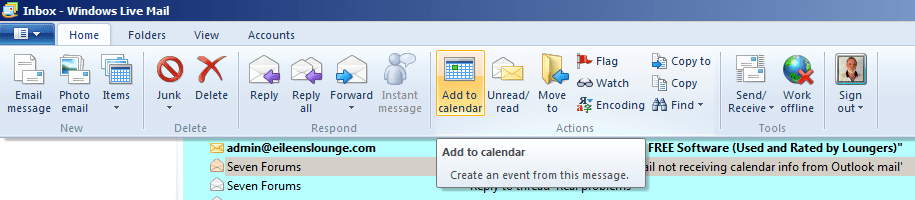
Do you use this method to add WLM messages to the calendar?

RR.png
 

My Computer My Computer

At a glance

Win7 H.Prem. 32bit+SP1
Computer Manufacturer/Model Number
Look in my Signature.
OS
Win7 H.Prem. 32bit+SP1
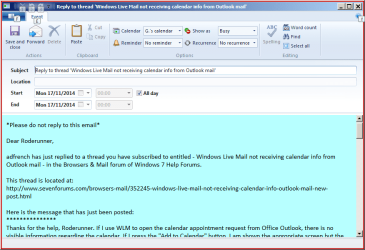
Thanks for the help, Roderunner. If I use WLM to open the calendar appointment request from Office Outlook, there is no visible information regarding the calendar. If I press the "Add to Calendar" button, I am shown the appropriate screen but the day and time shown reflect whatever the actual date and time are, not the date and time of the requested appointment.

In the following, I have changed the names for privacy, but the message from my colleague is being sent to me at three accounts and my wife.
On the WLM screen, there is an attachment shown, ATT00018.txt. I am thinking that it contains both the text of the message (which does appear) and the calendar request (which does not). A similar massage without the text showed in WLM as blank but had a similar .txt attachment except for the info on site visit, Mardi Gras World, etc. The contents of the .txt attachment with the text and calendar are:

BEGIN:VCALENDAR
METHOD:REQUEST
PRODID:Microsoft Exchange Server 2010
VERSION:2.0
BEGIN:VTIMEZONE
TZID:Eastern Standard Time
BEGIN:STANDARD
DTSTART:16010101T020000
TZOFFSETFROM:-0400
TZOFFSETTO:-0500
RRULE:FREQ=YEARLY;INTERVAL=1;BYDAY=1SU;BYMONTH=11
END:STANDARD
BEGIN:DAYLIGHT
DTSTART:16010101T020000
TZOFFSETFROM:-0500
TZOFFSETTO:-0400
RRULE:FREQ=YEARLY;INTERVAL=1;BYDAY=2SU;BYMONTH=3
END:DAYLIGHT
END:VTIMEZONE
BEGIN:VEVENT
ORGANIZER;CN=Colleague in Washington:MAILTO:[email protected]
ATTENDEE;ROLE=REQ-PARTICIPANT;PARTSTAT=NEEDS-ACTION;RSVP=TRUE;CN=Me
- Personal:MAILTO:[email protected]
DESCRIPTION;LANGUAGE=en-US:\n\n-----Original Appointment-----\nFrom: Michel
le Stevenson\nSent: Friday\, November 14\, 2014 10:38 AM\nTo: Colleague in Washingon
\; My wife\; Me at work\; Me at gmail
<mailto:my gmail.com acct>)\nSubject: ICS Conference Call\nWhen: M
onday\, November 24\, 2014 10:00 AM-11:00 AM (UTC-05:00) Eastern Time (US
& Canada).\nWhere: 10:00 AM Eastern / 9:00 AM Central\n\n\nAgenda\n\n1.
Confirmation of site visit\n2. Update of Mardi Gras World\n3.
Status of Basilica\n4. Review of Sponsor Brochure\n\n
SUMMARY;LANGUAGE=en-US:FW: ICS Conference Call
DTSTART;TZID=Eastern Standard Time:20141124T100000
DTEND;TZID=Eastern Standard Time:20141124T110000
UID:040000008200E00074C5B7101A82E0080000000060DA1D1BF7FFCF01000000000000000
0100000008F4BE0311F4D9B419333A035102C250B
CLASS:PUBLIC
PRIORITY:5
DTSTAMP:20141114T153819Z
TRANSP:OPAQUE
STATUS:CONFIRMED
SEQUENCE:1
LOCATION;LANGUAGE=en-US:10:00 AM Eastern / 9:00 AM Central
X-MICROSOFT-CDO-APPT-SEQUENCE:1
X-MICROSOFT-CDO-OWNERAPPTID:399423454
X-MICROSOFT-CDO-BUSYSTATUS:TENTATIVE
X-MICROSOFT-CDO-INTENDEDSTATUS:BUSY
X-MICROSOFT-CDO-ALLDAYEVENT:FALSE
X-MICROSOFT-CDO-IMPORTANCE:1
X-MICROSOFT-CDO-INSTTYPE:0
X-MICROSOFT-DISALLOW-COUNTER:FALSE
BEGIN:VALARM
ACTION:DISPLAY
DESCRIPTION:REMINDER
TRIGGER;RELATED=START:-PT15M
END:VALARM
END:VEVENT
END:VCALENDAR

It is as if WLM is not recognizing VCALENDAR and REQUEST.

 

My Computer My Computer

At a glance

Windows 7 64 bitIntel i7-37708.00 GB
Computer type
PC/Desktop
Computer Manufacturer/Model Number
HP h8-1360t
OS
Windows 7 64 bit
CPU
Intel i7-3770
Memory
8.00 GB
Hard Drives
SSD 250 GB, 1 TB conventional
Antivirus
norton
Browser
IE, Chrome, Mozilla
In the following, I have changed the names for privacy, but the message from my colleague is being sent to me at three accounts and my wife.
Does this mean the same message is being sent to 4 different places i.e. accounts.
-
When I click a message in WLM to add to calendar, I get this:-

RR.png
 

My Computer My Computer

At a glance

Win7 H.Prem. 32bit+SP1
Computer Manufacturer/Model Number
Look in my Signature.
OS
Win7 H.Prem. 32bit+SP1
Back
Top