
Solved Windows Live Messenger Issues

mccoady

New member
Member
VIP
Local time
10:03 AM
Messages
142
I'm trying to figure out why Windows Live Messenger has disappeared from our computer just out of the blue... I installed Windows Live Essentials months ago which included Windows Live Messenger, Windows Live Mail, etc. and everything is intact/working except Messenger.

There was a Messenger short-cut but it couldn't find it's direction and if I go to Program Files (x86)>Windows Live>Messenger there's files listed but there doesn't appear to be a .exe anywhere.

If I try to install Windows Live Essentials again it says Messenger is installed along with the rest of the programs.

Anyway just to reinstall Messenger again or do I have to uninstall Windows Live Essentials and then reinstall it? Any other ideas I have no idea why it disappeared?
 

My Computer

Computer type
PC/Desktop
Computer Manufacturer/Model Number
Home Build
OS
Windows 7 Home Premium 64-bit; SP1
CPU
Intel Core i5 2500K
Motherboard
ASRock Z68 Extreme3 Gen3
Memory
Corsair Vengeance 16GB DDR3
Graphics Card(s)
Intel HD Graphics 3000
Sound Card
Integrated
Monitor(s) Displays
Samsung SyncMaster 943BX
Screen Resolution
1280x1024
Hard Drives
Western Digital Caviar Black WD1002FAEX 1TB 7200 RPM 64MB Cache SATA 6.0Gb/s 3.5" Internal

Western Digital Caviar Black WD7501AALS 750GB 7200 RPM 32MB Cache SATA 3.0Gb/s 3.5" Internal
PSU
SeaSonic S12ll 520W Bronze
Case
Cooler Master Haf 912 Advanced
Cooling
Cooler Master Hyper 212 EVO
Keyboard
Logitech Wireless K800
Mouse
Logitech Wireless Performance MX
Internet Speed
5.0 mb
Other Info
LG WH12LS30 Black SATA 12X Blu-ray
ASUS DRW-24B1ST/BLK/B/AS
AFT XM-5UE Card Reader
Do a clean reinstall. Remove Essentials with Revo Uninstaller Free with the advanced option checked, then delete any registry and file leftovers that Revo finds. Download a fresh copy of the Essentials installer from Microsoft's website and install the programs you need again.
 

My Computer

Computer type
Laptop
Computer Manufacturer/Model Number
Custom
OS
Windows 7 Home Premium x64
CPU
Intel Core i5 2500K
Motherboard
MSI MS-7750
Memory
8GB DDR3
Graphics Card(s)
nVidia GeForce GTX650 Ti BOOST
Sound Card
Realtek
Monitor(s) Displays
21' Philips
Screen Resolution
Full HD
Hard Drives
1TB
PSU
500W
Do a clean reinstall. Remove Essentials with Revo Uninstaller Free with the advanced option checked, then delete any registry and file leftovers that Revo finds. Download a fresh copy of the Essentials installer from Microsoft's website and install the programs you need again.

Sorry but that's kind of a drastic solution wiping the hard drive just to get back Messenger I don't think that's a good option. If no one else comes up with something better I will just uninstall Essentials using Revo Uninstaller (I use all the time) and reinstall.
 

My Computer

Computer type
PC/Desktop
Computer Manufacturer/Model Number
Home Build
OS
Windows 7 Home Premium 64-bit; SP1
CPU
Intel Core i5 2500K
Motherboard
ASRock Z68 Extreme3 Gen3
Memory
Corsair Vengeance 16GB DDR3
Graphics Card(s)
Intel HD Graphics 3000
Sound Card
Integrated
Monitor(s) Displays
Samsung SyncMaster 943BX
Screen Resolution
1280x1024
Hard Drives
Western Digital Caviar Black WD1002FAEX 1TB 7200 RPM 64MB Cache SATA 6.0Gb/s 3.5" Internal

Western Digital Caviar Black WD7501AALS 750GB 7200 RPM 32MB Cache SATA 3.0Gb/s 3.5" Internal
PSU
SeaSonic S12ll 520W Bronze
Case
Cooler Master Haf 912 Advanced
Cooling
Cooler Master Hyper 212 EVO
Keyboard
Logitech Wireless K800
Mouse
Logitech Wireless Performance MX
Internet Speed
5.0 mb
Other Info
LG WH12LS30 Black SATA 12X Blu-ray
ASUS DRW-24B1ST/BLK/B/AS
AFT XM-5UE Card Reader
Did you try a system restore?
 

My Computer

Computer type
PC/Desktop
Computer Manufacturer/Model Number
Self assembled
OS
Windows 10 Home 64Bit
CPU
Intel Core i5 10400 @ 2.90GHz
Motherboard
Intel Corporation DG41WV (PROCESSOR)
Memory
8.00GB Single-Channel Unknown @ 1329MHz (16-20-20-38)
Sound Card
Realtek High Definition Audio
Monitor(s) Displays
DELL E170S
Screen Resolution
1280x1024 pixels
Hard Drives
931GB TOSHIBA DT01ACA100 (SATA)
238GB TEAM TM8PS7256G (SATA SSD)
Case
Nothing Fancy
Cooling
Fans
Keyboard
A4 Tech Co LTD
Mouse
A4 Tech Co Ltd/Logitech
Internet Speed
25 Mbps
No, I didn't mean to wipe the whole system. I meant: do a clean reinstall of Essentials! lol
 

My Computer

Computer type
Laptop
Computer Manufacturer/Model Number
Custom
OS
Windows 7 Home Premium x64
CPU
Intel Core i5 2500K
Motherboard
MSI MS-7750
Memory
8GB DDR3
Graphics Card(s)
nVidia GeForce GTX650 Ti BOOST
Sound Card
Realtek
Monitor(s) Displays
21' Philips
Screen Resolution
Full HD
Hard Drives
1TB
PSU
500W
Koolkat77 no I didn't do a system restore I've had trouble with system restore working correctly ever since I went to 64-bit.

Gornot sorry for misunderstanding what you were saying I guess I have no choice then to reinstall Essentials was trying to avoid that since I use Windows Live Mail and it will require setting up again.
 

My Computer

Computer type
PC/Desktop
Computer Manufacturer/Model Number
Home Build
OS
Windows 7 Home Premium 64-bit; SP1
CPU
Intel Core i5 2500K
Motherboard
ASRock Z68 Extreme3 Gen3
Memory
Corsair Vengeance 16GB DDR3
Graphics Card(s)
Intel HD Graphics 3000
Sound Card
Integrated
Monitor(s) Displays
Samsung SyncMaster 943BX
Screen Resolution
1280x1024
Hard Drives
Western Digital Caviar Black WD1002FAEX 1TB 7200 RPM 64MB Cache SATA 6.0Gb/s 3.5" Internal

Western Digital Caviar Black WD7501AALS 750GB 7200 RPM 32MB Cache SATA 3.0Gb/s 3.5" Internal
PSU
SeaSonic S12ll 520W Bronze
Case
Cooler Master Haf 912 Advanced
Cooling
Cooler Master Hyper 212 EVO
Keyboard
Logitech Wireless K800
Mouse
Logitech Wireless Performance MX
Internet Speed
5.0 mb
Other Info
LG WH12LS30 Black SATA 12X Blu-ray
ASUS DRW-24B1ST/BLK/B/AS
AFT XM-5UE Card Reader
Hi mccoady

You can take a back up of your emails. Check if you find this location: C:\Users\logon\AppData\Local\Microsoft\Windows Live Mail

Remember to tick mark the option that allows hidden files to be shown.

If you've installed Windows Live Mail in Vista or Windows 7, chances are your email is stored in subfolders of C:\Users\ logon \AppData\Local\Microsoft\Windows Live Mail, where logon is, of course, the name you use to log onto Windows.
 

My Computer

Computer type
PC/Desktop
Computer Manufacturer/Model Number
Self assembled
OS
Windows 10 Home 64Bit
CPU
Intel Core i5 10400 @ 2.90GHz
Motherboard
Intel Corporation DG41WV (PROCESSOR)
Memory
8.00GB Single-Channel Unknown @ 1329MHz (16-20-20-38)
Sound Card
Realtek High Definition Audio
Monitor(s) Displays
DELL E170S
Screen Resolution
1280x1024 pixels
Hard Drives
931GB TOSHIBA DT01ACA100 (SATA)
238GB TEAM TM8PS7256G (SATA SSD)
Case
Nothing Fancy
Cooling
Fans
Keyboard
A4 Tech Co LTD
Mouse
A4 Tech Co Ltd/Logitech
Internet Speed
25 Mbps
I just exported my mail to my desktop so I assume that should be backing them up.

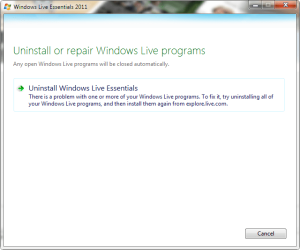
Ok here's the problem it doesn't matter if I Revo Uninstaller or Add/Remove Windows Live Essentials uninstaller won't run and there is no way to uninstall WLE programs individually that I know of besides using Essentials Uninstaller... I ran Microsoft Fixit but that didn't help.
 

Attachments

  • 2012-06-15_102534.png
    2012-06-15_102534.png
    18.2 KB · Views: 12

My Computer

Computer type
PC/Desktop
Computer Manufacturer/Model Number
Home Build
OS
Windows 7 Home Premium 64-bit; SP1
CPU
Intel Core i5 2500K
Motherboard
ASRock Z68 Extreme3 Gen3
Memory
Corsair Vengeance 16GB DDR3
Graphics Card(s)
Intel HD Graphics 3000
Sound Card
Integrated
Monitor(s) Displays
Samsung SyncMaster 943BX
Screen Resolution
1280x1024
Hard Drives
Western Digital Caviar Black WD1002FAEX 1TB 7200 RPM 64MB Cache SATA 6.0Gb/s 3.5" Internal

Western Digital Caviar Black WD7501AALS 750GB 7200 RPM 32MB Cache SATA 3.0Gb/s 3.5" Internal
PSU
SeaSonic S12ll 520W Bronze
Case
Cooler Master Haf 912 Advanced
Cooling
Cooler Master Hyper 212 EVO
Keyboard
Logitech Wireless K800
Mouse
Logitech Wireless Performance MX
Internet Speed
5.0 mb
Other Info
LG WH12LS30 Black SATA 12X Blu-ray
ASUS DRW-24B1ST/BLK/B/AS
AFT XM-5UE Card Reader
I just exported my mail to my desktop so I assume that should be backing them up.

Ok here's the problem it doesn't matter if I Revo Uninstaller or Add/Remove Windows Live Essentials uninstaller won't run and there is no way to uninstall WLE programs individually that I know of besides using Essentials Uninstaller... I ran Microsoft Fixit but that didn't help.

The pic shows one of the programs have a problem so you should uninstall and reinstall it completely then.
 

My Computer

Computer type
PC/Desktop
Computer Manufacturer/Model Number
Self assembled
OS
Windows 10 Home 64Bit
CPU
Intel Core i5 10400 @ 2.90GHz
Motherboard
Intel Corporation DG41WV (PROCESSOR)
Memory
8.00GB Single-Channel Unknown @ 1329MHz (16-20-20-38)
Sound Card
Realtek High Definition Audio
Monitor(s) Displays
DELL E170S
Screen Resolution
1280x1024 pixels
Hard Drives
931GB TOSHIBA DT01ACA100 (SATA)
238GB TEAM TM8PS7256G (SATA SSD)
Case
Nothing Fancy
Cooling
Fans
Keyboard
A4 Tech Co LTD
Mouse
A4 Tech Co Ltd/Logitech
Internet Speed
25 Mbps
What you're not getting is Windows Live Essentials uninstaller is telling me there is a problem and to uninstall all the Windows Live programs and then reinstall Essentials but it doesn't give me the option to do that. When you run Essentials uninstaller it should give you the option to uninstall one or more Live programs or do a repair but all I get is the error screen I posted.

[FONT=Verdana, Arial, Helvetica]The problem is the missing msnmsgr.exe file can I copy and paste that file from another Windows 7 64-bit PC running Windows Live Essentials?[/FONT]
 

My Computer

Computer type
PC/Desktop
Computer Manufacturer/Model Number
Home Build
OS
Windows 7 Home Premium 64-bit; SP1
CPU
Intel Core i5 2500K
Motherboard
ASRock Z68 Extreme3 Gen3
Memory
Corsair Vengeance 16GB DDR3
Graphics Card(s)
Intel HD Graphics 3000
Sound Card
Integrated
Monitor(s) Displays
Samsung SyncMaster 943BX
Screen Resolution
1280x1024
Hard Drives
Western Digital Caviar Black WD1002FAEX 1TB 7200 RPM 64MB Cache SATA 6.0Gb/s 3.5" Internal

Western Digital Caviar Black WD7501AALS 750GB 7200 RPM 32MB Cache SATA 3.0Gb/s 3.5" Internal
PSU
SeaSonic S12ll 520W Bronze
Case
Cooler Master Haf 912 Advanced
Cooling
Cooler Master Hyper 212 EVO
Keyboard
Logitech Wireless K800
Mouse
Logitech Wireless Performance MX
Internet Speed
5.0 mb
Other Info
LG WH12LS30 Black SATA 12X Blu-ray
ASUS DRW-24B1ST/BLK/B/AS
AFT XM-5UE Card Reader
If the build number is the same, yes, you can try just copying the .exe file and see if it works.

Some Live Essentials installations get "corrupted" i.e. you're unable to uninstall them if you used, for example, Ccleaner to remove the actual setup files needed for uninstallation. Did you try downloading a fresh copy of the Essentials installer from their website and using that to uninstall? I clearly remember a message in Ccleaner telling me that if I remove those setup files, I must have a new copy of the Essentials installer in order to remove those programs instead of just running the uninstaller already on your PC.
 

My Computer

Computer type
Laptop
Computer Manufacturer/Model Number
Custom
OS
Windows 7 Home Premium x64
CPU
Intel Core i5 2500K
Motherboard
MSI MS-7750
Memory
8GB DDR3
Graphics Card(s)
nVidia GeForce GTX650 Ti BOOST
Sound Card
Realtek
Monitor(s) Displays
21' Philips
Screen Resolution
Full HD
Hard Drives
1TB
PSU
500W
Thanks Gornot I copied/pasted the exe and it worked I was afraid to try it without asking first!
 

My Computer

Computer type
PC/Desktop
Computer Manufacturer/Model Number
Home Build
OS
Windows 7 Home Premium 64-bit; SP1
CPU
Intel Core i5 2500K
Motherboard
ASRock Z68 Extreme3 Gen3
Memory
Corsair Vengeance 16GB DDR3
Graphics Card(s)
Intel HD Graphics 3000
Sound Card
Integrated
Monitor(s) Displays
Samsung SyncMaster 943BX
Screen Resolution
1280x1024
Hard Drives
Western Digital Caviar Black WD1002FAEX 1TB 7200 RPM 64MB Cache SATA 6.0Gb/s 3.5" Internal

Western Digital Caviar Black WD7501AALS 750GB 7200 RPM 32MB Cache SATA 3.0Gb/s 3.5" Internal
PSU
SeaSonic S12ll 520W Bronze
Case
Cooler Master Haf 912 Advanced
Cooling
Cooler Master Hyper 212 EVO
Keyboard
Logitech Wireless K800
Mouse
Logitech Wireless Performance MX
Internet Speed
5.0 mb
Other Info
LG WH12LS30 Black SATA 12X Blu-ray
ASUS DRW-24B1ST/BLK/B/AS
AFT XM-5UE Card Reader
Sorry for not reading your post attentively.
Glad you have a fix now. :)
 

My Computer

Computer type
PC/Desktop
Computer Manufacturer/Model Number
Self assembled
OS
Windows 10 Home 64Bit
CPU
Intel Core i5 10400 @ 2.90GHz
Motherboard
Intel Corporation DG41WV (PROCESSOR)
Memory
8.00GB Single-Channel Unknown @ 1329MHz (16-20-20-38)
Sound Card
Realtek High Definition Audio
Monitor(s) Displays
DELL E170S
Screen Resolution
1280x1024 pixels
Hard Drives
931GB TOSHIBA DT01ACA100 (SATA)
238GB TEAM TM8PS7256G (SATA SSD)
Case
Nothing Fancy
Cooling
Fans
Keyboard
A4 Tech Co LTD
Mouse
A4 Tech Co Ltd/Logitech
Internet Speed
25 Mbps
Thanks Gornot I copied/pasted the exe and it worked I was afraid to try it without asking first!

Great. Glad you sorted it out :)
 

My Computer

Computer type
Laptop
Computer Manufacturer/Model Number
Custom
OS
Windows 7 Home Premium x64
CPU
Intel Core i5 2500K
Motherboard
MSI MS-7750
Memory
8GB DDR3
Graphics Card(s)
nVidia GeForce GTX650 Ti BOOST
Sound Card
Realtek
Monitor(s) Displays
21' Philips
Screen Resolution
Full HD
Hard Drives
1TB
PSU
500W
Back
Top