windows maximized, cant see right hand scroll bars

sliebman

New member
Local time
6:21 PM
Messages
11
my screen resolution is set to the recommended for my monitor, but whenever i have anything open, i have to minimize, and adjust it to almost full screen. when it is maximized, the right hand side of the screen is lost, what other settings can i adjust?
 

My Computer My Computer

OS
windows 7 32 bit
Welcome to Seven Forums sliebman. Do you have an AMD video card with the Catalyst Control Center installed? I believe CCC has an overscan setting that may account for this. A Guy
 

My Computer My Computer

Computer type
PC/Desktop
OS
Windows 10 Home x64
CPU
INTEL Core i5-750 Quad-Core 3.37GHz
Motherboard
ASUS P7P55D
Memory
HyperX Fury Black Series 8GB (2 x 4GB) 1866Mhz
Graphics Card(s)
EVGA GeForce GTX 750 Superclocked 1GB 128-Bit GDDR5
Monitor(s) Displays
LG 32MA68HY 32" IPS
Screen Resolution
1920 x 1080
Hard Drives
Samsung 840 Evo 120GB, SEAGATE 500GB Barracuda® 7200.12, SATA 3 Gb/s, 7200 RPM, 16MB cache
PSU
ANTEC TruePower New TP-550, 80 PLUS, 550W
Case
ANTEC Three Hundred Illusion
Cooling
COOLER MASTER Hyper 212 Plus, 4 x 120mm 1 x 140mm Noctua's
Internet Speed
85 + Mbps
Antivirus
Avast
Browser
Vivaldi
Hi again, no its not an AMD, its an Intel HD Graphics card......funny my husband and son never noticed that the windows were actually minimized until just recently
 

My Computer My Computer

OS
windows 7 32 bit
Is this a certain browsers windows (IE, Firefox, etc.), or any window opened on the PC (Program windows, Windows Explorer, etc.)?

A Guy
 

My Computer My Computer

Computer type
PC/Desktop
OS
Windows 10 Home x64
CPU
INTEL Core i5-750 Quad-Core 3.37GHz
Motherboard
ASUS P7P55D
Memory
HyperX Fury Black Series 8GB (2 x 4GB) 1866Mhz
Graphics Card(s)
EVGA GeForce GTX 750 Superclocked 1GB 128-Bit GDDR5
Monitor(s) Displays
LG 32MA68HY 32" IPS
Screen Resolution
1920 x 1080
Hard Drives
Samsung 840 Evo 120GB, SEAGATE 500GB Barracuda® 7200.12, SATA 3 Gb/s, 7200 RPM, 16MB cache
PSU
ANTEC TruePower New TP-550, 80 PLUS, 550W
Case
ANTEC Three Hundred Illusion
Cooling
COOLER MASTER Hyper 212 Plus, 4 x 120mm 1 x 140mm Noctua's
Internet Speed
85 + Mbps
Antivirus
Avast
Browser
Vivaldi
any window, softwares on my computer, explorer, etc.....it has to be something with my computer.....
 

My Computer My Computer

OS
windows 7 32 bit
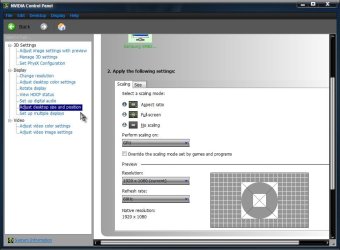
Right click and empty spot on your desktop. See if you have a choice of NVIDIA Control Panel. If so, open it and look under Display for Adjust desktop size and position. Look at both the scaling and size tabs to see if you have an option that corrects your issue.

Nvidia.jpg

A Guy
 

My Computer My Computer

Computer type
PC/Desktop
OS
Windows 10 Home x64
CPU
INTEL Core i5-750 Quad-Core 3.37GHz
Motherboard
ASUS P7P55D
Memory
HyperX Fury Black Series 8GB (2 x 4GB) 1866Mhz
Graphics Card(s)
EVGA GeForce GTX 750 Superclocked 1GB 128-Bit GDDR5
Monitor(s) Displays
LG 32MA68HY 32" IPS
Screen Resolution
1920 x 1080
Hard Drives
Samsung 840 Evo 120GB, SEAGATE 500GB Barracuda® 7200.12, SATA 3 Gb/s, 7200 RPM, 16MB cache
PSU
ANTEC TruePower New TP-550, 80 PLUS, 550W
Case
ANTEC Three Hundred Illusion
Cooling
COOLER MASTER Hyper 212 Plus, 4 x 120mm 1 x 140mm Noctua's
Internet Speed
85 + Mbps
Antivirus
Avast
Browser
Vivaldi
been awhile, sorry, i have been using my laptop lately and kind of forgot about this issue til i went back on my pc last night. i dont have Nvidia on my pc.....i will keep looking for an answer, but in the mean time, just continue to minimize and drag it to just about full screen.
 

My Computer My Computer

OS
windows 7 32 bit
Back
Top