Windows Media Player Troubleshooting Guide

   Information
Windows 7 has some fine in-built diagnostic tools to help you troubleshoot Windows Media Player issues, which you may be facing. This tutorial will give you some steps to fix common problem you might encounter with Windows Media Player 12.
   Note
The N and KN editions of Windows 7 have all the features that normally come with each individual Windows 7 edition, except for Windows Media Player 12 and related programs, such as Windows Media Center or Windows DVD Maker.

The N editions of Windows 7 allow you to choose your own media player and software required to manage and play CDs, DVDs, and other digital media files. If you choose to use Windows Media Player 12, downloading it, along with related software, is free. Download Media Feature Pack for Windows 7 N with Service Pack 1 and Windows 7 KN with Service Pack 1 (KB968211) from Official Microsoft Download Center


To open these specific troubleshooting & diagnostic modules do the following: 1.png
1. Type msdt.exe -id WindowsMediaPlayerConfigurationDiagnostic in Start Search and hit Enter to open the troubleshooting wizard which will help you reset WMP to default settings. 2.png
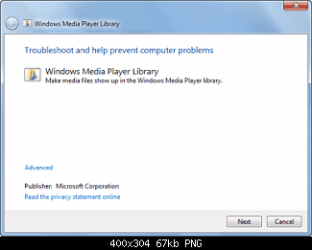
2. Type msdt.exe -id WindowsMediaPlayerLibraryDiagnostic in Start Search and hit Enter to open the troubleshooting wizard which will help make Media files show up in WMP library. 3.png
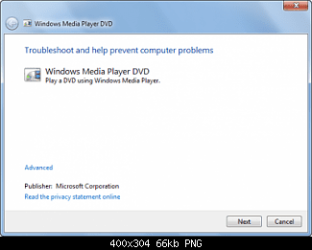
4. Type msdt.exe -id WindowsMediaPlayerDVDDiagnostic in Start Search and hit Enter to open the troubleshooting wizard which will help trouble-shoot DVD playing problems.

5. You could also use the Fix WMP Utility from thewindowsclub, which re-registers all concerned dll’s required for the smooth functioning of Windows Media Player.

6. Lets reinstall Windows Media Player 12

7. Click “Start” button, type “windows features” in the program search box and hit enter.

8. In the “Windows Features” dialog box, look for “Media Features” and expand it.

9. Clear “Windows Media Player” check box.

10. As soon as you clear the check box, you will see a pop-up saying that “The following Windows features will also be turned off because they are dependent on Windows Media Player.” The listed program is “Windows Media Center”.

11. Go ahead and click “Yes”. Windows will now begin uninstalling WMP12.

12. You to restart Windows for the uninstallation to complete.

13. Click “Start” button, type “windows features” in the program search box and hit enter.

14. In the “Windows Features” dialog box, look for “Media Features” and expand it.

15. Check boxes “Windows Media Player” and “Windows Media Center”.

16. Click “OK”. Windows will take some time in reinstalling them. Wait for the process to finish.

17. You to restart Windows for the installation to complete.

Hope this helps,
Captain


Last edited by a moderator:
Thank You! This has been needed several times lately.
Good Job Capt.:)
 

My Computer

Computer type
PC/Desktop
Computer Manufacturer/Model Number
Self Built
OS
Win 10 Pro x64
CPU
Intel I5-2500K @3.3GHz
Motherboard
Asrock P67 Extreme4
Memory
16GB G.Skill Ripjaws X (4x4GB)
Graphics Card(s)
EVGA GeForce 750 Ti SC 2GB
Sound Card
ASUS Xonar DG 5.1 Channels 24-bit 96KHz PCI Interface Sound
Monitor(s) Displays
auria eq2367
Screen Resolution
1920 x 1080
Hard Drives
250GB Samsung 850 EVO SSD
1TB WD Blue
1TB Hitachi
PSU
SeaSonic X 650W 80 Plus Gold
Case
Corsair Obsidian 750D
Cooling
Corsair H60, Three 140mm case fans
Keyboard
Logitech Wireless Keyboard K520
Mouse
Logitech Wireless Mouse M310
Internet Speed
Wave Broadband ~ 100 dn 5 up
Antivirus
Windows Defender, Malwarebytes Premium
Browser
Edge, IE11, Chrome
Other Info
Laptop specs: HP g7-1365dx /
CPU: AMD A6-3420M APU with Radeon(tm) HD Graphics /
RAM: Crucial 8Gb (2x4Gb) /
SSD: Crucial M4-CT128M4SSD2 ATA Device/ FW 000F /
GFX: AMD Radeon HD 6520G /
OS: Windows 10 Pro x64
Thanks Derek :)
 

My Computer

Computer Manufacturer/Model Number
Samsung NP550P5C-S02IN
OS
Windows 7 Ultimate - 64-bit | Windows 8 Pro - 64-bit
CPU
Intel® Core™ i7 Processor 3,610QM (2.30Hz, 6MB L3 Cach
Memory
8 GB
Graphics Card(s)
NVIDIA® GeForce® GT 650M 2GB Graphics, Optimus™ techno
Sound Card
SoundAlive™ JBL 3 Speakers (With sub-Woofer)
Monitor(s) Displays
39.62cm (15.6) SuperBright 300nit HD+ LED Display
Screen Resolution
1,600 x 900, Anti-Reflective
Hard Drives
1TB S-ATA II Hard Drive (5,400RPM)

My Computer

Computer type
PC/Desktop
Computer Manufacturer/Model Number
Self Built
OS
Win 10 Pro x64
CPU
Intel I5-2500K @3.3GHz
Motherboard
Asrock P67 Extreme4
Memory
16GB G.Skill Ripjaws X (4x4GB)
Graphics Card(s)
EVGA GeForce 750 Ti SC 2GB
Sound Card
ASUS Xonar DG 5.1 Channels 24-bit 96KHz PCI Interface Sound
Monitor(s) Displays
auria eq2367
Screen Resolution
1920 x 1080
Hard Drives
250GB Samsung 850 EVO SSD
1TB WD Blue
1TB Hitachi
PSU
SeaSonic X 650W 80 Plus Gold
Case
Corsair Obsidian 750D
Cooling
Corsair H60, Three 140mm case fans
Keyboard
Logitech Wireless Keyboard K520
Mouse
Logitech Wireless Mouse M310
Internet Speed
Wave Broadband ~ 100 dn 5 up
Antivirus
Windows Defender, Malwarebytes Premium
Browser
Edge, IE11, Chrome
Other Info
Laptop specs: HP g7-1365dx /
CPU: AMD A6-3420M APU with Radeon(tm) HD Graphics /
RAM: Crucial 8Gb (2x4Gb) /
SSD: Crucial M4-CT128M4SSD2 ATA Device/ FW 000F /
GFX: AMD Radeon HD 6520G /
OS: Windows 10 Pro x64
just the tutorial did not work and neither did the fix-wmp-utility

now what
 

My Computer

Computer Manufacturer/Model Number
home grown
OS
windows 7 ultimate 32 bit
CPU
intel core2 quad Q6600 2.4ghz
Motherboard
gigiabyte x38t-dq6.0
Memory
4gb ddr3 corsair-twin3x2048-1333c9dhx
Graphics Card(s)
nvidia geforce 8600gt 512mb
Sound Card
realtek onboard alc889a
Monitor(s) Displays
samsung 21.3
Screen Resolution
1024 by 768
Hard Drives
500gb wd

250gb wd
PSU
corsair cmpsu-750tx
Case
standard tower
Cooling
arctic cooling freezer 7 pro
Keyboard
microsoft wireless keyboard 7000
Mouse
microsoft wireless mouse 7000
Internet Speed
cable 850
Other Info
pioneer dvd-rw dvr215d

lite-on cd-rw sohr

creative inspire pt7800 7.1

hp officejet pro 8500 wireless

My Computer

Computer Manufacturer/Model Number
Sony Vaio Z46GDU
OS
Windows 7 Ultimate x86-64
CPU
[email protected] 1066MHz FSB
Motherboard
Sony branded
Memory
6GB DDR3 1066MHz
Graphics Card(s)
9300M GS 256MB Dedicated (Speed) + Intel4500MHD (Stamina)
Sound Card
Realtek HD Audio
Monitor(s) Displays
13.1' WXGA
Screen Resolution
1600x900
Hard Drives
320GB 7200RPM w/ 16MB cache
Internet Speed
1MB/s
media player 12 or media center cannot be opened

tired what was suggested
 

My Computer

Computer Manufacturer/Model Number
home grown
OS
windows 7 ultimate 32 bit
CPU
intel core2 quad Q6600 2.4ghz
Motherboard
gigiabyte x38t-dq6.0
Memory
4gb ddr3 corsair-twin3x2048-1333c9dhx
Graphics Card(s)
nvidia geforce 8600gt 512mb
Sound Card
realtek onboard alc889a
Monitor(s) Displays
samsung 21.3
Screen Resolution
1024 by 768
Hard Drives
500gb wd

250gb wd
PSU
corsair cmpsu-750tx
Case
standard tower
Cooling
arctic cooling freezer 7 pro
Keyboard
microsoft wireless keyboard 7000
Mouse
microsoft wireless mouse 7000
Internet Speed
cable 850
Other Info
pioneer dvd-rw dvr215d

lite-on cd-rw sohr

creative inspire pt7800 7.1

hp officejet pro 8500 wireless
Won't open? Type WMP into the start menu and press enter. Anything happen?
 

My Computer

Computer Manufacturer/Model Number
Sony Vaio Z46GDU
OS
Windows 7 Ultimate x86-64
CPU
[email protected] 1066MHz FSB
Motherboard
Sony branded
Memory
6GB DDR3 1066MHz
Graphics Card(s)
9300M GS 256MB Dedicated (Speed) + Intel4500MHD (Stamina)
Sound Card
Realtek HD Audio
Monitor(s) Displays
13.1' WXGA
Screen Resolution
1600x900
Hard Drives
320GB 7200RPM w/ 16MB cache
Internet Speed
1MB/s
no iam sorry typed wmp in the start menu and nothing happens nothing appears in the box
 

My Computer

Computer Manufacturer/Model Number
home grown
OS
windows 7 ultimate 32 bit
CPU
intel core2 quad Q6600 2.4ghz
Motherboard
gigiabyte x38t-dq6.0
Memory
4gb ddr3 corsair-twin3x2048-1333c9dhx
Graphics Card(s)
nvidia geforce 8600gt 512mb
Sound Card
realtek onboard alc889a
Monitor(s) Displays
samsung 21.3
Screen Resolution
1024 by 768
Hard Drives
500gb wd

250gb wd
PSU
corsair cmpsu-750tx
Case
standard tower
Cooling
arctic cooling freezer 7 pro
Keyboard
microsoft wireless keyboard 7000
Mouse
microsoft wireless mouse 7000
Internet Speed
cable 850
Other Info
pioneer dvd-rw dvr215d

lite-on cd-rw sohr

creative inspire pt7800 7.1

hp officejet pro 8500 wireless
no iam sorry typed wmp in the start menu and nothing happens nothing appears in the box

Try redownloading it or adding it in control panel.
 

My Computer

Computer Manufacturer/Model Number
Sony Vaio Z46GDU
OS
Windows 7 Ultimate x86-64
CPU
[email protected] 1066MHz FSB
Motherboard
Sony branded
Memory
6GB DDR3 1066MHz
Graphics Card(s)
9300M GS 256MB Dedicated (Speed) + Intel4500MHD (Stamina)
Sound Card
Realtek HD Audio
Monitor(s) Displays
13.1' WXGA
Screen Resolution
1600x900
Hard Drives
320GB 7200RPM w/ 16MB cache
Internet Speed
1MB/s
i searched to d/l wmp12

could not locate the site any help
 

My Computer

Computer Manufacturer/Model Number
home grown
OS
windows 7 ultimate 32 bit
CPU
intel core2 quad Q6600 2.4ghz
Motherboard
gigiabyte x38t-dq6.0
Memory
4gb ddr3 corsair-twin3x2048-1333c9dhx
Graphics Card(s)
nvidia geforce 8600gt 512mb
Sound Card
realtek onboard alc889a
Monitor(s) Displays
samsung 21.3
Screen Resolution
1024 by 768
Hard Drives
500gb wd

250gb wd
PSU
corsair cmpsu-750tx
Case
standard tower
Cooling
arctic cooling freezer 7 pro
Keyboard
microsoft wireless keyboard 7000
Mouse
microsoft wireless mouse 7000
Internet Speed
cable 850
Other Info
pioneer dvd-rw dvr215d

lite-on cd-rw sohr

creative inspire pt7800 7.1

hp officejet pro 8500 wireless
Many thanks Cap'n - worked a treat.
 

My Computer

Computer type
PC/Desktop
Computer Manufacturer/Model Number
Dell Inspiron 580
OS
Windows 7 Professional 64-bit SP1
CPU
Intel Quad Core i5 750 2.67Ghz 8Mb
Motherboard
Dell 033FF6 A00
Memory
6Gb DDR3 Dual Channel
Graphics Card(s)
1Gb ATI Radeon HD 5450
Sound Card
Integrated 7.1
Monitor(s) Displays
Dell 23" ST 2310 HDMI; Samsung 21" HDMI
Screen Resolution
1920 x 1080; 1920 x 1080
Hard Drives
1TB WD Serial ATA 7200RPM
Iomega 500Gb Remote
PSU
300w
Case
Dell
Cooling
1 x Case; 1 x Processor; 1 x Video Card
Keyboard
Microsoft Comfort Curve 3000
Mouse
Microsoft Wireless Touch (Intellipoint)
Internet Speed
down 200Mb; up 12Mb (Virgin Media SuperHub 2)
Antivirus
MSE
Browser
IE11, Google Chrome
Other Info
HP Photosmart Premium 309g-m
Compaq Presario Laptop CQ70 with 7 Pro 32-bit.
Huawei MediaPad 32GB
Several Raspberry Pi's B2,B3 and Zero
Several varieties of Arduinos
hi capt.Jack!

i have been having issues with my wmp, it will not play any file, i have checked to make sure it is set as default player and checked to make sure all default file associations are checked... i ran the diagnostic tools you put up earlier, the first two particularly... they both revealed issues, the first suggested configuration could be incorrect and the 2nd suggested my library is corrupted, i completed the tools and still nothing is happening. i have also gone through control panel>programs>windows features on or off and uninstalled-reinstalled with no success. my sound is fine in all other respects.. sound works fine on websites and default windows sounds work fine too.. also have issue with vlc media player not playing audio also.. even though, as i mentioned, all other sound seems fine. any suggestions would be welcome
 

My Computer

OS
windows 7 home premium 32bit
Welcome to the forum,

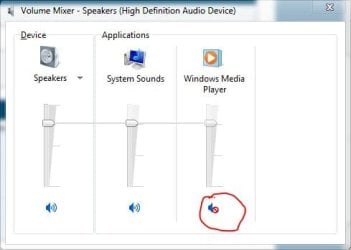
Have you made sure that the sound to media player isn't muted?
 

Attachments

  • Capture.JPG
    Capture.JPG
    23.1 KB · Views: 798

My Computer

Computer type
PC/Desktop
Computer Manufacturer/Model Number
Self Built
OS
Win 10 Pro x64
CPU
Intel I5-2500K @3.3GHz
Motherboard
Asrock P67 Extreme4
Memory
16GB G.Skill Ripjaws X (4x4GB)
Graphics Card(s)
EVGA GeForce 750 Ti SC 2GB
Sound Card
ASUS Xonar DG 5.1 Channels 24-bit 96KHz PCI Interface Sound
Monitor(s) Displays
auria eq2367
Screen Resolution
1920 x 1080
Hard Drives
250GB Samsung 850 EVO SSD
1TB WD Blue
1TB Hitachi
PSU
SeaSonic X 650W 80 Plus Gold
Case
Corsair Obsidian 750D
Cooling
Corsair H60, Three 140mm case fans
Keyboard
Logitech Wireless Keyboard K520
Mouse
Logitech Wireless Mouse M310
Internet Speed
Wave Broadband ~ 100 dn 5 up
Antivirus
Windows Defender, Malwarebytes Premium
Browser
Edge, IE11, Chrome
Other Info
Laptop specs: HP g7-1365dx /
CPU: AMD A6-3420M APU with Radeon(tm) HD Graphics /
RAM: Crucial 8Gb (2x4Gb) /
SSD: Crucial M4-CT128M4SSD2 ATA Device/ FW 000F /
GFX: AMD Radeon HD 6520G /
OS: Windows 10 Pro x64
hi again

ok so i got my vlc media player working fine now.. was a simple setting.

when i open up wmp and click on a file to play a small red "x" appears next to the file and the next file automatically is selected.. as if the file i originally clicked doesnt exist anymore..

i ran the first two diagnostic tools for 'window media player settings' and 'windows media player library'. upon running the first it showed "reset default windows media player settings" then i ran "apply fix" and it came up with 'additional issues' -"configuration settings may be set incorrectly". i also ran it for windows media player library at it found "recreate media library" i clicked "apply fix" for this too and then it opened up next with, "windows library is corrupted"

any help is greatly appreciated

regards
 

My Computer

OS
windows 7 home premium 32bit

My Computer

Computer type
PC/Desktop
Computer Manufacturer/Model Number
Self Built
OS
Win 10 Pro x64
CPU
Intel I5-2500K @3.3GHz
Motherboard
Asrock P67 Extreme4
Memory
16GB G.Skill Ripjaws X (4x4GB)
Graphics Card(s)
EVGA GeForce 750 Ti SC 2GB
Sound Card
ASUS Xonar DG 5.1 Channels 24-bit 96KHz PCI Interface Sound
Monitor(s) Displays
auria eq2367
Screen Resolution
1920 x 1080
Hard Drives
250GB Samsung 850 EVO SSD
1TB WD Blue
1TB Hitachi
PSU
SeaSonic X 650W 80 Plus Gold
Case
Corsair Obsidian 750D
Cooling
Corsair H60, Three 140mm case fans
Keyboard
Logitech Wireless Keyboard K520
Mouse
Logitech Wireless Mouse M310
Internet Speed
Wave Broadband ~ 100 dn 5 up
Antivirus
Windows Defender, Malwarebytes Premium
Browser
Edge, IE11, Chrome
Other Info
Laptop specs: HP g7-1365dx /
CPU: AMD A6-3420M APU with Radeon(tm) HD Graphics /
RAM: Crucial 8Gb (2x4Gb) /
SSD: Crucial M4-CT128M4SSD2 ATA Device/ FW 000F /
GFX: AMD Radeon HD 6520G /
OS: Windows 10 Pro x64
ive also tried to delete windows media player folder and clearing cache... and letting wmp rebuild library as it does.. ive downloaded and run microsoft fix it which found several errors and seemed to fix them, it appeared as if wmp completely reinstalled after that but i am still getting that dreaded red x when i go to play a file from wmp...
 

My Computer

OS
windows 7 home premium 32bit
trying now derekimo- thnx for info... will report progress when finished
 

My Computer

OS
windows 7 home premium 32bit
You're welcome. Let us know how it goes. :)
 

My Computer

Computer type
PC/Desktop
Computer Manufacturer/Model Number
Self Built
OS
Win 10 Pro x64
CPU
Intel I5-2500K @3.3GHz
Motherboard
Asrock P67 Extreme4
Memory
16GB G.Skill Ripjaws X (4x4GB)
Graphics Card(s)
EVGA GeForce 750 Ti SC 2GB
Sound Card
ASUS Xonar DG 5.1 Channels 24-bit 96KHz PCI Interface Sound
Monitor(s) Displays
auria eq2367
Screen Resolution
1920 x 1080
Hard Drives
250GB Samsung 850 EVO SSD
1TB WD Blue
1TB Hitachi
PSU
SeaSonic X 650W 80 Plus Gold
Case
Corsair Obsidian 750D
Cooling
Corsair H60, Three 140mm case fans
Keyboard
Logitech Wireless Keyboard K520
Mouse
Logitech Wireless Mouse M310
Internet Speed
Wave Broadband ~ 100 dn 5 up
Antivirus
Windows Defender, Malwarebytes Premium
Browser
Edge, IE11, Chrome
Other Info
Laptop specs: HP g7-1365dx /
CPU: AMD A6-3420M APU with Radeon(tm) HD Graphics /
RAM: Crucial 8Gb (2x4Gb) /
SSD: Crucial M4-CT128M4SSD2 ATA Device/ FW 000F /
GFX: AMD Radeon HD 6520G /
OS: Windows 10 Pro x64
ok.. running sfc/scannow first run didnt find any issues to resolve.. so im running it a 2nd time. im running microsoft fix it again and it has revealed these issues:

1- 'reset windows media player'-'reset and run windows media player setup',
2- 'scripting registration corrupt'-'resetting jscript.dll and vbscript.dll registration'
3- 'settings for windows media networking streaming are corrupted'-'reset network streaming settings'
4- 'windows media player library'-'reset windows media player library'

i click 'next' to apply fixes. it completes resolving issues and then i open WMP- it reinstalls and rebuilds library.. i go to click on a music file and i still get the dreaded red x "WMP has encountered a problem .."

at a loss
 

My Computer

OS
windows 7 home premium 32bit
Back
Top