Windows Movie Maker 6.0 - Install on Windows 7

How to Install Windows Movie Maker 6.0 on Windows 7


   Information
In Windows 7, it is preferred for you to download and install the newer Windows Live Movie Maker. If you would prefer the older Windows Movie Maker 6.0 from Windows Vista instead, then this will show you how to install it over to Windows 7.
   Note
These are the things you are going to need for this tutorial:
  • Windows Movie Maker 6.0 Files from Windows Vista
  • The .cmd file to register Movie Maker DLL's to Windows 7 (Check the attachments)
  • and of course, a PC running Windows 7
   Tip

  • If you did a custom install from Windows Vista, you can find your Movie Maker files from the Windows.old folder. (Thanks to Wii Master 64)


Here's How:
1. First, you must copy Windows Movie Maker 6.0 files from a computer with Vista installed.
Important: If you are going to install WMM on a Windows 7 64-bit, make sure that the WMM files you will use came from a 64-bit version of Windows Vista.

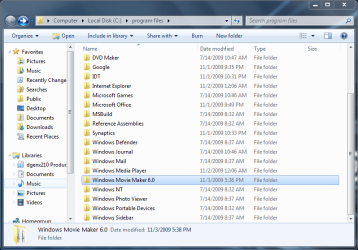
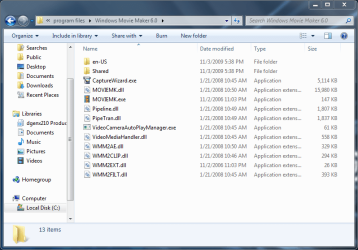
2. Go to "C:\Program Files". Make a folder named "Windows Movie Maker 6.0" then paste the WMM files inside that folder.
34933d1257351135-windows-movie-maker-6-0-install-windows-7-3-program-files-pasted.png

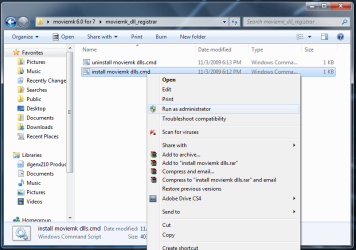
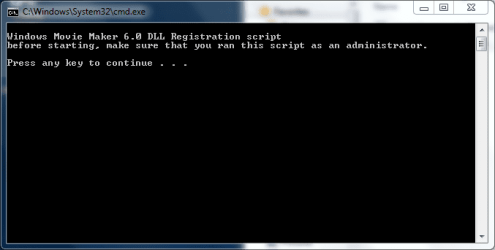
3. Click on the Download button below to download and save moviemk_dll_registrar.zip. Extract and run the install moviemk dlls.cmd file with Run as Administrator and follow the instructions.

Download


34934d1257351135-windows-movie-maker-6-0-install-windows-7-4-run-admin.png

34935d1257351238-windows-movie-maker-6-0-install-windows-7-5-dll_1.png

4. Add a shortcut to Windows Movie Maker on your desktop for easy access.

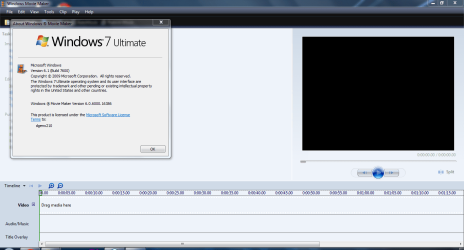
5. That's it! You're done :D
34936d1257351284-windows-movie-maker-6-0-install-windows-7-6-proof.png


Attachments

  • moviemk_dll_registrar.zip
    moviemk_dll_registrar.zip
    702 bytes · Views: 111,597
  • 2 - program files.PNG
    2 - program files.PNG
    40.7 KB · Views: 148
  • 3 - program files pasted.PNG
    3 - program files pasted.PNG
    36.3 KB · Views: 453,729
  • 4 - run as admin.png
    4 - run as admin.png
    40.1 KB · Views: 452,300
  • 5 - dll_1.PNG
    5 - dll_1.PNG
    9.3 KB · Views: 448,337
  • 6 - proof.PNG
    6 - proof.PNG
    42.7 KB · Views: 466,801
Last edited by a moderator:
YES!

Okay, sorry about before (again). But thanks for your help, and dealing with me. Helping me too, but dealing with me also.

Since I'm new here, I just have to say: get use to it.
 

My Computer My Computer

At a glance

Windows 7Intel Pentium E5300Intel(R) G45/G43 Express Chipset
Computer Manufacturer/Model Number
Gateway SX2802-07
OS
Windows 7
CPU
Intel Pentium E5300
Motherboard
WG43M
Graphics Card(s)
Intel(R) G45/G43 Express Chipset
Sound Card
Realtek High Definition Audio
Monitor(s) Displays
Acer S232HL
Keyboard
Standard PS/2
Mouse
HID-Compliant
No worries - enjoy.
 

My Computers My Computers

  • At a glance

    7 X64i5 84002x8gb 3200mhz
    Computer type
    PC/Desktop
    OS
    7 X64
    CPU
    i5 8400
    Motherboard
    gigabyte b365m ds3h
    Memory
    2x8gb 3200mhz
    Hard Drives
    various
    PSU
    pure power 11 400w cm
    Case
    Coolermaster
    Cooling
    cryorig m9i
  • At a glance

    7x64g54008gb ddr4 2400
    Computer type
    PC/Desktop
    OS
    7x64
    CPU
    g5400
    Motherboard
    ga b365m ds3h
    Memory
    8gb ddr4 2400
    PSU
    xfx pro 450w
Can't get HD in movie maker

I followed all the steps listed and registered all the .dll's. But when I try to publish a video in movie maker, there's no option to publish in HD. Am I missing the HD codecs or something like that? Or is it just incompatible with Windows 7?
 

My Computer My Computer

At a glance

Windows 7
OS
Windows 7
WMM6, Windows 7, and HD

I followed all the steps listed and registered all the .dll's. But when I try to publish a video in movie maker, there's no option to publish in HD. Am I missing the HD codecs or something like that? Or is it just incompatible with Windows 7?

It's all about the profiles. In MM6 on Vista, you create a folder called "Shared," and under that "Profiles." Then you use Windows Media Profile Editor to create profiles to put in that folder, following a few basic rules, that meet your needs.

PapaJohn says his work just fine on Windows 7. I have one magic profile that gives me 1080i that I created at some point for my Canon HF10. That one shows up in the list. None of my other profiles work. I have been through all the settings and security descriptors and can't figure out why one works and the rest don't.

To make matters even more confusing, I have three "Custom" profiles that show up in WLMM that aren't in the place the WLMM documentation says they are supposed to be. I'm not sure where it's finding them.

This will be an important question for many, if not most people, who go to the trouble of porting their Vista MM6 to Windows 7. Why should anyone buy a VGA camcorder when HD can be had for $150 or less? (iPod Nano users certainly didn't buy them to shoot video that they might want to edit.)

I have a larger question about whether .prx (windows media profile) files will be used in the future on Windows, or whether it will be something like the .xml files that Expression Encoder spits out in V3.

I'm willing to work with whomever wants to push this question to get an answer.
 
Last edited:

My Computer My Computer

At a glance

Windows 7 Ultimate 32-bitIntel Core2 Quad CPU Q6600 @2.40GHz 2.40GHz3 GB
Computer Manufacturer/Model Number
HP Pavillion m9150f
OS
Windows 7 Ultimate 32-bit
CPU
Intel Core2 Quad CPU Q6600 @2.40GHz 2.40GHz
Memory
3 GB
Monitor(s) Displays
ViewSonic, 17" x 2
Screen Resolution
1680x1050 (2)
Movie Maker 6 Download!

I expect this URL from myworthytips.com to go viral here at sevenforums.com in about 48 hours. Myworthytips.com (a trusted site) has a download application which quickly and easily installs Windows Movie Maker 6 on your Windows 7 computer. Outstanding!


Enjoy!
 

My Computer My Computer

At a glance

W7 64 BitAMD Phenom x4 4000Mhz8 GB DDR-2PNY-NVIDIA GeForce GTX 460 1GB GDDR5 PCI-e
Computer Manufacturer/Model Number
My own Custom Build: Asus, Corsair, Transcend, AMD, PNY, Ultra
OS
W7 64 Bit
CPU
AMD Phenom x4 4000Mhz
Memory
8 GB DDR-2
Graphics Card(s)
PNY-NVIDIA GeForce GTX 460 1GB GDDR5 PCI-e
Monitor(s) Displays
Dual: Flatron L1942T
Hard Drives
C: Drive (Agility 2 Solid State Drive 60 GB)
D: Drive (HDD Internal Western Digital 640 GB)
PSU
650 Watt
Cooling
Corsair Hydro H6 Liquid Cooler
Internet Speed
25 mbps down - 3 mbps up
Thanks,

You probably didn't see this post as it is a few pages back 48 -d/l and unzip , then run setup.
 

My Computers My Computers

  • At a glance

    7 X64i5 84002x8gb 3200mhz
    Computer type
    PC/Desktop
    OS
    7 X64
    CPU
    i5 8400
    Motherboard
    gigabyte b365m ds3h
    Memory
    2x8gb 3200mhz
    Hard Drives
    various
    PSU
    pure power 11 400w cm
    Case
    Coolermaster
    Cooling
    cryorig m9i
  • At a glance

    7x64g54008gb ddr4 2400
    Computer type
    PC/Desktop
    OS
    7x64
    CPU
    g5400
    Motherboard
    ga b365m ds3h
    Memory
    8gb ddr4 2400
    PSU
    xfx pro 450w
I got as far as the DOS window and when I hit "any key" it says my version of Windows (7 Ultimate) will not work with this file.
Did I find the wrong copy of MM 6.0?

Thanks
 

My Computer My Computer

At a glance

W-7 StarterIntel atom N4502 GBIntel Grapics media 3150
Computer Manufacturer/Model Number
ASUS 1001P
OS
W-7 Starter
CPU
Intel atom N450
Memory
2 GB
Graphics Card(s)
Intel Grapics media 3150
Sound Card
Realtek HD
Screen Resolution
1024x600
Hard Drives
Hitachi 160GB

My Computer My Computer

At a glance

Windows7 x64
Computer Manufacturer/Model Number
Sony Vaio SR 390
OS
Windows7 x64
lost in video!

This is my first time ever making a video... I bought a Sony HDR-sr11 a while back and shot a bunch of HD 1080i videos onto the hard drive. The computer I had at the time was archaic and would not play back the videos... Now I have this awesome fast computer but I have no idea how to import/edit/burn a video or even what that entails. Well I can hook the camera up via USB and view all the clips just fine. But is there a special way to import video clips that is better than another way? (maybe to keep important data or some reason that I might not be aware of)...Or should I just copy straight from the camera folder into a folder on say my desktop?

Does anyone know of any tutorials for this or can you offer advice?

The reason I am posting here is that I stumbled across it in my search for video editing software. Does Movie Maker 6.0 have better editing than the software that usually comes with the camera? Mine came with some software (which I lost) and I'm wondering if it's even worthwhile to find and download... I think it is called Sony Picture Motion Browser.
 

My Computer My Computer

At a glance

Windows 7 Pro 64-bitIntel Core i712.0 GB
Computer Manufacturer/Model Number
Dell XPS 435T
OS
Windows 7 Pro 64-bit
CPU
Intel Core i7
Memory
12.0 GB
I' rather stick with Movie Maker 2.6 cause it seems to be less buggy and can do most of the stuff that WMM 6.0 can do.
 

My Computer My Computer

At a glance

Windows 7 Ultimate 32 Bit, Windows Developer ...Intel Pentium Dual CPU E2180@2GHzNVIDIA GeForce 7200 GS
Computer Manufacturer/Model Number
Custom Built
OS
Windows 7 Ultimate 32 Bit, Windows Developer Preview, Linux Mint 9 Gnome 32 Bit
CPU
Intel Pentium Dual CPU E2180@2GHz
Motherboard
Elitegroup 671T-M3
Graphics Card(s)
NVIDIA GeForce 7200 GS
Monitor(s) Displays
AOC TFT1560 15" LCD Monitor
Screen Resolution
1024x768
Keyboard
Logitech USB Keyboard
Consider getting a video converter

Windows Movie Maker is a good place to get started, because it's free and reasonably powerful. Windows Live Movie Maker may actually like the video files from your camcorder, but it's possible, if not likely, that any other version of WMM will not. You may find it easiest, as I did, to simply bite the bullet and use a video converter to convert your files to .WMM -- a format liked by all Windows video editors.

One to try is "Any Video Converter" -- a free download you can find with Google. Another is Windows Expression Encoder, which is only slightly more difficult to use, and does a fine job of quality HD conversion of any file type I have thrown at it. Again, free, and again, Google will get you there.
 

My Computer My Computer

At a glance

Windows 7 Ultimate 32-bitIntel Core2 Quad CPU Q6600 @2.40GHz 2.40GHz3 GB
Computer Manufacturer/Model Number
HP Pavillion m9150f
OS
Windows 7 Ultimate 32-bit
CPU
Intel Core2 Quad CPU Q6600 @2.40GHz 2.40GHz
Memory
3 GB
Monitor(s) Displays
ViewSonic, 17" x 2
Screen Resolution
1680x1050 (2)
Hi Folks, I'm a newbie here, all the above sounds fine, but I have the problem that my original Movie Maker is on the Windows XP and not vista, I am experiencing the problem that my Sony camcorder works fine on XP but will not import from my camcorder in Windows 7, my new laptop came with Wndows 7 and my other laptop has Windows XP, my camcorder is a Sony DCR-TRV140E and works fine on XP but not on Windows 7, it will not recognise the camcorder, I also have a Sony digital camera DSC-P9 and that works fine on both, I am at a complete loss on this..... :mad: I have loaded 'Windows Movie Maker' & 'Windows Live Movie Maker' and also 'Nero 8', but none of them will recognise the camcorder as an import device on Windows 7, I have trailed the internet, been on Microsoft and Sony sites and got nowhere!
 

My Computer My Computer

At a glance

Windows 7 Home Premium 64 bit
Computer Manufacturer/Model Number
packard bell
OS
Windows 7 Home Premium 64 bit
Windows Movie Maker is a good place to get started, because it's free and reasonably powerful. Windows Live Movie Maker may actually like the video files from your camcorder, but it's possible, if not likely, that any other version of WMM will not. You may find it easiest, as I did, to simply bite the bullet and use a video converter to convert your files to .WMM -- a format liked by all Windows video editors.

One to try is "Any Video Converter" -- a free download you can find with Google. Another is Windows Expression Encoder, which is only slightly more difficult to use, and does a fine job of quality HD conversion of any file type I have thrown at it. Again, free, and again, Google will get you there.

Thanks for the tips! I'll give em a whirl!
 

My Computer My Computer

At a glance

Windows 7 Pro 64-bitIntel Core i712.0 GB
Computer Manufacturer/Model Number
Dell XPS 435T
OS
Windows 7 Pro 64-bit
CPU
Intel Core i7
Memory
12.0 GB
I don't have it on Vista, I have it on Windows XP, will this work copying from Windows XP over to Windows 7?
 

My Computer My Computer

At a glance

Windows 7 Home Premium 64 bit
Computer Manufacturer/Model Number
packard bell
OS
Windows 7 Home Premium 64 bit
publish not working with audio muted

wmm6.0 works fine (thanks for the trick) but i have one problem

if i mute my audio in the video file then publish does not work ( it get stuck on 0%).
- if i don't mute my audio channel it publishs ok
- there is no problem muting the audio in vista 32 bit.

as anyone got the same problem ? help !!

-> update : for those that have the same problem i found a workaround : set volume to1% instead of muting and it solves the problem.
 
Last edited:

My Computer My Computer

At a glance

vista
OS
vista
movie maker publishing..?

Hi.. I'm new here but I thought I'd join since I pretty often have problems with my laptop :/ I have installed WMM 6 properly and editing and all that works, except publishing. When I click the publish button nothing happens, and the program stops responding. What's the cause of it and how do I fix it? :/
 

My Computer My Computer

At a glance

Windows 7 Home Premium
OS
Windows 7 Home Premium
1080p profiles does not work

the .prx 1080p profiles that i put in shared/profiles does not works under windows7.

can someone have custom profiles to work in wm6.0 under w7 in order to customize the publishing video quality?
 

My Computer My Computer

At a glance

vista
OS
vista
This is prefect, but I don't have a Vista. Is there a link to download these files?

If there is, please edit the first post with it, for people like me that are going to have to dig through the 8 page topic.

Thanks.

~Joshua~
 

My Computer My Computer

At a glance

Windows 7
OS
Windows 7
Sorry to bother you but i was wondering if you could help. I downloaded the file to try and get WMM6 as i really dislike WLMM and it kept coming up with the message that it failed to load and to check the binary or debug it. I was wondering if you could help me please, as my version of vista just auto updated and i lost my WMM6 to WLMM live there too! Sorry to bother you!
 

My Computer My Computer

At a glance

?
OS
?
Um, hello! I followed all the instructions, but I could not run the install file as an administrator. I'm not sure why... Could I bother for some help? It'd be greatly appreciated... thank you! :]
 

My Computer My Computer

At a glance

Windows 7
OS
Windows 7
Back
Top